
NOKTA DETECTION TECHNOLOGIES 11000866
Nokta Score Metal Detector User Manual
Model: 11000866
Introduction
This manual provides essential information for the proper setup, operation, and maintenance of your Nokta Score Metal Detector. Please read these instructions carefully before using the device to ensure optimal performance and longevity.
The Nokta Score Metal Detector is a multi-frequency, fully waterproof, and rechargeable device designed for treasure hunting. It features simultaneous multi-frequency (SMF) technology, Bluetooth connectivity, and a lightweight, ergonomic design for extended use.
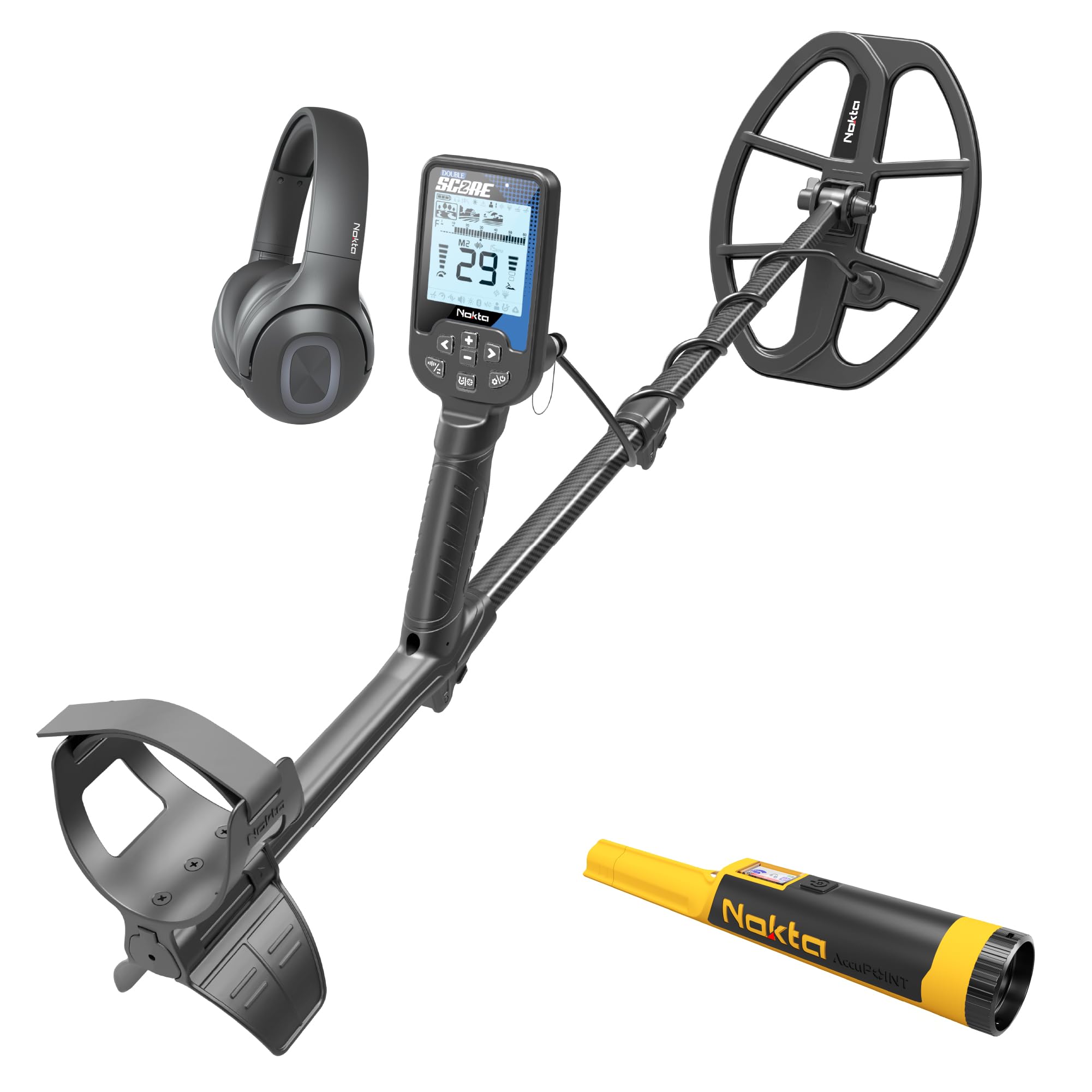
Image: The Nokta Score Metal Detector, showcasing its main unit, search coil, and adjustable shaft.
Package Contents
Verify that all components are present in your package:
- Nokta Score Metal Detector Main Unit
- Search Coil
- Shaft Assembly (Upper, Middle, Lower)
- Armrest
- USB Charging Cable
- User Manual (this document)
- (Optional, depending on package) Bluetooth Headphones
- (Optional, depending on package) AccuPOINT Pinpointer
Setup
1. Assembly
- Attach the search coil to the lower shaft using the provided bolt and nut. Ensure it is securely fastened but not overtightened.
- Connect the lower shaft to the middle shaft, and then the middle shaft to the upper shaft.
- Slide the armrest onto the upper shaft and adjust its position for comfortable use.
- Mount the main control unit onto the upper shaft.
- Wrap the search coil cable neatly around the shaft, securing it with the provided clips or ties, and plug the connector into the main control unit. Ensure the connection is firm and waterproof.

Image: The fully assembled Nokta Score Metal Detector, ready for use.
2. Charging the Battery
The Nokta Score Metal Detector is equipped with a rechargeable 3250 mAh Lithium Polymer battery. Before first use, fully charge the device.
- Locate the charging port on the main control unit.
- Connect the supplied USB charging cable to the detector and to a USB charger or power bank.
- The charging indicator on the display will show the charging status. A full charge provides up to 12 hours of operation.

Image: Close-up of the Nokta Score Metal Detector's control unit connected to a USB charging cable.
Operating Instructions
1. Power On/Off
- To power on, press and hold the power button (usually marked with a circle and a vertical line) until the display illuminates.
- To power off, press and hold the power button again until the device shuts down.
2. Search Modes
The SCORE detector features 3 distinct search modes, optimized for various terrains and target types. Refer to the on-screen display for current mode selection.
- Mode 1: General purpose, suitable for most environments.
- Mode 2: Enhanced sensitivity for smaller targets or mineralized ground.
- Mode 3: Specific for highly mineralized areas or beach hunting.

Image: The control panel of the Nokta Score Metal Detector, showing the display and button layout for mode selection and settings.
3. Multi-Frequency Technology (SMF)
The SCORE utilizes Simultaneous Multi-Frequency (SMF) technology, allowing it to transmit and receive multiple frequencies simultaneously. This enhances target identification and depth capabilities across diverse ground conditions.
- The detector automatically processes multiple frequencies to provide accurate target information.
- Adjustments to frequency settings are typically handled internally, but some modes may offer user-selectable frequency ranges for specific conditions.
4. Bluetooth Connectivity
Connect your SCORE Metal Detector to compatible Bluetooth devices, such as wireless headphones, for an enhanced detecting experience.
- Access the Bluetooth settings menu on the detector.
- Enable Bluetooth and pair with your desired device.
- Ensure your Bluetooth device is in pairing mode.
5. Waterproof Operation (IP68)
The Nokta Score is IP68 rated, meaning it is fully submersible up to 16 feet (5 meters) and protected from total dust ingress. This allows for effective underwater metal detecting.
- Before submerging, ensure all caps and covers are securely closed.
- After use in saltwater, rinse the detector with fresh water to prevent corrosion.
- Avoid operating buttons underwater unnecessarily to prevent water ingress through seals.

Image: A person using the Nokta Score Metal Detector in shallow water, demonstrating its waterproof capability.
6. Target Identification and Tones
The detector provides 60 Target IDs and harmonic tones with adjustable frequencies to help identify targets accurately before digging.
- The Target ID number displayed on the screen corresponds to the conductivity of the detected object.
- Different tones indicate various target types, allowing for discrimination between trash and valuable items.
- Consult the detector's on-screen guide or a quick reference chart for common Target ID values.
Maintenance
1. Cleaning
- After each use, especially in dirty or wet conditions, wipe down the detector with a damp cloth.
- Avoid using abrasive cleaners or solvents, as these can damage the device.
- Ensure the search coil and shaft connections are free of debris.
2. Battery Care
- To prolong battery life, avoid fully discharging the battery frequently.
- Store the detector in a cool, dry place when not in use, with the battery partially charged (around 50%).
- If storing for extended periods, charge the battery every few months.
3. Firmware Updates
Stay up-to-date with the latest features and performance improvements by regularly checking for and installing firmware updates.
- Connect the detector to your computer using the USB cable.
- Visit the official Nokta website for the latest firmware and update instructions.
- Follow the on-screen prompts or website instructions carefully during the update process.
Troubleshooting
If you encounter issues with your Nokta Score Metal Detector, refer to the following common solutions:
| Problem | Possible Cause | Solution |
|---|---|---|
| Detector does not power on. | Low battery; loose cable connection. | Charge the battery fully; ensure all cables are securely connected. |
| Erratic signals or false positives. | High mineralization; electromagnetic interference (EMI); incorrect ground balance. | Perform ground balance; use auto noise cancellation; move away from power lines or other electronics. |
| No sound from headphones. | Headphones not paired; volume too low; faulty headphones. | Re-pair Bluetooth headphones; increase volume; test with different headphones if available. |
| Poor depth detection. | Incorrect search mode; highly mineralized ground; coil not parallel to ground. | Select appropriate search mode; perform ground balance; sweep coil parallel to the ground. |
If the problem persists after attempting these solutions, please contact Nokta customer support.
Specifications
| Feature | Detail |
|---|---|
| Brand | NOKTA DETECTION TECHNOLOGIES |
| Model Number | 11000866 |
| Color | Black |
| Material | Carbon Fiber |
| Power Source | Battery Powered |
| Battery Type | Rechargeable 3250 mAh Lithium Polymer |
| Battery Life | Up to 12 hours |
| Waterproof Rating | IP68 (Fully submersible up to 16ft / 5 meters) |
| Item Weight | 2.7 Pounds (1.25 kg) |
| Adjustable Length | Yes |
| Search Modes | 3 |
| Target IDs | 60 |
| Connectivity | Bluetooth, USB for firmware updates |
Warranty Information
For detailed warranty information regarding your Nokta Score Metal Detector, please refer to the official NOKTA DETECTION TECHNOLOGIES website or the warranty card included with your product. Warranty terms and conditions may vary by region and purchase date.
Customer Support
If you require further assistance, have questions not covered in this manual, or need technical support, please contact NOKTA DETECTION TECHNOLOGIES customer service.
- Website: www.noktadetectors.com (Please check the official website for the most current contact information and support resources.)
- Online Resources: Firmware updates, FAQs, and additional guides may be available on the manufacturer's website.
Related documents11000866


Ask a question about this manual
Ask about setup, troubleshooting, compatibility, parts, safety, or missing instructions. Manuals+ will review the question and use this page’s manual context to help answer it.