
Black Shark GS3 Sport
Contents
Black Shark GS3 Sport Smartwatch User Manual
Model: GS3 Sport | Brand: Black Shark
Introduction
The Black Shark GS3 Sport Smartwatch is a robust and feature-rich wearable designed for active lifestyles. It boasts a vibrant 1.43-inch AMOLED display, military-grade durability, and comprehensive health monitoring capabilities. With over 120 sports modes and precise GPS tracking, it is an ideal companion for various physical activities. This manual provides essential information for setting up, operating, maintaining, and troubleshooting your smartwatch.

Image: Black Shark GS3 Sport Smartwatch in Luna Purple, showcasing its design and display.
What's in the Box
Upon unboxing your Black Shark GS3 Sport Smartwatch, please verify that all components are present:
- Black Shark GS3 Sport Smartwatch x 1
- Straps x 2 (one pre-attached, one spare)
- Charging Cable x 1
- User Guide x 1 (this document)

Image: Diagram showing the Black Shark GS3 Sport Smartwatch, two straps, charging cable, and user guide included in the packaging.
Setup
1. Initial Charging
Before first use, fully charge your Black Shark GS3 Sport Smartwatch.
- Connect the magnetic charging cable to the charging port on the back of the smartwatch.
- Plug the USB end of the cable into a standard USB power adapter (not included) or a computer's USB port.
- The watch display will indicate charging status. Allow approximately 2 hours for a full charge.
2. App Installation and Pairing
To unlock the full potential of your smartwatch, download and install the companion application on your smartphone.
- Scan the QR code provided in the quick start guide (if available) or search for "Shark Fitlife" in your smartphone's app store (Google Play Store for Android, Apple App Store for iOS).
- Install the "Shark Fitlife" application.
- Open the app and follow the on-screen instructions to create an account or log in.
- Enable Bluetooth on your smartphone.
- In the "Shark Fitlife" app, navigate to the device pairing section and select "Add Device".
- Select "Black Shark GS3 Sport" from the list of available devices.
- Confirm the pairing request on both your smartphone and the smartwatch.
Once paired, the smartwatch will synchronize data with the app, and you can customize settings, view health data, and manage notifications.
Operating Instructions
Display and Navigation
The Black Shark GS3 Sport features a vibrant 1.43-inch AMOLED display with a resolution of 466x466 pixels and 326 PPI, ensuring clear visuals. The 60Hz refresh rate provides a smooth user experience.
- Touchscreen: Swipe left/right, up/down to navigate through menus and widgets. Tap to select.
- Physical Buttons: The watch is equipped with multiple physical buttons for quick access to functions. Refer to the watch face for specific button labels (e.g., HOME, LIGHT, MODE).

Image: Close-up of the Black Shark GS3 Sport Smartwatch display, highlighting its 1.43-inch AMOLED screen, 466x466 resolution, 60Hz refresh rate, and 600 nits brightness.
Bluetooth Calling with ENC
Make and receive calls directly from your wrist thanks to the built-in microphone and speaker with Environmental Noise Cancellation (ENC).
- Ensure your smartwatch is connected to your smartphone via Bluetooth.
- When a call comes in, you can answer or reject it from the watch screen.
- To make a call, access the call function on the watch and select a contact or dial a number.

Image: The Black Shark GS3 Sport Smartwatch displaying an incoming call, illustrating its Bluetooth call functionality with ENC.
Sports Modes and GPS Tracking
The smartwatch supports over 120 sports modes and features an independent GNSS chip for precise location tracking.
- Access the "Workout" or "Sports" menu on your watch.
- Select your desired activity (e.g., running, cycling, swimming).
- The watch will automatically detect and utilize GPS, BeiDou, GLONASS, QZSS, and GALILEOGPS for accurate route and distance tracking.
- View detailed workout summaries in the "Shark Fitlife" app.

Image: Visual representation of the Black Shark GS3 Sport Smartwatch's GNSS five-satellite positioning capabilities and a selection of its 120+ sports modes.
Health Monitoring
Monitor your health with 24/7 heart rate tracking, blood oxygen saturation (SpO2), stress levels, and comprehensive sleep analysis.
- Heart Rate: The watch continuously monitors your heart rate. View real-time data on the watch or historical trends in the app.
- Blood Oxygen: Measure your SpO2 levels on demand.
- Sleep Tracking: Automatically tracks sleep stages (deep, light, REM) and provides a sleep quality score.
- Women's Health Management: Track menstrual and ovulation cycles through the "Shark Fitlife" app.

Image: Close-up of the Black Shark GS3 Sport Smartwatch displaying heart rate data, illustrating its 24-hour health monitoring capabilities.

Image: A person sleeping, with an overlay showing the Black Shark GS3 Sport Smartwatch's all-day sleep monitoring data, including sleep duration and stages.

Image: Visual representation of the Black Shark GS3 Sport Smartwatch's women's health management feature, showing cycle tracking icons.
Customization: Watch Faces
Personalize your smartwatch with over 200 stylish watch faces available through the "Shark Fitlife" app.
- Open the "Shark Fitlife" app.
- Navigate to the "Watch Faces" section.
- Browse and select your preferred watch face to synchronize it to your smartwatch.

Image: A collage showcasing various digital and analog watch face designs available for the Black Shark GS3 Sport Smartwatch.
Built-in LED Flashlight
The smartwatch includes a convenient LED flashlight on the side, offering four brightness levels for use in low-light conditions or during nighttime adventures.
- Locate the dedicated "LIGHT" button on the side of the watch.
- Press the button to activate the flashlight. Subsequent presses may cycle through brightness levels or turn it off.

Image: The Black Shark GS3 Sport Smartwatch demonstrating its built-in LED flashlight for nighttime use and its 50m water resistance during water activities.
Other Smart Features
The Black Shark GS3 Sport Smartwatch offers additional functionalities for daily convenience:
- Games: Engage with simple games directly on your wrist.
- Weather: Get real-time weather updates.
- Camera Control: Remotely control your smartphone's camera.
- Music Control: Manage music playback on your paired smartphone.
- Alarm: Set alarms for reminders.
- Stopwatch & Timer: Utilize precise timing tools.
- Calculator: Perform basic calculations on the go.

Image: Icons illustrating additional smart features such as Games, Weather, Camera Control, Music Control, Alarm, Stopwatch, Timer, and Calculator.
Maintenance
Cleaning Your Smartwatch
To ensure optimal performance and hygiene, regularly clean your smartwatch.
- Wipe the display and watch body with a soft, lint-free cloth.
- For stubborn smudges, slightly dampen the cloth with water. Avoid using harsh chemicals or abrasive materials.
- Clean the charging contacts periodically to ensure proper charging.
- Rinse the straps with clean water after intense workouts or exposure to sweat/dirt, then dry thoroughly.
Water Resistance
The Black Shark GS3 Sport Smartwatch features 50m water resistance, making it suitable for swimming and showering.
- Do not use the watch for diving or high-pressure water activities.
- Avoid exposing the watch to hot water, steam, or detergents, as this may compromise the water seal.
- After exposure to saltwater, rinse the watch with fresh water and dry it thoroughly.
Battery Life Optimization
The smartwatch offers an 18-day battery life in daily use mode and up to 35 days in power-saving mode.
- To extend battery life, consider reducing screen brightness, limiting continuous heart rate monitoring, and disabling unnecessary notifications.
- Utilize the power-saving mode when extended battery life is critical.
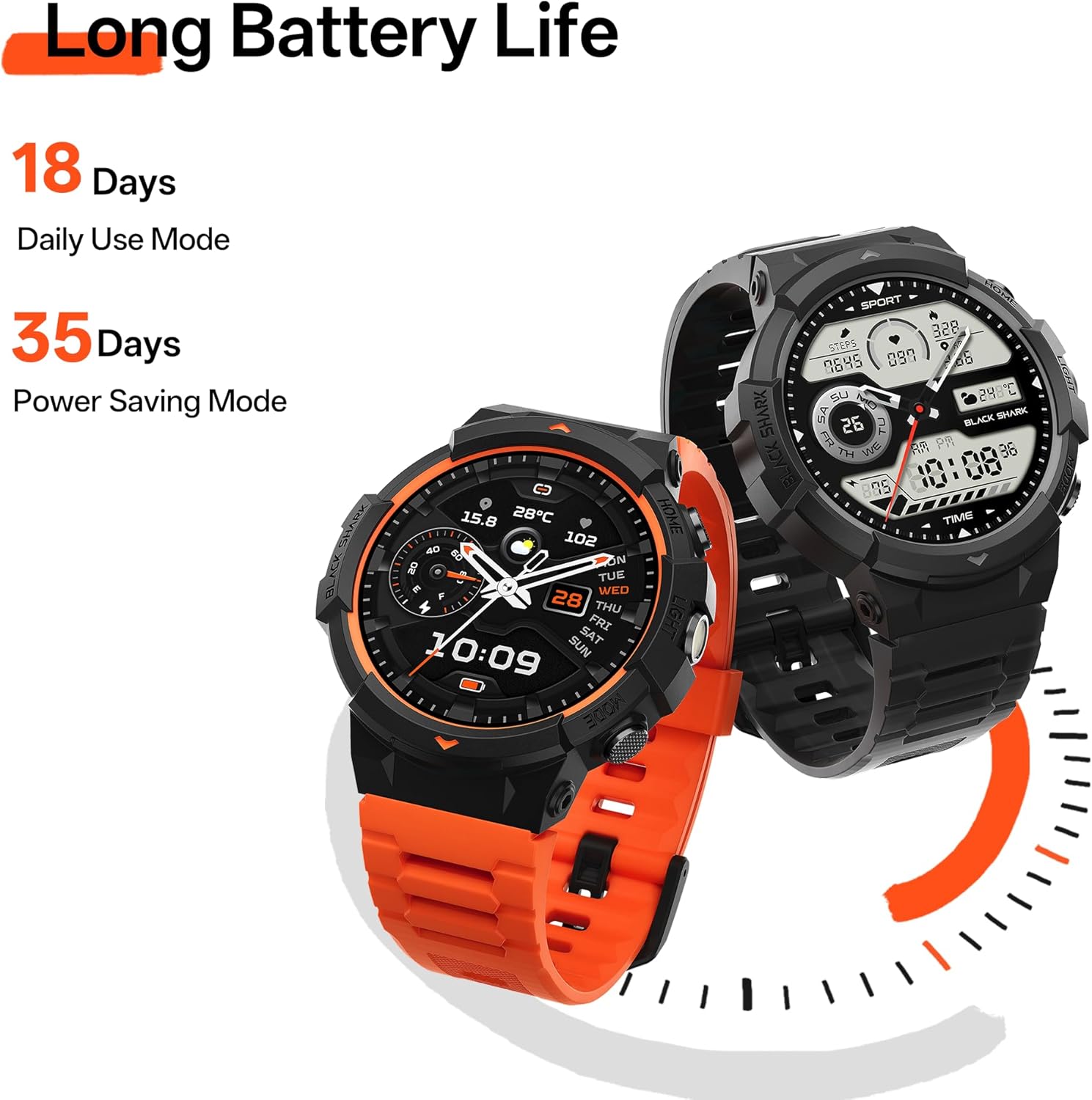
Image: Two Black Shark GS3 Sport Smartwatches illustrating the long battery life of 18 days in daily use mode and 35 days in power saving mode.
Troubleshooting
If you encounter issues with your Black Shark GS3 Sport Smartwatch, refer to the following common solutions:
| Problem | Possible Solution |
|---|---|
| Watch not turning on or charging | Ensure the charging cable is securely connected to both the watch and the power source. Try a different USB port or power adapter. Clean the charging contacts on the watch. |
| Cannot pair with smartphone | Ensure Bluetooth is enabled on your smartphone and the watch. Restart both devices. Forget the device in your phone's Bluetooth settings and try pairing again through the "Shark Fitlife" app. |
| Inaccurate GPS tracking | Ensure you are in an open area with a clear view of the sky. Allow the watch sufficient time to acquire a GPS signal before starting an activity. Update the watch firmware via the "Shark Fitlife" app. |
| Health data seems incorrect | Ensure the watch is worn snugly on your wrist, about one finger's width above the wrist bone. Clean the sensor on the back of the watch. Consult a medical professional for accurate health measurements. |
| Notifications not appearing | Check notification settings in the "Shark Fitlife" app and your smartphone's system settings. Ensure the app has necessary permissions. Keep the app running in the background. |
| Watch is unresponsive | Perform a force restart by pressing and holding the power button (or a combination of buttons, refer to specific watch instructions if available) for approximately 10-15 seconds until the watch restarts. |
For further assistance, please refer to the official Black Shark support resources.
Specifications
| Feature | Detail |
|---|---|
| Model | GS3 Sport |
| Display | 1.43-inch AMOLED, 466x466 resolution, 326 PPI, 60Hz Refresh Rate, up to 600 nits brightness |
| Battery Life | Up to 18 days (Daily Use Mode), Up to 35 days (Power Saving Mode) |
| Water Resistance | 50 meters |
| GPS | Built-in GNSS (GPS, BeiDou, GLONASS, QZSS, GALILEOGPS) |
| Connectivity | Bluetooth (ENC Bluetooth Call) |
| Sports Modes | 120+ |
| Health Monitoring | 24/7 Heart Rate, Blood Oxygen, Stress, Sleep Analysis, Step Counting, Women's Health Management |
| Durability | Military-Grade, PC+TPU dual-color injection shell, Panda Glass |
| Special Features | Built-in LED Flashlight, 200+ Watch Faces |
| Dimensions (approx.) | 54mm (watch face width), 22mm (strap width), 264mm (total length with strap) |
| Weight | 7 ounces (approx.) |
| Operating System | Android (compatible) |
Image: Diagram illustrating the physical dimensions of the Black Shark GS3 Sport Smartwatch.
Warranty and Support
For information regarding warranty coverage, returns, or technical support, please refer to the official Black Shark website or contact their customer service.
You can also visit the Black Shark Store on Amazon for additional product information and resources.
Documents and downloads
Ask a question about this manual
Ask about setup, troubleshooting, compatibility, parts, safety, or missing instructions. Manuals+ will review the question and use this page’s manual context to help answer it.