
1. Introduction
This manual provides essential information for the installation, operation, and maintenance of your ANNKE 3K PoE Turret Security Camera. Please read this manual thoroughly before using the product to ensure proper setup and functionality. Keep this manual for future reference.
2. Package Contents
Verify that all items listed below are included in your package. If any items are missing or damaged, please contact ANNKE customer support.
- 1 x ANNKE 3K Wired PoE Camera
- 1 x Mounting Screw Bags
- 1 x 1m/3.2ft Ethernet Cable
- 1 x Waterproof Lid
- 1 x User Manual

Figure 2.1: Package Contents
3. Product Overview
The ANNKE 3K PoE Turret Security Camera is designed for both indoor and outdoor surveillance, offering high-resolution video, color night vision, and advanced AI detection capabilities.
3.1 Key Features
- 3K (3072x1728) Super HD Resolution: Provides clear and detailed video footage.
- 116° Wide Angle 2.8mm Lens: Captures a broad field of view, reducing blind spots.
- Power over Ethernet (PoE): Single Ethernet cable for both power and data transmission.
- Color Night Vision: Delivers vivid footage even in low-light conditions.
- AI Human & Vehicle Detection: Reduces false alarms by accurately identifying human and vehicle movement.
- IP67 Weatherproof: Durable design for reliable operation in various weather conditions.
- Flexible Storage: Supports microSD card (up to 256GB, not included) or NVR recording.
- Remote Access: Monitor live view and playback via the ANNKE Vision app.

Figure 3.1: 3K HD Clarity and Wide View

Figure 3.2: 116° Wide Angle Lens

Figure 3.3: AI Human & Vehicle Detection

Figure 3.4: Color Night Vision in Low Light

Figure 3.5: Enhanced Color Night Vision

Figure 3.6: IP67 Weatherproof Design
4. Setup
4.1 Physical Installation
- Choose a Location: Select a suitable indoor or outdoor location that provides the desired viewing angle and is within reach of an Ethernet cable. Ensure the mounting surface is sturdy enough to support the camera.
- Mounting: Use the provided mounting screw bags to securely attach the camera to the chosen surface (e.g., wall or ceiling). Drill pilot holes if necessary.
- Adjust Angle: Loosen the adjustment screws on the camera body to position the lens for optimal coverage. Tighten the screws once the desired angle is achieved.
- Waterproof Connection (Outdoor Use): For outdoor installations, use the included waterproof lid to protect the Ethernet cable connection from moisture.
4.2 Network Connection (PoE)
The camera utilizes Power over Ethernet (PoE), meaning a single Ethernet cable provides both power and data connectivity.
- Connect Ethernet Cable: Connect one end of the Ethernet cable to the camera's Ethernet port.
- Connect to PoE Device: Connect the other end of the Ethernet cable to a PoE-enabled NVR, PoE switch, or PoE injector. (Power supply not included with camera, requires PoE source).
- Verify Connection: Once connected, the camera should power on and establish a network connection. Refer to your NVR or network device manual for specific connection indicators.
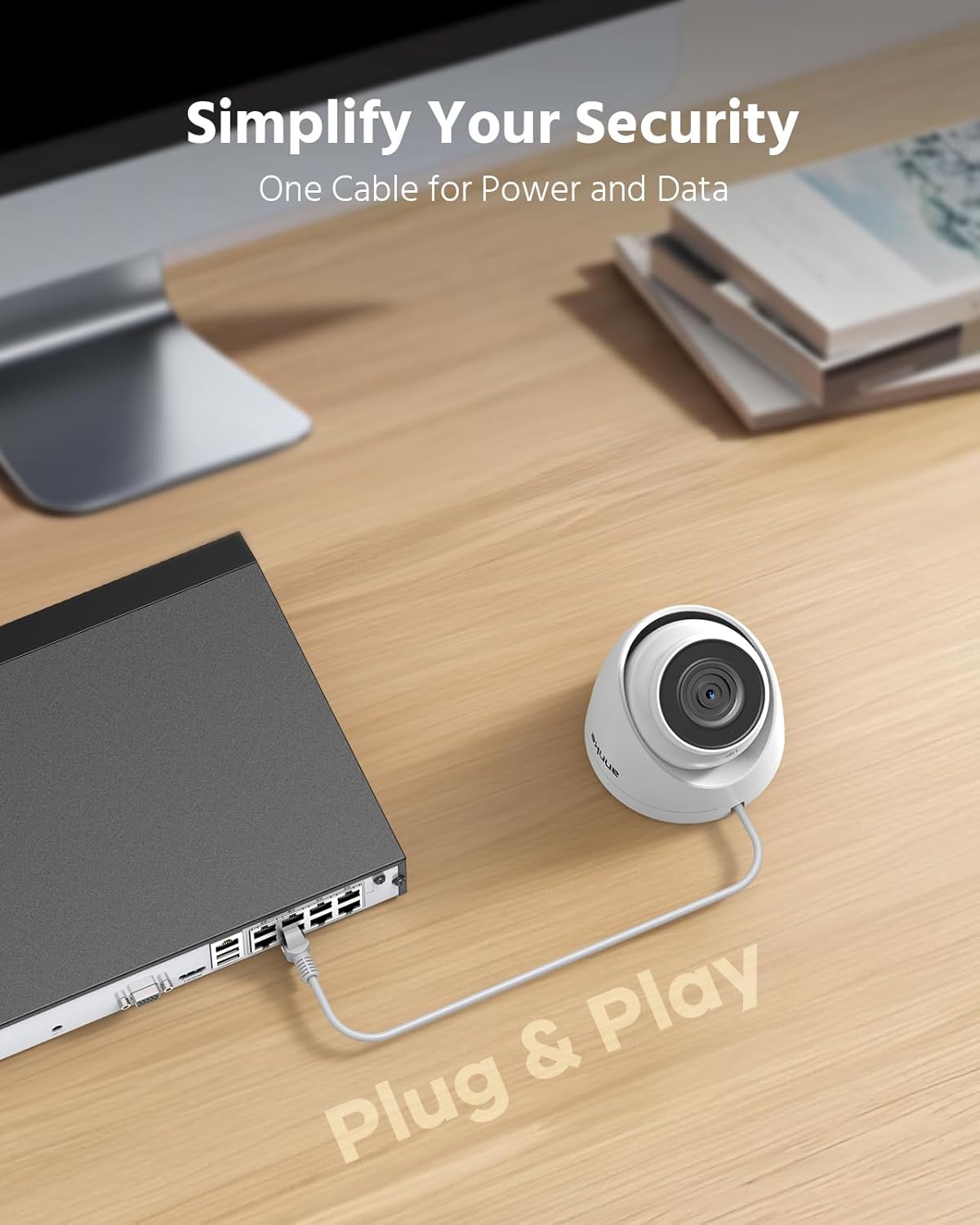
Figure 4.1: Easy PoE Setup

Figure 4.2: Single Cable for Power and Data
4.3 App Setup (ANNKE Vision)
To access your camera remotely and receive alerts, download and configure the ANNKE Vision app.
- Download App: Search for "ANNKE Vision" on the App Store (iOS) or Google Play (Android) and install it on your smartphone.
- Create Account: Open the app and follow the on-screen instructions to create a new account or log in if you already have one.
- Add Device: Tap the "+" icon or similar option to add a new device. Scan the QR code on your camera or manually enter its serial number.
- Follow Prompts: Complete the setup process by following the app's instructions, which may include setting a password for the camera.

Figure 4.3: Remote Access via ANNKE Vision App
5. Operation
5.1 Live View and Playback
Access live video streams and review recorded footage through your NVR or the ANNKE Vision app.
- Live View: In the ANNKE Vision app, select your camera to view the real-time video feed. On an NVR, select the corresponding channel.
- Playback: Use the app or NVR interface to access recorded footage. You can typically filter by date, time, and event type (e.g., motion detection).

Figure 5.1: Multi-Device Monitoring
5.2 Recording Options
The camera supports continuous 24/7 recording and motion-triggered recording.
- 24/7 Recording: When connected to an NVR or with a microSD card installed, the camera can record continuously.
- Motion Recording: Configure motion detection settings via the NVR or app to record only when movement is detected, saving storage space.

Figure 5.2: H.265+ Compression for Efficient Storage
5.3 AI Human & Vehicle Detection
The camera's AI capabilities distinguish between humans, vehicles, and other moving objects, providing more accurate alerts.
- Configure Detection Zones: Use the ANNKE Vision app or NVR interface to define specific areas for motion detection.
- Receive Smart Alerts: Get real-time push notifications on your smartphone when human or vehicle activity is detected in the configured zones.

Figure 5.3: AI Detection Event Timeline

Figure 5.4: Instant Alerts for Detected Events
6. Maintenance
6.1 Cleaning the Camera
Regular cleaning helps maintain optimal image quality.
- Lens: Gently wipe the camera lens with a soft, clean cloth. If necessary, use a lens cleaning solution designed for optical surfaces. Avoid abrasive materials.
- Camera Body: Wipe the camera body with a damp cloth. Do not use strong detergents or solvents.
6.2 Firmware Updates
Periodically check for firmware updates to ensure your camera has the latest features and security enhancements. Firmware updates are typically available through the ANNKE Vision app or the ANNKE official website.
- Check for Updates: Refer to the ANNKE Vision app settings or ANNKE support website for instructions on checking and applying firmware updates.
- Stable Power: Ensure the camera has a stable power supply during the update process to prevent interruptions.
7. Troubleshooting
If you encounter issues with your ANNKE 3K PoE Turret Security Camera, refer to the following common troubleshooting steps.
- No Power/No Video:
- Ensure the Ethernet cable is securely connected to both the camera and the PoE source (NVR/switch/injector).
- Verify that your PoE source is functioning correctly and providing power.
- Check the Ethernet cable for damage. Try a different cable if available.
- Poor Image Quality:
- Clean the camera lens as described in the Maintenance section.
- Ensure the camera is properly focused (if adjustable) and not obstructed.
- Check network bandwidth. Insufficient bandwidth can affect video quality.
- Motion Detection Not Working/False Alarms:
- Review and adjust the motion detection sensitivity settings in the app or NVR.
- Ensure detection zones are correctly configured to cover only desired areas.
- Minimize environmental factors like moving branches or reflections that might trigger false alarms.
- Cannot Access Camera Remotely:
- Verify your smartphone has a stable internet connection.
- Ensure the camera and NVR (if applicable) are connected to the internet.
- Check firewall settings on your router; ensure necessary ports are open if required (refer to ANNKE support for specific port forwarding details if direct access is needed).
- Confirm the camera is properly added and online in the ANNKE Vision app.
For more detailed troubleshooting or issues not covered here, please visit the ANNKE support website or contact their customer service.
8. Specifications
| Feature | Specification |
|---|---|
| Video Capture Resolution | 3K (3072*1728) |
| Lens | 2.8mm |
| Viewing Angle | 116 Degrees |
| Photo Sensor Technology | CMOS |
| Frame Rate | 20 frames per second |
| Connectivity Technology | Ethernet (PoE) |
| Indoor/Outdoor Usage | Indoor, Outdoor |
| Weather Resistance Level | IP67 Waterproof |
| Night Vision Range | 100 Feet |
| Night Vision Type | Color Night Vision |
| Alert Type | Motion Only (AI Human/Vehicle Detection) |
| Compatible Devices | NVR |
| Flash Memory Type | Micro SD (up to 256 GB, not included) |
| Video Encoding | H.265+ |
| Item Weight | 0.58 Kilograms |

Figure 8.1: Product Dimensions
9. Warranty and Support
ANNKE products typically come with a standard manufacturer's warranty. Please refer to the warranty card included in your package or visit the official ANNKE website for detailed warranty terms and conditions.
For technical assistance, product inquiries, or warranty claims, please contact ANNKE customer support through their official website or the contact information provided in your product documentation.
ANNKE Official Website: www.annke.com
10. Official Product Videos
Watch these official videos for additional guidance on your ANNKE 3K PoE Security Camera.
ANNKE 3K PoE Security Camera Overview
This video provides a general overview of the ANNKE 3K PoE Security Camera's features and capabilities, including night vision, motion alerts, and remote access.
ANNKE 3K Security Camera Unboxing
This video demonstrates the unboxing experience of the ANNKE 3K Security Camera, showing all included components and accessories.


