
1. Introduction
This manual provides essential information for the safe and efficient operation, maintenance, and troubleshooting of your PYY Commercial Conveyor Toaster. Please read this manual thoroughly before operating the appliance and retain it for future reference.
The PYY Commercial Conveyor Toaster is designed for high-volume toasting of various bread products, including bread slices, buns, bagels, and waffles, making it suitable for commercial environments such as restaurants, buffets, and bakeries.

Image 1.1: The PYY Commercial Conveyor Toaster, showcasing its design and capacity for various bread types.
2. Safety Instructions
To prevent injury or damage to the appliance, always adhere to the following safety precautions:
- Read all instructions before using the appliance.
- Ensure the power supply matches the voltage specified on the appliance's rating label.
- Do not immerse the appliance, cord, or plug in water or other liquids.
- Always unplug the toaster from the outlet when not in use, before cleaning, or before performing any maintenance.
- Do not operate the appliance with a damaged cord or plug, or if the appliance malfunctions or has been damaged in any manner.
- Keep hands, hair, and clothing away from moving parts during operation.
- Do not touch hot surfaces. Use handles or knobs.
- Ensure adequate ventilation around the toaster during operation.
- This appliance is for commercial use only.
- Do not place the toaster near flammable materials or heat sources.
3. Product Features
The PYY Commercial Conveyor Toaster is equipped with several features designed for efficiency and durability:
- Efficient Commercial Toasting: Capable of toasting up to 300 slices per hour, ideal for high-demand environments.
- Front/Back Output Modes: Bread can be dispensed from either the front or rear chute, offering flexibility for different kitchen layouts and workflows.
- Easy to Clean Design: Features air vents for heat dissipation and a removable crumb tray for simple cleaning.
- Durable Construction: Made from heavy-duty stainless steel for increased durability and corrosion resistance.
- User-Friendly Operation: Equipped with intuitive switch knobs for controlling speed and heating modes.
- Versatile Adjustments: Offers 7 speed options and dial-controlled heating to accommodate various toasting needs and bread types.
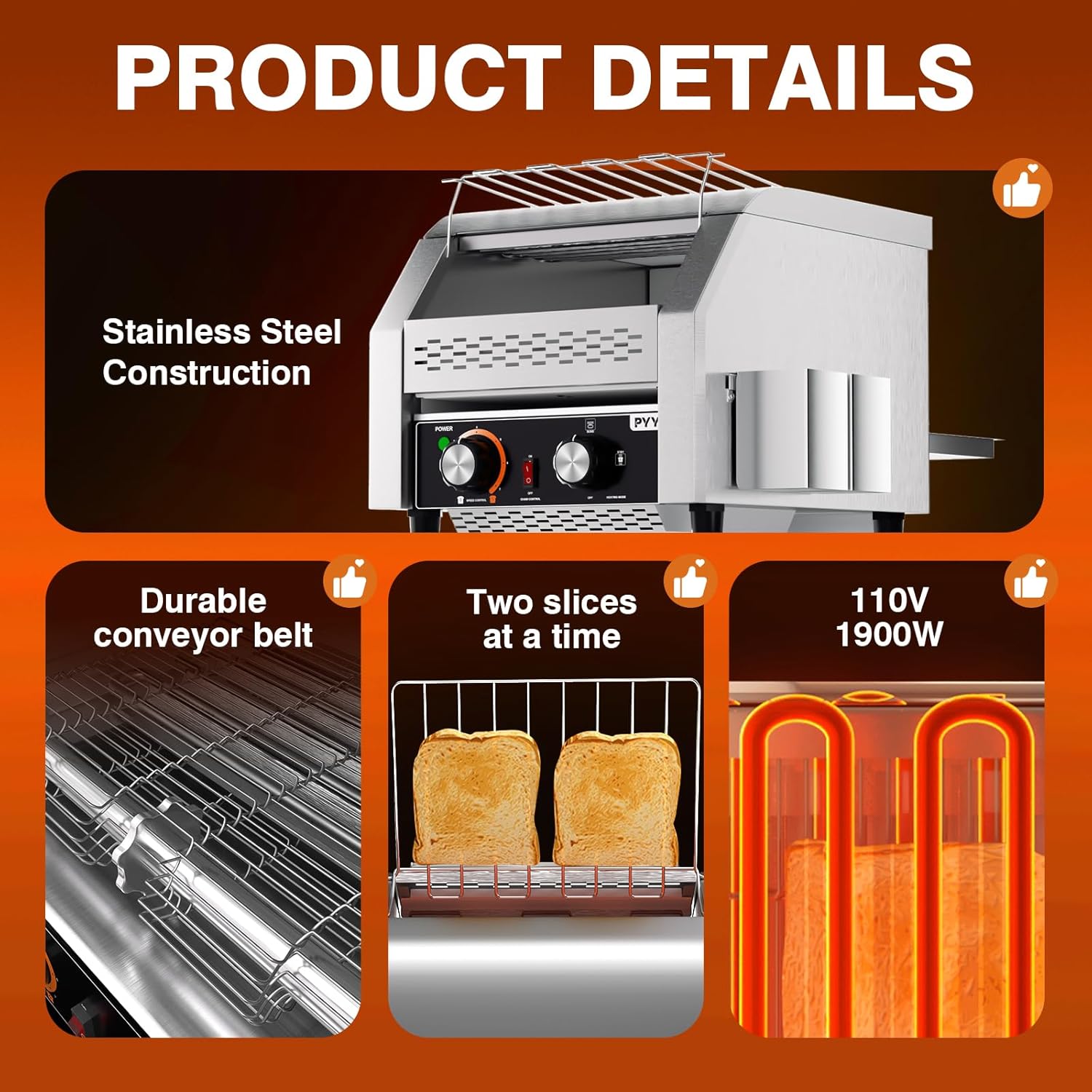
Image 3.1: Key product details, highlighting the stainless steel build, conveyor belt, toasting capacity, and power specifications.
4. Setup
- Unpacking: Carefully remove the toaster from its packaging. Retain packaging materials for future transport or storage.
- Placement: Place the toaster on a stable, flat, heat-resistant surface. Ensure there is adequate clearance around the appliance for ventilation, especially from the air vents. The toaster features four non-slip feet for stability.
- Power Connection: Ensure the power outlet matches the electrical requirements of the toaster (110V, 1900W). Plug the power cord securely into a grounded electrical outlet.
- Initial Cleaning: Before first use, wipe down the exterior with a damp cloth. Remove and clean the crumb tray.
5. Operating Instructions
Follow these steps to operate your PYY Commercial Conveyor Toaster:
- Power On: Locate the "POWER" switch on the control panel and turn it to the "ON" position. The power indicator light will illuminate.
- Select Output Mode: Use the switch to select either front or rear output for the toasted items.
- Adjust Heating Mode: The "HEATING MODE" knob allows you to select the desired heating elements:
- Bread: Activates both upper and lower heating elements for standard bread slices.
- Buns: Activates only the upper heating element, ideal for toasting the cut side of buns or bagels.
- STBY (Standby): Maintains a lower temperature, keeping the toaster warm without actively toasting, saving energy during idle periods.
- Set Conveyor Speed: Use the "SPEED CONTROL" knob to adjust the conveyor belt speed. A lower number indicates a slower speed, resulting in darker toast. A higher number indicates a faster speed, resulting in lighter toast. There are 7 speed options available.
- Preheating: Allow the toaster to preheat for approximately 5-10 minutes after setting the heating mode and speed.
- Loading Bread: Place bread slices, buns, or bagels onto the conveyor belt feed rack. Ensure items are placed flat and do not overlap.
- Toasting Process: The conveyor belt will automatically carry the items through the heating chamber. Toasted items will exit from the selected front or rear chute.
- Power Off: When finished, turn the "POWER" switch to the "OFF" position and unplug the appliance.
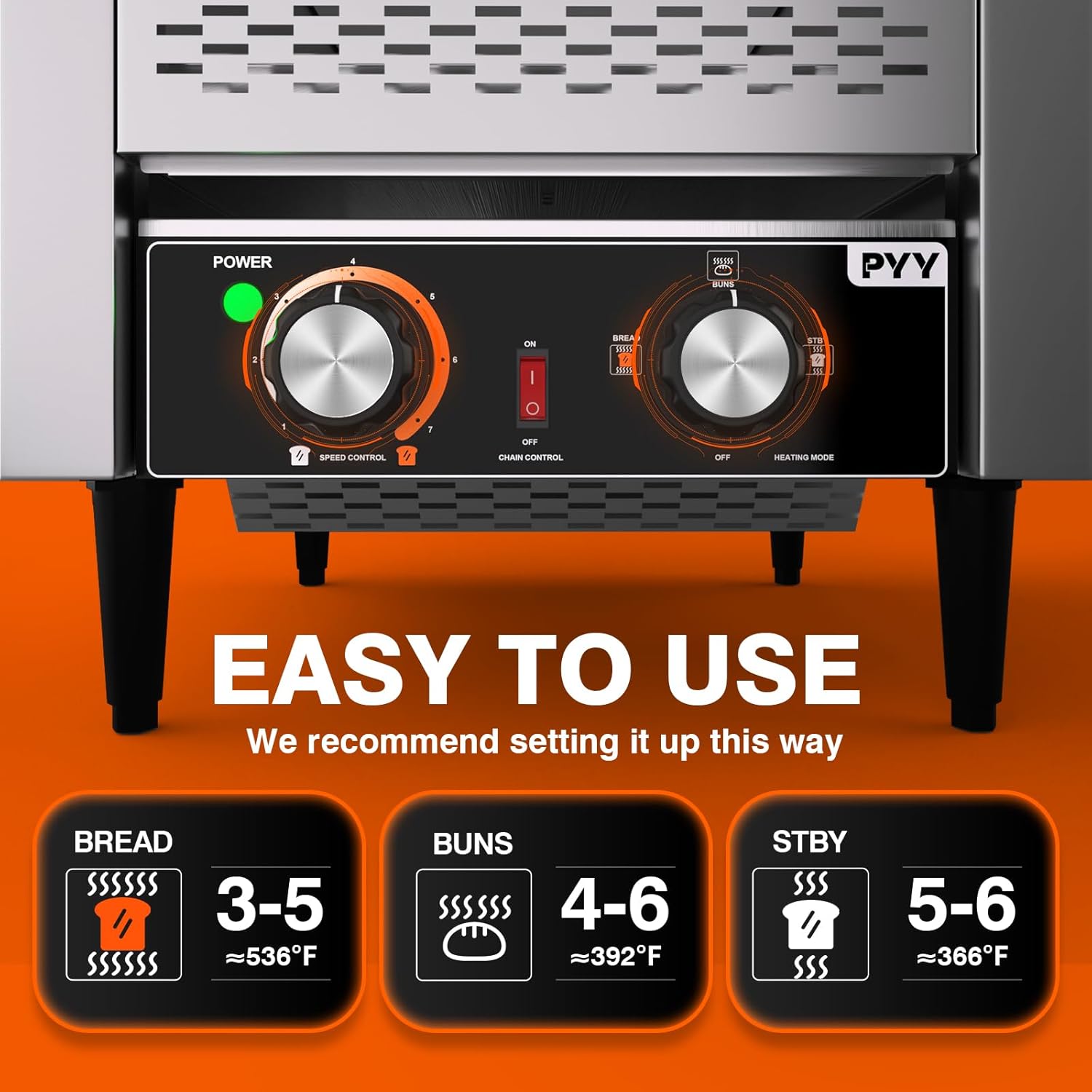
Image 5.1: Detailed view of the control panel, illustrating settings for speed, chain control, and heating modes for different bread types.
Recommended Settings:
- Bread
Speed: 3-5
Approx. 536°F - Buns
Speed: 4-6
Approx. 392°F - Standby (STBY)
Speed: 5-6
Approx. 366°F
6. Maintenance and Cleaning
Regular cleaning and maintenance will ensure the longevity and optimal performance of your toaster.
- Always Unplug: Before cleaning, ensure the toaster is turned off, unplugged, and completely cooled down.
- Crumb Tray: The toaster is equipped with a removable crumb tray. Slide out the tray from the bottom front of the appliance. Dispose of accumulated crumbs and wipe the tray clean with a damp cloth. Reinsert the tray securely.
- Exterior Cleaning: Wipe the exterior stainless steel surfaces with a soft, damp cloth. For stubborn stains, a mild, non-abrasive cleaner designed for stainless steel can be used. Dry thoroughly.
- Interior Cleaning: Periodically, and with the toaster unplugged and cool, gently brush away any crumbs or debris from the conveyor belt and heating elements using a soft brush. Do not use water or liquid cleaners inside the toaster.
- Do Not Immerse: Never immerse the toaster in water or any other liquid.

Image 6.1: Illustration of the removable crumb tray, designed for convenient cleaning and maintenance.
7. Troubleshooting
If you encounter issues with your PYY Commercial Conveyor Toaster, refer to the following common problems and solutions:
| Problem | Possible Cause | Solution |
|---|---|---|
| Toaster does not turn on. | No power supply; Power switch is off; Blown fuse/tripped circuit breaker. | Ensure the toaster is plugged into a live outlet. Check the power switch. Check your circuit breaker or fuse box. |
| Bread is not toasting evenly or is too light/dark. | Incorrect speed setting; Incorrect heating mode; Heating elements are dirty or faulty. | Adjust the "SPEED CONTROL" knob (slower for darker, faster for lighter). Ensure the correct "HEATING MODE" is selected for the item. Clean heating elements if necessary (when cool and unplugged). If elements are faulty, contact support. |
| Conveyor belt is stuck or not moving. | Crumbs or debris obstructing the belt; Motor malfunction. | Unplug the toaster and carefully remove any obstructions. Clean the crumb tray and surrounding area. If the issue persists, contact customer support. |
| Excessive smoke or burning smell. | Accumulated crumbs or food residue burning; Overheating. | Immediately unplug the toaster. Allow it to cool. Clean the crumb tray and interior thoroughly. Ensure proper ventilation. If the smell persists after cleaning, discontinue use and contact support. |
If the problem persists after attempting these solutions, please contact PYY customer support.
8. Specifications
Detailed specifications for the PYY Commercial Conveyor Toaster:
- Brand: PYY
- Model Name: PYYDSLJZTT450SSUS (Note: Item model number is PYYDSLTT300SSUSYDA)
- Color: Silver
- Product Dimensions (D x W x H): 21.45" x 18.17" x 17.12"
- Item Weight: 50.6 pounds
- Material: Stainless Steel
- Power Source: Electric
- Power Rating: 1900W
- Voltage: 110V
- Capacity: 300 slices/hour
- Special Feature: Anti-Slip Base
- Included Components: BubbleWaffle
- UPC: 723747214560
- ASIN: B0F8MY14KN

Image 8.1: Dimensional overview of the PYY Commercial Conveyor Toaster.
9. Warranty and Support
For warranty information or technical support, please contact PYY customer service through the retailer where the product was purchased or visit the official PYY website. Please have your model number (PYYDSLTT300SSUSYDA) and purchase date available when contacting support.
For general inquiries or to explore other PYY products, you may visit the PYY Store on Amazon.
