
1. Introduction
Thank you for choosing the MELONFARM Grow Tent Complete Setup 2x2. This comprehensive kit provides an optimal environment for indoor plant cultivation, featuring a durable grow tent, a powerful LED grow light, and an efficient ventilation system. This manual will guide you through the assembly, operation, and maintenance of your new grow tent system to ensure successful plant growth.
2. Safety Information
- Always read and understand all instructions before assembly and operation.
- Ensure all electrical connections are secure and comply with local electrical codes.
- Do not operate the grow light or fan with damaged cords or plugs.
- Keep water and liquids away from electrical components.
- Do not block ventilation openings to prevent overheating.
- Keep out of reach of children and pets.
- Use in a well-ventilated area.
3. Package Contents
Verify that all components listed below are included in your package:
- 24"x24"x48" Grow Tent
- 70W Full Spectrum LED Grow Light
- 4-inch 190 CFM Inline Fan
- Carbon Filter
- 16.4 feet of Ducting
- 2 Stainless Steel Clamps
- Rubber Pipe Coupling
- Durable Metal Poles for Tent Frame
- Rope Hangers for LED Light
- Stainless Steel Hooks for LED Light
4. Setup Instructions
4.1. Grow Tent Assembly
Assemble the metal frame using the provided poles and connectors. Ensure all connections are secure. Once the frame is built, carefully drape the grow tent fabric over the frame. Zip up the tent completely to ensure a light-proof seal.

Image: Illustration of the grow tent frame assembly with metal poles and fabric covering.

Image: Diagram showing the layers of the grow tent material, including steel poles, 600D Oxford fabric, lightproof layering, and diamond Mylar interior.
4.2. LED Grow Light Installation
Hang the 70W LED grow light from the tent's support bars using the provided rope hangers and stainless steel hooks. Adjust the height of the light according to your plant's growth stage. Connect the power cable to the LED light and route it through one of the tent's designated cable ports.
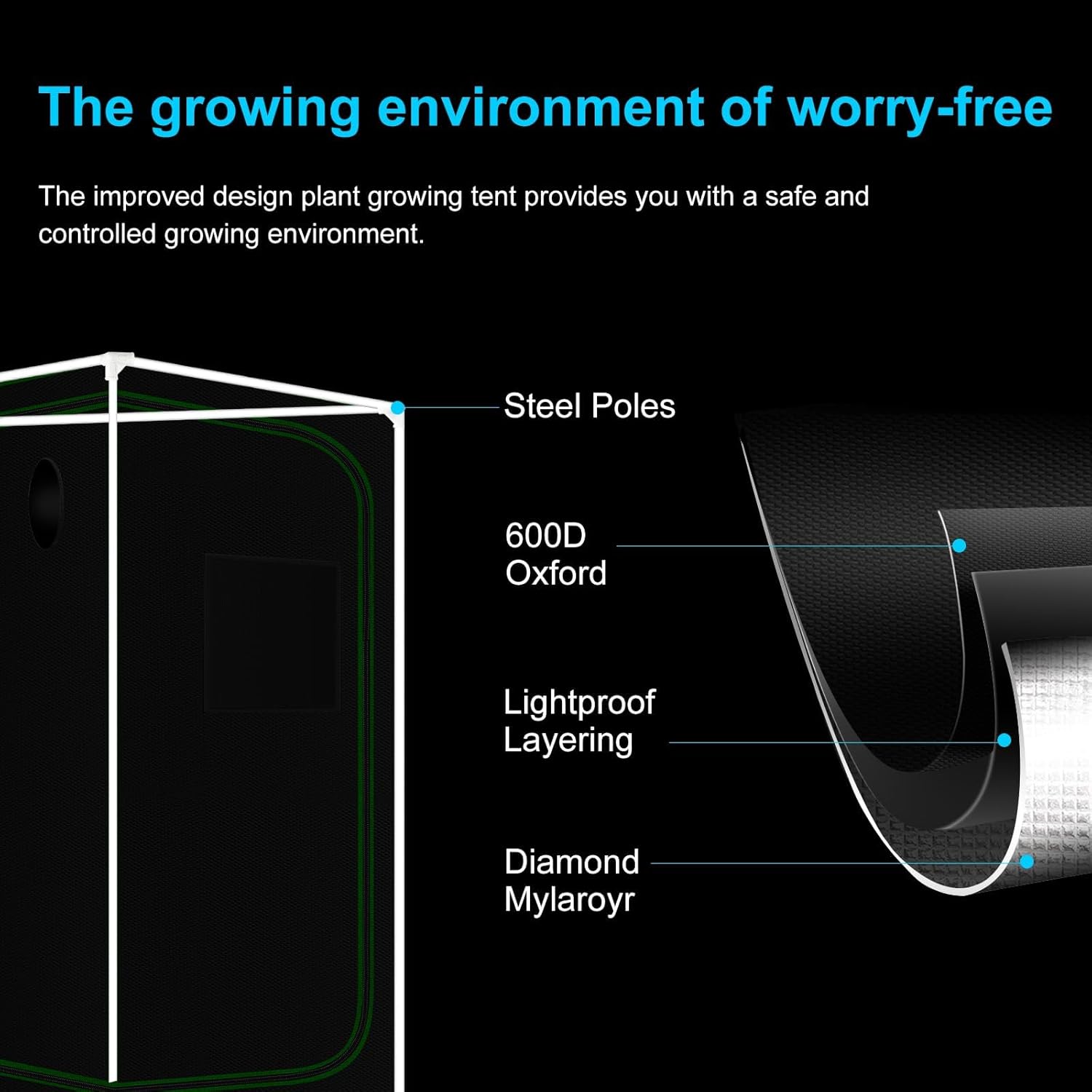
Image: The 70W LED grow light suspended inside the grow tent, illuminating plants below.

Image: Detailed view of the 70W LED grow light, showing its dimensions, 216 diodes, and included accessories like stainless steel hooks and rope hangers.
4.3. Ventilation System Setup
Install the 4-inch inline fan and carbon filter. Connect them using the provided ducting and stainless steel clamps. The rubber pipe coupling helps minimize noise from fan vibrations. Route the ducting through the tent's ventilation ports and secure them with the drawstrings. Ensure the fan is positioned to create optimal airflow, typically exhausting air from the top of the tent.

Image: Exploded view of the 2-in-1 fan/filter system, highlighting the built-in fan, RC412 Australian virgin activated carbon, and inner/outer mesh for efficient ventilation.

Image: Illustration of quality aluminum ducting and stainless steel clamps, emphasizing their corrosion resistance and heavy-duty nature.
5. Operating Instructions
5.1. LED Light Operation
The 70W LED grow light provides full spectrum illumination. Use the dimmer control (if applicable) to adjust light intensity based on your plant's specific needs during different growth stages. Refer to plant-specific guidelines for optimal light cycles and intensity.
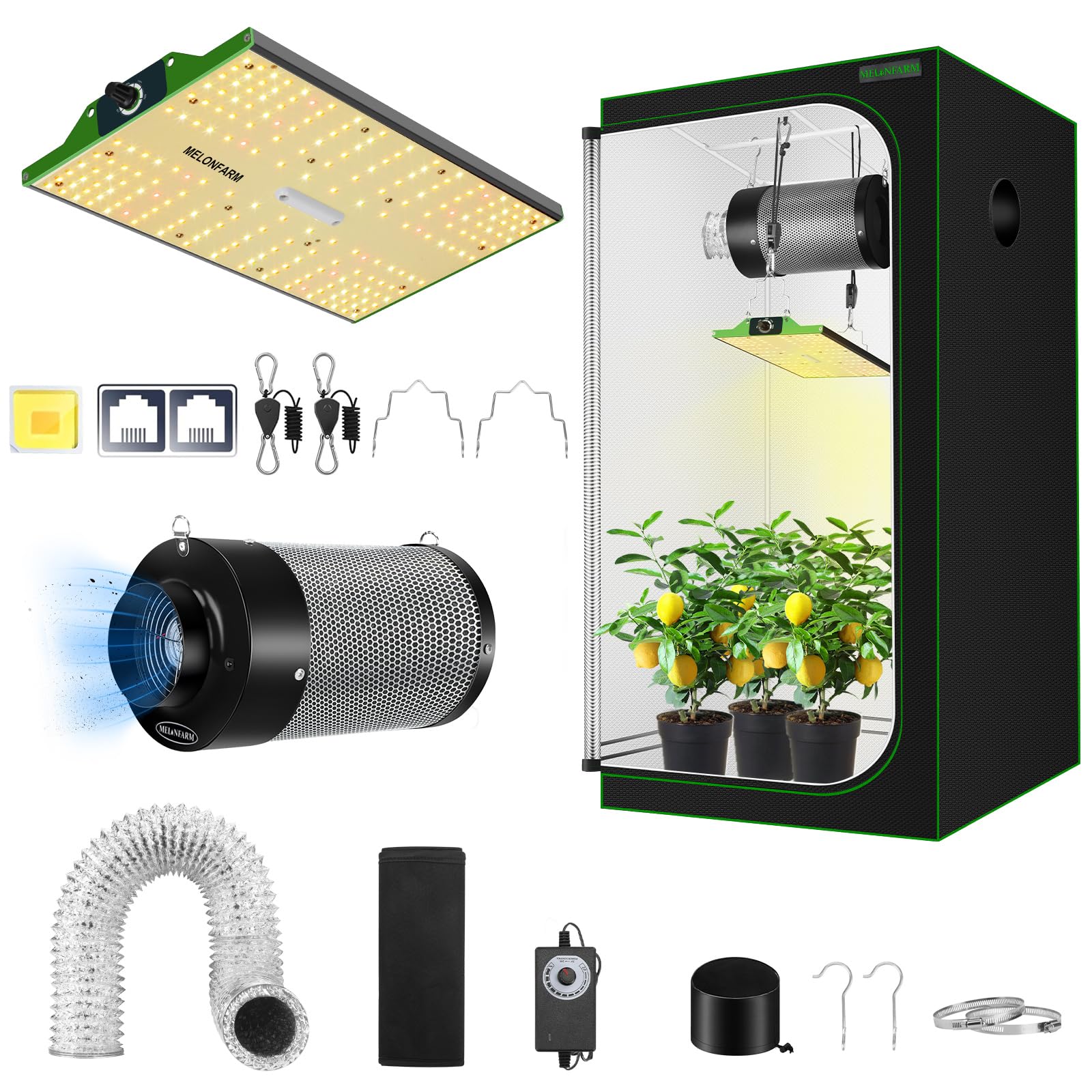
Image: The LED grow light demonstrating ultra-strong heat dissipation through its hollow design, managing light and heat for better climate control.
5.2. Ventilation Control
The 4-inch inline fan ensures proper air circulation and temperature regulation. Adjust the fan speed as needed to maintain desired temperature and humidity levels within the tent. The carbon filter effectively removes odors from the exhausted air.
5.3. Environmental Monitoring
Regularly monitor the temperature and humidity inside the grow tent. Optimal conditions vary by plant type and growth stage. Adjust lighting and ventilation settings to maintain the ideal environment.
6. Maintenance
- Cleaning the Tent: Wipe down the interior Mylar lining with a damp cloth as needed to maintain reflectivity. Ensure no water enters electrical components.
- Carbon Filter: The carbon filter's lifespan depends on usage and air quality. Replace the carbon filter when odor control diminishes.
- Fan Maintenance: Periodically check the inline fan for dust buildup and clean as necessary to ensure efficient operation.
- Light Cleaning: Gently wipe the LED grow light surface with a dry, soft cloth to remove dust and maintain light output.
7. Troubleshooting
| Problem | Possible Cause | Solution |
|---|---|---|
| Light not turning on | Power cable disconnected, faulty outlet, light switch off. | Check power connections, test outlet, ensure light switch is on. |
| Poor airflow/odor issues | Blocked ducting, dirty carbon filter, fan speed too low. | Check ducting for obstructions, clean/replace carbon filter, increase fan speed. |
| Tent overheating | Insufficient ventilation, high ambient room temperature. | Increase fan speed, open passive vents, consider cooling the room. |
| Light leaks | Unzipped tent, loose vent drawstrings, damaged fabric. | Ensure all zippers are closed, tighten drawstrings, inspect for tears and repair if necessary. |
8. Specifications
- Brand: MELONFARM
- Model Number: MFGTACLL224
- Product Dimensions: 24"L x 24"W x 48"H
- Item Weight: 12 Pounds
- Frame Material: Metal
- Inner Material: Mylar
- Outer Material: Oxford Cloth
- Light Source Wattage: 70 Watts
- Inline Fan Airflow: 190 CFM (4-inch)
9. Warranty and Support
For warranty information, technical support, or replacement parts, please visit the official MELONFARM website or contact their customer service. Keep your purchase receipt as proof of purchase.