
KILOVIEW RE-3 Dual-Channel 4K UHD Rackmount Encoding Card User Manual
Model: RE3
1. Introduction
The KILOVIEW RE-3 is a dual-channel 4K UHD H.265/H.264 rackmount encoding card designed for integration into the Cradle Series Frame. It supports both HDMI and 3G-SDI inputs, offering advanced encoding capabilities for professional video applications. This manual provides essential information for the proper setup, operation, and maintenance of your RE-3 encoding card.
2. Safety Information
- Ensure the device is installed in a well-ventilated area to prevent overheating.
- Only use power supplies and accessories specified by KILOVIEW.
- Avoid exposing the device to moisture, dust, or extreme temperatures.
- Do not attempt to open or modify the device. Refer all servicing to qualified personnel.
- Disconnect power before performing any maintenance or installation procedures.
3. Package Contents
Verify that all items are present in the package:
- KILOVIEW RE-3 Dual-Channel 4K UHD H.265/H.264 HDMI/3G-SDI/NDI|HX Rackmount Encoding Card
4. Product Overview
The RE-3 encoding card features a compact design for rackmount integration, providing various input and output interfaces for versatile video encoding.
4.1 Front Panel Interfaces

Figure 4.1: Front panel of the RE-3 encoding card.
The front panel includes the following interfaces:
- NET (RJ45 Ethernet Port): For network connectivity (10/100M/1000M).
- HDMI IN: HDMI video input.
- 3G-SDI IN: 3G-SDI video input.
- USB Ports: For future expansion or peripheral connections.
- LINE IN: Audio input.
- Tally: Tally light indicator.
5. Setup
Follow these steps to set up your KILOVIEW RE-3 encoding card:
5.1 Installation into Cradle Series Frame
The RE-3 card is designed for seamless integration into KILOVIEW Cradle Series Frames (RU01, RU03, RU03S).
- Ensure the Cradle Series Frame is powered off and disconnected from the main power supply.
- Locate an available slot in the Cradle Series Frame.
- Carefully slide the RE-3 encoding card into the slot until it is firmly seated.
- Secure the card using the provided screws on the front panel.
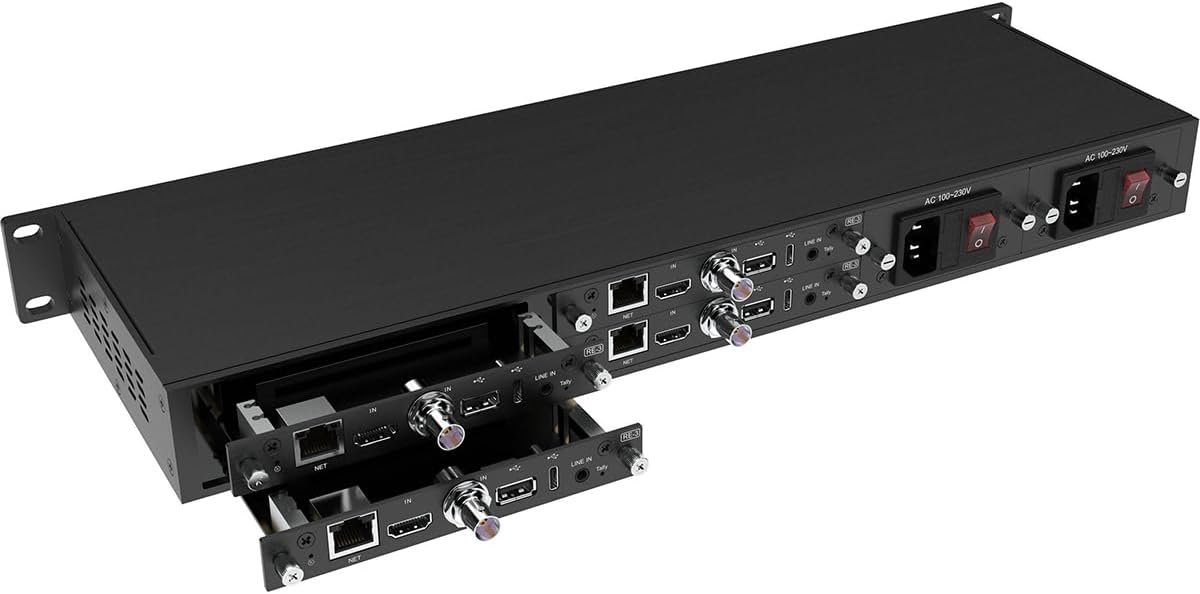
Figure 5.1: Inserting the RE-3 card into a Cradle Series Frame.
5.2 Connecting Video Sources
Connect your video sources to the RE-3 card:
- For HDMI input, connect an HDMI cable from your video source to the HDMI IN port.
- For 3G-SDI input, connect an SDI cable from your video source to the 3G-SDI IN port.
5.3 Network Connection
Connect the RE-3 card to your network:
- Connect an Ethernet cable from your network switch or router to the NET (RJ45) port on the RE-3 card.

Figure 5.2: Rear view of a Cradle Series Frame with RE-3 cards showing network and video connections.
5.4 Powering On
Once all connections are made, power on the Cradle Series Frame. The RE-3 card will initialize automatically.
6. Operation
The KILOVIEW RE-3 offers advanced video encoding capabilities for various professional applications.
6.1 Video Encoding
- The RE-3 supports 4K video encoding at up to 30 frames per second (fps) via HDMI input.
- For HD video, it supports up to 60 fps via 3G-SDI inputs.
- It supports both H.265 (HEVC) and H.264 (AVC) video codecs, ensuring broad compatibility.
6.2 Dual-Channel Input
The dual-channel video inputs provide flexibility, allowing simultaneous encoding of two video streams. This is beneficial for scenarios requiring multiple camera feeds or different content streams.
6.3 Multi-Destination Streaming
Leveraging advanced HEVC technology, the RE-3 can facilitate live streaming to as many as eight destinations concurrently. This feature is ideal for live production, remote transmission, and post-production workflows.
6.4 Customizable Overlays
Enhance your video streams by adding user-defined text and image overlays. This allows for branding, watermarks, or informational graphics to be directly integrated into your content.
7. Maintenance
To ensure the longevity and optimal performance of your RE-3 encoding card, follow these maintenance guidelines:
- Cleaning: Periodically clean the exterior of the card and the Cradle Series Frame with a soft, dry cloth. Do not use liquid cleaners or solvents.
- Ventilation: Ensure that the ventilation openings on the Cradle Series Frame are not obstructed to allow for proper airflow.
- Firmware Updates: Check the KILOVIEW official website regularly for firmware updates to ensure your device has the latest features and bug fixes.
8. Troubleshooting
If you encounter issues with your RE-3 encoding card, refer to the following common troubleshooting steps:
- No Video Input:
- Check that the video source is powered on and outputting a signal.
- Verify that the HDMI or 3G-SDI cable is securely connected to both the source and the RE-3 card.
- Ensure the input resolution and frame rate are supported by the RE-3 card.
- No Network Connectivity:
- Check the Ethernet cable connection to the NET port and your network switch/router.
- Verify that your network is functioning correctly.
- Confirm that the RE-3 card has obtained an IP address (check via the Cradle Series Frame management interface).
- Encoding Issues:
- Ensure the input signal is stable.
- Check the encoding settings in the device's web interface.
- Reduce the bitrate or resolution if experiencing dropped frames or artifacts due to network bandwidth limitations.
9. Specifications
Key technical specifications for the KILOVIEW RE-3 encoding card:
| Feature | Specification |
|---|---|
| Model Number | RE3 |
| Connectivity Technology | Ethernet |
| Compatible Devices | Camera |
| Number of Channels | 2 |
| Video Input | HDMI, 3G-SDI |
| Video Codecs | H.265 (HEVC), H.264 (AVC) |
| Max Encoding Resolution (HDMI) | 4K UHD @ 30fps |
| Max Encoding Resolution (3G-SDI) | 1080p @ 60fps |
| Ethernet Port | 10/100M/1000M RJ45 |
| Item Weight | 1 Pounds |
10. Warranty
The KILOVIEW RE-3 Dual-Channel 4K UHD H.265/H.264 HDMI/3G-SDI/NDI|HX Rackmount Encoding Card comes with a Kiloview 1 Year Limited Warranty. Please retain your proof of purchase for warranty claims. For detailed terms and conditions, refer to the official Kiloview warranty policy available on their website.
11. Support
For technical assistance, product inquiries, or further support, please visit the official KILOVIEW website or contact their customer service department. Online resources, FAQs, and driver downloads may also be available on their support pages.


