
1. Introduction
Thank you for choosing Cozylady 50M Bluetooth LED Strip Lights. This product is designed to enhance your living space with vibrant, customizable lighting, perfect for bedrooms, living rooms, children's rooms, and parties. Featuring dual control via a mobile app and an infrared remote, along with music synchronization capabilities, these lights offer a dynamic and immersive lighting experience. Please read this manual carefully before installation and use to ensure proper operation and safety.
2. Safety Information
- Ensure the power supply is disconnected before installation or maintenance.
- Do not expose the LED strips or control unit to water or high humidity. This product is designed for indoor use only.
- Avoid bending the LED strip sharply or at angles less than 90 degrees, as this may damage the circuit.
- Do not cover the LED strips with flammable materials when in operation.
- Keep out of reach of children.
- Use only the provided power adapter and control unit. Using incompatible components may cause damage or fire.
- If any part of the product is damaged, discontinue use immediately and contact customer support.
3. Package Contents
Please verify that all items listed below are included in your package:
- 50M LED Strip Lights (two 25M rolls)
- Bluetooth Control Unit with built-in microphone
- IR Remote Control
- UL-Certified Power Adapter
- Mounting Clips (for additional adhesion security)
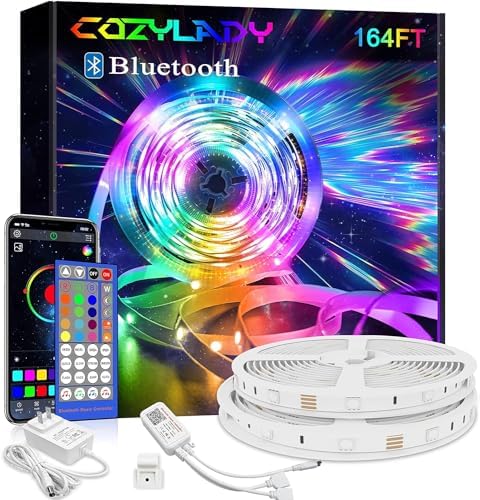
4. Setup Instructions
Follow these steps for a quick and easy installation:
- Prepare the Surface: Choose a clean, dry, and flat surface for installation. Dust, dirt, or moisture can affect the adhesive's effectiveness. Wipe the surface thoroughly before proceeding.
- Unroll the LED Strip: Carefully unroll the LED strip lights. Avoid twisting or sharply bending the strip.
- Peel and Stick: Remove the protective backing from the adhesive tape on the back of the LED strip. Begin sticking the strip to your desired surface, pressing firmly along the entire length to ensure good contact.
- Connect the Control Unit: Connect the end of the LED strip to the Bluetooth control unit. Ensure the connectors are aligned correctly and securely fastened.
- Connect Power: Plug the power adapter into the Bluetooth control unit, then plug the power adapter into a standard electrical outlet.
- Download the App: Scan the QR code provided on the control unit or in the packaging to download the smart app (e.g., 'HappyLighting' or similar, as indicated by the product).
- Bluetooth Pairing: Enable Bluetooth on your mobile device. Open the downloaded app. The app should automatically detect and connect to the LED strip lights. If not, follow the in-app instructions for manual pairing.
- Secure with Clips (Optional): For added security, especially on textured or vertical surfaces, use the included mounting clips at regular intervals along the strip.
5. Operating Instructions
Your Cozylady LED Strip Lights can be controlled using either the included IR remote or the dedicated mobile application.
5.1 Using the IR Remote Control
The remote control allows for basic functions:
- Power Button: Turn the lights ON/OFF.
- Brightness Adjustment: Increase or decrease the light intensity.
- Color Selection: Choose from a variety of preset static colors.
- Mode Selection: Cycle through various dynamic lighting modes (e.g., flash, fade, jump).
- DIY Colors: Some remotes allow for custom color mixing.
5.2 Using the Mobile Application
The smart app unlocks the full potential of your LED lights, offering advanced features:
- Color Palette: Access over 16 million colors to create your perfect ambiance.
- Brightness and Saturation Control: Fine-tune the light output and color vibrancy.
- Dynamic Modes: Explore a wider range of pre-programmed dynamic modes, often with adjustable speed.
- Music Synchronization: The built-in high-precision microphone in the control unit allows the lights to react to ambient sound or music played through your phone. Select the music sync mode in the app and watch the lights dance to your favorite tunes.
- Timer Function: Set schedules for the lights to turn ON/OFF automatically.
- DIY Modes: Create and save your own custom lighting sequences and color combinations.
6. Maintenance
To ensure the longevity and optimal performance of your LED strip lights, follow these maintenance guidelines:
- Cleaning: Gently wipe the LED strips and control unit with a soft, dry cloth to remove dust. Do not use liquid cleaners or abrasive materials.
- Adhesion Check: Periodically check the adhesion of the strip to the surface. If any sections are peeling, gently press them back into place or use additional mounting clips for reinforcement.
- Storage: If storing the lights for an extended period, ensure they are clean, dry, and coiled loosely to prevent damage to the strip or wiring. Store in a cool, dry place.
- Power Supply: Ensure the power adapter is not covered or placed in an area with poor ventilation during operation to prevent overheating.
7. Troubleshooting
If you encounter any issues with your Cozylady LED Strip Lights, please refer to the following common problems and solutions:
| Problem | Possible Cause | Solution |
|---|---|---|
| Lights do not turn on. | No power, loose connection, faulty power adapter/control unit. | Check power outlet, ensure all connections are secure. Test with another outlet. If problem persists, contact support. |
| Remote control not working. | Battery depleted, remote not pointed at IR receiver, obstruction. | Replace remote battery. Ensure remote is pointed directly at the IR receiver on the control unit. Remove any obstructions. |
| Bluetooth connection issues. | Bluetooth off, app not open, interference, multiple devices. | Ensure Bluetooth is enabled on your phone. Close and reopen the app. Restart your phone. Disconnect other Bluetooth devices. |
| Lights are dim or flickering. | Insufficient power, damaged strip section. | Ensure power adapter is correctly connected. Check for physical damage on the strip. |
| Adhesive is not holding. | Surface not clean/dry/flat, environmental factors. | Ensure surface is thoroughly cleaned and dry before application. Use included mounting clips for stronger adhesion, especially on vertical or textured surfaces. |
If you are unable to resolve the issue using these steps, please contact Cozylady customer support for further assistance.
8. Specifications
| Feature | Specification |
|---|---|
| Brand | Cozylady |
| Item Model Number | 012B-02-006-006 |
| Package Dimensions | 17 x 16 x 5 cm |
| ASIN | B0F8JB3827 |
| Date First Available | March 30, 2025 |
| Color | Black |
| Indoor/Outdoor Use | Indoor |
| Special Feature | Color Changing |
| Light Source Type | LED |
| Style | Modern |
| Material | Plastic |
| Number of Light Sources | 114 |
| Included Components | Power cord control with TV backlight |
| Number of Items | 1 |
9. Warranty and Support
Cozylady is committed to providing high-quality products. For any warranty claims or technical support, please contact the seller or refer to the official Cozylady website for contact information. Please have your product model number (012B-02-006-006) and purchase details ready when contacting support.


