
1. Introduction
The MINIEYE UTOUR T600 is an AI-powered mirror dash cam designed to enhance driving safety. It features high-resolution front and rear cameras, advanced driving assistance systems (ADAS), and a user-friendly touchscreen interface. This manual provides essential information for the proper installation, operation, and maintenance of your device.
2. Safety Information and Precautions
- This product is an aftermarket collision prevention 'warning' system and does not control vehicle braking or steering. It is intended as an aid, not a substitute for safe driving practices.
- Due to variations in vehicle conditions, driving styles, and road environments, some functions may not operate correctly or as expected.
- Do not over-rely on this product. The manufacturer is not responsible for any accidents, property damage, personal injury, or any other incidents arising from the use of this product.
- Always read the included manual thoroughly before using the product.
3. Product Features Overview
The UTOUR T600 integrates advanced technology to provide a comprehensive driving experience:
- High-Resolution Recording: Front camera records in 2.5K (2560x1440P) and the rear camera in Full HD (1920x1080P), capturing clear details.
- Wide-Angle Lenses: Both front and rear cameras feature 130° wide-angle F1.8 lenses for extensive field of view, minimizing blind spots.
- 9.66-inch IPS Touchscreen: A large, responsive display for clear viewing of recorded footage and real-time video, enabling intuitive touch operations.
- Advanced Driving Assistance Systems (ADAS): AI-powered detection of vehicles, motorcycles, pedestrians, bicycles, and lanes to prevent accidents. Includes:
- Following Distance / Collision Warning
- Lane Departure Warning
- Pedestrian Distance / Collision Warning
- Forward Vehicle Departure Notification
- LCA (Lane Change Assist) Rear Vehicle Detection
- High-Precision 3-Axis G-Sensor: Automatically locks and saves recordings upon impact detection, securing critical moments as accident evidence.
- Large Storage Capacity: Supports microSD cards up to 256GB (Class 10 or higher recommended) for extended recording times and loop recording.
- Durable Design: Operates reliably in temperatures from -20°C to 70°C, suitable for various climates.

Figure 3.1: The UTOUR T600 Mirror Dash Cam displaying real-time driving information and ADAS warnings.

Figure 3.2: Icons illustrating the advanced driving assistance features, including collision warning, pedestrian warning, and lane change assist.
4. Setup and Installation
4.1 Package Contents
Before installation, ensure all components are present:
- MINIEYE UTOUR T600 Mirror Dash Cam Unit
- Rear Camera (if applicable)
- Car Charger
- Charging Cable
- Mounting Straps/Adhesive
- User Manual
4.2 Installing the Dash Cam
- Mount the Main Unit: Securely attach the mirror dash cam over your existing rearview mirror using the provided straps or adhesive. Ensure it does not obstruct your view or interfere with vehicle controls.
- Install the Rear Camera: Mount the rear camera on the rear windshield or license plate area. Route the cable neatly to the main unit, ensuring it does not interfere with airbags or other safety features.
- Connect Power: Connect the charging cable to the dash cam and plug the car charger into your vehicle's cigarette lighter socket. Start the engine to power on the device.
- Insert MicroSD Card: Insert a Class 10 or higher microSD card (up to 256GB) into the designated slot on the main unit.
5. Operating Instructions
5.1 Basic Operation
- Power On/Off: The device typically powers on automatically when the vehicle starts and powers off when the engine is turned off. A manual power button may also be available.
- Touchscreen Interface: Navigate through menus and settings by tapping and swiping on the 9.66-inch IPS touchscreen.
- Recording: The dash cam begins recording automatically when powered on. Loop recording ensures continuous recording by overwriting the oldest files when the memory card is full.

Figure 5.1: The intuitive touchscreen interface allows easy access to driving support, media, recording, and system settings.
5.2 Advanced Driving Assistance Systems (ADAS)
The UTOUR T600 provides various ADAS features to assist your driving:
- Vehicle Distance / Collision Warning: When driving above 30 km/h, the system identifies the vehicle ahead and issues a warning if the distance rapidly decreases within 3 seconds.
- Pedestrian Distance Warning: When driving between 5 km/h and 60 km/h, the system identifies pedestrians and bicycles, issuing warnings as needed.
- LCA (Lane Change Assist) Rear Vehicle Detection: When a vehicle approaches from behind in an adjacent lane, a yellow indicator appears on the left or right side of the monitor, depending on the vehicle's direction.
- Forward Vehicle Departure Notification: If the vehicle ahead starts moving while your vehicle remains stationary (e.g., at a traffic light), the system issues an alert.

Figure 5.2: Visual representation of the vehicle distance and collision warning system.

Figure 5.3: Visual representation of the pedestrian distance warning system.
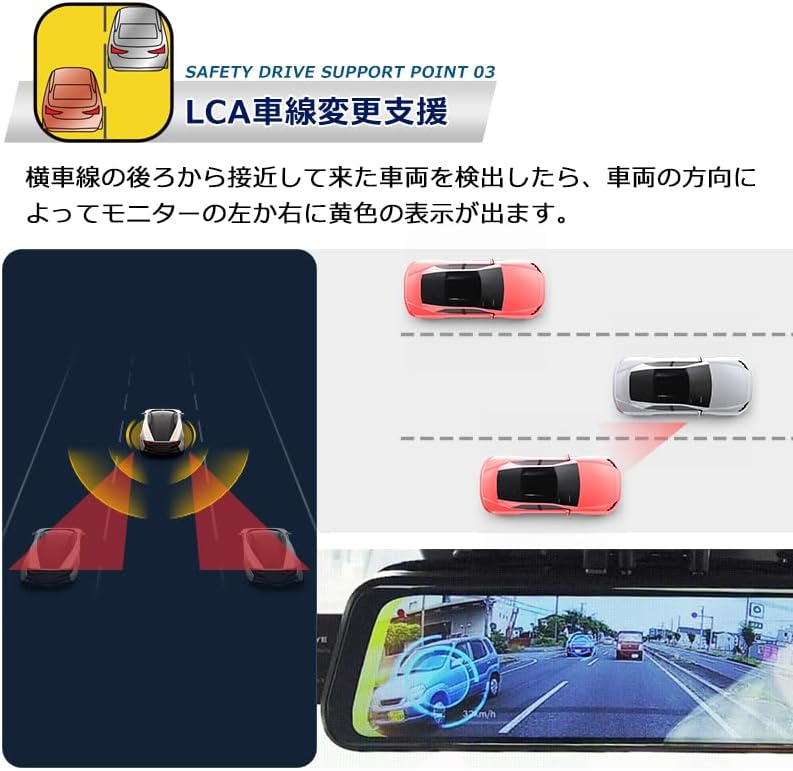
Figure 5.4: Visual representation of the Lane Change Assist feature detecting vehicles in adjacent lanes.

Figure 5.5: Visual representation of the forward vehicle departure notification.
5.3 G-Sensor and Emergency Recording
The built-in 3-axis G-sensor detects sudden impacts or collisions. When an impact is detected, the current recording file is automatically locked to prevent it from being overwritten by loop recording. These locked files are crucial for accident investigation.
6. Maintenance
- MicroSD Card Management: Regularly format the microSD card (at least once a month) to ensure optimal performance and prevent data corruption. Back up important recordings before formatting.
- Cleaning: Use a soft, dry cloth to clean the device screen and lenses. Avoid using abrasive cleaners or solvents that could damage the unit.
- Firmware Updates: Check the manufacturer's website periodically for firmware updates to ensure your device has the latest features and bug fixes.

Figure 6.1: Key features for maintenance and usage: Loop recording, continuous recording, 12V compatibility, and support for up to 256GB microSD cards.
7. Troubleshooting
If you encounter issues with your UTOUR T600, refer to the following common problems and solutions:
- Device not powering on: Check the power connection and ensure the car charger is properly inserted into the cigarette lighter socket. Verify the vehicle's power outlet is functional.
- Recording issues: Ensure a Class 10 or higher microSD card is inserted correctly. Format the card regularly. If issues persist, try a different microSD card.
- ADAS warnings are too frequent/infrequent: Adjust the sensitivity settings for collision warning, lane departure warning, and other ADAS features through the device's menu.
- Poor video quality: Ensure the camera lenses are clean and free from obstructions. Check the recording resolution settings.
- Touchscreen unresponsive: Try restarting the device. If the issue persists, contact customer support.
8. Specifications
| Feature | Specification |
|---|---|
| Brand | MINIEYE |
| Model | UTOUR T600 |
| Front Camera Resolution | 2.5K (2560x1440P) |
| Rear Camera Resolution | Full HD (1920x1080P) |
| Lens Aperture | F1.8 |
| Viewing Angle | 130° (Front & Rear) |
| Display | 9.66-inch IPS Touchscreen |
| G-Sensor | 3-axis Gyroscope |
| Storage | MicroSD card up to 256GB (Class 10 or higher recommended) |
| Operating Temperature | -20°C to 70°C |
| Dimensions (D x W x H) | 24 cm x 34 cm x 5 cm |
| Included Components | Car charger, Charging cable |
| Compatible Vehicle Type | Car |
| Country of Origin | China |
| UPC | 731052573197 |
| ASIN | B0F8J8XTB2 |
9. Warranty and Support
9.1 Manufacturer's Warranty
This product comes with a 1-year manufacturer's warranty. Please note that the manufacturer's warranty is only valid for products purchased from the official 'MINIEYE Store'. Always verify the seller before making a purchase.
9.2 Customer Support
For technical assistance, troubleshooting not covered in this manual, or warranty claims, please contact the MINIEYE customer support team. Refer to your purchase documentation or the official MINIEYE website for contact details.