
1. Introduction
This manual provides essential information for the proper setup, operation, and maintenance of your AGPTEK T08X MP3 Player. Please read these instructions carefully before using the device to ensure optimal performance and longevity.

Image 1.1: AGPTEK T08X MP3 Player with its user interface displayed.
2. Package Contents
Verify that all items are present in the package:
- AGPTEK T08X MP3 Player
- Type-C Charging Cable
- Wired Headphones (3.5mm Plug)
- User Manual (this document)
- Screen Protector
- Protective Case (Transparent)
- 64GB Memory Card (pre-installed or separate)

Image 2.1: All items included in the AGPTEK T08X product box.
3. Setup Guide
3.1 Initial Charging
Before first use, fully charge your AGPTEK T08X MP3 Player. Connect the provided Type-C charging cable to the device and a compatible 5V USB power adapter (not included). A full charge typically takes approximately 2 hours.
Important: Do not use phone chargers with higher voltage/amperage than 5V, as this may damage the device. Always use the provided cable or a compatible 5V cable.
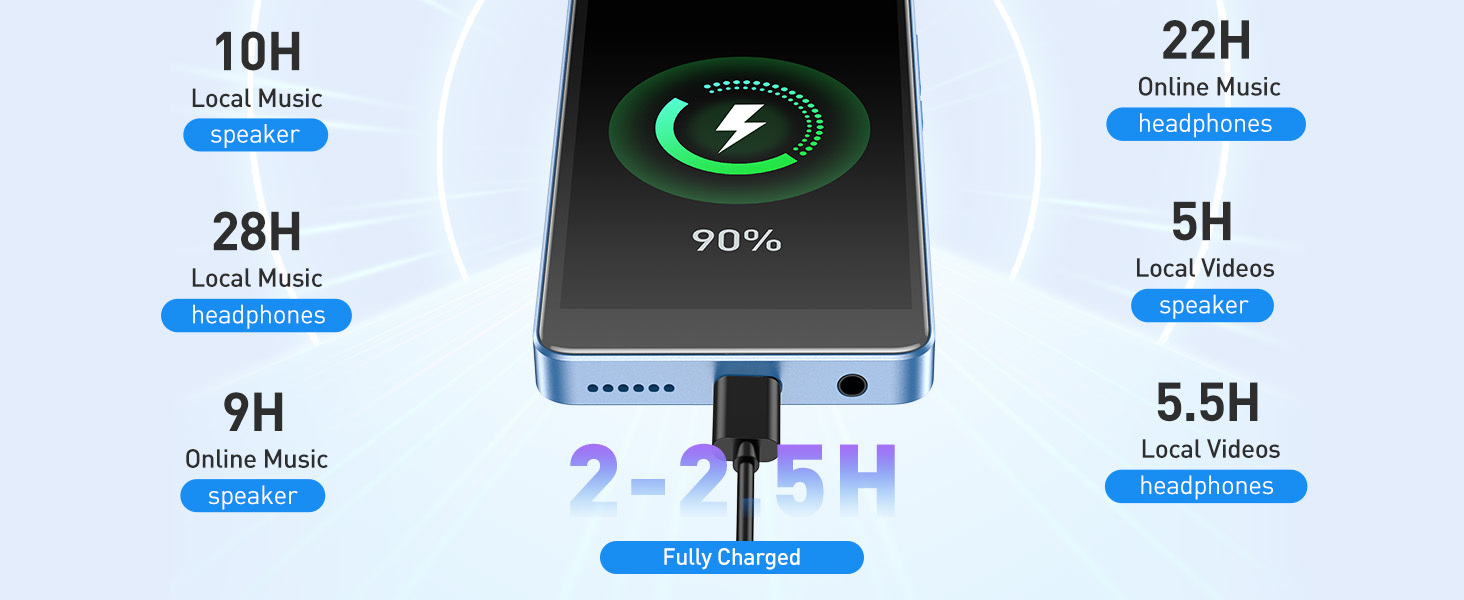
Image 3.1: Charging the AGPTEK T08X MP3 Player.
3.2 Power On/Off
To power on the device, press and hold the power button until the screen illuminates. To power off, press and hold the power button, then select 'Power off' from the options.
3.3 Wi-Fi Connection
For internet-dependent applications, connect your device to a stable Wi-Fi network:
- Go to Settings.
- Select Network & internet.
- Tap on Wi-Fi and toggle it On.
- Select your desired network from the list and enter the password if prompted.
3.4 Initial Software Updates
It is recommended to update the device firmware and Google Play Store components after connecting to Wi-Fi:
- Open a web browser (e.g., Chrome) and search for "agptek firmware update T08x".
- Follow the instructions on the official AGPTEK website to download and install any available firmware updates. Keep the device cool during this process.
- After firmware update, go to Settings > Security to check for and apply any security updates and Google Play Store updates.
3.5 SD Card Management
The device comes with a 64GB microSD card pre-installed, adding to the 32GB internal storage for a total of 96GB. The storage is expandable up to 1TB.

Image 3.2: Storage capacity of the AGPTEK T08X MP3 Player.
If you replace the microSD card:
- Carefully eject the existing card.
- Insert your new microSD card into the slot.
- The device will prompt you to format the card. Formatting will erase all data on the card. Proceed only if you have backed up any important files.
- Once formatted, you can transfer files from your computer to the SD card.
4. Operating Instructions
4.1 User Interface and Android 14
The AGPTEK T08X runs on Android 14, providing a smooth and responsive user experience. The 4-inch HD IPS touchscreen offers vibrant colors and clear visuals for navigation and media consumption.

Image 4.1: Android 14 operating system features.
4.2 Media Playback
The device supports various audio formats including MP3, FLAC, APE, and WMA, and offers Hi-Fi audio quality. Video playback is supported up to 1080P HD.
- Music: Use pre-installed apps like Spotify, Apple Music, Amazon Music, Pandora, or transfer your own files.
- Videos: Watch 1080P HD videos using the built-in video player or streaming apps like YouTube.
- E-books/Audiobooks: Access content through pre-installed apps such as Audible, Kindle, Libby, and LibriVox.

Image 4.2: Supported audio formats for Hi-Res Audio.

Image 4.3: 1080P HD video playback capability.
4.3 Bluetooth Connectivity
Connect to Bluetooth headphones or speakers for wireless audio playback. The device features Bluetooth 5.0 for stable connections.
- Swipe down from the top of the screen to access Quick Settings, or go to Settings > Connected devices > Bluetooth.
- Toggle Bluetooth On.
- Ensure your Bluetooth accessory is in pairing mode.
- Select your accessory from the list of available devices to pair.

Image 4.4: Bluetooth 5.0 connectivity options.
4.4 App Management and Parental Controls
The device comes with several pre-installed apps. You can download additional apps from the Google Play Store or uninstall unnecessary ones.
- Install Apps: Open the Google Play Store app, search for your desired application, and follow the on-screen instructions to install.
- Uninstall Apps: Drag and drop an app icon to the 'Uninstall' option that appears, or go to Settings > Apps > See all apps, select the app, and choose 'Uninstall'.
- Parental Controls: The 'Family Link' parental control function can be installed via settings to manage app access and usage for children.

Image 4.5: Uninstalling applications on the device.
5. Maintenance
5.1 Device Care
To ensure the longevity of your AGPTEK T08X MP3 Player, handle it with care:
- Avoid dropping, squeezing, or subjecting the device to strong vibrations.
- Keep the device away from water and excessive moisture.
- Use the provided protective case and screen protector to guard against scratches and minor impacts.
- Clean the screen and body with a soft, dry cloth. Avoid abrasive materials or harsh chemicals.
5.2 Battery Optimization
The device features an 1800mAh battery, offering up to 28 hours of music playback with headphones. To optimize battery life:
- Initially, allow the battery to fully discharge and recharge 1-2 times to calibrate.
- Manage the auto-shutdown feature: The player automatically powers off after 10 minutes of inactivity to save power. This setting can be adjusted or disabled in the device settings.
- Reduce screen brightness when not needed.
- Close unused applications running in the background.
6. Troubleshooting
If you encounter issues with your AGPTEK T08X MP3 Player, refer to the following common solutions:
- Device is slow or unresponsive: Restart the device. Ensure sufficient free storage space. Close background applications.
- Battery drains quickly: Check the auto-shutdown setting (Settings > Battery > Power saving options). Reduce screen brightness. Limit usage of Wi-Fi and streaming apps.
- Cannot charge: Ensure you are using the provided Type-C cable or a compatible 5V cable. Verify the power adapter is functioning correctly.
- SD card not recognized or cannot be inserted: Ensure the SD card is inserted correctly with the contacts facing the device. If using a new card, ensure it is formatted by the device. If the slot appears obstructed, do not force the card.
- Poor sound quality: Ensure headphones/speakers are properly connected. Adjust equalizer settings within your music player app (e.g., Poweramp). Test with different audio files or accessories.
- App updates fail: Ensure a stable Wi-Fi connection. Try updating apps one at a time. Clear the cache of the Google Play Store app (Settings > Apps > Google Play Store > Storage & cache > Clear cache).
7. Specifications
| Feature | Detail |
|---|---|
| Model Name | T08X |
| Operating System | Android 14 |
| Internal Storage | 32 GB |
| Included Memory Card | 64 GB microSD (Total 96 GB) |
| Expandable Storage | Up to 1 TB via microSDXC |
| Screen Size | 4 Inches |
| Display Type | HD IPS Touchscreen |
| Video Playback | Up to 1080P HD |
| Connectivity | Bluetooth 5.0, Dual-band Wi-Fi (2.4GHz & 5GHz) |
| Audio Formats | MP3, FLAC, APE, WMA, AAC, OGG, MAV |
| Battery Capacity | 1800 mAh Lithium Polymer |
| Music Playback Time | Up to 28 hours (with headphones) |
| Charging Time | Approx. 2 hours |
| Item Weight | 11.3 ounces |
| Dimensions | 8.35 x 5.43 x 0.87 inches (Package) |
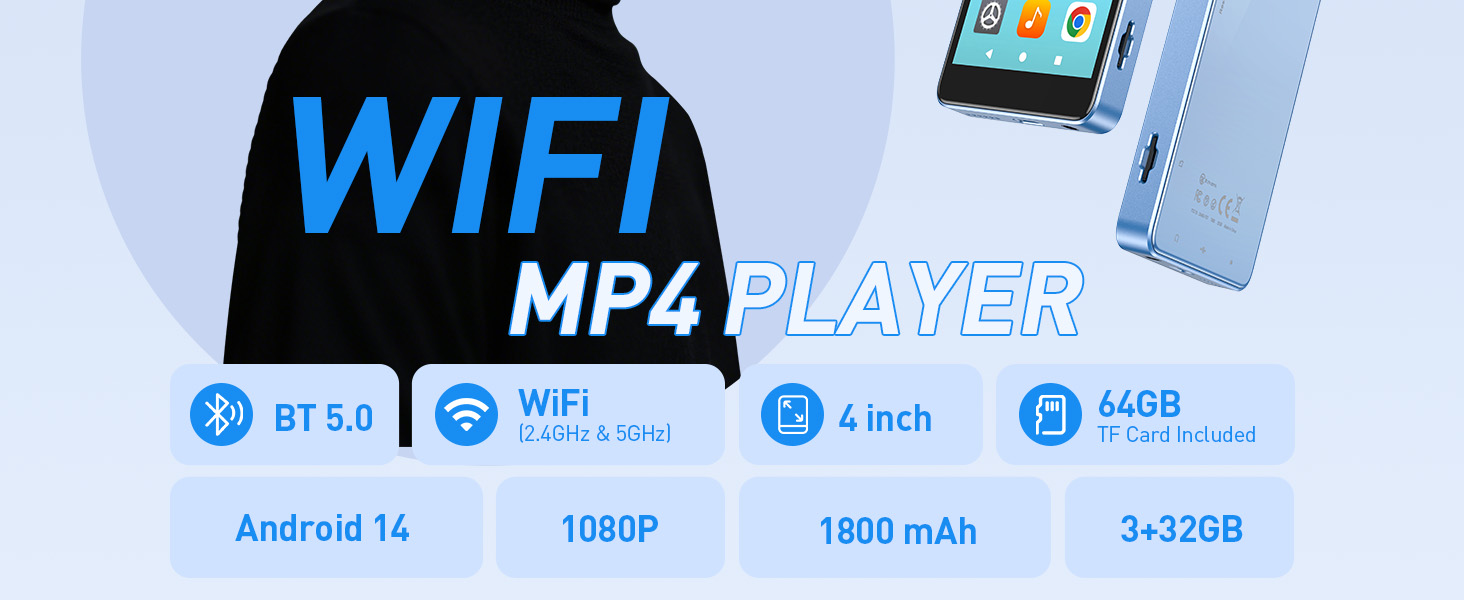
Image 7.1: Key specifications of the AGPTEK T08X MP3 Player.
8. Warranty and Support
8.1 Warranty Information
Specific warranty details for the AGPTEK T08X MP3 Player are typically provided with your purchase documentation or on the official AGPTEK website. Please refer to these resources for information regarding warranty coverage and terms.
8.2 Customer Support
For further assistance, technical support, or inquiries, please visit the official AGPTEK website or contact their customer service department. Contact information can usually be found on the manufacturer's website or in your product packaging.


