
Introduction
This manual provides detailed instructions for the proper installation, operation, and maintenance of your DEFENTAC 500 Lumens Pistol Light and HD1080P Camera Combo, Model DF9099-P_BL-D. Please read this manual thoroughly before using the device to ensure safe and effective operation.

This image shows the Defentac pistol light and camera combo from an angled front view, with the 500-lumen flashlight actively emitting light. The device features a compact, black housing designed for rail mounting.
Safety Information
- Always ensure the device is securely mounted before use.
- Do not look directly into the flashlight beam to avoid eye injury.
- Keep the device away from water and extreme temperatures.
- Use only the provided charging cable for recharging.
- Store the device in a safe place, out of reach of children.
Package Contents
Verify that all items are present in your package:
- Pistol Light and HD Camera Combo (1 unit)
- Charging Cable (1 unit)
- User Manual (1 unit)
- Toolings (2 units, typically Allen wrenches for mounting)

This image shows all items included in the product package: the Defentac Pistol Light and HD Camera Combo unit, a charging cable, a user manual, and two small tools (likely Allen wrenches for mounting).
Product Overview
The DEFENTAC DF9099-P_BL-D integrates a 500-lumen tactical flashlight with an HD1080P camera, designed for compatibility with Picatinny rails.
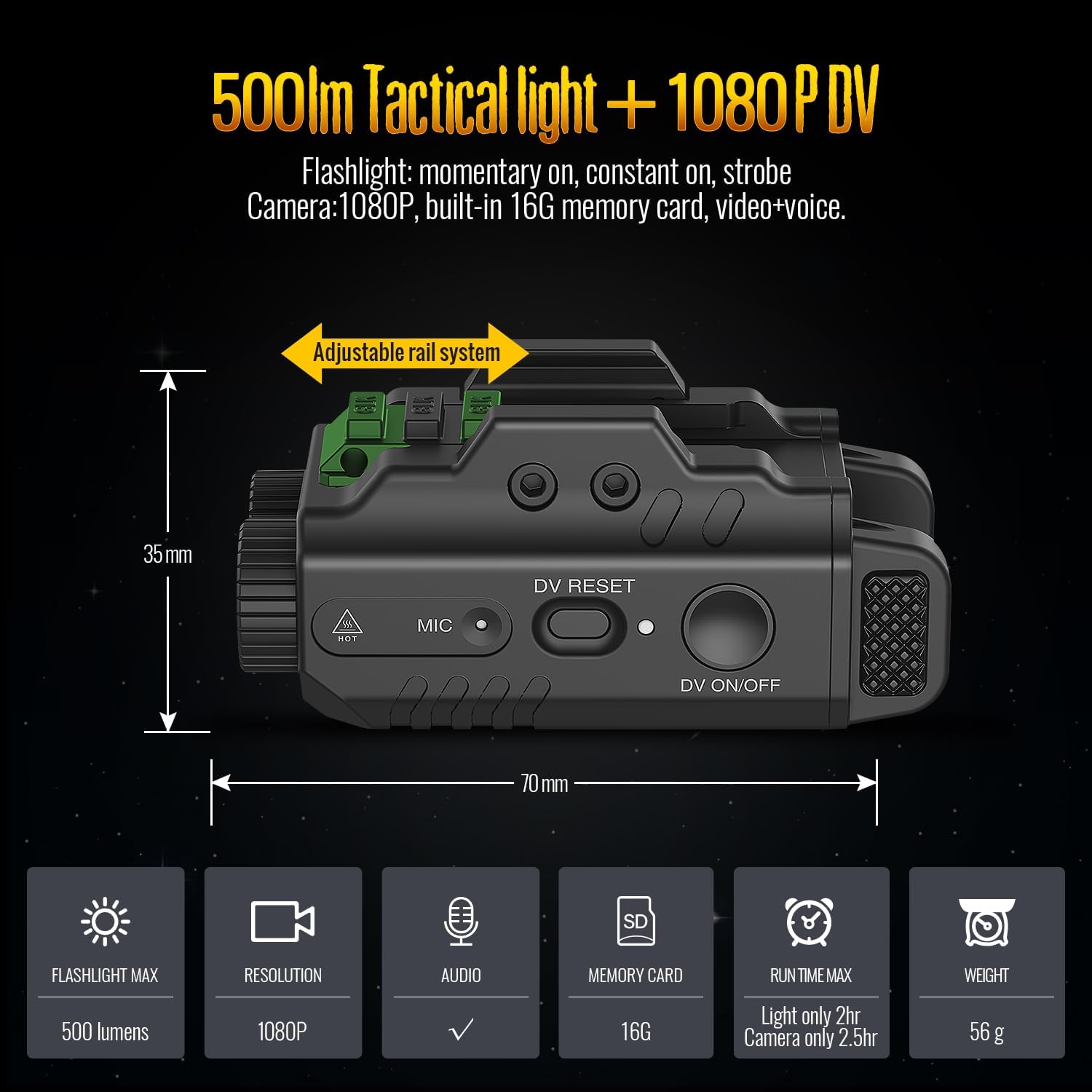
An overhead view of the Defentac pistol light and camera combo, illustrating its dimensions (70mm length, 35mm height) and key specifications: 500 lumens flashlight, 1080P resolution, audio recording, 16GB built-in memory, 2-hour light runtime, 2.5-hour camera runtime, and 56g weight. An adjustable rail system is highlighted.
Component Identification

Two views of the device with labels pointing to its various components: Flashlight Switch, Charging/Data Port, Power Indicator, Mounting Bolt, Camera On/Off/Pause Switch, Camera Working Indicator, Camera Reset Button, and Microphone. This helps users identify controls and ports.
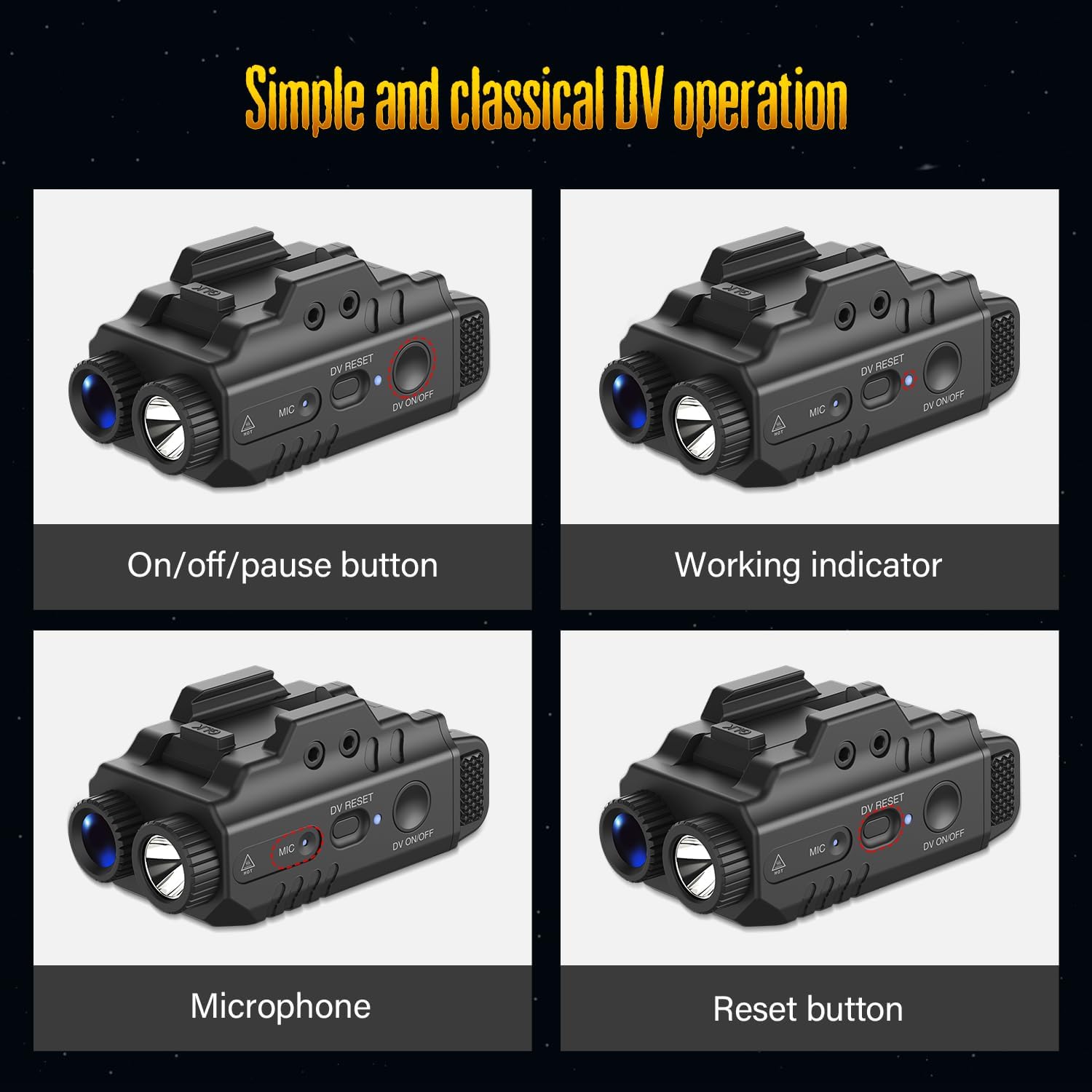
Four detailed close-up images highlighting the 'On/off/pause button' for the camera, the 'Working indicator' (blue light), the 'Microphone' input, and the 'Reset button' for the digital video function. These visuals clarify the function of each control.
Setup
Mounting
The device is compatible with full-size Picatinny rails (21±0.5mm width). To mount:
- Loosen the mounting bolt using the provided tool.
- Slide the device onto the Picatinny rail of your pistol.
- Tighten the mounting bolt securely to ensure the device is firmly attached.
Charging
Before initial use, fully charge the device using the included USB charging cable.
- Connect the charging cable to the Charging/Data Port on the device.
- Connect the other end of the cable to a standard USB power source.
- The Power Indicator will show charging status. Refer to the indicator guide for details.
Operating Instructions
Flashlight Operation
The flashlight features 500 lumens brightness with Strobe and Momentary functions.
- On/Off: Single-press the Flashlight Switch.
- Strobe: Double-press the Flashlight Switch.
- Momentary On: Press and hold the Flashlight Switch. Release to turn off.
Camera Operation
The integrated HD1080P camera records video with audio.

This image displays the device's operational modes: 'Light and Video' (both flashlight and camera active), 'Light Only - Constant On/Strobe' (flashlight only, with constant or strobe options), and 'Only Video' (camera recording without flashlight). The flashlight beam is visible in the relevant modes.
- Activation: The camera requires an 8-second activation process (3 seconds for switch press + 5 seconds for booting).
- On/Off: Press and hold the Camera On/Off/Pause Switch for 3 seconds. The camera will begin its 5-second booting process, indicated by a blue light. Once the blue indicator starts flashing, video recording is in progress.
- Pause/Resume Recording: Click the Camera On/Off/Pause Switch. The indicator will be solid blue when paused and flashing blue when recording.
Data Transfer
To access recorded video files:
- Use the included USB cable to connect the device to your computer.
- The recorded video files will be accessible on your computer as a removable storage device.
Maintenance
- Cleaning: Use a soft, dry cloth to clean the exterior of the device. Do not use abrasive cleaners or solvents.
- Lens Care: Gently wipe the camera lens and flashlight lens with a microfiber cloth to remove dust or smudges.
- Storage: When not in use for extended periods, store the device in a cool, dry place. Ensure it is fully charged before storing and recharge periodically to maintain battery health.
Troubleshooting
| Problem | Possible Cause | Solution |
|---|---|---|
| Device does not turn on. | Low battery. | Charge the device fully using the provided USB cable. |
| Camera not recording. | Not properly activated or paused. | Ensure the camera switch is held for 3 seconds and wait for the 5-second boot process. Check for flashing blue indicator. Click to resume if paused. |
| Cannot transfer data to computer. | Incorrect cable or connection. | Use the included USB cable. Ensure a secure connection to both the device and the computer. Try a different USB port on the computer. |
| Flashlight not responding. | Low battery or switch malfunction. | Charge the device. If the issue persists, contact customer support. |
Specifications
| Feature | Detail |
|---|---|
| Brand | DEFENTAC |
| Model Name | DF9099-P_BL-D |
| Light Output | 500 Lumens |
| Camera Resolution | HD 1080P |
| Compatibility | Picatinny Rail (21±0.5mm width) |
| Material | Aluminum, Polymer |
| Product Dimensions | 2.76"L x 1.3"W x 1.46"H |
| Item Weight | 8.6 Grams |
| Power Source | Rechargeable |
| Included Components | Pistol Light and HD Camera Combo, Charging Cable, User Manual, Toolings |
Warranty Information
This DEFENTAC product comes with a 30-day warranty from the date of purchase, covering manufacturing defects. Please retain your proof of purchase for warranty claims.
Extended protection plans may be available for purchase separately:
- 2-Year Protection Plan
- 3-Year Protection Plan
- Complete Protect (monthly subscription covering multiple eligible purchases)
For details on protection plans, please refer to the specific plan documentation or contact the provider.
Customer Support
If you encounter any issues or have questions regarding your DEFENTAC 500 Lumens Pistol Light and HD1080P Camera Combo that are not addressed in this manual, please contact DEFENTAC customer support through the retailer's platform or the official brand website for assistance.
Please have your product model number (DF9099-P_BL-D) and purchase information ready when contacting support.