
1. Introduction
This manual provides comprehensive instructions for the operation and maintenance of your BAOFENG UV-32 Ham Radio. Please read this manual thoroughly before using the device to ensure proper function and safety. The BAOFENG UV-32 is a professional handheld two-way radio designed for long-range communication, featuring 10W output, GPS, NOAA weather reception, and versatile programming options.
2. Package Contents
Verify that all items listed below are included in your package:
- 2 x BAOFENG UV-32 Radio Units
- 2 x 2500mAh Rechargeable Batteries
- 2 x 21cm Antennas
- 2 x 38cm Gooseneck Antennas
- 2 x Headsets
- 2 x USB-C Charging Cables
- 2 x Base Chargers
- 2 x Radio Cases
- 2 x User Manuals (this document)

Image 2.1: Contents of the BAOFENG UV-32 package, including two radio units, antennas, batteries, chargers, and accessories.
3. Product Overview and Features
The BAOFENG UV-32 is equipped with advanced features for reliable communication:
- Long Range Communication: 10W output with High/Mid/Low Tri-Power Switching.
- Extensive Channel Capacity: Up to 1000 programmable channels.
- Integrated GPS: Built-in GPS for location tracking and sharing.
- NOAA Weather Radio: Receive weather forecasts and emergency alerts.
- Flexible Programming: Supports Phone APP programming, frequency copying, and Chirp software.
- Multiple Charging Options: USB-C port on battery and base charger.
- Dual Antennas: Includes a standard 21cm antenna and a 38cm gooseneck antenna for varied environments.
- Display: 2-inch color LCD screen.

Image 3.1: Detailed diagram illustrating the various components of the BAOFENG UV-32 radio, including the antenna, power/volume knob, PTT key, numeric keypad, LCD screen, and charging port.
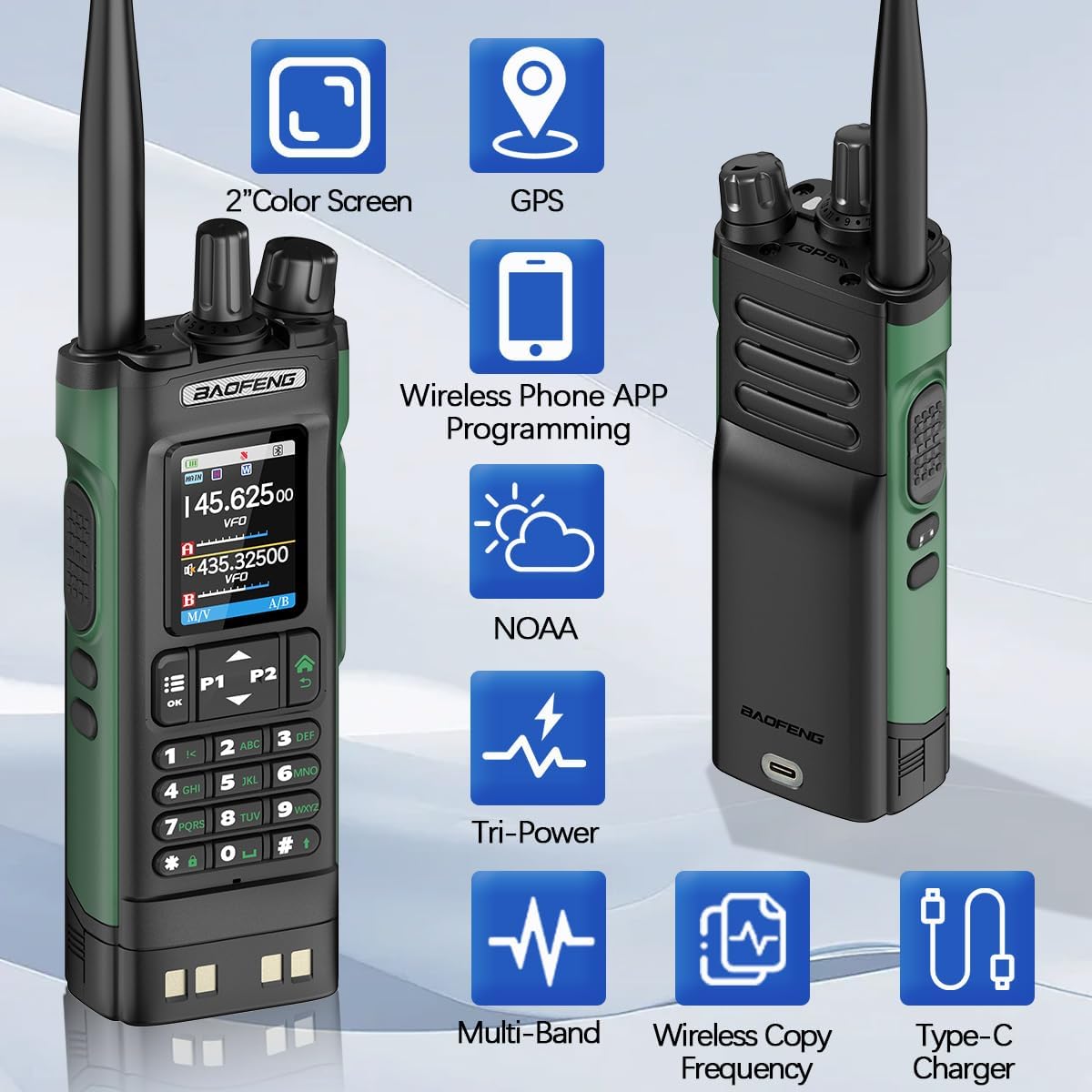
Image 3.2: Visual representation of key features such as 2-inch color screen, GPS, wireless phone app programming, NOAA weather, tri-power, multi-band, wireless copy frequency, and Type-C charging.
4. Setup
4.1 Attaching the Antenna
- Select the desired antenna (21cm standard or 38cm gooseneck) based on your communication needs.
- Screw the antenna clockwise onto the antenna connector at the top of the radio until it is finger-tight. Do not overtighten.
4.2 Installing the Battery
- Align the battery pack with the grooves on the back of the radio.
- Slide the battery upwards until it clicks into place.
- To remove, press the battery release latch (if present) and slide the battery downwards.
4.3 Initial Power On
- Ensure the battery is fully charged before first use.
- Rotate the Power/Volume knob clockwise until you hear a click. The screen will illuminate.
- Adjust the volume by continuing to rotate the knob.
5. Charging the Battery
The BAOFENG UV-32 radio supports multiple charging methods for convenience:
5.1 Using the Base Charger
- Connect the AC adapter to the base charger and plug it into a power outlet.
- Place the radio (with battery attached) into the charging slot of the base charger.
- The charging indicator light on the base will show the charging status (e.g., red for charging, green for fully charged).
5.2 USB-C Direct Charging
- Locate the Type-C charging port on the back of the 2500mAh rechargeable battery.
- Connect the provided USB-C charging cable to the battery port.
- Plug the other end of the USB-C cable into a compatible USB power source (e.g., car charger, power bank, laptop, USB wall adapter).
- The radio can be charged while in use via USB-C, though charging speed may vary.

Image 5.1: Illustration of various charging methods for the BAOFENG UV-32, including the base charger and direct USB-C charging from sources like a car, laptop, or power bank.
6. Operating Instructions
6.1 Basic Operation
- Power On/Off: Rotate the Power/Volume knob.
- Volume Adjustment: Rotate the Power/Volume knob after turning on.
- PTT Key: Press and hold to transmit, release to receive.
- Channel/Frequency Selection: Use the numeric keypad or the encoder/channel selector knob to input frequencies or select channels.
- VFO/MR Mode: Switch between Frequency Mode (VFO) for direct frequency input and Channel Mode (MR) for stored channels. Refer to the on-screen menu for specific button assignments (e.g., M/V button).
6.2 Tri-Power Switching (10W Output)
The UV-32 allows you to select between High, Medium, and Low power output settings:
- High (H): 10W for maximum range.
- Medium (M): Typically 8W for balanced range and battery life.
- Low (L): Typically 4W for short-range communication and extended battery life.
To change the power setting, navigate through the radio's menu system. The specific menu option is usually labeled "TX Power" or "Power Level".

Image 6.1: Display showing the selectable power output levels: Low (4W), Medium (8W), and High (10W), demonstrating the radio's tri-power capability.
7. Programming the Radio
The BAOFENG UV-32 offers several methods for programming frequencies and settings.
7.1 Wireless Phone APP Programming
The radio can be programmed wirelessly via a mobile application:
- Download the compatible programming application (e.g., "walkie-talkietool") from your smartphone's app store.
- Enable Bluetooth on your smartphone and the radio.
- Pair your radio with the smartphone application.
- Use the app interface to input frequencies, channel names, and other settings. Save the profile to the radio.

Image 7.1: The radio screen alongside a smartphone displaying the wireless programming application interface, allowing for easy channel and frequency management.
7.2 One-Click Frequency Copying
This feature allows you to quickly copy frequencies from another radio:
- Turn on the radio. Long press the designated "Copy" or "Search" key on the keypad (often indicated by an icon).
- When "SEARCH" appears on the screen, you can press a key (e.g., "M/V" or "A/B") to switch between bands (VHF/UHF) if necessary.
- Place the transmitting radio near your UV-32 and transmit a signal. The UV-32 will detect and display the frequency.
- Once the frequency is displayed, press the "OK" or "Save" key to store it as a new channel.

Image 7.2: Step-by-step visual guide for the one-click frequency copying function, showing how to initiate search, detect frequency, and save it to a channel.
7.3 PC Software Programming (Chirp)
The BAOFENG UV-32 is compatible with Chirp programming software (UV-17ProGPS version recommended). This method requires a programming cable (not included in all packages) and a computer.
- Install the Chirp software on your computer.
- Connect the radio to your computer using a compatible programming cable.
- Follow the instructions within the Chirp software to read from and write to the radio, managing channels, frequencies, and other advanced settings.

Image 7.3: Overview of the multiple programming options available for the BAOFENG UV-32, including Chirp software, phone app, and keypad programming.
8. GPS and NOAA Functions
8.1 GPS Positioning and APRS
The built-in GPS function provides real-time location information, which can be used for personal navigation or shared with others for coordination and teamwork. The radio supports APRS (Automatic Packet Reporting System) for location tracking in emergency situations.

Image 8.1: Two BAOFENG UV-32 radios in an outdoor setting, illustrating the GPS positioning capability with location pins on a map.
8.2 NOAA Weather Radio
The UV-32 can receive NOAA (National Oceanic and Atmospheric Administration) weather broadcasts, providing access to weather forecasts and emergency alerts for severe weather conditions. This feature is crucial for safety during outdoor activities or in adverse weather.

Image 8.2: The radio displaying the NOAA Weather Radio function, with icons representing various weather hazards like snowstorms, hurricanes, floods, and earthquakes.
9. Maintenance
- Cleaning: Use a soft, damp cloth to clean the radio's exterior. Do not use harsh chemicals or solvents.
- Battery Care: Store batteries in a cool, dry place. Avoid fully discharging the battery frequently to prolong its lifespan.
- Antenna Care: Ensure antennas are securely attached. Avoid bending or stressing the antenna excessively.
- Water Resistance: This radio is not water resistant. Avoid exposure to rain, splashes, or immersion in water.
10. Troubleshooting
| Problem | Possible Cause | Solution |
|---|---|---|
| Radio does not power on. | Battery is low or not installed correctly. | Charge the battery or re-install it securely. |
| Cannot transmit or receive. | Incorrect frequency/channel, low power, or antenna issue. | Verify frequency/channel, check power setting, ensure antenna is attached. |
| Poor audio quality. | Weak signal, incorrect squelch setting, or damaged speaker/microphone. | Move closer to the other radio, adjust squelch, or contact support. |
| GPS not acquiring signal. | Obstructed view of the sky, indoor use. | Move to an open outdoor area with a clear view of the sky. |
If you encounter issues not listed here or require further assistance, please contact BAOFENG customer support.
11. Specifications
| Feature | Detail |
|---|---|
| Brand | BAOFENG |
| Model Number | UV-32 |
| Output Power | 10W (High/Mid/Low Tri-Power) |
| Number of Channels | 1000 |
| Battery Capacity | 2500mAh |
| Frequency Range | VHF UHF |
| Special Features | Copy Frequency, Long Range, NOAA Weather Receiver, Built-in GPS, APP Programming |
| Charging | USB-C, Base Charger |
| Display | 2-inch Color Screen |
| Water Resistance Level | Not Water Resistant |
| Item Weight | Approximately 3.69 pounds (for the 2-pack) |
| Package Dimensions | 10.67 x 8.7 x 5.35 inches |
12. Warranty and Support
Please note that the product specifications indicate "Warranty: NO". For any product-related inquiries, technical support, or assistance with programming software (e.g., Chirp), please contact the seller or BAOFENG customer service directly through their official channels.
For programming software, the seller states: "If you need programming software you can contact our after-sales service, we will actively cooperate with you."