
1. Introduction
The SmallRig Focus Control Dual Grip (Model 4327) is specifically engineered to enhance the functionality and ergonomics of DJI RS 2, RS 3 Pro, and RS 4 Pro gimbal stabilizers. This dual handle system provides comprehensive control over various gimbal and camera functions, offering versatile shooting possibilities and improved handling comfort.

Figure 1: SmallRig Focus Control Dual Grip attached to a DJI RS series gimbal, demonstrating its primary function.
Key Features:
- Designed for DJI RS Series: Offers shutter control, recording, joystick operation, mode switching, centering/locking, and power/sleep mode for DJI RS 2 / RS 3 Pro / RS 4 Pro. Note: This handle is not for DJI RS 4.
- Inverted Use & Flexible Angles: Supports inverted operation and provides flexible angle adjustments for smooth, effortless shooting from various perspectives.
- Multiple Mounting Points: Features 1/4"-20 threaded holes, 3/8"-16 locating holes, a cold shoe mount, a NATO rail, a QD socket, and strap slots for attaching accessories like V-mount battery plates (ID 2801B, 2988) for extended power.
- Quick Assembly & Storage: Engineered for fast assembly and disassembly, streamlining production workflows and offering convenient storage. Supports a maximum load of 8.0kg / 17.6lb.
- Ergonomic Design: Made from soft silicone with a double-curve design for a non-slip, comfortable grip. The focus dial allows fast adjustment of the 3-axis system, focus control, and various camera parameters.
2. Setup
2.1 Unboxing and Initial Inspection
Upon receiving your SmallRig Focus Control Dual Grip, carefully unbox all components and inspect for any damage. The package should include the dual handles with focus control and a user manual.
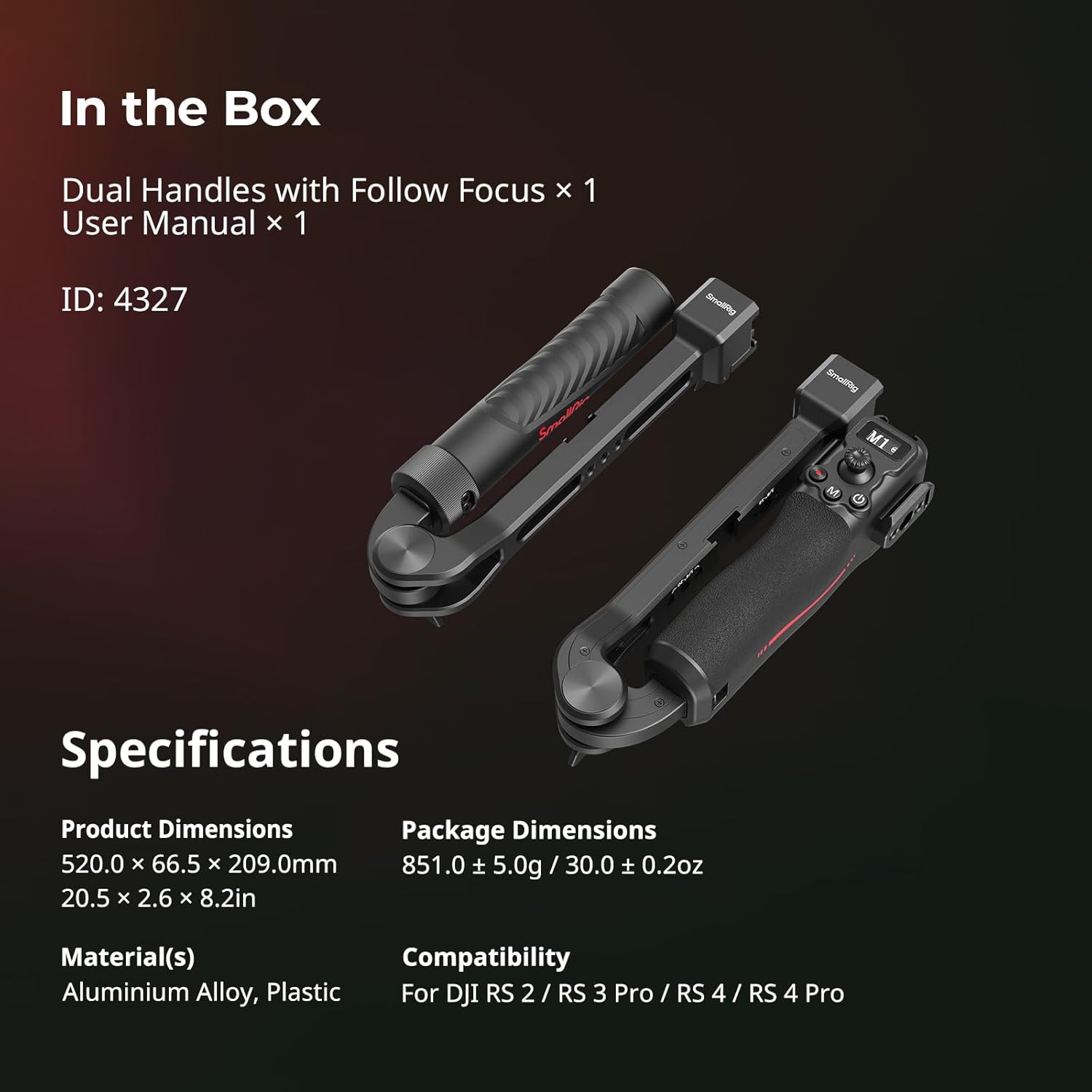
Figure 2: Contents of the SmallRig Focus Control Dual Grip box and product specifications, including dimensions, materials, and compatibility.
2.2 Attaching the Dual Grip to your Gimbal
- Ensure your DJI RS series gimbal is powered off and securely placed on a flat surface or its tripod.
- Locate the NATO rail on your gimbal. The SmallRig Dual Grip features a quick-release NATO clamp for easy attachment.
- Align the clamp on the dual grip with the NATO rail on the gimbal.
- Slide the dual grip onto the NATO rail until it clicks into place. Tighten the locking knob to secure the grip firmly.
- Repeat the process for the second handle if using both.

Figure 3: Illustration of the simple installation mechanism of the SmallRig Dual Grip onto the gimbal, ensuring a secure fit.
2.3 Balancing the Gimbal with Dual Grip
Proper balancing is crucial for optimal gimbal performance and to prevent motor strain. Refer to your DJI RS series gimbal's manual for detailed balancing instructions. The SmallRig Dual Grip does not alter the gimbal's balancing procedure but provides additional points for accessory weight distribution.
2.4 Attaching Accessories
The dual grip offers multiple mounting points for various accessories:
- Cold Shoe Mounts: For microphones, LED lights, or small monitors.
- 1/4"-20 & 3/8"-16 Threaded Holes: For articulating arms, monitor mounts, or other rigging components.
- NATO Rail: For quick-release accessories.
- QD Socket & Strap Slots: For shoulder straps or wrist straps for added security.

Figure 4: Close-up of the SmallRig Dual Grip showing various mounting points including cold shoe, QD, and threaded holes for attaching accessories.
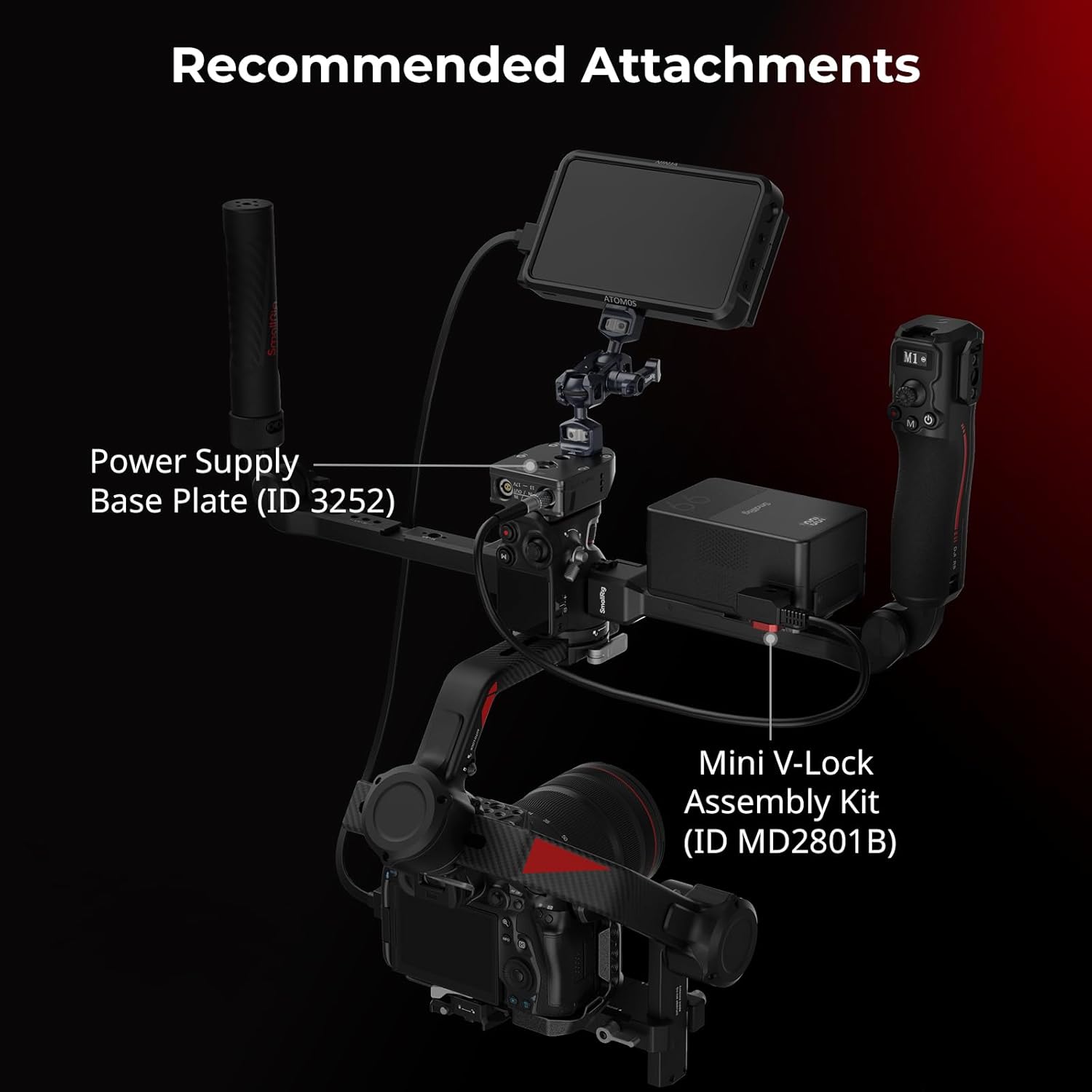
Figure 5: Example setup with recommended attachments like a V-mount battery plate and mini V-lock assembly kit, demonstrating expanded functionality.
3. Operating
3.1 Basic Controls and Functions
The integrated focus control handle provides intuitive access to essential gimbal and camera functions:
- Focus Dial: Allows for precise adjustment of the 3-axis system, focus control, and various camera parameters.
- Joystick: Controls gimbal movement (pan, tilt, roll) for dynamic shots.
- Shutter/Record Button: Initiates photo capture or video recording.
- Mode Switch: Toggles between different gimbal follow modes (e.g., Pan Follow, Tilt Lock, FPV).
- Centering/Locking Button: Quickly re-centers the gimbal or locks its position.
- Power/Sleep Mode Button: Manages the gimbal's power state.

Figure 6: Detailed view of the focus control dial and joystick on the SmallRig Dual Grip for precise adjustments and intuitive control.
3.2 Switching Between Upright and Inverted Modes
The dual grip design facilitates easy transitions between upright and inverted operating modes, expanding your creative shooting angles. Simply adjust the handle's position as needed, ensuring all locking mechanisms are secure after adjustment.

Figure 7: User operating the gimbal with the SmallRig Dual Grip in an inverted position, highlighting flexible angles for diverse shots.
3.3 Quick Setup and Storage
The handles are designed for rapid assembly and disassembly, allowing for efficient transitions between shooting scenarios and convenient storage. The foldable design minimizes the footprint for transport.

Figure 8: Demonstration of quick setup and storage, showing the handles being assembled and stored in a bag for portability.
3.4 Official Product Videos
Video 1: Official SmallRig video demonstrating the assembly and key features of the Dual Handle with Focus Control, including its ergonomic design and various control functions.
Video 2: Official SmallRig video showcasing the follow focus handle kit, its installation, and how it integrates with DJI stabilizers for precise focus adjustments.
4. Maintenance
To ensure the longevity and optimal performance of your SmallRig Focus Control Dual Grip, follow these maintenance guidelines:
- Cleaning: Wipe down the handles and metal components with a soft, dry cloth after each use to remove dust, dirt, and moisture. For stubborn grime, use a slightly damp cloth and dry thoroughly. Avoid harsh chemicals or abrasive materials.
- Storage: Store the dual grip in a clean, dry environment, preferably in its original packaging or a dedicated carrying case, away from extreme temperatures and humidity.
- Inspection: Periodically check all screws, clamps, and moving parts for tightness. Re-tighten any loose components to prevent accidental detachment or damage to your equipment.
5. Troubleshooting
If you encounter any issues with your SmallRig Focus Control Dual Grip, consider the following:
- Handles feel loose: Ensure all NATO clamps and locking knobs are fully tightened. Check for any debris obstructing the clamping mechanism.
- Difficulty attaching/detaching: Verify that the quick-release levers are fully disengaged before attempting to slide the handles on or off the NATO rail.
- Focus dial/joystick unresponsive: Ensure the handle is correctly connected to the gimbal and the gimbal's firmware is up to date. Check the connection cables if applicable.
- Gimbal performance issues after attachment: Re-balance your gimbal with all accessories attached. Ensure the total payload does not exceed the gimbal's maximum capacity.
For further assistance, please refer to the Support section.
6. Specifications
| Feature | Detail |
|---|---|
| Product Dimensions | 8.23 x 2.62 x 8.23 inches (20.5 x 2.6 x 8.2 inches folded) |
| Item Weight | 2.12 pounds (0.96 Kilograms) |
| Material(s) | Aluminium Alloy, Plastic |
| Compatibility | For DJI RS 2, for DJI RS 3 Pro, for DJI RS 4 Pro |
| Max Load | 17.6lb (8.0kg) |
| Manufacturer | SmallRig |
| ASIN | B0F8HWXPVY |
7. Warranty & Support
SmallRig products are designed for durability and performance. For warranty information, please refer to the official SmallRig website or the warranty card included with your product.
For technical support, product inquiries, or to explore additional accessories, please visit the Official SmallRig Store on Amazon or their official website.
