
1. Introduction
This manual provides detailed instructions for the B-Qtech Car Inclinometer, Model B0F8HV4STY. This multi-functional device is designed to enhance off-road driving safety and navigation by providing real-time vehicle data, including pitch and roll angles, GPS speed, altitude, compass direction, and battery voltage. Its compact design and clear display make it an essential tool for various vehicles, including off-road vehicles, sedans, SUVs, trucks, and tractors.
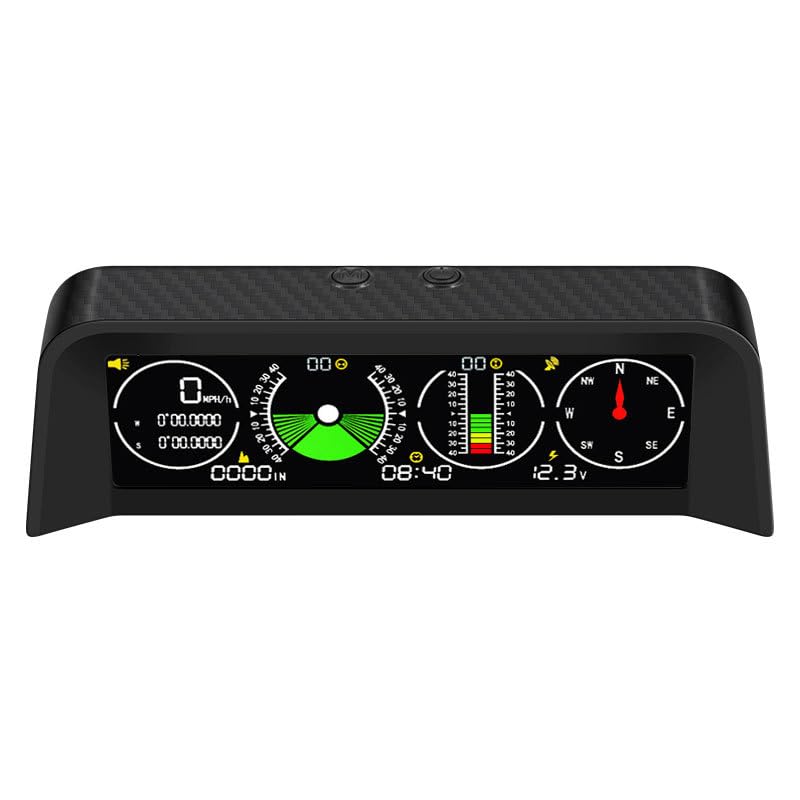
Image 1.1: Front view of the B-Qtech Car Inclinometer display, showing various metrics like speed, roll angle, pitch angle, time, compass, and voltage.
2. Package Contents
Upon opening the package, please ensure all items are present and in good condition:
- B-Qtech Car Inclinometer Unit
- Power Cable (typically USB to cigarette lighter adapter)
- Mounting Pad/Bracket
- User Manual (this document)
3. Setup and Installation
Follow these steps to properly install and set up your B-Qtech Car Inclinometer:
- Placement: Choose a suitable location on your dashboard that does not obstruct your view of the road or interfere with airbag deployment. Ensure the device is level for accurate readings.
- Mounting: Use the provided mounting pad or bracket to secure the inclinometer firmly to the dashboard. Clean the dashboard surface thoroughly before applying the adhesive.
- Power Connection: Connect the power cable to the inclinometer and plug the other end into your vehicle's 12V cigarette lighter socket or a suitable USB power source. The device will power on automatically with the vehicle's ignition.
- Initial GPS Lock: For the first use, park your vehicle in an open area with a clear view of the sky to allow the GPS module to acquire satellite signals. This may take a few minutes. Once locked, the GPS icon on the display will indicate a stable connection.
- Calibration (if necessary): The device typically self-calibrates. If you suspect inaccurate readings for pitch or roll, consult the operating section for manual calibration instructions (if available for your model).
4. Operating Instructions
The B-Qtech Car Inclinometer offers a comprehensive suite of functions. Familiarize yourself with the display and controls for optimal use.

Image 4.1: Diagram illustrating the various functions displayed on the inclinometer screen, with numbered labels pointing to Speed, Roll angle, Set key, Start key, Tilt angle, GPS, Compass, Altitude, Clock, and Voltage.
4.1. Multi-Functional Display Overview
The device integrates 10 intelligent functions for comprehensive vehicle monitoring:
- Speedometer: Displays real-time vehicle speed using GPS data.
- Tilt Angle (Roll and Pitch): Shows the vehicle's lateral (roll) and longitudinal (pitch) angles.
- Battery Voltmeter: Monitors the vehicle's battery voltage.
- Satellite Time: Displays current time synchronized via GPS.
- Compass: Provides real-time heading direction.
- Altitude: Shows current altitude based on GPS data.
- Coordinates: Displays latitude and longitude.
- Overspeed/Fatigue Driving Alerts: Provides warnings for exceeding set speed limits or prolonged driving periods.
4.2. Roll Angle Display
The roll angle display indicates the vehicle's tilt from side to side, ranging from -40° to +40°. It accurately locates the slope angle on the left or right side. For safety, driving on slopes exceeding 40 degrees is not recommended, and the device will provide an alert if this threshold is approached.

Image 4.2: Visual representation of roll angle (uphill/downhill slope) and pitch angle (tilt to left/right) displays, showing vehicles on inclined surfaces. The device warns if the tilt angle exceeds 30 degrees to prevent rollover.
4.3. Pitch Angle Display
The pitch angle display shows the vehicle's incline or decline, also ranging from -40° to +40°. It accurately indicates the precise degree of uphill or downhill movement. Slope scale prompts are provided, and a warning is issued if the slope exceeds 40°.
4.4. Digital Speed Gauge
The digital display provides intuitive real-time vehicle speed. Utilizing GPS satellite positioning technology, the speed measurement accuracy is less than 0.36 km/h, ensuring reliable readings. The system also monitors driving conditions to prevent fatigue driving and overspeeding, enhancing safety.

Image 4.3: Display showing icons for 'Alarm when you drive for 4 hours' (fatigue warning) and 'Alarm if the speed exceeds 120km/h' (overspeed warning), indicating the device's safety features.
4.5. Real-time Voltage Monitoring
The inclinometer continuously monitors your vehicle's battery voltage (DC 5V-30V range with 0.5V accuracy). This feature helps prevent voltage-related issues such as breakdowns, starting difficulties, or affected headlights, and contributes to extending battery life.

Image 4.4: Close-up of the inclinometer display showing the real-time voltage reading (12.3V in the example), with a note on the voltage measurement range and accuracy.
4.6. GPS Satellite Positioning and Altimeter
The integrated GPS satellite positioning technology provides high-precision latitude and longitude coordinates, compass direction, and altitude data. The 32-channel high-performance GPS chip ensures accurate altitude readings, making it ideal for self-driving, off-road, and mountain climbing activities. The GPS compass automatically corrects and calibrates, overcoming vehicle magnetic field interference.

Image 4.5: The inclinometer display showing Latitude/Longitude, Altitude, and Compass readings, positioned in a vehicle during an off-road trip, highlighting its utility for navigation.
4.7. Automatic Brightness Adjustment
The device features a built-in light sensing system that automatically adjusts screen brightness based on ambient light levels. This ensures optimal visibility during both day and night driving, while also protecting your vision.

Image 4.6: Illustration of the automatic brightness adjustment feature, showing the inclinometer display adapting its brightness for both bright daytime and dark nighttime conditions.
5. Maintenance
To ensure the longevity and optimal performance of your B-Qtech Car Inclinometer, follow these maintenance guidelines:
- Cleaning: Use a soft, dry cloth to clean the display and exterior of the device. Avoid using abrasive cleaners, solvents, or harsh chemicals, as these can damage the screen or casing.
- Temperature: Do not expose the device to extreme temperatures (e.g., direct sunlight for prolonged periods in a closed car, or freezing conditions) as this may affect its electronic components.
- Moisture: Keep the device dry. Avoid contact with water or other liquids.
- Power Connection: Ensure the power cable is securely connected and free from damage. Disconnect the device if it will not be used for an extended period.
6. Troubleshooting
If you encounter issues with your B-Qtech Car Inclinometer, refer to the following common problems and solutions:
| Problem | Possible Cause | Solution |
|---|---|---|
| Device does not power on | No power supply; faulty cable; vehicle's power outlet issue | Check power cable connection; try a different power outlet; inspect cable for damage. |
| No GPS signal / Inaccurate speed/altitude | Obstructed view of sky; initial GPS lock not achieved; driving in tunnels/dense urban areas | Move to an open area for GPS acquisition; wait for signal lock; GPS performance may be limited in certain environments. |
| Inaccurate pitch/roll angle | Device not level; initial calibration error | Ensure the device is mounted on a level surface; if issues persist, refer to the manufacturer's website for specific calibration steps if available. |
| Display too dim or too bright | Automatic brightness sensor obstructed or malfunctioning | Ensure the light sensor (usually on the top of the device) is not covered. |
7. Specifications
Key technical specifications for the B-Qtech Car Inclinometer (Model B0F8HV4STY):
| Feature | Detail |
|---|---|
| Model | B0F8HV4STY |
| Brand | B-Qtech |
| Material | Plastic |
| Package Dimensions | 8.4 x 5.7 x 2.7 inches |
| Item Weight | 14.4 ounces |
| Voltage Measurement Range | DC 5V-30V |
| Voltage Measurement Accuracy | 0.5V |
| Pitch/Roll Angle Range | -40° to +40° |
| GPS Speed Accuracy | Less than 0.36 km/h |
| GPS Chip | 32-channel high-performance |

Image 7.1: Diagram showing the physical dimensions of the B-Qtech Car Inclinometer: 17cm (6.69in) length, 6cm (2.36in) height at the back, and 7cm (2.75in) height at the front.
8. Warranty and Support
For warranty information and customer support, please refer to the official B-Qtech website or contact your retailer. Keep your purchase receipt as proof of purchase for any warranty claims.
For technical assistance or inquiries, please visit the B-Qtech Store on Amazon or contact their customer service directly.