1. Introduction
This manual provides comprehensive instructions for the operation and maintenance of your ZEALOT P12 60W Portable Bluetooth Speaker. Please read this manual thoroughly before using the device to ensure proper function and to maximize your listening experience. Retain this manual for future reference.
2. Product Overview
2.1 Key Features
- 60W total audio output for clear and powerful sound.
- Integrated deep bass subwoofer for enhanced low frequencies.
- Portable and lightweight design for easy transport.
- IPX5 waterproof rating, suitable for outdoor use.
- 8000mAh built-in battery providing up to 28 hours of playtime.
- Multiple connectivity options: Bluetooth 5.3, TF card, AUX input, USB drive.
- EQ modes for customizable sound effects (Bass, Vocal, Normal).
2.2 Package Contents
- ZEALOT P12 Bluetooth Speaker
- Power Cable
- User Manual (this document)
2.3 Component Identification

Figure 1: Front view of the ZEALOT P12 Bluetooth Speaker, showing the main grille and control panel.
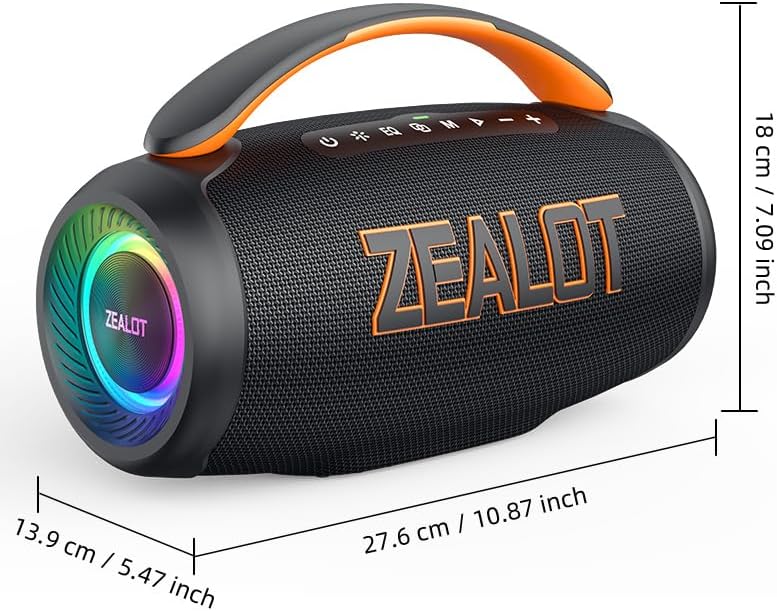
Figure 2: Rear view of the ZEALOT P12 Bluetooth Speaker, illustrating the protective flap covering the TF card slot, AUX input, DC5V charging port, and USB port.

Figure 3: Close-up of the control panel, highlighting the power, EQ, mode, play/pause, and volume buttons.
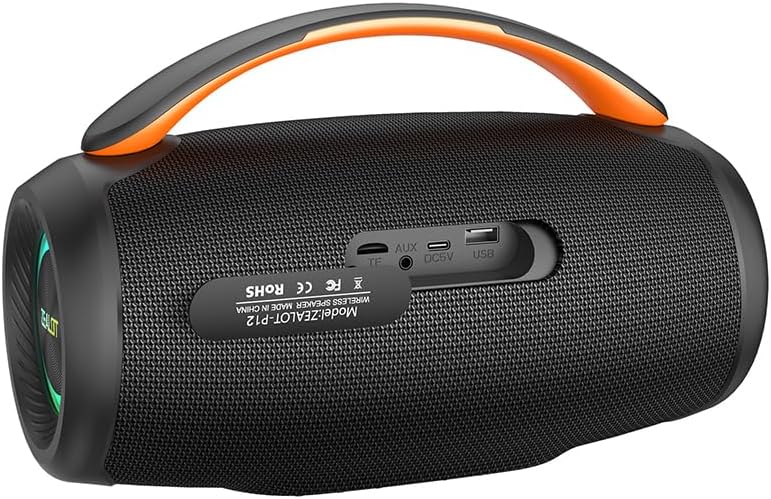
Figure 4: Diagram illustrating the internal acoustic components of the ZEALOT P12, including a 10W tweeter, 50W woofer, and two independent bass passive diaphragms for 360-degree sound.
The speaker features a top-mounted control panel with buttons for power, EQ mode selection, input mode switching (M), play/pause, and volume adjustment. The rear panel houses protected ports for charging, auxiliary input, TF card, and USB drive.
3. Setup
3.1 Initial Charging
- Before first use, fully charge the speaker.
- Locate the DC5V charging port on the rear of the speaker, typically under a protective flap.
- Connect the provided power cable to the speaker's charging port and a suitable USB power adapter (not included).
- The charging indicator light will illuminate. Once fully charged, the light may change color or turn off, depending on the model.
3.2 Powering On/Off
- To power on: Press and hold the Power button (
 ) for approximately 3 seconds until you hear an audible prompt or see the indicator lights activate.
 - To power off: Press and hold the Power button () for approximately 3 seconds until the indicator lights turn off.
4. Operating Instructions
4.1 Bluetooth Pairing
- Ensure the speaker is powered on and in Bluetooth mode. If not, press the Mode button (M) to switch to Bluetooth mode. The Bluetooth indicator light will flash, indicating it is ready for pairing.
- On your smartphone, tablet, laptop, or other Bluetooth-enabled device, navigate to the Bluetooth settings.
- Search for available devices. The speaker will appear as "ZEALOT P12".
- Select "ZEALOT P12" to connect. Once connected, the Bluetooth indicator light will become solid, and you may hear a confirmation tone.
- If prompted for a password, enter "0000".
4.2 Audio Playback
- Play/Pause: Press the Play/Pause button () to start or pause playback.
- Volume Up: Press the "+" button to increase volume.
- Volume Down: Press the "-" button to decrease volume.
- Next Track: Press and hold the "+" button for approximately 2 seconds.
- Previous Track: Press and hold the "-" button for approximately 2 seconds.
4.3 EQ Modes
The ZEALOT P12 offers three distinct EQ sound effects to optimize your listening experience:
Figure 5: Illustration of the EQ button and its three modes: Bass, Vocal, and Normal.
- Press the EQ button () to cycle through the available modes:
- Bass: Enhances low-frequency sounds for a deeper, richer bass experience.
- Vocal: Optimizes mid-range frequencies for clearer vocals.
- Normal: Provides a balanced sound profile suitable for general listening.
4.4 True Wireless Stereo (TWS) Pairing (Optional)
If you have two ZEALOT P12 speakers, you can pair them together for a stereo sound experience.
- Ensure both speakers are powered on and not connected to any Bluetooth device.
- On one speaker (this will be the primary speaker), press and hold the Mode button (M) for approximately 3 seconds. You will hear a prompt indicating TWS pairing mode.
- The primary speaker will automatically search for the secondary speaker. Once connected, you will hear a confirmation tone, and the indicator lights on both speakers will synchronize.
- Now, connect your Bluetooth device to the primary speaker as described in section 4.1. Audio will play in stereo through both speakers.
- To disconnect TWS, press and hold the Mode button (M) on either speaker for 3 seconds.
5. Connectivity
In addition to Bluetooth, the ZEALOT P12 supports several other audio input methods:
- TF Card Playback: Insert a TF (microSD) card containing MP3 audio files into the TF card slot. The speaker will automatically switch to TF card mode and begin playback.
- AUX Input: Connect an audio device (e.g., MP3 player, PC) to the speaker's AUX port using a 3.5mm audio cable (not included). Press the Mode button (M) to switch to AUX mode.
- USB Drive Playback: Insert a USB flash drive containing MP3 audio files into the USB port. The speaker will automatically switch to USB mode and begin playback.
6. Charging and Battery
The ZEALOT P12 is equipped with an 8000mAh rechargeable battery, providing extended playtime.
- Battery Life: A full charge provides up to 28 hours of continuous music playback, depending on volume level and audio content.
- Charging: Use the provided power cable and a standard USB power adapter (DC5V) to charge the speaker. The charging port is located on the rear panel.
- Low Battery Indicator: When the battery level is low, the speaker may emit an audible warning or an indicator light may flash. Charge the speaker promptly to avoid interruption.
7. Maintenance
7.1 Waterproof Rating (IPX5)
The ZEALOT P12 speaker has an IPX5 waterproof rating, meaning it is protected against low-pressure water jets from any direction. This makes it suitable for outdoor use and resistant to splashes, rain, and sweat.
- Important: IPX5 rating does not mean the speaker can be submerged in water. Do not immerse the speaker in water.
- Ensure the protective flap covering the charging and input ports on the rear is securely closed when using the speaker near water or in wet conditions.
7.2 General Care
- Clean the speaker with a soft, dry cloth. Do not use abrasive cleaners or solvents.
- Avoid exposing the speaker to extreme temperatures, direct sunlight for prolonged periods, or high humidity.
- Store the speaker in a cool, dry place when not in use.
- Do not attempt to disassemble or repair the speaker yourself, as this will void the warranty.
8. Troubleshooting
| Problem | Possible Cause | Solution |
|---|---|---|
| Speaker does not power on. | Low battery. | Charge the speaker fully. |
| No sound. | Volume too low; incorrect input mode; device not connected. | Increase volume; press 'M' button to select correct input mode; ensure Bluetooth device is paired or AUX/USB/TF card is properly inserted. |
| Bluetooth connection unstable or fails. | Speaker too far from device; interference; device's Bluetooth off. | Move speaker closer to device (within 10 meters); avoid obstacles; ensure Bluetooth is enabled on your device; try re-pairing. |
| TWS pairing fails. | Speakers already connected to other devices; incorrect pairing procedure. | Ensure both speakers are disconnected from all Bluetooth devices before initiating TWS pairing. Follow TWS pairing instructions carefully. |
9. Specifications

Figure 6: Dimensions of the ZEALOT P12 Bluetooth Speaker: 27.6 cm (10.87 inch) length, 13.9 cm (5.47 inch) width, 18 cm (7.09 inch) height.
| Feature | Detail |
|---|---|
| Model Name | ZEALOT P12 |
| Speaker Type | Portable Speaker |
| Connectivity Technology | Bluetooth 5.3, Auxiliary (3.5mm), TF Card Slot, USB Port |
| Audio Output Mode | Stereo |
| Speaker Maximum Output Power | 60 Watts |
| Frequency Response | 20 Hz - 20 KHz |
| Battery Capacity | 8000mAh |
| Playtime | Up to 28 hours |
| Waterproof Rating | IPX5 |
| Product Dimensions | 27.6D x 13.9W x 18H cm (10.87D x 5.47W x 7.09H inches) |
| Item Weight | 1.55 kg (1550 Grams) |
| Material | Acrylonitrile Butadiene Styrene (ABS) |
| Compatible Devices | Smartphone, Tablet, Laptop, PC, Television, Projector |
| Included Components | Power Cable |
| Manufacturer | ZEALOT |
| Country of Origin | China |
10. Warranty and Support
For warranty information and technical support, please refer to the warranty card included with your product or contact ZEALOT customer service directly. Contact details can typically be found on the manufacturer's official website or on the product packaging.
Please retain your proof of purchase for warranty claims.


