
1. Introduction
The Proster Digital Sound Level Meter PST291 is a compact and portable device designed for accurate measurement of ambient sound levels and environmental temperature. It offers a measurement range of 30-130dB with an accuracy of ±2.0dB, making it suitable for various applications.
This device features A-weighting, which simulates human ear sensitivity to sound, providing more relevant noise measurements. It includes Max/Min value display, selectable Fast/Slow response modes, a clear backlit LCD, and data hold functionality. Its lightweight design (76g with batteries) ensures easy portability for use in diverse environments.

Figure 1: The Proster PST291 is lightweight and compact, ideal for portable use.
2. Safety Information
- Do not expose the device to extreme temperatures or high humidity.
- Avoid strong impacts or dropping the device.
- Keep the device dry. Do not immerse it in water or other liquids.
- Ensure batteries are inserted with correct polarity. Remove batteries if the device will not be used for an extended period.
- Do not attempt to disassemble or modify the device. Refer all servicing to qualified personnel.
3. Product Overview
3.1 Package Contents
- Proster Digital Sound Level Meter PST291
- User Manual
- AAA Batteries (x2)
- Screwdriver

Figure 2: Package contents of the Proster PST291.
3.2 Device Components and Display

Figure 3: Front and back view of the Proster PST291 with labeled components.
- Microphone with Sponge Cover: Captures sound for measurement.
- LCD Display Screen: Shows measurement readings and indicators.
- POWER Button (SEL/POWER): Long press to Power On/Off. Short press to switch between FAST/SLOW time weighting.
- MAX/MIN/T Button: Short press to toggle between MAX and MIN sound level readings. Long press to switch temperature units (°C/°F).
- H/BL Button: Short press for Data Hold. Long press to turn Backlight On/Off.
- Battery Cover: Located on the back, for battery installation.

Figure 4: LCD Screen Indicator Overview.
4. Setup
4.1 Battery Installation
- Locate the battery cover on the back of the device.
- Use the provided screwdriver to open the battery compartment.
- Insert two AAA batteries, ensuring correct polarity (+/-).
- Close the battery cover and secure it with the screw.
5. Operating Instructions
5.1 Power On/Off
- To power on the device, long press the POWER button.
- To power off the device, long press the POWER button again.
5.2 Sound Level Measurement
The device will display real-time sound level readings in dBA. The A-weighting function is active by default, simulating human ear sensitivity.
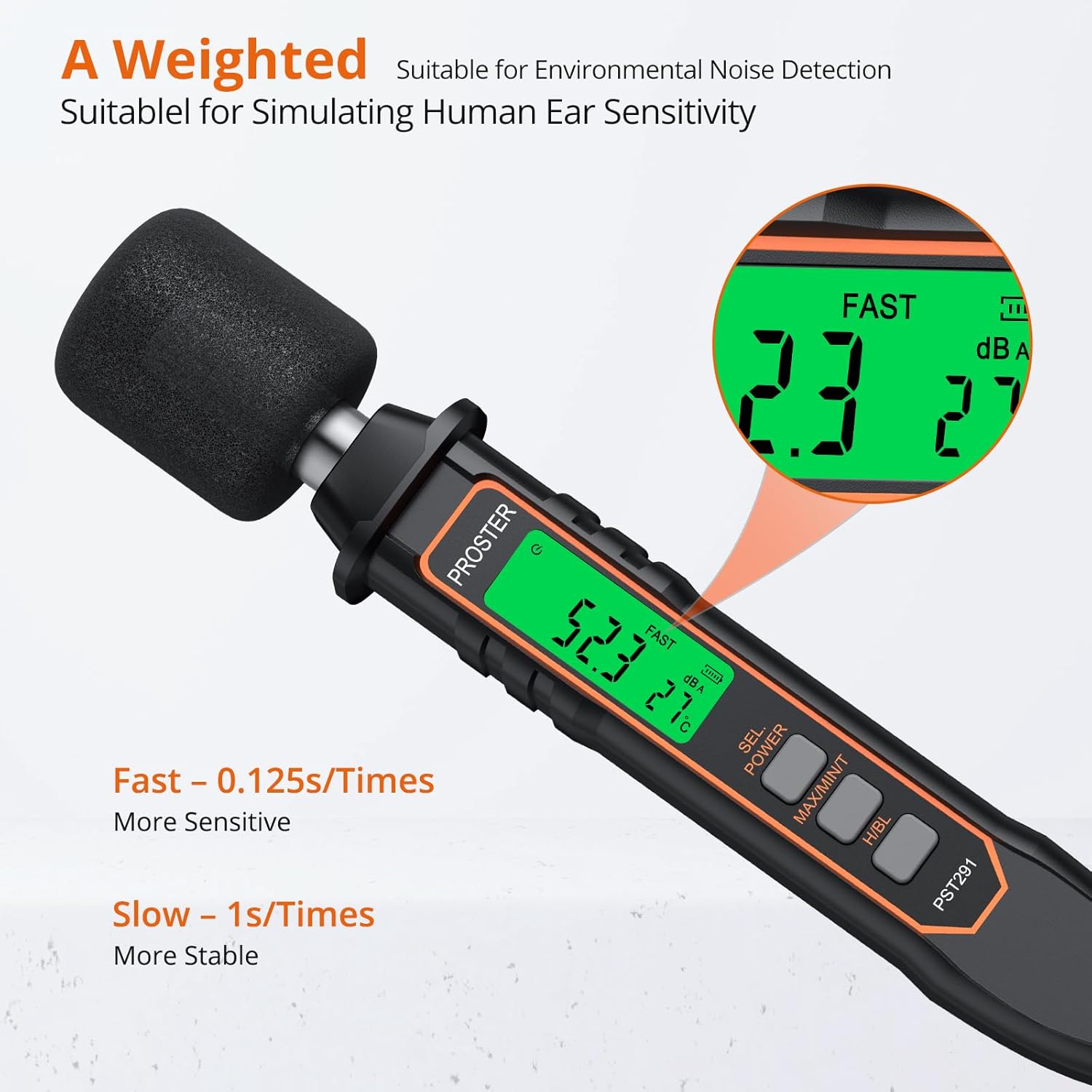
Figure 5: A-weighted measurement and time weighting modes.
5.2.1 Time Weighting (FAST/SLOW)
- Short press the POWER button to switch between FAST (0.125 seconds response) and SLOW (1 second response) modes.
- FAST: More sensitive, suitable for capturing rapidly changing sounds.
- SLOW: More stable, suitable for general measurements in environments with less sound fluctuation.
5.2.2 MAX/MIN Measurement
- Short press the MAX/MIN/T button to toggle between displaying the maximum (MAX) and minimum (MIN) sound levels recorded during the measurement period.
5.3 Temperature Measurement
The device also measures ambient temperature. The temperature reading is displayed on the LCD.
5.3.1 Switching Temperature Units (°C/°F)
- Long press the MAX/MIN/T button to switch the temperature display between Celsius (°C) and Fahrenheit (°F).
5.4 Data Hold
- Short press the H/BL button to activate the Data Hold function. The current reading will be frozen on the display, indicated by an 'H' icon.
- Short press the H/BL button again to release Data Hold and resume real-time measurement.
5.5 Backlight
- Long press the H/BL button to turn the LCD backlight On or Off. This is useful for reading the display in low-light conditions.
5.6 Auto Power Off
The device features an auto power-off function to conserve battery life. If no button is pressed for a certain period, the device will automatically shut down.
6. Maintenance
- Cleaning: Wipe the device with a soft, dry cloth. Do not use abrasive cleaners or solvents.
- Storage: Store the device in a cool, dry place away from direct sunlight and extreme temperatures.
- Battery Replacement: When the low battery icon appears on the display, replace the batteries promptly to ensure accurate readings and continuous operation. Follow the battery installation steps in Section 4.1.
7. Troubleshooting
- Device does not power on: Check if the batteries are correctly installed and have sufficient charge. Replace batteries if necessary.
- Inaccurate readings: Ensure the microphone is not obstructed. Avoid measuring in extremely windy conditions without proper wind screening. Verify that the device is set to the appropriate time weighting (FAST/SLOW) for the environment.
- Display is dim or flickering: The batteries may be low. Replace them.
- No display: The device might be in auto power-off mode. Press the POWER button to turn it on. Check batteries.
8. Specifications
| Feature | Specification |
|---|---|
| Measurement Range | 30-130 dBA |
| Accuracy | ±2.0 dB |
| Frequency Weighting | A-weighting |
| Resolution | 0.1 dB |
| Time Weighting | FAST (0.125s), SLOW (1s) |
| Temperature Measurement | Yes (°C/°F selectable) |
| Display | 4-digit LCD with Backlight |
| Data Hold | Yes |
| MAX/MIN Function | Yes |
| Auto Power Off | Yes |
| Power Supply | 2 x AAA Batteries |
| Product Weight (with batteries) | 76 g |
| Model Number | PST291 |
9. Warranty and Support
For warranty information or technical support, please refer to the contact details provided with your purchase or visit the official Proster website. Keep your purchase receipt as proof of purchase.