
1. Introduction
The FURUNO TZT10X is a 10-inch Multi-Function Display (MFD) designed for marine navigation and fishing. It integrates advanced features such as a powerful internal 1kW dual-channel TruEcho CHIRP Fish Finder, CHIRP Side-Scan capabilities, and the innovative TZ MAPS charting system. The TZT10X features a hybrid control interface, combining a multi-touch IPS LCD screen with Furuno's RotoKey control knob and dedicated buttons, ensuring intuitive operation in all sea conditions. This manual provides essential information for the setup, operation, and maintenance of your TZT10X unit.
2. Setup and Installation
Proper installation is crucial for optimal performance of your TZT10X MFD. The unit is designed for panel mount installation.
2.1 Mounting the Unit
The TZT10X is typically panel-mounted. Ensure the mounting surface is flat and strong enough to support the unit's weight. Refer to the detailed installation template provided with your product packaging for precise cutout dimensions and mounting hole locations. Secure the unit using the supplied mounting hardware.
2.2 Power Connection
Connect the unit to a 12-24VDC power source. Ensure the power supply is stable and capable of providing the necessary current. Use appropriate gauge wiring and inline fuses as specified in the full installation guide to prevent damage from power fluctuations.
2.3 Transducer and Network Connections
The TZT10X supports various connections for enhanced functionality:
- Transducer: Connect your CHIRP/CW transducer to the dedicated 12-pin port. For Side-Scan functionality, connect the appropriate 12-pin Side-Scan transducer.
- NMEA2000/NMEA0183: Connect to compatible marine electronics for data exchange (e.g., GPS, autopilot, engine data).
- LAN: Use the 1000BASE-T LAN port for networking with other NavNet TZtouchXL MFDs or compatible devices.
- USB: A USB 3.0 port is available for connecting control units or external storage.
- Wireless LAN: The unit features IEEE802.11b/g/n wireless LAN for connectivity.
Always ensure all connections are secure and waterproofed according to marine standards.

Figure 1: The FURUNO TZT10X Multi-Function Display with a detailed chart view, illustrating its compact design and integrated controls.
3. Operating Instructions
The TZT10X offers a user-friendly interface with multiple control options.
3.1 User Interface and Controls
- Hybrid Control: Navigate menus and functions using the multi-touch IPS LCD screen, the RotoKey control knob, or the dedicated physical buttons.
- Page Builder: Customize your display layouts with up to 10 different page configurations.
- Screen Split: Split the screen into up to 6 customizable sections to view multiple components and sensors simultaneously.
- Edge Swipe: Access advanced screen layout options and functions with intuitive edge swipe gestures.
3.2 Navigation with TZ MAPS
The TZT10X utilizes TZ MAPS, offering highly detailed navigation and fishing charts.
- Chart Content: Access raster charts, vector charts, satellite photos, and bathymetric data.
- BathyVision: Experience unprecedented detail in depth data, with contour intervals as fine as 3 inches, creating ultimate fishing charts.
- AI Routing: Plan intelligent routes that consider your boat's draft and navigation hazards, automatically generating recommended routes.
- Custom Objects: Share custom user objects with other registered TZ MAPS users via TimeZero's moderation service.
- Chart Updates: Charts can be purchased and updated directly from the MFD via an internet connection.
3.3 Fish Finder Operation
The integrated fish finder provides comprehensive underwater views.
- TruEcho CHIRP: The internal 1kW dual-channel TruEcho CHIRP fish finder operates across a wide frequency range (40kHz to 240kHz), providing clear target separation.
- CHIRP Side-Scan: Utilize the built-in CHIRP Side-Scan (235kHz or 455kHz) to scan both port and starboard sides of your vessel, revealing high-resolution images of bottom structure and fish targets.
- Extension Modes: Features like ACCU-FISH, A-Scope, Auto (Fishing/Cruising), Bottom Discrimination, and TruEcho CHIRP enhance fish detection.
- Alarms: Set alarms for fish schools and bottom lock.
3.4 Radar Functionality
When connected to an NXT Radar, the TZT10X offers advanced radar features.
- Display Modes: Head-up and North-up modes are available (heading input required for North-up).
- Target Tracking: Track up to 100 ARPA targets automatically (heading input required).
- Safety Features:
- Risk Visualizer: Provides a 360-degree visual representation of potential collision risks with objects around your vessel.
- AI Avoidance Route: Dynamically suggests safe routes to avoid hazards, which can be sent to a Furuno NavPilot autopilot with a single tap.
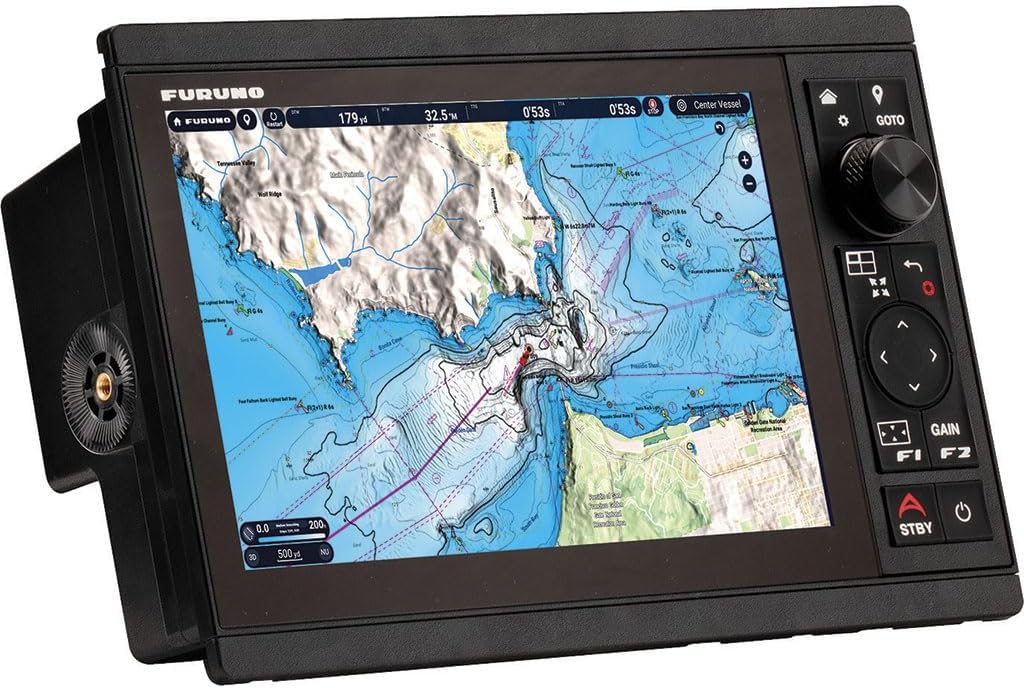
Figure 2: The FURUNO TZT10X MFD showing a navigation chart with active routes and data overlays, highlighting its intuitive touch and button controls.
4. Maintenance
Regular maintenance ensures the longevity and optimal performance of your TZT10X MFD.
4.1 Cleaning
- Screen: Gently wipe the screen with a soft, lint-free cloth dampened with fresh water. Avoid abrasive cleaners or solvents.
- Unit Exterior: Clean the exterior casing with a soft cloth and mild detergent if necessary. Ensure no liquid enters the unit.
4.2 Software Updates
Periodically check the Furuno website or your dealer for software updates. Keeping your unit's software up-to-date ensures access to the latest features and performance enhancements.
4.3 Environmental Considerations
The TZT10X is designed for marine environments with an IP56 waterproof rating. However, avoid exposing the unit to extreme temperatures outside its operating range (-15℃ to +55℃) and ensure proper ventilation if installed in an enclosed space.
5. Troubleshooting
This section addresses common issues. For more complex problems, consult the full service manual or contact Furuno support.
5.1 No Power
- Check all power connections and ensure they are secure.
- Verify the vessel's power supply is active and within the 12-24VDC range.
- Inspect the inline fuse on the power cable; replace if blown.
5.2 GPS Signal Loss
- Ensure the GPS antenna has a clear view of the sky, free from obstructions.
- Check the GPS antenna cable connection to the MFD.
5.3 Fish Finder Not Displaying Data
- Verify the transducer is correctly connected to the MFD.
- Ensure the transducer is properly submerged and free from marine growth.
- Check the fish finder settings on the MFD, including frequency and gain.
5.4 Alarms
The TZT10X features various alarms to alert you to critical conditions:
- Navigation Alarms: Anchor Watch, XTE (Cross Track Error).
- Sensor Alarms: Depth, Speed, Sea Temperature (requires external data).
- Fuel Alarms: Trip Distance, Fuel Meter (requires external data).
- Radar Alarms: Guard Zone, CPA/TCPA, Video, Bearing, Heading Line.
Address the cause of any active alarm promptly. Alarms can typically be acknowledged or silenced through the MFD interface.
6. Specifications
| Category | Specification |
|---|---|
| Display Unit | |
| Type | Color TFT Multi-Touch IPS LCD |
| Screen Size | 10.1 inches Widescreen |
| Resolution | WUXGA 1920 × 1200 |
| Screen Brightness | 900 cd/m² (Standard) |
| Display Colors | 16,770,000 colors (Chartplotter), 64 colors (Radar/Fish Finder) |
| GPS/WAAS | |
| Receiver Type | GPS: 72 Channels, SBAS: 1 Channel (C/A Mode, WAAS) |
| Receiving Frequency | L1 (1575.42MHz) |
| Time to First Fix | 100 seconds (Cold Start) |
| Accuracy | 10m (GPS), 7m (MSAS), 3m (WAAS) |
| Position Update Interval | 100ms or 10Hz |
| Chartplotter | |
| Map Creation | TZ MAPS, MM3 Vector, CMO Compatible (US only) |
| Memory Capacity | 30,000 User Points, 100,000 Points for Ship's Track, 200 Planned Routes (5000 points per route) |
| Radar | |
| Display Modes | Head-up, North-up* (*Heading input required) |
| Echo Trail | Intervals: 15s, 30s, 1min, 3min, 6min, 15min, 30min, Continuous (Heading input required) |
| Target Tracking | 100 ARPA Targets (Radar dependent), Fully Automatic Target Acquisition (Heading input required) |
| Fish Finder | |
| Transmit Frequency* | CW: 50/200kHz, CHIRP: 40kHz~240kHz (Low, Medium, High) |
| Transducer Power* | 300/600W or 1kW |
| Display Range | 2~1,200m (Shift 0~1,200m) (1) 200~2,400m / 4,000~8,000ft |
| Extension Modes | ACCU-FISH, A-Scope, Auto (Fishing/Cruising), Bottom Discrimination, TruEcho CHIRP (with compatible transducer) |
| Picture Advance | 8 Steps: x4, x2, x1, 1/2, 1/4, 1/8, 1/16, Stop Fish |
| Side-Scan | |
| Transmit Frequency* | CHIRP: 220-240KHz / 445-465KHz |
| Transducers | 225kHz: 225T-PR904, 225T-SS904, 225T-TM904 / 455kHz: 455T-PR903, 455T-SS903, 455T-TM903 |
| Display Range | 750ft each side |
| Display Colors | Green, Blue, Amber, White |
| Interfaces | |
| NMEA2000 | 1 Port Input/Output (Various PGNs supported) |
| NMEA0183 | 1 Serial Output Port (AAM, APB, BOD, DBT, DPT, GGA, GLL, GNS, GSA, GSV, RMB, RMC, RTE, TTM, VDM, VTG, WPL, XTE, ZDA) |
| LAN | 1 Port (1000BASE-T) |
| USB | 1 Port (USB 3.0) for Control Unit |
| Video I/O | Input: 1 Port (NTSC/PAL) |
| AUX I/O | 2 Ports (Event Switch and External Power Switch) |
| SD Card Slot | 1 Slot (Micro SDXC, Rear) |
| Wireless LAN | IEEE802.11b/g/n, Transmit Frequency: 2.412~2,462GHz, Max 11dBm |
| Environmental | |
| Temperature | -15℃ to +55℃ |
| Relative Humidity | 93% or less at +40℃ |
| Waterproof | IP56 |
| Power | 12-24VDC |
*Note: Some transducers may require a matching box (MB1100).
7. Warranty and Support
For detailed warranty information, please refer to the official FURUNO website or the warranty card included with your product. For technical support, product registration, or service inquiries, please contact your authorized FURUNO dealer or visit the official FURUNO support portal.
FURUNO Official Website: www.furuno.com