1. Introduction
The Janome HD1400 Heavy Duty Sewing Machine is engineered for durability and ease of use, providing a reliable sewing experience for a wide range of fabrics and projects. Its robust aluminum body construction ensures stability and longevity. This manual provides essential information for the proper setup, operation, and maintenance of your machine.
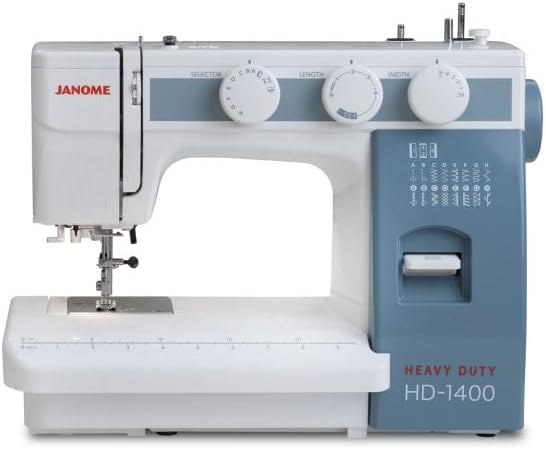
Figure 1: The Janome HD1400 Heavy Duty Sewing Machine, featuring its white and blue-gray casing, stitch selection dials, and integrated work light.
2. Important Safety Instructions
When using an electrical appliance, basic safety precautions should always be followed, including the following:
- Read all instructions before using this sewing machine.
- Keep these instructions in a suitable place near the machine.
- Unplug the machine from the electrical outlet immediately after using and before cleaning, removing covers, or making any user servicing adjustments.
- Do not allow to be used as a toy. Close attention is necessary when this machine is used by or near children.
- Use this appliance only for its intended use as described in this manual.
- Never operate this machine if it has a damaged cord or plug, if it is not working properly, or if it has been dropped or damaged.
- Never drop or insert any object into any opening.
- Do not use outdoors.
- Do not operate where aerosol (spray) products are being used or where oxygen is being administered.
- To disconnect, turn all controls to the off position, then remove plug from outlet.
3. Machine Components
Familiarize yourself with the main parts of your Janome HD1400 sewing machine to ensure correct operation.
- Spool Pins: Holds the thread spool.
- Thread Guide: Guides the thread during winding and sewing.
- Tension Dial: Adjusts the upper thread tension.
- Stitch Selector Dial: Selects the desired stitch pattern (16 options).
- Stitch Length Dial: Adjusts the length of the stitches.
- Stitch Width Dial: Adjusts the width of zigzag and decorative stitches.
- Reverse Stitch Lever: Engages reverse sewing for securing stitches.
- Needle: Pierces the fabric to form stitches.
- Presser Foot: Holds the fabric firmly against the feed dogs.
- Bobbin Winder: Winds thread onto the bobbin.
- Handwheel: Manually raises and lowers the needle.
- Power Switch: Turns the machine on/off and controls the light.
- Foot Control Jack: Connects the foot control for speed regulation.
- Built-in Needle Threader: Assists in threading the needle.
- Drop Feed Dog Lever: Lowers the feed dogs for free-motion sewing.
4. Initial Setup
4.1 Unpacking and Placement
Carefully remove the machine from its packaging. Place the machine on a stable, flat surface, ensuring adequate space for fabric handling. Keep all packing materials for future storage or transport.
4.2 Power Connection
Insert the machine plug into the machine's power socket. Connect the foot control plug to the foot control jack. Plug the power cord into a suitable electrical outlet (AC power source).
4.3 Bobbin Winding
- Place an empty bobbin onto the bobbin winder spindle.
- Place a spool of thread on the spool pin.
- Guide the thread through the upper thread guide and around the bobbin winding tension disc.
- Wrap the thread clockwise around the bobbin a few times.
- Push the bobbin winder spindle to the right.
- Press the foot control to start winding. Stop when the bobbin is full.
- Cut the thread and push the bobbin winder spindle back to the left.
4.4 Inserting the Bobbin
- Open the bobbin cover plate.
- Insert the wound bobbin into the bobbin case, ensuring the thread unwinds in the correct direction (usually counter-clockwise).
- Pull the thread through the tension spring and into the thread guide slot.
- Replace the bobbin cover plate.
4.5 Threading the Upper Thread
- Raise the presser foot lever.
- Place a spool of thread on the spool pin.
- Guide the thread through the upper thread guides as indicated by the numbered path on the machine.
- Ensure the thread passes through the tension discs and into the take-up lever.
- Thread the needle from front to back, or use the built-in needle threader.
4.6 Needle Installation
- Turn the handwheel towards you to raise the needle to its highest position.
- Loosen the needle clamp screw.
- Remove the old needle.
- Insert a new needle with the flat side facing the back of the machine, pushing it up as far as it will go.
- Tighten the needle clamp screw securely.
5. Operating the Machine
5.1 Stitch Selection
Rotate the Stitch Selector Dial to choose one of the 16 available stitch patterns. The selected stitch will be indicated on the dial.
5.2 Adjusting Stitch Length and Width
- Stitch Length: Use the Stitch Length Dial to adjust the length of your stitches. Higher numbers result in longer stitches.
- Stitch Width: Use the Stitch Width Dial to adjust the width of zigzag and decorative stitches. Higher numbers result in wider stitches.
5.3 Sewing a Seam
- Place your fabric under the presser foot.
- Lower the presser foot lever.
- Turn the handwheel to lower the needle into the fabric.
- Press the foot control to begin sewing. Guide the fabric gently.
- At the end of the seam, press the reverse stitch lever to secure the stitches.
- Raise the needle and presser foot, then remove the fabric.
5.4 Reverse Stitch
To sew in reverse, press and hold the Reverse Stitch Lever while sewing. Release the lever to resume forward sewing. This is used to secure the beginning and end of seams.
5.5 Buttonhole Sewing
The Janome HD1400 features a 4-step buttonhole. Refer to the stitch selector for the four buttonhole steps (1, 2, 3, 4). Use the included buttonhole foot for best results.
- Attach the buttonhole foot.
- Mark the buttonhole position on your fabric.
- Set the stitch selector to the first buttonhole step.
- Sew the first side of the buttonhole.
- Switch to the next step and sew the bar tack.
- Continue through all four steps, rotating the fabric as needed, to complete the buttonhole.
5.6 Drop Feed Dog
The Drop Feed Dog Lever is located on the back of the free arm. Lowering the feed dogs allows for free-motion sewing, darning, or embroidery without the fabric being fed automatically by the machine. Raise the feed dogs for normal sewing.
6. Care and Maintenance
6.1 Cleaning
Regular cleaning helps maintain your machine's performance. Always unplug the machine before cleaning.
- Bobbin Area: Remove the bobbin case and bobbin. Use a small brush to remove lint and dust from the bobbin area and feed dogs.
- Machine Surface: Wipe the exterior of the machine with a soft, dry cloth. Do not use harsh chemicals or abrasive cleaners.
6.2 Storage
When not in use, cover your machine with the provided dust cover to protect it from dust and debris. Store it in a dry, stable environment.
7. Troubleshooting Guide
This section addresses common issues you might encounter. For problems not listed here, please contact customer support.
| Problem | Possible Cause | Solution |
|---|---|---|
| Thread breaks | Incorrect tension, improperly threaded, bent needle | Adjust tension, re-thread machine, replace needle |
| Skipped stitches | Bent or dull needle, incorrect needle size for fabric | Replace needle, use appropriate needle type/size |
| Fabric not feeding | Presser foot not lowered, feed dogs dropped | Lower presser foot, raise feed dogs |
| Machine not starting | Power cord not connected, foot control not connected, power switch off | Check all connections, turn power switch on |
8. Technical Specifications
- Model: HD1400
- Dimensions (L x W x H): 15 x 6.5 x 11.5 inches
- Item Weight: 17.71 pounds
- Stitches: 16 built-in stitches
- Buttonhole: 4-step
- Hook System: Vertical Oscillating Hook
- Body Construction: Heavy-duty aluminum
- Power Source: AC
- UPC: 732212411977
9. Included Accessories
Your Janome HD1400 machine comes with the following accessories:
- Bobbins
- Needle Set
- Seam Ripper
- Buttonhole Foot
- Hemmer Foot
- Zipper Foot
- Hemming Guide
- Oil
- Screwdriver
- Dust Cover
- Foot Control
- Instruction Manual (this document)
10. Warranty and Customer Support
For warranty information, service, or technical assistance, please refer to the warranty card included with your product or visit the official Janome website. Keep your purchase receipt as proof of purchase.


