
JANOME HD2200
Janome HD2200 Sewing Machine User Manual
Model: HD2200 | Brand: JANOME
Introduction
This manual provides comprehensive instructions for the setup, operation, maintenance, and troubleshooting of your Janome HD2200 Heavy Duty Sewing Machine. Please read this manual thoroughly before using the machine to ensure safe and efficient operation and to maximize its lifespan.
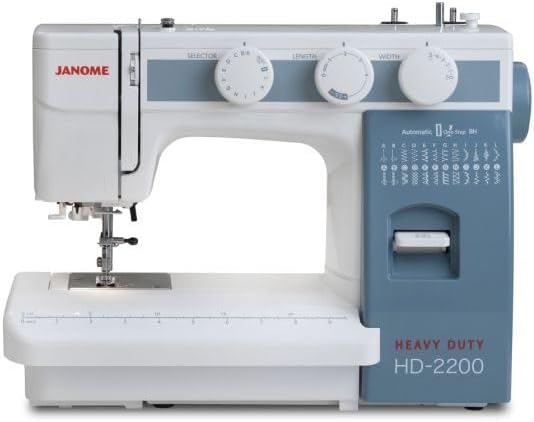
Figure 1: Front view of the Janome HD2200 Heavy Duty Sewing Machine, showcasing its sturdy design and control dials.
1. Setup and Initial Preparation
1.1 Unpacking and Placement
Carefully remove the machine from its packaging. Place the machine on a stable, flat surface. Ensure there is adequate space around the machine for comfortable operation and fabric handling.
1.2 Power Connection
Connect the foot control and power cord to the machine and then plug the power cord into a suitable electrical outlet. Ensure the power switch is in the 'OFF' position before connecting.
1.3 Winding the Bobbin
Refer to the diagram on the machine or the detailed instructions in the full manual for correct bobbin winding. Place the empty bobbin on the bobbin winder spindle, guide the thread as indicated, and engage the winder. The stop motion type bobbin winder will automatically stop when the bobbin is full.
1.4 Threading the Machine
Follow the numbered threading path for the upper thread. The Janome HD2200 features a channel threading system to the needle. Utilize the built-in needle threader for easy and quick threading of the needle eye.
1.5 Installing the Needle
Ensure the machine is turned off. Loosen the needle clamp screw, insert the new needle with the flat side facing the back, and push it up as far as it will go. Tighten the screw securely. Always use the correct needle type and size for your fabric and thread.
2. Operating Your Sewing Machine
2.1 Stitch Selection
The Janome HD2200 offers 24 built-in stitches, including utility stitches, decorative stitches, and a one-step buttonhole. Use the stitch selection dial to choose your desired stitch. The stitch chart is conveniently located on the machine body.

Figure 2: Close-up of the stitch selection chart and one-step buttonhole guide on the Janome HD2200.
2.2 Adjusting Stitch Length and Width
Adjust the stitch length (maximum 4mm) and stitch width (maximum 5mm) using the dedicated dials. These adjustments allow for fine-tuning stitches to suit different fabric types and sewing requirements.
2.3 Presser Foot and Fabric Handling
The machine features an extra high presser foot lift, useful for thicker fabrics and multiple layers. Adjustable pressure for light to heavy fabrics ensures optimal fabric feeding. The clip-on presser feet allow for quick changes between different sewing tasks.
2.4 Free Arm and Accessory Tray
Remove the accessory tray to utilize the free arm capability, ideal for sewing cuffs, sleeves, and other small, circular items. The accessory tray also provides convenient storage for included tools and bobbins.

Figure 3: The Janome HD2200 with its accessory tray detached, revealing the free arm for circular sewing and the integrated storage compartment.
2.5 Drop Feed Dog
Engage the drop feed dog mechanism for darning, free-motion quilting, or embroidery. Consult the full instruction manual for specific guidance on using this feature.
2.6 Reverse Stitch Lever
Press and hold the reverse stitch lever to sew in reverse, which is used for securing stitches at the beginning and end of seams.
2.7 Built-in Thread Cutter
A convenient built-in thread cutter is located on the machine for quickly trimming threads after sewing.
2.8 Twin Needle Sewing
The vertical spool pins support twin needle sewing, allowing for parallel rows of stitching, often used for decorative purposes or hemming knit fabrics.
3. Maintenance and Care
Regular maintenance ensures the longevity and optimal performance of your Janome HD2200 sewing machine.
3.1 Cleaning
Periodically clean lint and dust from the bobbin case area and feed dogs using a small brush. Always disconnect the machine from power before cleaning.
3.2 Oiling
Apply a small drop of sewing machine oil to designated oiling points as indicated in the comprehensive instruction manual. Do not over-oil.
3.3 Needle Replacement
Replace needles frequently, especially after 8-10 hours of sewing or if you notice skipped stitches, pulled threads, or needle deflection. A dull or bent needle can damage fabric and the machine.
4. Troubleshooting Common Issues
Before contacting customer support, review the following common issues and their potential solutions:
- Skipped Stitches: Check needle installation (flat side to back), ensure needle is not bent or dull, rethread the machine, check bobbin winding.
- Thread Breakage: Verify correct threading, ensure proper thread tension, check for burrs on needle plate or bobbin case, use quality thread.
- Uneven Stitches / Fabric Puckering: Adjust thread tension (upper and bobbin), ensure correct presser foot pressure for fabric type, use appropriate needle size.
- Machine Not Sewing: Check if power cord is securely plugged in, ensure foot control is connected, verify bobbin winder is disengaged, check if needle is properly installed.
For more detailed troubleshooting steps, refer to the complete instruction manual provided with your machine.
5. Product Specifications
| Model Number | HD2200 |
| Brand | JANOME |
| Dimensions (L x W x H) | 15 x 6.5 x 11.5 inches (approx.) |
| Item Weight | 20 pounds |
| Country of Origin | Japan |
| Built-in Stitches | 24 (including 1-step buttonhole) |
| Maximum Stitch Width | 5mm |
| Maximum Stitch Length | 4mm |
| Hook System | Vertical Oscillating Hook System |
| Key Features | Free Arm, Built-in Needle Threader, Built-in Thread Cutter, Drop Feed Dog, Adjustable Presser Foot Pressure, Reverse Stitch Lever, Twin Needle Capability |
| Included Accessories | Bobbins, Needles, Seam Ripper, Automatic Buttonhole Foot, Hemmer Foot, Zipper Foot, Satin Stitch Foot, Hemming Guide, Oil, Small Screwdriver, Large Screwdriver, Foot Control, Instruction Manual, Cover |
6. Warranty and Support
For detailed information regarding the product warranty, please refer to the warranty card included with your Janome HD2200 Sewing Machine or visit the official Janome website. For technical support, service, or replacement parts, please contact Janome customer service through their official channels.
Always ensure you have your model number (HD2200) and serial number ready when contacting support.
Ask a question about this manual
Ask about setup, troubleshooting, compatibility, parts, safety, or missing instructions. Manuals+ will review the question and use this page’s manual context to help answer it.