Introduction
The SHPTDJTIC 4K Body Camera (Model: 4k-PRO-128G) is an ultra-compact, wearable camera designed for capturing high-quality 4K video and audio. Its lightweight and durable design, coupled with versatile mounting options and a waterproof case, make it ideal for various activities including outdoor adventures, travel, and daily recording. This manual provides essential information for setting up, operating, and maintaining your device.

Image: The SHPTDJTIC 4K Body Camera shown with its various accessories, including clips, straps, waterproof case, and a 128GB SD card.
What's in the Box
- SHPTDJTIC 4K Body Camera
- 360° Rotating Clip
- Magnetic Clip
- Privacy Cover
- 128GB SD Card
- Battery (included inside device)
- USB Charging Cable
- Various mounting accessories (e.g., helmet mounts, handlebar mounts, magic band)
Product Overview and Features
The SHPTDJTIC 4K Body Camera is designed for ease of use and versatility. Key features include:
- Ultra-Compact Design: Weighing only 1.25 oz (35.7g) and smaller than a thumb (2.5x1.1x0.7 inches), it's highly portable for discreet recording.
- 4K Video Recording: Captures crisp, high-resolution footage.
- Audio Recording: Integrated audio capture for comprehensive documentation.
- Waterproof Capability: Waterproof up to 30 meters with the included waterproof case, suitable for aquatic activities.
- Long Battery Life: Provides up to 120 minutes of continuous 4K recording (or 150 minutes at 1080P) with its built-in 800mAh battery. Supports charging while recording.
- Versatile Mounting Options: Includes a 360° rotatable clip, magnetic clip, and a silicone magic band for attachment to various surfaces, clothing, or even pets.
- WiFi Connectivity: Allows for instant sharing and live preview via a mobile application.
- 128GB Storage: Comes with a 128GB TF card, providing ample storage for hours of footage.
- One-Click Recording: User-friendly design for instant capture.

Image: The camera's compact size, illustrating it as thumb-sized, with dimensions of 2.5x1.1x0.7 inches and a weight of 1.25 oz (35.7g).
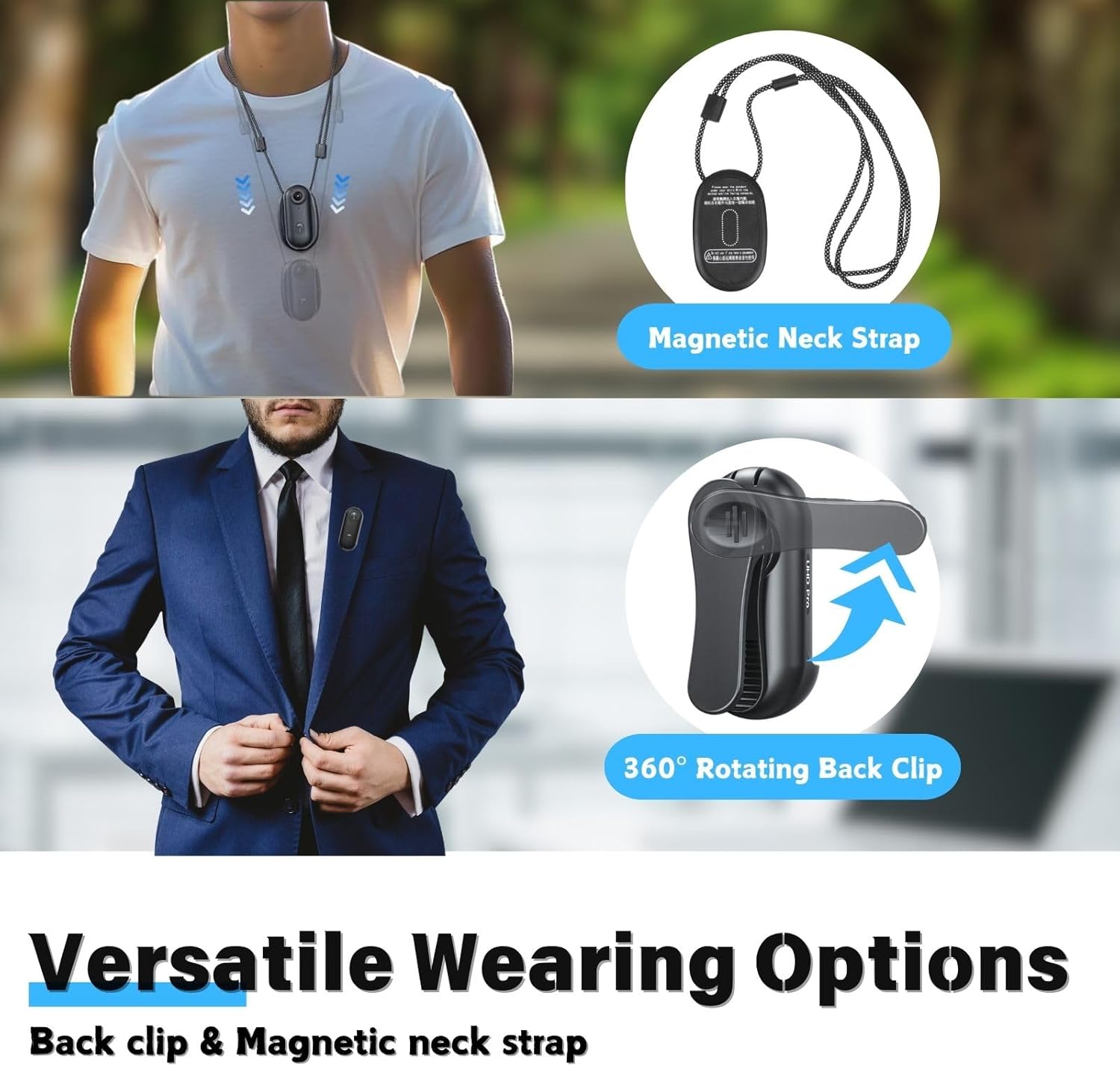
Image: Demonstrates various wearing options, including a magnetic neck strap and a 360° rotating back clip for attaching to clothing.

Image: Shows the camera mounted on a helmet (top and side) and a bicycle handlebar, highlighting its adaptability for different activities.

Image: Illustrates the use of the adjustable silicone wristband and extension strap (Magic Band) for mounting on a backpack strap, wrist, or drone.

Image: A diver using the camera with its waterproof case, emphasizing its capability to be used up to 30 meters underwater.

Image: Details the built-in battery design, showing 120 minutes of recording at 4K and 150 minutes at 1080P, with support for charging during recording.
Setup
- Charge the Device: Before first use, fully charge the camera using the provided USB cable. Connect the cable to the camera's charging port and a standard USB power adapter (not included). The indicator light will show charging status.
- Insert SD Card: Locate the SD card slot on the camera. Gently insert the included 128GB TF card until it clicks into place. Ensure the card is inserted in the correct orientation.
- Power On/Off: Press and hold the power button for a few seconds to turn the camera on or off. The indicator light will illuminate when the device is powered on.
- Install Mobile App (for WiFi features): Search for the dedicated SHPTDJTIC app on your smartphone's app store (iOS/Android). Install the app to enable live preview, file transfer, and settings adjustments via Wi-Fi.
Operating Instructions
Basic Recording
- Start Recording: With the camera powered on, press the record button once to begin video recording. The indicator light will change to indicate recording is in progress.
- Stop Recording: Press the record button again to stop recording. The indicator light will revert to standby mode.
- One-Click Recording: The camera features a user-friendly one-click recording function for instant capture.

Image: A person demonstrating the one-click recording feature, showing the camera being activated with a single press.
Using the Waterproof Case
For underwater activities or use in heavy rain, place the camera inside the provided waterproof case. Ensure the case is properly sealed before submersion. The case allows the camera to be waterproof up to 30 meters.
Mounting Options
Utilize the various accessories to mount your camera:
- Magnetic Clip: Attach to metal surfaces or use with the magnetic neck strap for chest-level recording.
- 360° Rotating Clip: Ideal for securing the camera to clothing, backpack straps, or other thin edges.
- Magic Band: Wrap the silicone band around arms, trees, pet collars, or attach to drones for unique angles.
- Helmet/Handlebar Mounts: Use the specific mounts for attaching the camera to helmets or bicycle handlebars.

Image: A visual guide illustrating different ways to mount the camera, including easy clip, magnet pendant, magic band, and pivot stand with waterproof case.
WiFi Connectivity and App Usage
The camera supports WiFi for seamless connection to your smartphone:
- Enable WiFi: Refer to the camera's specific button sequence or menu option to activate WiFi mode.
- Connect to App: Open the SHPTDJTIC app on your phone. Follow the in-app instructions to connect to the camera's WiFi network.
- Live Preview & Transfer: Once connected, you can view a live feed from the camera, transfer recorded videos and photos to your phone, and adjust settings.

Image: A smartphone screen showing the live preview and file sharing interface of the camera's app, demonstrating instant transfer and sharing capabilities.

Image: Illustrates the "Instant APP Preview" feature, allowing users to watch and manage footage immediately after filming via the mobile app.
Maintenance
- Cleaning: Use a soft, dry cloth to clean the camera body. For the lens, use a specialized lens cleaning cloth and solution.
- Waterproof Case Care: After using the waterproof case in saltwater, rinse it thoroughly with fresh water and allow it to air dry. Regularly check the rubber seals for any damage or debris.
- Storage: Store the camera in a cool, dry place away from direct sunlight and extreme temperatures.
- Battery Care: To prolong battery life, avoid fully discharging the battery frequently. Charge the camera regularly, even if not in use for extended periods.
Troubleshooting
| Problem | Possible Cause | Solution |
|---|---|---|
| Camera not powering on | Low battery; device malfunction. | Ensure the camera is fully charged. If problem persists, contact customer support. |
| Video quality is poor/laggy | Insufficient lighting; SD card issue; high resolution setting. | Ensure adequate lighting. Try a different SD card. Lower the recording resolution (e.g., to 1080P). |
| Overheating during use | Prolonged recording; high ambient temperature. | This can be normal for compact devices during extended 4K recording. Allow the camera to cool down. If excessive, reduce recording duration or resolution. |
| Cannot connect to Wi-Fi/App | Incorrect Wi-Fi settings; app not open; interference. | Ensure camera Wi-Fi is enabled. Restart both camera and phone. Keep the app open during connection. Try connecting in a different location to avoid interference. |
| SD card not recognized | Improper insertion; card corruption; incompatible card. | Reinsert the SD card correctly. Try formatting the card (this will erase data). Use the included 128GB card or a compatible high-speed Micro SD card. |
Specifications
| Feature | Detail |
|---|---|
| Brand | SHPTDJTIC |
| Model Name | 4K-Pro-128G (Item model number: 4K-Pro-A) |
| Video Capture Resolution | 4K |
| Camcorder Type | Action Camera |
| Item Weight | 1.25 ounces (35.7g) |
| Package Dimensions | 7.8 x 4.96 x 2.24 inches |
| Battery | 1 x 12V battery (included), 800mAh capacity |
| Flash Memory Type | Micro SD (128GB card included) |
| Maximum Focal Length | 42 Millimeters |
| Maximum Aperture | 2.8 f |
| Video Capture Format | MP4 |
| Supported Audio Format | AAC |
| Waterproof Depth | Up to 30 meters (with waterproof case) |
Warranty and Support
For warranty information and customer support, please refer to the product packaging or contact SHPTDJTIC directly through their official website or the retailer where the product was purchased. Protection plans may also be available for extended coverage.
For common issues, please refer to the Troubleshooting section of this manual. For further assistance, please reach out to our support team.


