
1. Introduction
Thank you for choosing the Feihe 15.6 Inch Smart TV. This manual provides essential information for the safe and efficient operation of your television. Please read it thoroughly before use and retain it for future reference.
2. Important Safety Information
Always follow basic safety precautions when using this product to reduce the risk of fire, electric shock, and injury.
- Do not expose the TV to rain or moisture.
- Do not block ventilation openings.
- Ensure the power cord is not walked on or pinched.
- Only use attachments/accessories specified by the manufacturer.
- Unplug the TV during lightning storms or when unused for long periods.
- Refer all servicing to qualified service personnel.
3. What's in the Box
Verify that all components are present upon unboxing:
- Feihe 15.6 inch Smart TV
- Remote Control
- TV Stand
- User's Manual (this document)
4. Setup
4.1 Stand Installation
Follow these steps to attach the TV stand:
- Insert the support post of the stand directly into the square base round hole.
- Place the round post of the support column into the back case of the TV.
- Cover the round post of the support column with the raised cover and then secure the four holes with screws.

Image: Visual guide demonstrating the easy installation process for the Feihe 15.6 Inch Smart TV stand. The image shows three steps: inserting the stand post into the base, attaching the stand to the TV's back, and securing it with screws.
4.2 Power Connection
Connect the AC power adapter to the TV's power input and then plug it into a standard electrical outlet (110-240V AC).
4.3 Initial Setup and Network Connection
Upon first power-on, the TV will guide you through the initial setup process. This includes selecting your language, country, and connecting to a network.
- Wi-Fi Connection: Select your Wi-Fi network from the list and enter the password. The TV supports dual-band 2.4/5 GHz Wi-Fi.
- Ethernet Connection: Connect an Ethernet cable from your router to the RJ45 port on the TV for a wired internet connection.
- Channel Scan: If using an antenna, select the ATSC tuner option and perform an automatic channel scan to find available broadcast channels.
5. Operating Your Feihe Smart TV
5.1 Remote Control
The included remote control allows you to navigate the TV's interface, adjust settings, and access smart features. Insert two AAA batteries (not included) into the remote control, observing polarity.
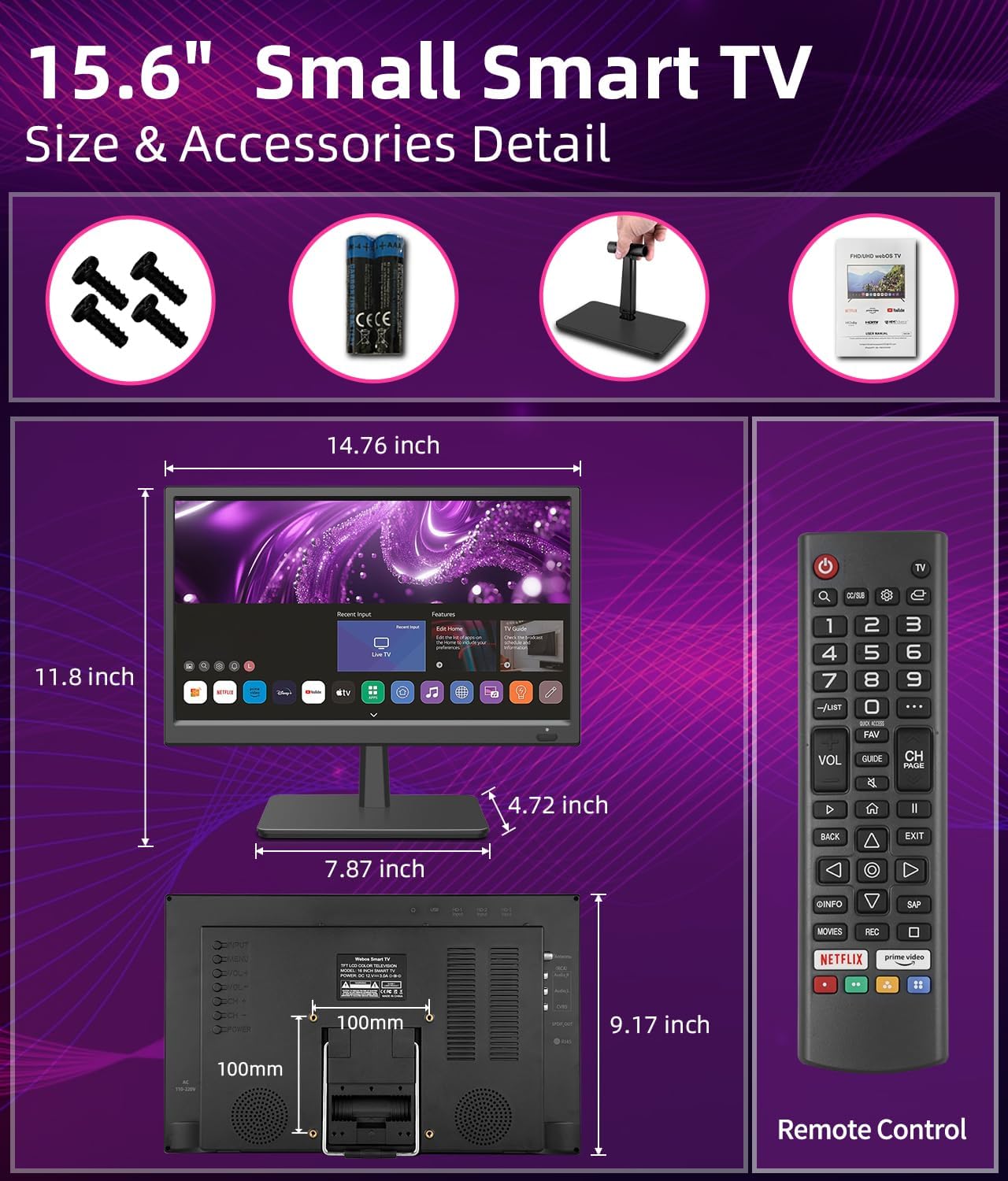
Image: The remote control for the Feihe 15.6 Inch Smart TV. It features standard navigation buttons, volume and channel controls, and dedicated buttons for popular streaming services like Netflix and Prime Video.
5.2 Smart TV Features
Your Feihe Smart TV comes with built-in smart features, providing access to a wide range of entertainment options:
- Streaming Apps: Access popular streaming services like Netflix, YouTube, Prime Video, Hulu, and more directly from the TV's home screen.
- Web Browser: Use the integrated web browser to surf the internet.
- Content Recommendations: The TV may offer personalized content recommendations based on your viewing habits.
- Fast Boot: Experience quick startup times for immediate entertainment.

Image: The Feihe 15.6 Inch Smart TV screen showing its home interface with icons for various applications and inputs, including Netflix, Prime Video, YouTube, and Live TV.
5.3 Connectivity and External Devices
The TV offers multiple ports for connecting external devices:
- HDMI (x3, including ARC): Connect Blu-ray players, gaming consoles, streaming sticks, and other HDMI-enabled devices.
- USB: Play media files from USB drives.
- AV (RCA): Connect older devices using composite video and stereo audio cables.
- Earphone: Connect headphones for private listening.
- SPDIF_OUT: Digital audio output for connecting to soundbars or home theater systems.
- TV Tuner (RF): Connect an antenna for over-the-air broadcast channels.

Image: A detailed view of the rear panel of the Feihe 15.6 Inch Smart TV, clearly labeling its various input and output ports for comprehensive connectivity.
5.4 Screen Mirroring (Miracast)
The TV supports Miracast for screen mirroring, allowing you to wirelessly display content from compatible smartphones or tablets onto the TV screen.
6. Maintenance
6.1 Cleaning
To clean the screen, gently wipe it with a soft, lint-free cloth. For stubborn marks, slightly dampen the cloth with water or a screen-cleaning solution. Avoid using harsh chemicals or abrasive materials. For the TV body, use a soft, dry cloth.
6.2 Software Updates
Periodically check for software updates through the TV's settings menu to ensure optimal performance and access to the latest features. Connect the TV to the internet to download and install updates.
7. Troubleshooting
If you encounter issues with your Feihe Smart TV, refer to the following common solutions:
| Problem | Possible Solution |
|---|---|
| No Power | Ensure the power cord is securely connected to both the TV and the power outlet. Check if the outlet is functioning. |
| No Picture / Black Screen | Check the input source (HDMI, AV, TV Tuner) is correctly selected. Ensure external devices are powered on and connected properly. |
| No Sound | Check the volume level and ensure the TV is not muted. Verify audio cables for external devices are connected correctly. |
| Cannot Connect to Wi-Fi | Ensure your Wi-Fi router is on and within range. Re-enter the Wi-Fi password carefully. Try restarting both the TV and the router. |
| Remote Control Not Working | Check and replace the batteries. Ensure there are no obstructions between the remote and the TV's IR sensor. |
| Difficulty with Cable TV Connection | Ensure the cable is securely connected to the RF input. Perform a channel scan after connecting. If issues persist, consult your cable provider. |
8. Specifications
- Screen Size: 15.6 Inches
- Display Technology: LED
- Resolution: 1080p (1920x1080 pixels)
- Refresh Rate: 60 Hz
- Aspect Ratio: 16:9
- Connectivity: 3x HDMI (including ARC), 1x USB, 1x RF (TV Tuner), 1x AV (RCA), 1x Earphone, 1x RJ45, 1x SPDIF_OUT
- Special Features: Built-In Speaker, Flat, Miracast, Portable, Wide Color Enhancer
- Voltage: 110-240 Volts (AC)
- Wattage: 12 watts
- Product Dimensions: 2 x 15 x 12.2 inches (D x W x H)
- Item Weight: 5.21 pounds
9. Warranty and Support
9.1 Warranty Information
Warranty details for your Feihe 15.6 Inch Smart TV are typically provided with your purchase documentation or can be found on the official Feihe website. Please retain your proof of purchase for warranty claims.
9.2 Customer Support
For technical assistance, troubleshooting beyond this manual, or service inquiries, please contact Feihe customer support. Refer to the contact information provided with your product or visit the official Feihe website for support options.