1. Product Overview
The MOFT Dynamic Folio Case is a versatile and ultra-thin magnetic stand designed for select iPad Air models. It offers over 20 adjustable viewing angles, auto wake/sleep functionality, and a lightweight design to enhance your iPad experience.
2. Compatibility
This MOFT Dynamic Folio Case (Model: MS028-1-11P23) is exclusively compatible with the following iPad Air models:
- iPad Air 11-inch (M4 2026 / M3 2025 / M2 2024) - Model numbers: A3266, A3267, A2902, A2903, A2588, A2589, A2591, A2316, A2324, A2325, A2072
- iPad Air 10.9-inch (5th Gen 2022 / 4th Gen 2020) - Model numbers: A3266, A3267, A2902, A2903, A2588, A2589, A2591, A2316, A2324, A2325, A2072
Note: This case is not compatible with other iPad models. Please verify your iPad model before use.
How to Identify Your iPad Model
- Option 1: Check the back of your iPad. The model number is printed in small text on the back of your device.
- Option 2: Check iPad Settings. Go to "Settings" > "General" > "About" to find the model name of your iPad.

Figure 2.1: Locating the model number on the back of your iPad.
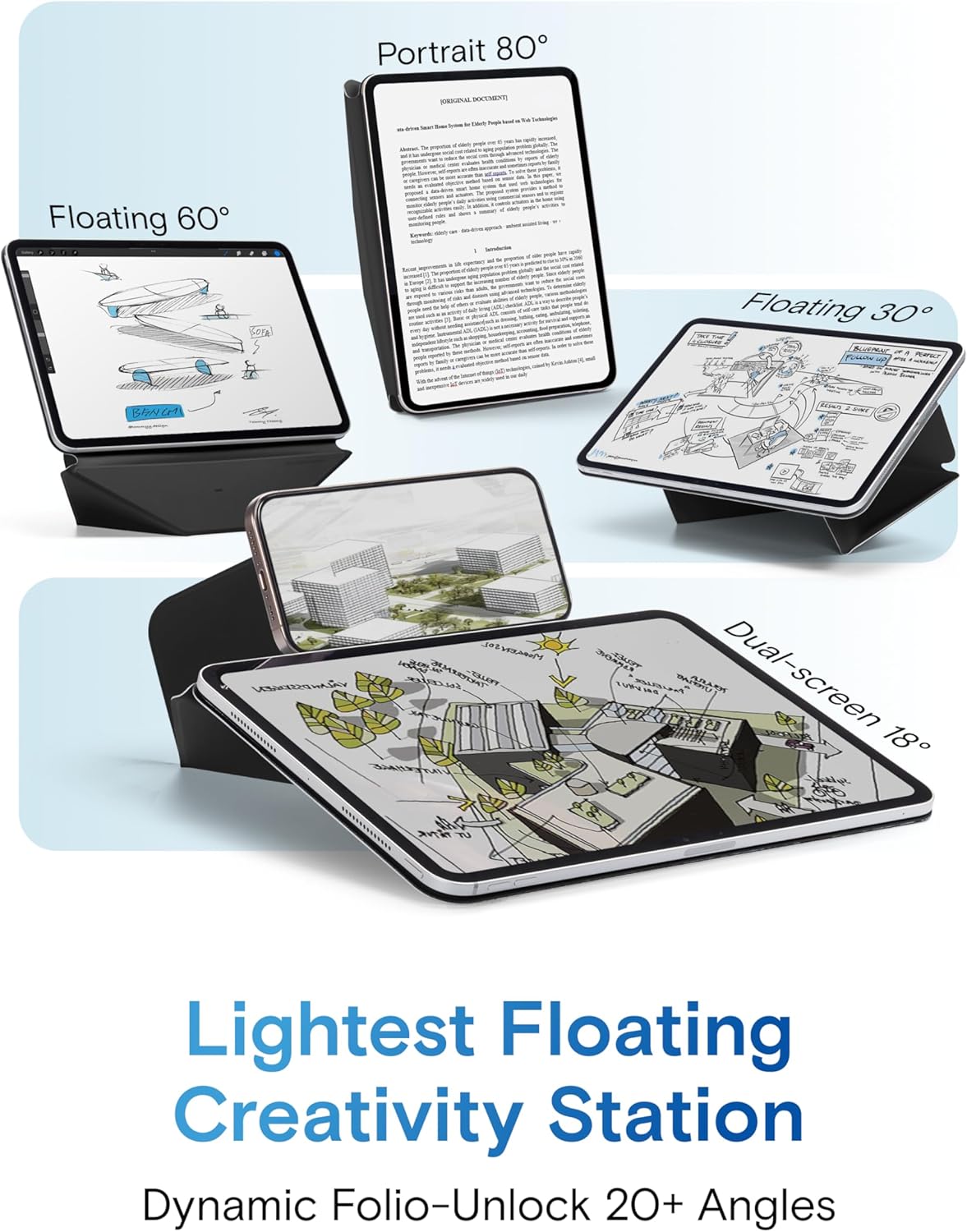
Figure 2.2: Finding the model name through iPad settings.
3. Setup and Installation
The MOFT Dynamic Folio Case attaches magnetically to your iPad. Ensure your iPad is clean and free of debris before attachment.
- Align the iPad with the back cover of the folio case. The magnets will securely snap the iPad into place.
- Ensure the camera cutout on the folio aligns with your iPad's camera.
How to Set Up the Stand
The folio features an origami-inspired design allowing for various stand configurations. Match the icons on the folio to achieve the desired mode.
Video 3.1: Demonstrates how to set up the MOFT Dynamic Folio Case for various viewing angles, including floating and dual-screen modes.
Video 3.2: Shows the process of unfolding the MOFT Dynamic Folio to achieve different viewing angles and positions.
4. Operating Instructions
4.1 Dynamic Viewing Angles
The Dynamic Folio offers over 20 adjustable angles for various activities. The unique single-piece structure allows for effortless folding into different configurations.
- Floating Modes (30° and 60°): Ideal for creative tasks like drawing, writing, or comfortable viewing. These modes lift the iPad up to 2-3 inches for improved ergonomics.
- Portrait Mode (70°/80°): Suitable for reading, video calls, or vertical content consumption.
- Dual-screen Mode (15°/18°): Allows you to dock your phone alongside your iPad for side-by-side referencing or extended workspace.
- Leg Mount Angle: Provides a stable viewing angle when using the iPad on your lap.

Figure 4.1: Overview of multiple dynamic viewing angles, including floating and portrait modes.

Figure 4.2: Detailed view of 60° and 30° floating modes for different tasks.

Figure 4.3: Examples of efficient dual-screen creation in drawing and study modes.

Figure 4.4: iPad in 80° portrait mode for hands-free use.

Figure 4.5: More experiences to unlock, including leg mount, reading, and typing angles.
4.2 Auto Wake/Sleep Functionality
The folio case supports your iPad's auto wake/sleep feature. Opening the cover will wake your iPad, and closing it will put it to sleep, conserving battery life.
4.3 Magnetic Detachable Pencil Holder (Optional Accessory)
The Modular Pen Holder is an optional accessory that can be attached magnetically to the folio. It securely holds your Apple Pencil and doubles as a ruler.

Figure 4.6: Magnetic detachable pencil holder in use.
5. Maintenance
To maintain the quality and appearance of your MOFT Dynamic Folio Case:
- Wipe the surface with a soft, damp cloth.
- Avoid using harsh chemicals or abrasive cleaners.
- Keep the case away from extreme temperatures and direct sunlight.
6. Troubleshooting
6.1 Weak Magnetic Hold
If you experience insufficient magnetic hold, please ensure the following:
- The iPad model is correctly matched to the case. Different iPad models have varying magnetic attachment points.
- The magnetic surfaces on both the iPad and the folio are clean and free from obstructions.
Important: Avoid actions that may damage your iPad or the folio due to magnetic stress.
Video 6.1: Demonstrates actions that may potentially damage your iPad or compromise the magnetic hold of the folio case.
Video 6.2: MOFT Certified Standard Magnetic Strength Test Method, illustrating proper handling to ensure secure attachment.
7. Specifications
| Feature | Detail |
|---|---|
| Product Dimensions | 14.57 x 9.8 x 0.12 inches |
| Item Weight | 10.3 ounces |
| Item Model Number | MS028-1-11P23 |
| Special Features | Auto Sleep/Wake, Durable MOVAS material, Light and portable, Minimalist design with versatile functionality, Up to 20+ adjustable angles |
| Form Factor | Case |
| Color | Jet Black |
| Compatible Devices | iPad Air 11" (M3 2025/M2 2024) & iPad Air 10.9" (5th 2022/4th 2020) |
| Shell Type | Hybrid |
8. Customer Support
For any questions regarding compatible models, product functionality, or other inquiries, please contact MOFT customer support through the official MOFT website or your retailer's support channels.