1. Introduction
The Yiliaw Star Alarm Clock with Night Light is designed to assist children in developing healthy sleep habits through a combination of visual cues, soothing sounds, and customizable lighting. This multi-functional device serves as a sleep trainer, alarm clock, night light, and sound machine, all housed in a child-safe silicone design. Please read this manual carefully to ensure proper use and to maximize the benefits of your new alarm clock.

Figure 1.1: Overview of the Yiliaw Star Alarm Clock's key features, including dual alarms, white noise, and night light options.
2. Setup
2.1 Package Contents
Before beginning, please verify that all items are present in the package:
- 1x Yiliaw Star Alarm Clock
- 1x USB-C Charging Cable
- 1x User Manual

Figure 2.1: Contents included in the product package.
2.2 Charging the Device
The alarm clock is powered by a built-in rechargeable battery. Before first use, fully charge the device using the provided USB-C cable.
- Connect the USB-C end of the cable to the charging port located at the bottom rear of the alarm clock.
- Connect the USB-A end of the cable to a compatible USB power adapter (not included), computer USB port, or power bank.
- The charging indicator on the display will show charging status. A full charge typically takes a few hours.

Figure 2.2: Connecting the USB-C charging cable to the device.
3. Operating Instructions
3.1 Controls Overview
Familiarize yourself with the buttons and indicators on your alarm clock:

Figure 3.1: Front display and rear control panel layout.

Figure 3.2: Button functions for short and long presses.
3.2 Setting the Time
To set the current time and choose between 12-hour or 24-hour display:
- Long press the Time Setting button (clock icon) to enter time setting mode.
- Use the + and - buttons to adjust the hour. Press the Time Setting button again to move to minutes.
- Adjust minutes using + and -.
- Press the Time Setting button once more to select 12-hour (AM/PM) or 24-hour format. Use + and - to toggle.
- Press the Time Setting button to confirm and exit.

Figure 3.3: 12-hour and 24-hour display options.
3.3 Sleep Training and Alarm Settings
The alarm clock features a gentle sleep training system using color-guided signals:
- Red Light: Indicates bedtime, accompanied by white noise for 30 minutes.
- Yellow Light: Appears 30 minutes before the set wake-up time, mimicking sunrise.
- Green Light: Signals it's time to wake up.

Figure 3.4: Visual cues for sleep training.
Setting Sleep Alarm:
- Long press the Sleep Alarm Setting button (moon icon) to enter sleep alarm setting mode.
- Use + and - to set the desired bedtime hour and minutes.
- Press the Sleep Alarm Setting button to confirm. The clock will display a red light and play white noise at the set time.

Figure 3.5: Sleep alarm with red light and white noise.
Setting Wake-Up Alarm:
- Long press the Wake Up Alarm Setting button (sun icon) to enter wake-up alarm setting mode.
- Use + and - to set the desired wake-up hour and minutes.
- Press the Wake Up Alarm Setting button to confirm. The clock will display a green light at the set time.

Figure 3.6: Wake-up alarm with green light.
Reminder Light (Yellow):
The yellow light will gradually brighten 30 minutes before the set wake-up alarm, gently preparing the child for waking.

Figure 3.7: Reminder light transitioning to wake-up.
3.4 Night Light Function
The alarm clock features a multi-mode night light with adjustable brightness and color options. Tap the body of the alarm clock to cycle through modes:
- Tap once: Warm light (Level 1 brightness).
- Tap twice: Warm light (Level 2 brightness).
- Tap three times: Gradual color-changing mode.
- Tap four or more times: Cycle through 7 fixed colors.
Briefly press the Power On/Off and Night Light button (power icon) to turn the light on or off.

Figure 3.8: Available night light colors.
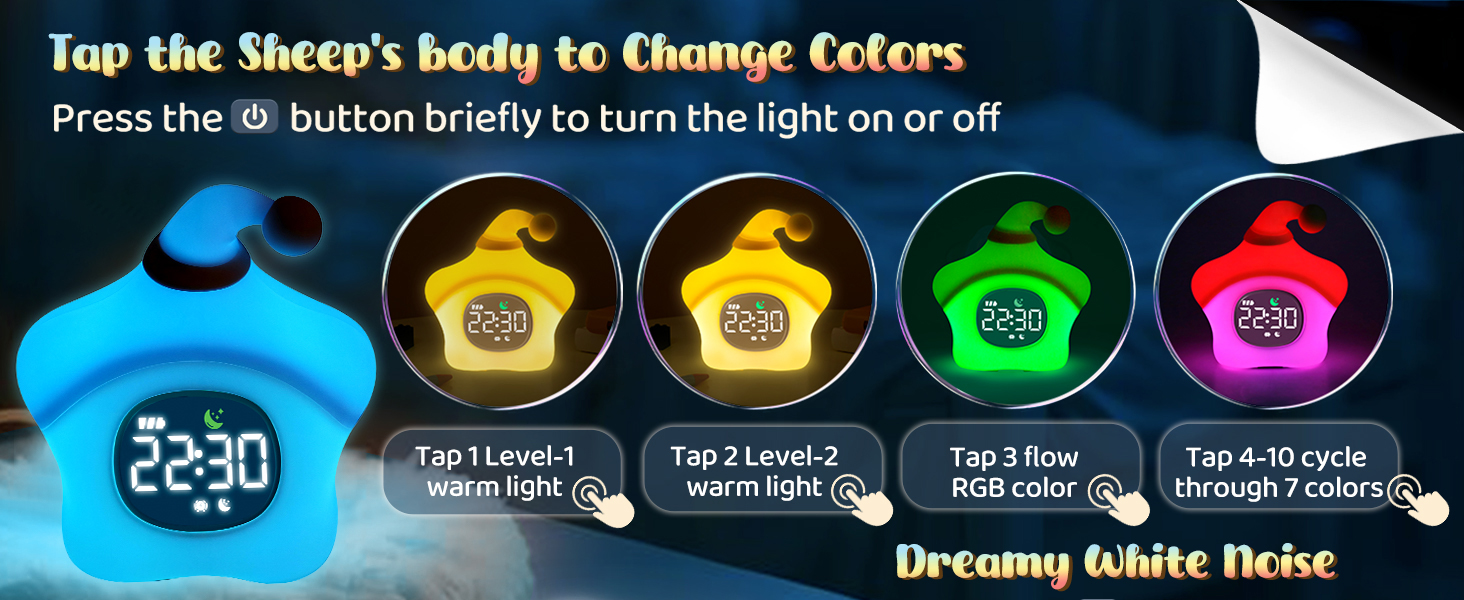
Figure 3.9: Tapping the device to change night light modes.
3.5 Sound Machine (White Noise)
The alarm clock includes six calming nature and ambient sounds to aid sleep:
- Rain
- Ocean
- Thunder
- Birdsong
- Creek
- Wind
There are eight adjustable volume levels for the white noise.
- Short press the White Noise button (music note icon) to cycle through the six white noise sounds.
- Long press the + or - buttons to adjust the volume level (L0 to L8).

Figure 3.10: White noise options and volume control.
3.6 Snooze Function
When the alarm sounds, you can activate the snooze function for an additional five minutes of sleep, up to three times.
- When the alarm rings, simply tap the body of the alarm clock to activate snooze. The alarm will sound again after 5 minutes.
- To turn off the alarm completely, long press any button on the back panel.

Figure 3.11: Activating the snooze function.
3.7 Adjusting Screen Brightness
The display screen brightness can be adjusted to three levels (Low, Med, Hi) for comfortable viewing in various lighting conditions.
- Short press the + or - buttons to cycle through the brightness levels.

Figure 3.12: Screen brightness levels.
4. Maintenance
To ensure the longevity and proper functioning of your Yiliaw Star Alarm Clock, follow these maintenance guidelines:
- Cleaning: Wipe the surface of the alarm clock with a soft, dry cloth. For stubborn marks, a slightly damp cloth can be used, but ensure no moisture enters the charging port or button areas. Do not use abrasive cleaners, solvents, or harsh chemicals.
- Storage: When not in use for extended periods, store the alarm clock in a cool, dry place away from direct sunlight and extreme temperatures.
- Battery Care: To maintain battery health, avoid fully discharging the battery frequently. Recharge the device when the battery indicator is low.
5. Troubleshooting
If you encounter any issues with your alarm clock, please refer to the following common problems and solutions:
| Problem | Possible Cause | Solution |
|---|---|---|
| Device does not turn on. | Battery is depleted. | Connect the alarm clock to a power source using the USB-C cable and allow it to charge for at least 30 minutes before attempting to power on. |
| Alarm does not sound. | Alarm is not set or is turned off. | Ensure the alarm time is correctly set and the alarm is enabled (check the alarm icon on the display). |
| Night light is not working. | Light function is off or battery is low. | Briefly press the power button to turn on the light. Ensure the device is charged. |
| White noise volume is too low/high. | Volume level needs adjustment. | Long press the '+' or '-' buttons to adjust the white noise volume. |
| Display is too bright/dim. | Screen brightness setting. | Short press the '+' or '-' buttons to cycle through the three screen brightness levels. |
6. Specifications
| Feature | Detail |
|---|---|
| Brand | Yiliaw |
| Model | B0F8BR5CBF |
| Color | Yellow |
| Display Type | Digital |
| Power Source | Battery Powered (Rechargeable) |
| Battery Capacity | 2000mAh |
| Product Dimensions | 3.15"W x 5.12"H (Approx. 5.51"L x 3.26"W x 5.43"H based on image) |
| Item Weight | 0.3 Kilograms (10.5 ounces / 219g) |
| Materials | ABS+HIPS+Silicone |
| Special Feature | Cordless, Sleep Training, Sound Machine, Night Light |
7. Warranty and Support
For warranty information and customer support, please refer to the documentation included with your purchase or visit the official Yiliaw website. Keep your purchase receipt as proof of purchase for any warranty claims.
If you require further assistance or have questions not covered in this manual, please contact Yiliaw customer service through the contact information provided on their official channels.