
Introduction
Thank you for choosing the Xyvaly 6.0 CUB Cash Safe. This safe is designed to provide secure storage for your valuables, featuring a drop slot for convenient deposits and a high-security electronic combination lock. Please read this manual thoroughly before installation and operation to ensure proper use and maximum security.
What's Included
Carefully unpack the safe and verify that all components listed below are present. If any items are missing or damaged, please contact customer support.

Figure 1: Included Components. This image displays the Xyvaly 6.0 CUB Cash Safe along with its accessories: English Manual (1), Expansion Bolts (4), Emergency Keys (2), External Power Box (1), Fireproof Bags (1), and Internal Cabinet Keys (2).
- Xyvaly 6.0 CUB Cash Safe (1)
- Instruction Manual (1)
- External Battery Box (1)
- Emergency Keys (4)
- Expansion Screws (4)
Product Overview and Features
The Xyvaly 6.0 CUB Cash Safe is designed for robust security and convenient use in various environments.

Figure 2: Security Features. This image illustrates the safe's security elements including password access, solid steel bolts, key access, and mountable design.
- Dimensions: 14 x 14 x 27.2 inches (Depth x Width x Height).
- Capacity: 6.0 cubic feet, providing ample space for bills, envelopes, cash, documents, and other valuables.
- Drop Slot: Features an anti-fishing baffle to prevent unauthorized retrieval of deposited items.
- Construction: 10mm thick steel door panel and four 26mm diameter live-locking bolts for enhanced security.
- Internal Storage: Includes a lockable inner cabinet for additional hidden protection.
- Door Opening: 120° extra-large opening angle for convenient access to contents.
- Interior: Felt lining protects items from scratches.
- Integrated Handle: Sturdy and durable metal handle.
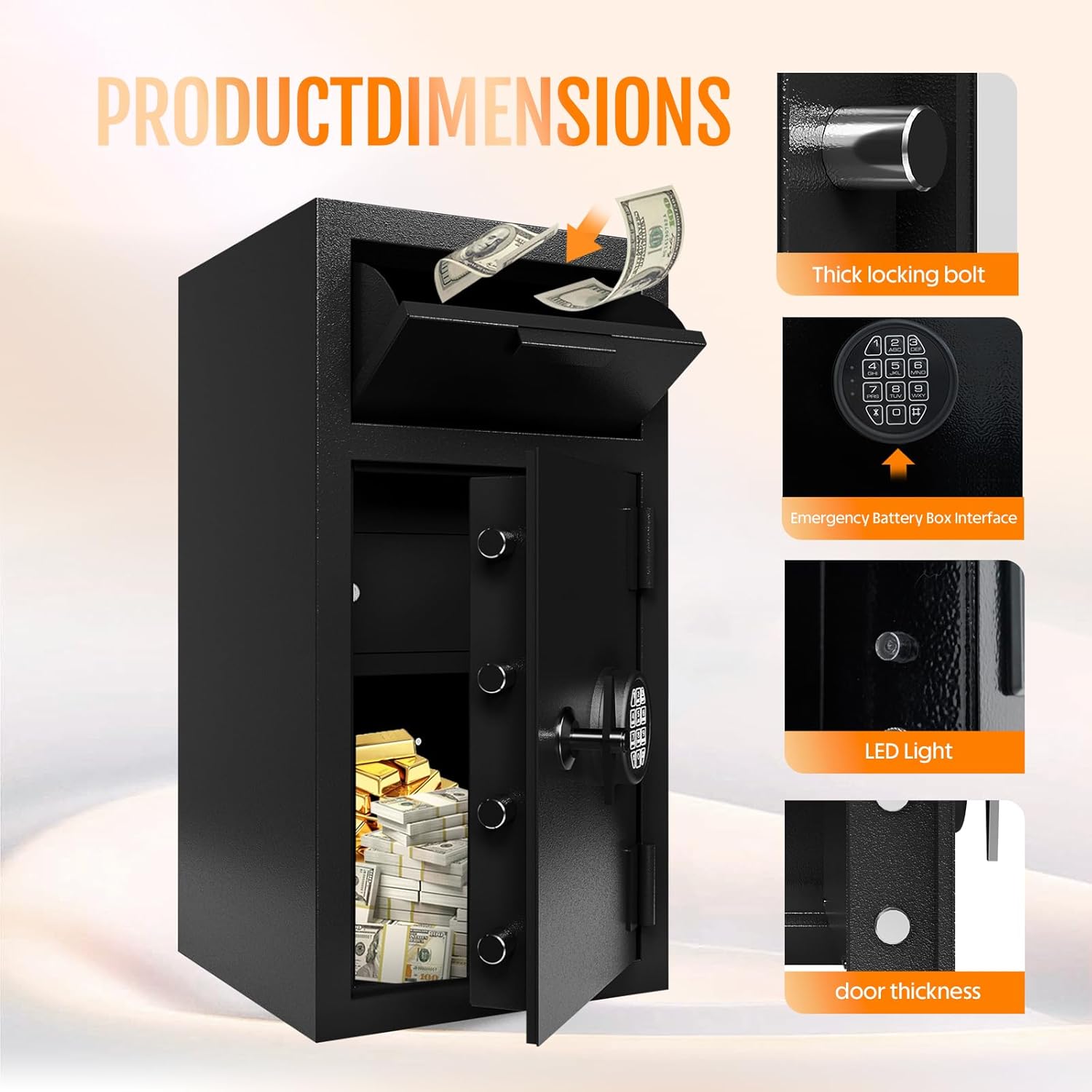
Figure 3: Product Details. This image highlights the safe's dimensions, thick locking bolts, emergency battery box interface, LED light, and door thickness.
Setup and Installation
Battery Installation
- Locate the battery compartment on the inside of the safe door.
- Insert four AA alkaline batteries (not included) according to the polarity markings.
- Ensure the battery cover is securely closed.
Mounting the Safe
The safe can be securely fixed to a wall or floor to prevent unauthorized removal.
- There are four pre-drilled bolt holes on the back of the safe and two on the bottom.
- Position the safe in the desired location.
- Mark the drilling points through the bolt holes onto the wall or floor.
- Drill holes using an appropriate drill bit for your mounting surface.
- Insert the expansion screws into the drilled holes.
- Align the safe with the screws and tighten them securely to fix the safe in place.
Operating Instructions
Opening the Safe
The safe offers two methods for access:

Figure 4: Access Methods. This image shows the electronic keypad for dual PIN code access and the emergency keyhole for traditional key access.
- Using the Electronic Combination Lock:
- Enter your 3 to 8-digit password on the keypad.
- The LED backlight panel will illuminate automatically to assist with password entry.
- If the password is correct, a green light will indicate successful entry.
- Turn the knob to open the safe door.
- Using the Emergency Key:
- This method is for first-time use, forgotten passwords, or low battery situations.
- Locate the emergency keyhole, usually hidden behind a cover on the keypad panel.
- Insert the emergency key and turn it while simultaneously turning the knob to open the safe.
Setting Your Password
Refer to the detailed instructions in the included manual for setting and changing your electronic password. It is recommended to set a master PIN code and up to one user PIN code.
Mute Function
To activate the mute function, press '1' on the keypad. This will silence keypad tones for discreet operation.
Depositing Items via Drop Slot
The top entry drop slot allows for easy and secure deposit of cash, envelopes, and other small items without opening the main safe door. The anti-fishing baffle prevents items from being retrieved once deposited.
Maintenance
- Cleaning: Wipe the exterior of the safe with a soft, damp cloth. Avoid abrasive cleaners.
- Battery Replacement: Replace batteries when the red low battery indicator light appears. Use only AA alkaline batteries.
- Key Storage: Store emergency keys in a secure location away from the safe.
Troubleshooting
Alarm Sounds After Incorrect Password Entry
If an incorrect password is entered three times consecutively, the safe's alarm will sound for 20 seconds.
- Solution: To disarm the alarm, open the safe using the emergency key and remove the batteries. Reinsert the batteries to reset the system.
Safe Not Opening / Keypad Unresponsive
- Check Batteries: Ensure batteries are correctly installed and not depleted. Replace if necessary.
- Use Emergency Key: If the keypad remains unresponsive, use the emergency key to open the safe.
Battery Cover Falling Off
If the internal battery cover detaches, potentially causing the lock to stop working, ensure the safe door is closed gently.
- Solution: Reattach the battery cover firmly. If the lock has stopped working, use the emergency key to open the safe and re-secure the battery cover.
Specifications
| Brand | Xyvaly |
| Model Number | 690 |
| Product Dimensions (D x W x H) | 35.6D x 35.6W x 69.1H centimetres (14 x 14 x 27.2 inches) |
| Capacity | 6 Cubic Feet |
| Item Weight | 28.4 kg |
| Material | Alloy Steel |
| Colour | Black |
| Lock Type | Electronic Combination Lock, Key |
| Mounting Type | Floor Mount, Wall Mount |
| Special Features | Alarm System, Anti-Theft, Combination Lock, Fireproof, Sensor Light |
| Alarm | Password error alarm & Vibration alarm |
| Water Resistance Level | Water Resistant |
Warranty and Support
Xyvaly products undergo strict production and testing to ensure quality. For any questions regarding your safe, please contact our customer support team. We are available to provide professional pre-sales consultation and prompt after-sales assistance.
Please refer to your purchase documentation for specific warranty terms and contact information.