1. Important Safety Information
Please read and understand all safety instructions before assembly and use. Failure to follow these instructions may result in injury or damage to the product.
- Always follow the assembly instructions carefully to avoid injury.
- Keep electrical components away from water and never leave them unattended while in use.
- Do not exceed the weight limit of the vanity to prevent damage or injury.
- For any safety concerns, please contact the seller.
- Ensure all connections are secure before using the electrical outlets.
2. Package Contents
Verify that all components are present and undamaged before beginning assembly. Refer to the detailed parts list provided in your physical instruction manual.
- Vanity Desk Components (panels, drawers, shelves)
- Mirror with 12 LED Bulbs
- Vanity Stool
- Power Outlet Unit (2 AC outlets, 2 USB ports)
- Hair Dryer Stand
- Assembly Hardware (screws, dowels, cam locks, etc.)
- Assembly Tools (basic wrench, screwdriver)
- Instruction Manual

Image: Overview of the Yanosaku Vanity Desk with its accompanying stool.
3. Assembly Instructions
Assembly is required for this vanity desk. It is recommended to follow the step-by-step instructions provided in the physical manual included with your product. Lay out all parts and hardware before starting. Two people are recommended for assembly.
- Unpack and Identify: Carefully unpack all components and compare them against the parts list in the manual.
- Assemble Base Structure: Begin by assembling the main frame of the vanity desk, including the side panels and central support.
- Install Drawers: Assemble each of the 11 drawers according to the instructions and install them into their respective slots.
- Attach Top Panel and Mirror: Secure the tabletop and then attach the mirror unit, ensuring all electrical connections for the lights are properly routed.
- Install Shelves and Accessories: Attach the 4 shelves, fold-up panel, power outlet unit, and hair dryer stand.
- Assemble Stool: Put together the vanity stool.

Image: Diagram showing the overall dimensions of the vanity desk and stool.
4. Operating Instructions
4.1 LED Lighting System
The vanity mirror is equipped with 12 LED Hollywood-style bulbs offering three color lighting modes and adjustable brightness.
- Power On/Off: Press the power button on the mirror frame to turn the lights on or off.
- Change Color Mode: Short press the 'M' button to cycle through the three color modes: Warm, Natural, and Cool.
- Adjust Brightness: Long press the power button to increase or decrease the brightness of the lights. Release when the desired brightness is reached.

Image: Visual representation of the three distinct lighting modes (Cold White, Warm White, Warm Yellow) available on the vanity mirror.
4.2 Power Outlet and USB Ports
The integrated charging station provides convenient access to power for your electronic devices.
- AC Outlets: Plug in hair dryers, curling irons, or other small appliances into the two standard 125V/12A AC outlets.
- USB Ports: Use the two 5V/2A USB ports to charge mobile phones, tablets, or other USB-powered devices.
- Ensure the vanity desk is properly connected to a wall outlet for the charging station to function.

Image: Close-up of the built-in power strip, highlighting the AC outlets and USB ports, with a hair dryer in its dedicated holder.
4.3 Fold-up Panel
The vanity features a foldable side panel to expand your workspace when needed.
- To Expand: Gently lift the fold-up panel and extend the support bracket underneath until it locks into place.
- To Fold: Release the support bracket and carefully lower the panel back into its compact position.

Image: Illustration showing the vanity's side panel in its expanded state for additional space and folded state for compactness.
4.4 Storage Drawers and Shelves
Utilize the 11 drawers and 4 shelves for organized storage of cosmetics, accessories, and other items.
- The drawers feature smooth gliding mechanisms for easy access.
- The embedded tempered glass tabletop allows for visible storage in the top central drawers, making items easily locatable.
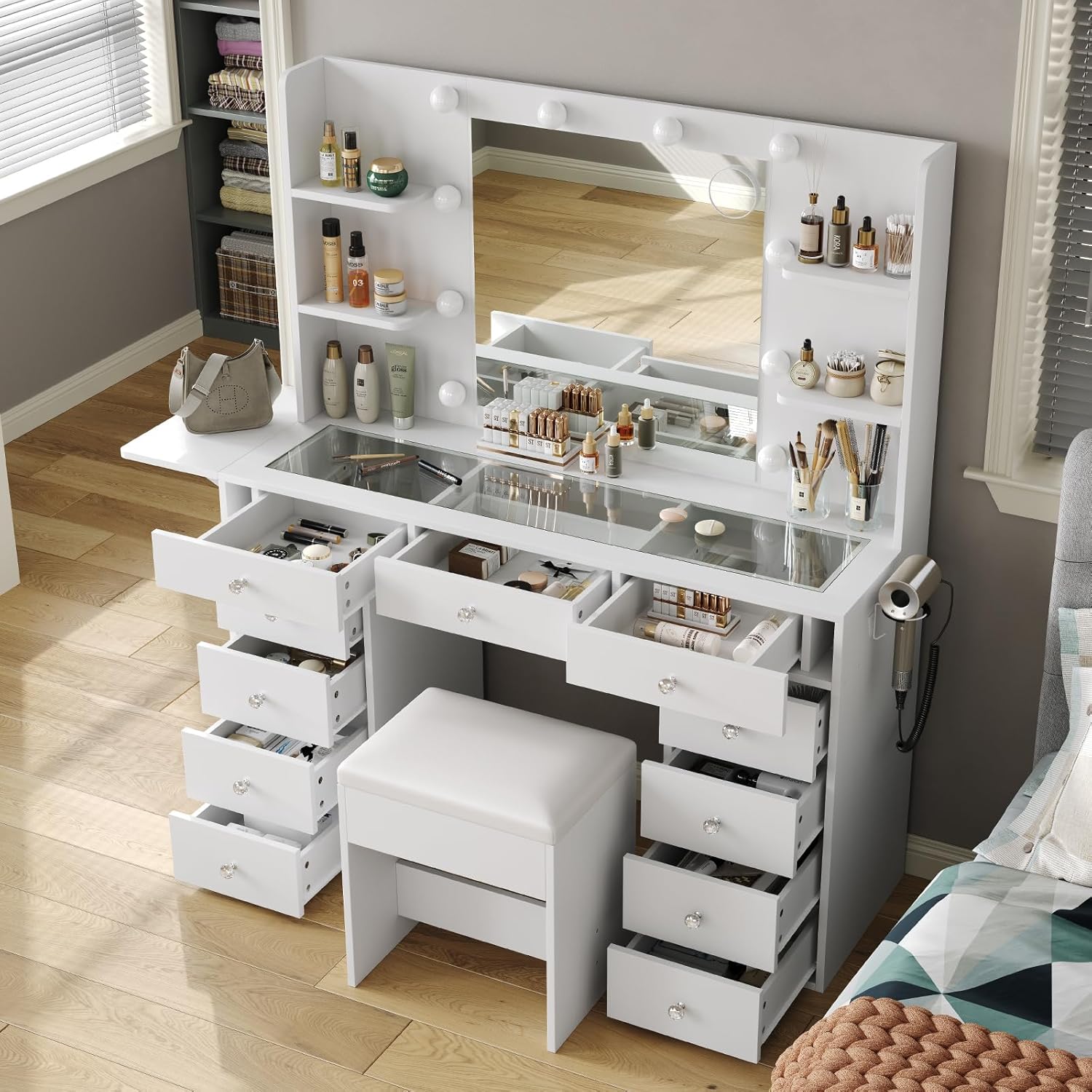
Image: An aerial view of the vanity desk with several drawers pulled open, demonstrating the extensive storage capacity.

Image: Close-up of the embedded tempered glass tabletop, providing a clear view of cosmetics and accessories stored in the drawers beneath.
5. Maintenance
5.1 Cleaning
- Wood Surfaces: Wipe with a soft, damp cloth. Avoid harsh chemicals or abrasive cleaners that may damage the finish.
- Mirror: Use a standard glass cleaner and a lint-free cloth.
- LED Bulbs: Dust gently with a dry, soft cloth. Do not use liquid cleaners directly on the bulbs or electrical components.
- Glass Top: Clean with glass cleaner. The tempered glass is designed to be anti-scalding and easy to clean.
5.2 General Care
- Periodically check all screws and fasteners to ensure they are tight. Retighten as necessary.
- Avoid placing hot items directly on the surface without protection.
- Keep the vanity away from direct sunlight and excessive moisture to prevent warping or discoloration.
6. Troubleshooting
| Problem | Possible Cause | Solution |
|---|---|---|
| LED lights not working | 1. Power cable not connected 2. Loose connection to LED controller 3. Faulty bulb or controller | 1. Ensure power cable is securely plugged into wall outlet and vanity. 2. Check connections to the LED controller and mirror. 3. Contact customer support for replacement parts if necessary. |
| Power outlets/USB ports not working | 1. Vanity not plugged in 2. Overload on circuit | 1. Verify the main power cord is securely plugged into a functional wall outlet. 2. Unplug some devices to reduce load. If issue persists, contact customer support. |
| Drawers do not slide smoothly | 1. Improper assembly of drawer slides 2. Obstruction in drawer track | 1. Review assembly instructions for drawer slide installation. Ensure they are aligned correctly. 2. Remove any objects obstructing the drawer tracks. |
| Fold-up panel does not stay extended | Support bracket not locked | Ensure the support bracket is fully extended and locked into its designated position. |
If you encounter any issues not listed here, or if the suggested solutions do not resolve the problem, please contact Yanosaku customer support for assistance.
7. Specifications
| Feature | Detail |
|---|---|
| Model Number | VD010-WH |
| Dimensions (Overall) | 47 inches (Width) x 54 inches (Height) x 15.7 inches (Depth) |
| Material | Engineered Wood |
| Color | White |
| LED Lights | 12 Hollywood-style bulbs, 3 color modes (Warm/Natural/Cool), adjustable brightness |
| Power Outlet | 2 x 125V/12A AC Outlets |
| USB Ports | 2 x 5V/2A USB Ports |
| Storage | 11 Drawers, 4 Shelves |
| Special Features | Fold-up Panel, Embedded Tempered Glass Tabletop, Hair Dryer Stand |
| Assembly Required | Yes |
| Item Weight | 140 pounds |
8. Warranty and Support
Yanosaku stands behind the quality of its products. For warranty information, replacement parts, or technical support, please refer to the contact details provided in your product packaging or reach out to the seller directly through the platform of purchase.
When contacting support, please have your model number (VD010-WH) and purchase date readily available.


