
1. Product Overview
The Carlett Pack Classic Family Shopping Cart is designed for convenience and efficiency in transporting groceries and other items. It features a robust frame, a large capacity bag, and a versatile wheel system for easy maneuverability. Its foldable design ensures compact storage when not in use.
Key Features:
- Adjustable handlebar for ergonomic comfort.
- 4-wheel system, convertible to 2 wheels for varied terrain.
- 360° swivel front wheels for enhanced maneuverability.
- Foldable and compact design for easy storage.
- Rear wheel brake for stability and safety.
- Large 64-liter main bag capacity with a 32 kg maximum load.
- Includes a 12-liter insulated bag, side net, and rear pocket.
- Gift hook with Velcro attachment for additional bags.
2. Setup and Assembly
Your Carlett Pack Classic Family Shopping Cart comes largely pre-assembled. Follow these steps to prepare it for use:
2.1 Unfolding the Cart
- Place the cart on a flat, stable surface.
- Gently pull the handlebar upwards until the frame locks into its open position. Ensure all locking mechanisms are securely engaged.
2.2 Attaching the Wheels (if detached)
The wheels are designed for easy attachment and removal for compact storage.
- Locate the wheel axles on the cart frame.
- Align each wheel with its corresponding axle.
- Push firmly until you hear a click, indicating the wheel is securely locked in place. Gently pull on the wheel to confirm it is attached.
2.3 Attaching the Main Bag
- Unfold the main bag.
- Secure the bag to the cart frame using the integrated straps or clips provided. Ensure the bag is stable and properly aligned.
2.4 Attaching the Gift Hook
The included gift hook can be attached to the handlebar for extra convenience.
- Wrap the Velcro strap of the gift hook around the cart's handlebar.
- Press the Velcro firmly to secure the hook in place.
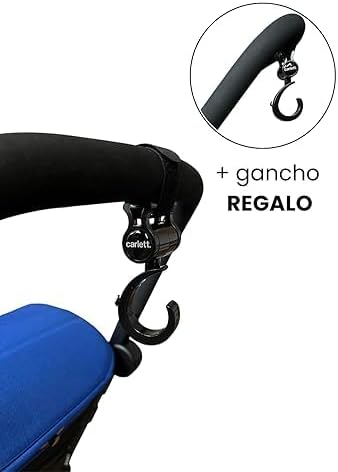
Image: The gift hook attached to the handlebar, ready for use.
3. Operating Instructions
3.1 Adjusting the Handlebar
The handlebar height can be adjusted to suit your preference for comfortable pushing.
- Locate the adjustment buttons or levers on the side of the handlebar.
- Press the buttons or release the levers and slide the handlebar to the desired height.
- Ensure the handlebar locks securely into position before use.
3.2 Using the 4-Wheel and 2-Wheel Modes
The cart can be used with four wheels for stability or converted to two wheels for easier navigation over curbs or stairs.
- 4-Wheel Mode: All four wheels are on the ground, providing maximum stability and easy pushing. The front wheels swivel 360° for effortless steering.
- 2-Wheel Mode: To engage 2-wheel mode, tilt the cart backward, lifting the front wheels off the ground. This mode is useful for pulling the cart up steps or over uneven surfaces.

Image: The shopping cart in its upright, 4-wheel configuration.
3.3 Engaging the Rear Wheel Brake
The rear wheel brake provides stability when you need to stop the cart on an incline or keep it stationary.
- To engage the brake, press down on the brake lever located near the rear wheels.
- To release, lift the brake lever.
- Always ensure the brake is fully engaged or disengaged.
3.4 Loading and Using Storage Compartments
- Main Bag (64L): Place your items inside the main compartment. Do not exceed the maximum load capacity of 32 kg. Use the adjustable strap closure to secure the bag's opening.
- Insulated Bag (12L): Use this separate compartment for temperature-sensitive items.
- Side Net & Rear Pocket: These are suitable for smaller items, personal belongings, or frequently accessed items.

Image: Rear view of the cart, highlighting the rear pocket.
3.5 Folding the Cart for Storage
To fold the cart for compact storage:
- Empty the main bag and any other compartments.
- Release any locking mechanisms on the frame that keep it in the open position.
- Push the handlebar downwards and the base upwards until the cart folds flat.
- If desired, the wheels and bag can be removed for even more compact storage.

Image: The shopping cart shown in its folded configuration for storage.
4. Maintenance
Regular maintenance will prolong the life of your Carlett shopping cart.
4.1 Cleaning
- Frame: Wipe the metal frame with a damp cloth and mild detergent. Dry thoroughly to prevent rust.
- Bag: The fabric bag can be spot cleaned with a damp cloth and mild soap. Allow it to air dry completely before folding or storing. Do not machine wash or tumble dry.
- Wheels: Periodically clean debris from the wheels and axles to ensure smooth operation.
4.2 Storage
Store the cart in a dry, cool place away from direct sunlight and extreme temperatures. Ensure it is clean and dry before storing to prevent mold or corrosion.
5. Troubleshooting
If you encounter issues with your shopping cart, refer to the following common problems and solutions:
| Problem | Possible Cause | Solution |
|---|---|---|
| Cart does not fold/unfold smoothly. | Locking mechanisms are stuck or obstructed. | Check for any debris or obstructions. Ensure all release levers/buttons are fully engaged. Apply a small amount of silicone lubricant to moving parts if necessary. |
| Wheels are stiff or not swiveling. | Debris caught in wheels or axles. | Remove any hair, dirt, or debris from around the wheels and axles. Clean thoroughly. |
| Rear brake is not holding. | Brake mechanism is misaligned or worn. | Ensure the brake lever is fully depressed. Check for any visible damage to the brake pads or mechanism. If the issue persists, contact customer support. |
| Bag is unstable on the frame. | Bag not properly attached or overloaded. | Ensure all bag straps/clips are securely fastened to the frame. Do not exceed the maximum weight limit of 32 kg. Distribute weight evenly. |
6. Specifications
| Feature | Detail |
|---|---|
| Model Number | LETT470-C7+H |
| Product Dimensions (L x W x H) | 100 x 100 x 100 cm |
| Item Weight | 6.16 kg |
| Brand | Carlett |
| Material (Frame) | Alloy Steel |
| Material (Wheels) | Metal and Rubber |
| Color (Variant) | Denim |
| Special Features | Foldable and compact, 360° swivel, Rear brake, Gift hook |
| Recommended Uses | Shopping |
| Handle Material | Plastic |
| Number of Wheels | 4 |
| Weight Limit | 32 Kilograms |
| Assembly Required | No (minimal setup) |
| Bag Volume | 64 Liters |
| Insulated Bag Volume | 12 Liters |
| Country of Origin | Spain |
7. Warranty and Support
For warranty information, please refer to the documentation provided with your purchase or contact your retailer. For further assistance or support, please reach out to Carlett customer service through their official website or the contact information provided in your product packaging.