
VINABTY ERF6A66
Contents
VINABTY ERF6A66 Replacement Remote Control User Manual
For Hisense ULED and ULED X Series TVs
1. Introduction
This manual provides detailed instructions for the VINABTY ERF6A66 Replacement Remote Control, designed as a direct substitute for original Hisense ERF6A66 remotes. It is compatible with a wide range of Hisense ULED and ULED X series televisions, offering seamless control and enhanced features like voice search and solar charging capabilities. This remote is an ideal replacement for damaged or lost original units, ensuring continued functionality of your television.

Figure 1.1: VINABTY ERF6A66 Replacement Remote Control
2. Product Overview
The ERF6A66 remote control features a comfortable design with clearly labeled buttons for intuitive operation. It incorporates a solar charging panel for convenience and a USB-C port for alternative charging. Key features include dedicated app buttons, voice search functionality, and standard TV controls.
2.1. Remote Control Layout
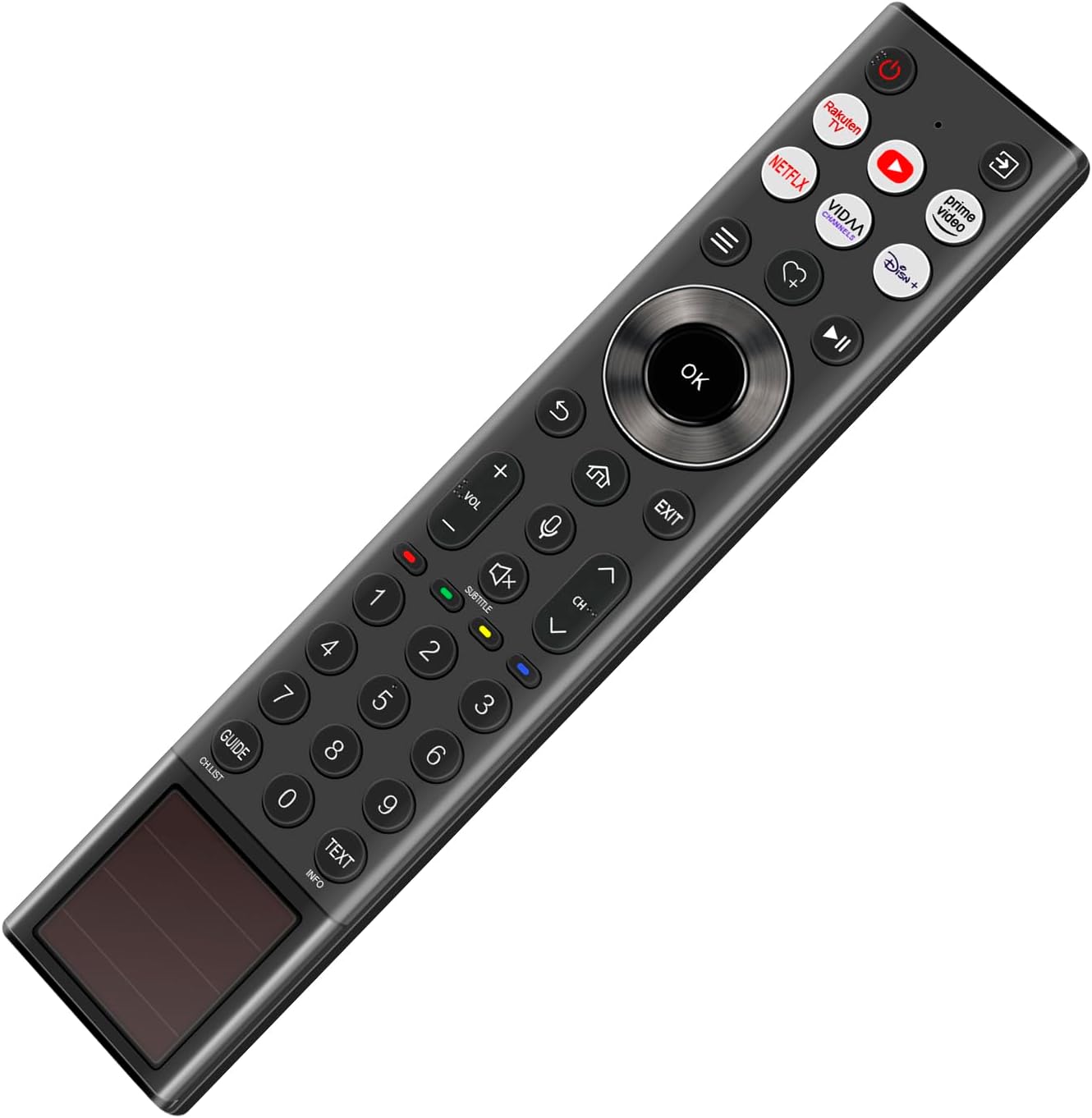
Figure 2.1: Angled view of the remote control highlighting button placement.
2.2. Special Features
- Voice Search: Activate voice commands for easy content discovery.
- Solar Charging: Integrated solar panel for eco-friendly power replenishment.
- Dedicated App Buttons: Quick access to popular streaming services like Netflix, YouTube, Prime Video, VIDAA, and Disney+.

Figure 2.2: Detail of the voice control button.

Figure 2.3: Side view with USB-C port and solar panel detail.
3. Setup
The VINABTY ERF6A66 remote control is designed for easy setup. It does not require traditional battery installation as it features a built-in rechargeable battery with solar charging capabilities. For initial use or if the remote is unresponsive, ensure it is adequately charged.
3.1. Initial Charging
Place the remote control with the solar panel facing a light source (natural sunlight or strong indoor light) to allow it to charge. For faster charging, you may use the USB-C port located on the side of the remote.
3.2. Pairing with Your TV
After powering on your Hisense TV, you will need to pair the remote control. The exact pairing procedure may vary slightly depending on your TV model. Generally, you can follow these steps:
- Ensure your TV is turned on.
- Press and hold the OK button and the Back button (usually the curved arrow) simultaneously for a few seconds until a pairing message appears on your TV screen.
- Follow any on-screen prompts to complete the pairing process.
- Once paired, the remote control should function normally.
If you encounter issues, refer to your Hisense TV's user manual for specific remote pairing instructions.
4. Operating Instructions
The ERF6A66 remote control provides full functionality for your Hisense TV. Below are common operations:
- Power Button: Turns the TV on or off.
- Navigation Pad (Directional Buttons & OK): Use the up, down, left, right arrows to navigate menus and the OK button to confirm selections.
- Volume +/-: Adjusts the volume level.
- Channel +/-: Changes TV channels.
- Mute Button: Mutes or unmutes the TV audio.
- Back Button: Returns to the previous screen or menu.
- Home Button: Accesses the TV's home screen or smart hub.
- Exit Button: Exits the current menu or application.
- Voice Button: Activates the voice search feature (requires TV to be connected to the internet and voice assistant enabled).
- Number Buttons (0-9): For direct channel input or numerical selections.
- App Buttons: Directly launch pre-programmed streaming applications.
5. Maintenance
Proper care and maintenance will extend the lifespan of your remote control.
- Cleaning: Use a soft, dry cloth to wipe the remote control. Do not use liquid cleaners or abrasive materials.
- Solar Panel Care: Keep the solar panel clean and free from obstructions to ensure efficient charging. Avoid direct, prolonged exposure to intense sunlight when not in use to prevent potential damage.
- Storage: Store the remote in a cool, dry place away from extreme temperatures and direct sunlight when not in use for extended periods.
- Avoid Drops: While durable, avoid dropping the remote control to prevent internal damage.
6. Troubleshooting
If you experience issues with your remote control, try the following solutions:
- Remote Not Responding:
- Ensure the remote is charged. Place it under light or connect via USB-C.
- Re-pair the remote control with your TV (refer to Section 3.2).
- Ensure there are no obstructions between the remote and the TV's sensor.
- Voice Control Not Working:
- Verify your TV is connected to the internet.
- Check TV settings to ensure the voice assistant feature is enabled.
- Ensure the remote is properly paired.
- Buttons Not Working:
- Clean the remote surface and buttons to remove any dirt or debris.
- If only specific buttons are unresponsive, the remote may require replacement.
If these steps do not resolve the issue, please contact customer support.
7. Specifications
| Feature | Specification |
|---|---|
| Model Number | ERF6A66 |
| Brand | VINABTY |
| Compatible Brand | Hisense |
| Color | Black |
| Connectivity Technology | Bluetooth |
| Controller Type | Button Control |
| Special Features | Voice search, Comfortable design |
| Maximum Range | 10 meters |
| Product Dimensions | 18 x 7 x 1 cm |
| Product Weight | 60 grams |
| Maximum Supported Devices | 1 |
| First Available Date | May 17, 2025 |
7.1. Compatible Models
This remote control is compatible with numerous Hisense TV models, including but not limited to:
- 100E77NQ PRO A234806, 100E77NQ PRO A23500U, 100E79NQ PRO A234806
- 100E7NQ PRO A234806, 100E7NQ PRO A235210, 100E7NQ PRO A235211
- 100E7NQ PRO A240110, 100E7NQ PRO A24203U, 100E7NQ PRO V24030Q
- 100L5NDA2438Z1, 110UXNQA242733, 120L5NDA24438Z0
- 55S7NQA24203V, 55S7NQA24290U, 55S7NQA24380Q
- 55U72NQA23400F, 55U79NQA23400F, 55U7NQ A23400F
- 55U7NQ A2774047G, 55U7NQA24321N, 55U7NQA24361L
- 55U7NQV23450U, 55U7NQV23490X, 55U7NQV24031Q, 55U7NQV24046B
- 65U72NQ A23390Y, 65U79NQ A23390Y, 65U7NQA23390Y
- 65U7NQA24047K, 65U7NQA241406, 65U7NQA24361K, 65U7NQA243715
- 65U7NQV235034, 65U7NQV23523L, 65U7NQV240471
- 65U8NQ A23450H, 65U8NQA24047B, 65U8NQA240534, 65U8NQA24093C
- 65U8NQA241408, 65U8NQV240329, 65U8NQV24047R
- 75U72NQA23450J, 75U79NQA23450J, 75U7NQ A23450J
- 75U7NQA24045B, 75U7NQA240476, 75U7NQA24130J
- 75U7NQV235036, 75U7NQV23521S, 75U7NQV24047F
- 75U8NQA23461D, 75U8NQA24044F, 75U8NQ A240463
- 75U8NQA240532, 75U8NQA24093D, 75U8NQA241327
- 85U7NQA2440132U, 85U7NQA241714, 85UXNQA241904
- A23450HH, PX3A2404Z1, PX3 A2404Z4, V23464P
8. Warranty and Support
We are committed to providing high-quality products and excellent customer service. If you encounter any issues with your VINABTY ERF6A66 Replacement Remote Control or our service, please do not hesitate to contact us. We guarantee a satisfactory response within 24 hours to address your concerns.
Ask a question about this manual
Ask about setup, troubleshooting, compatibility, parts, safety, or missing instructions. Manuals+ will review the question and use this page’s manual context to help answer it.