
1. Introduction
Thank you for choosing the Consciot CL1 Mini Dual Light Sources LED Lantern. This versatile, battery-powered lamp is designed for various indoor and outdoor applications, offering both functional illumination and ambient lighting. Its retro design, dual light sources, and stepless dimming capabilities make it an ideal companion for camping, reading, or creating a cozy atmosphere.
The CL1 lantern features two distinct light sources: a 6500K LED SMD for cool white light and a 2700K LED Filament for warm white light. Brightness and color temperature are adjustable via a single rotary knob. Built with durable materials, it is IPX4 water-resistant and shockproof up to 1 meter, ensuring reliable performance in diverse conditions.

Figure 1: Consciot CL1 LED Lantern highlighting its features: 2 LED sources (2700K & 6500K), maximum 265 lumens, 15-meter beam distance, and up to 200 hours runtime on low setting.
2. Setup
2.1 Battery Installation
The Consciot CL1 lantern requires 3 AA batteries (not included). For optimal performance and extended use, we recommend using high-quality alkaline or 1.2V rechargeable AA batteries.
- Locate the battery compartment cover at the bottom of the lantern.
- Twist the cover counter-clockwise to unlock and remove it.
- Insert 3 AA batteries, ensuring correct polarity (+/-) as indicated inside the compartment.
- Replace the battery compartment cover and twist it clockwise to secure.

Figure 2: Proper battery installation in the CL1 lantern's base.
3. Operating Instructions
The CL1 lantern features a single rotary knob for all lighting controls.
3.1 Power On/Off and Brightness Adjustment
- To turn the lantern on, rotate the knob clockwise from the 'off' position.
- Continue rotating the knob clockwise to progressively increase the brightness.
- To decrease brightness, rotate the knob counter-clockwise.
- To turn the lantern off, rotate the knob fully counter-clockwise until it clicks into the 'off' position.
3.2 Switching Light Sources (Color Temperature)
The CL1 lantern offers two light sources: Warm White (2700K LED Filament) and Cool White (6500K LED SMD). The light source switches automatically as you adjust the brightness via the rotary knob.
- When rotating the knob clockwise from the 'off' position, the lantern will first illuminate with Warm White (2700K) light. Continue rotating to increase its brightness.
- As you continue rotating the knob clockwise past a certain point (approximately halfway through the dimming range), the light source will transition to Cool White (6500K), and its brightness will then increase.
- Rotating the knob counter-clockwise will reverse this process, decreasing the cool white brightness, then transitioning to warm white, and finally decreasing its brightness until off.
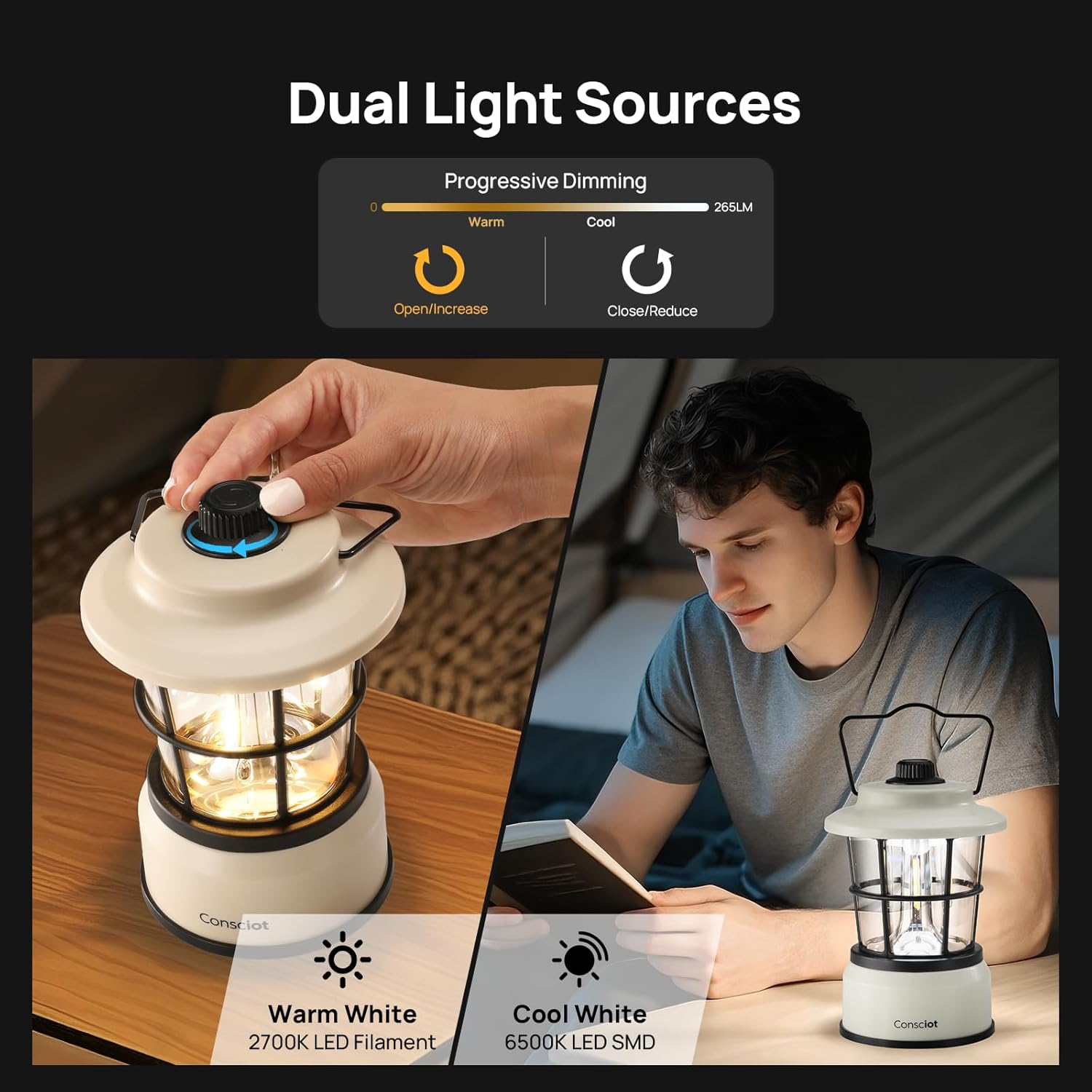
Figure 3: Adjusting brightness and switching between warm white and cool white light using the rotary knob.
Video 1: Demonstration of how to use the Consciot CL1 Dual-light LED Lantern, including power on/off, brightness adjustment, and switching between warm and cool light modes.
4. Maintenance
4.1 Cleaning
To clean the lantern, wipe its exterior with a soft, damp cloth. Do not use abrasive cleaners, solvents, or immerse the lantern in water. Ensure the battery compartment is sealed before cleaning.
4.2 Battery Care
If the lantern will not be used for an extended period, remove the batteries to prevent leakage and potential damage to the device.
4.3 Storage
Store the lantern in a cool, dry place away from direct sunlight and extreme temperatures.
5. Troubleshooting
| Problem | Possible Cause | Solution |
|---|---|---|
| Lantern does not turn on. | Batteries are depleted or incorrectly installed. | Replace batteries with new ones, ensuring correct polarity. |
| Light is dim or flickers. | Low battery power. | Replace batteries. |
| Cannot switch between light colors. | Rotary knob not turned far enough. | Ensure the rotary knob is turned past the halfway point to engage the second light source. |
| Water entered the lantern. | Exposure to heavy rain or submersion (beyond IPX4 rating). | Turn off immediately, remove batteries, and allow to dry completely before attempting to use again. If issues persist, contact support. |
6. Specifications
| Feature | Detail |
|---|---|
| Model Number | CL1 |
| Light Source Type | LED (Light Emitting Diode) |
| Number of Light Sources | 2 (6500K LED SMD, 2700K LED Filament) |
| Color Temperature | 2700 Kelvin (Warm White), 6500 Kelvin (Cool White) |
| Light Source Special Features | Adjustable Brightness, Dimmable, Color Temperature Adjustable |
| Power Source | Battery Powered |
| Battery Type | 3 AA batteries (not included) |
| Battery Compatibility | Compatible with 1.2V rechargeable batteries |
| Battery Life | Up to 200 hours (warm white low mode), 4.5 hours (cool white high mode) |
| Material | Acrylonitrile Butadiene Styrene (ABS), Polycarbonate (PC) |
| Water Resistance Level | IPX4 Water Resistant |
| Shockproof | Up to 1 meter drops |
| Item Dimensions (L x W x H) | 4.33"L x 4.33"W x 6.5"H |
| Item Weight | 0.65 kg (without batteries) |
| Mounting Type | Tabletop Mount, Hanging (via handle) |
| Included Components | 1* LED Lantern (Batteries Not Included), 1* User Manual |
7. Warranty & Support
7.1 Manufacturer Warranty
The Consciot CL1 Mini Dual Light Sources LED Lantern comes with a 2-year manufacturer's warranty from the date of purchase. This warranty covers defects in materials and workmanship under normal use.
7.2 Customer Support
Should you experience any issues with your Consciot CL1 lantern or have questions regarding its operation, please do not hesitate to contact our customer support team. We are committed to providing high-quality products and excellent service.
Please refer to your purchase documentation or the Consciot brand store on Amazon for specific contact details.


