
1. Introduction
This manual provides detailed instructions for the XINFUTE Universal TV Remote Control, model JH06B86W21TY05MS. This remote is designed for compatibility with various LED Android Voice TVs, including brands such as TCL, Master-G, Sansui, and Daewoo. Please read this manual carefully before use to ensure proper operation and to maximize your viewing experience.
The remote control is constructed from durable ABS material and is intended as a direct replacement or compatible unit for the specified TV models.
2. Product Overview
2.1 Package Contents
- 1 x XINFUTE Universal TV Remote Control
- Note: Batteries are not included.
2.2 Remote Control Layout
Familiarize yourself with the buttons and their functions on your new remote control.

Image 1: Front view of the XINFUTE Universal TV Remote Control, showing all buttons including Power, Mute, Home, Menu, Navigation (Up, Down, Left, Right, OK), Back, Volume, Google Assistant, Smart, Settings, Netflix, YouTube, Prime Video, and Tikilive.
- Power Button: Turns the TV on or off.
- Mute Button: Mutes or unmutes the TV audio.
- Home Button: Navigates to the TV's home screen.
- Menu Button: Accesses the TV's main menu or settings.
- Navigation Buttons (Up, Down, Left, Right): Used to move through menus and selections.
- OK Button: Confirms a selection.
- Back Button: Returns to the previous screen or menu.
- Volume Up/Down: Adjusts the TV's volume.
- Google Assistant Button: Activates voice control for commands and searches.
- Smart Button: Accesses smart TV features or a customizable shortcut.
- Settings Button: Opens the TV's settings menu.
- Dedicated App Buttons (Netflix, YouTube, Prime Video, Tikilive): Provides quick access to these streaming applications.
3. Setup
3.1 Installing Batteries
The remote control requires two (2) AAA batteries (not included) for operation.
- Locate the battery compartment on the back of the remote control.
- Slide the battery compartment cover downwards or press the latch and lift to open.
- Insert two AAA batteries, ensuring the positive (+) and negative (-) terminals align correctly with the markings inside the compartment.
- Replace the battery compartment cover, ensuring it clicks securely into place.
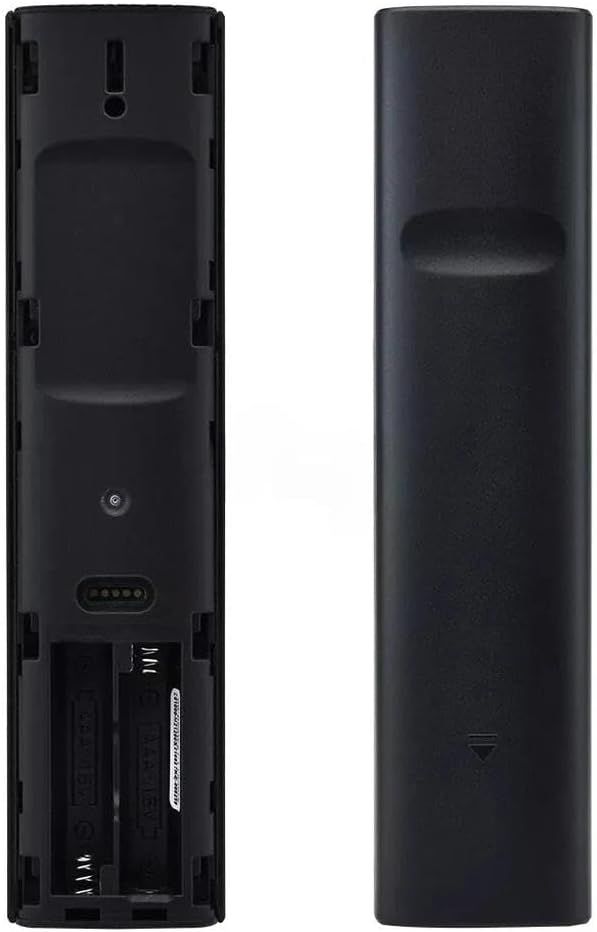
Image 2: Back view of the remote control with the battery compartment open, showing the slots for two AAA batteries.
3.2 Initial Use
Once batteries are installed, the remote control is generally ready for use with compatible TCL, Master-G, Sansui, and Daewoo LED Android Voice TVs. No complex pairing is typically required for basic functions as it operates as a direct replacement unit.
4. Operating Instructions
Point the remote control directly at your television's infrared receiver for optimal performance.
4.1 Basic TV Control
- Press the Power button to turn your TV on or off.
- Use the Volume Up/Down buttons to adjust the sound level.
- Press the Mute button to silence the TV audio.
- Use the Navigation buttons (Up, Down, Left, Right) to browse menus and content.
- Press the OK button to confirm selections.
- The Back button will return you to the previous screen.
4.2 Smart TV and Voice Functions
- Press the Home button to access your TV's main smart hub or home screen.
- Use the Settings button to open the TV's configuration options.
- Press the Google Assistant button and speak into the remote to use voice commands for searching, controlling smart home devices, or asking questions.
- Quickly launch streaming services using the dedicated Netflix, YouTube, Prime Video, and Tikilive buttons.
- The Smart button may provide access to additional smart features or a customizable shortcut depending on your TV model.
5. Troubleshooting
If you encounter issues with your remote control, please refer to the following common solutions:
- Remote not responding:
- Ensure the remote has fresh AAA batteries installed correctly.
- Check for any obstructions between the remote and the TV's infrared sensor.
- Verify that the remote is pointed directly at the TV.
- Specific buttons not working:
- Clean the remote control surface and buttons to remove any dirt or debris that might be interfering.
- If only certain smart app buttons are not working, ensure your TV is connected to the internet and the apps are updated.
- Voice control issues:
- Ensure your TV's voice assistant feature is enabled in its settings.
- Speak clearly and directly into the remote's microphone when pressing the Google Assistant button.
- Check your TV's internet connection, as voice commands often require online processing.
- Remote feels sluggish or intermittent:
- Replace batteries with new ones.
- Ensure no other devices are causing infrared interference.
6. Maintenance
To ensure the longevity and proper functioning of your remote control, follow these maintenance guidelines:
- Cleaning: Wipe the remote control regularly with a soft, dry cloth. For stubborn dirt, slightly dampen the cloth with water or a mild, non-abrasive cleaner. Avoid excessive moisture.
- Battery Replacement: Replace batteries promptly when the remote's performance degrades. Always replace both batteries at the same time with new ones of the same type (AAA).
- Storage: Store the remote in a cool, dry place away from direct sunlight and extreme temperatures.
- Avoid Drops: While made from durable ABS material, avoid dropping the remote control to prevent internal damage.
7. Specifications
| Feature | Specification |
|---|---|
| Model Number | JH06B86W21TY05MS |
| Material | ABS Material |
| Product Dimensions | 6 x 3 x 1 inches |
| Item Weight | 2.82 ounces |
| Batteries Required | 2 x AAA batteries (not included) |
| Special Feature | Ergonomic design |
| Compatible Devices | TCL, Master-G, Sansui, Daewoo LED Android Voice TVs |
| Max Number of Supported Devices | 1 (Television) |
8. Warranty Information
XINFUTE offers a one-year warranty on all purchases of this remote control. This warranty covers manufacturing defects and ensures the product functions as intended under normal use. Please retain your proof of purchase for warranty claims.
9. Customer Support
For any questions, technical assistance, or concerns regarding your XINFUTE Universal TV Remote Control, please contact our customer support team. All products are inspected before shipment to ensure quality. If you are not satisfied with your purchase, please contact us within 24 hours of receipt to discuss potential solutions.
For further support, please visit the XINFUTE Store on Amazon.