
Introduction
Thank you for choosing the UNIWEIGH Digital Hanging Scale, Model UN-ADH. This versatile and durable scale is designed for precise weighing in various environments, from industrial and agricultural settings to household, luggage, fishing, and hunting applications. Its robust construction and user-friendly features ensure reliable performance.
This image compares the compact and lightweight design of the UNIWEIGH scale with a larger, heavier crane scale, emphasizing its portability.
Safety Information
- Avoid strong shock or vibration during operation to ensure accurate readings.
- Do not use corrosive liquids (such as benzene, nitro solvent, or caustic soda) for cleaning. Use a soft cloth with water or a mild cleaner essence.
- If the scale is not in use for an extended period, remove the batteries to prevent leakage and damage.
- Do not disassemble the scale. For non-human fault issues, please contact the manufacturer for service.
Product Overview
The UNIWEIGH Digital Hanging Scale features a high-strength ABS engineering plastic housing and a high-quality stainless steel hook, designed for durability and ease of use.
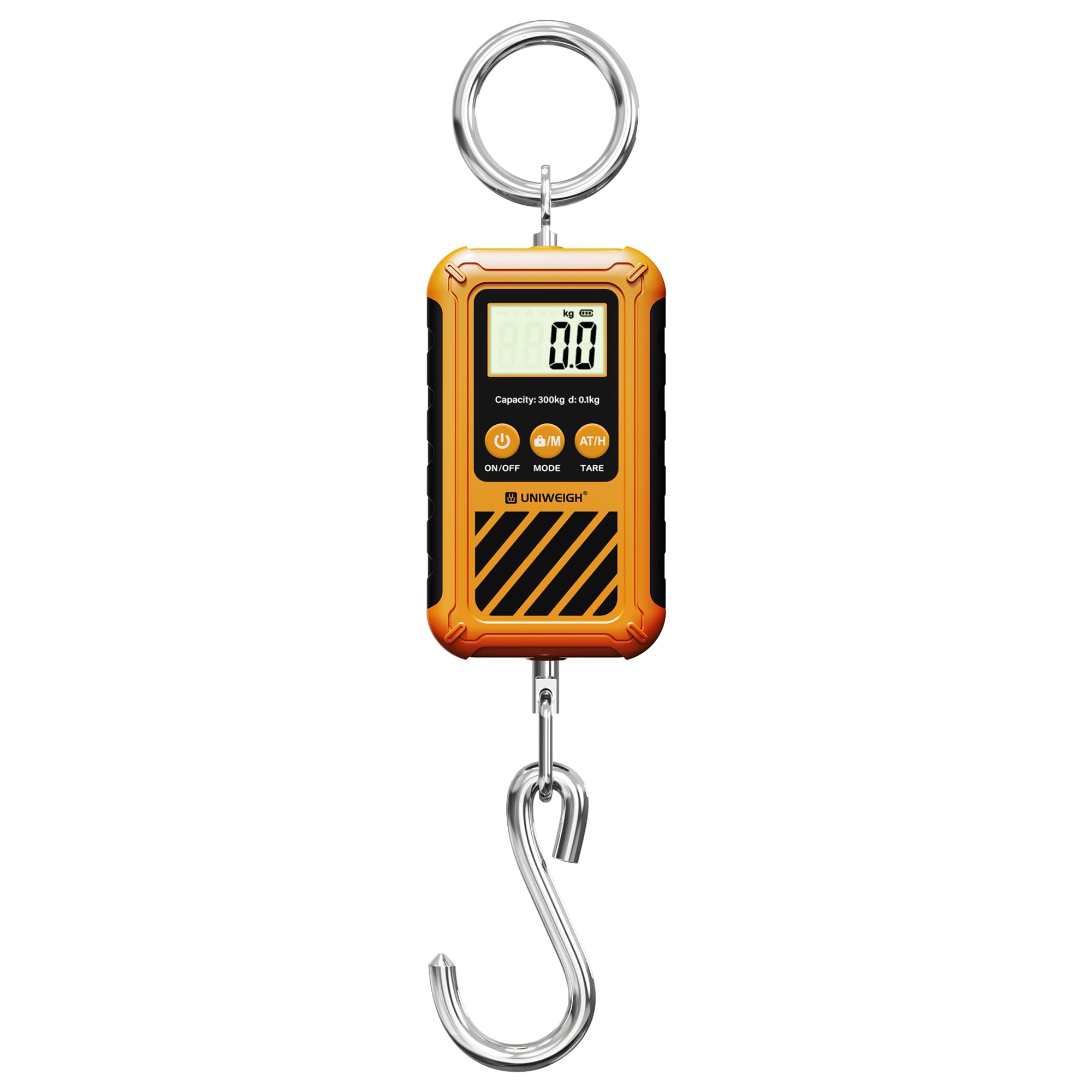
This image displays the front of the UNIWEIGH Digital Hanging Scale, highlighting its clear LCD screen and user-friendly control buttons for power, mode, and tare functions.
Components:
- LCD Display: Large, backlit screen for clear readings.
- ON/OFF Button: Powers the scale on or off.
- MODE Button: Cycles through weighing units (kg, lb, N).
- TARE Button: Activates the tare function for net weight measurement.
- Stainless Steel Hook: Durable hook for attaching items to be weighed.
- Sturdy Handle/Ring: For secure holding or hanging.
Setup
1. Battery Installation
The scale requires 2 AAA batteries (included). To install:
- Locate the battery compartment on the back of the scale.
- Open the battery compartment cover.
- Insert 2 AAA batteries, ensuring correct polarity (+/-).
- Close the battery compartment cover securely.

The rear view of the scale, illustrating the battery compartment cover. Ensure batteries are correctly inserted for operation.
2. Attaching Hooks/Rings
The scale comes with a high-quality stainless steel hook and a circular ring. Ensure both are securely attached to the scale's designated attachment points before use.
Operating Instructions
1. Power On/Off
- Press the ON/OFF button to turn the scale on.
- To turn off, press and hold the ON/OFF button for a few seconds, or the scale will automatically power off after a period of inactivity (auto shut-off feature).
2. Unit Conversion
- With the scale powered on, press the MODE button to cycle through the available weighing units: kilograms (kg), pounds (lb), and Newtons (N).
3. Tare Function
The tare function allows you to subtract the weight of a container to measure only the net weight of its contents.
- Hang the empty container or item you wish to tare onto the hook.
- Wait for the reading to stabilize.
- Press the TARE button. The display will reset to zero.
- Now, place the items to be weighed into the container. The display will show the net weight.
4. Hold Function
The scale features an automatic lock function that holds the stable reading on the display.
- Once an item is hung and the weight stabilizes, the display will automatically lock the reading.
- A 'HOLD' indicator may appear on the screen.
- You can then remove the item and view the locked weight.
5. Weighing Items
- Ensure the scale is powered on and set to your desired unit.
- Hold the scale by its handle or hang it from a stable support.
- Carefully attach the item to be weighed to the stainless steel hook.
- Wait for the display to stabilize and lock the reading.

The digital hanging scale in action, accurately weighing a fish. This illustrates its suitability for fishing and outdoor activities.

This image shows the scale being used to weigh a suitcase, highlighting its portability and utility for travel and luggage weight management.
Operation Video:
This video demonstrates the basic operation of a digital hanging scale, including power on, unit conversion, tare function, and weighing items. It highlights the ease of use for various applications.
Watch this video for a detailed guide on using the digital hanging crane scale, covering setup, changing weighing units, utilizing the tare function, and locking readings for convenience.
Maintenance
- Cleaning: Wipe the scale with a soft, damp cloth. Do not use abrasive cleaners or immerse the scale in water.
- Storage: Store the scale in a dry place at room temperature. If storing for a long period, remove the batteries to prevent corrosion.
- Battery Replacement: Replace batteries promptly when the low-battery indicator appears on the display to ensure continuous accurate operation.
Troubleshooting
- "Lo" or Low Battery Indicator: Replace the AAA batteries with new ones.
- "O-Ld" or Overload Indicator: The item being weighed exceeds the maximum capacity of 300 kg (660 lb). Remove the item immediately to prevent damage to the scale.
- Inaccurate Readings: Ensure the scale is held steadily and the item is not swinging. Check that the hook is properly attached and there are no obstructions.
- Display Not Turning On: Check battery installation and ensure batteries are not depleted.
Specifications

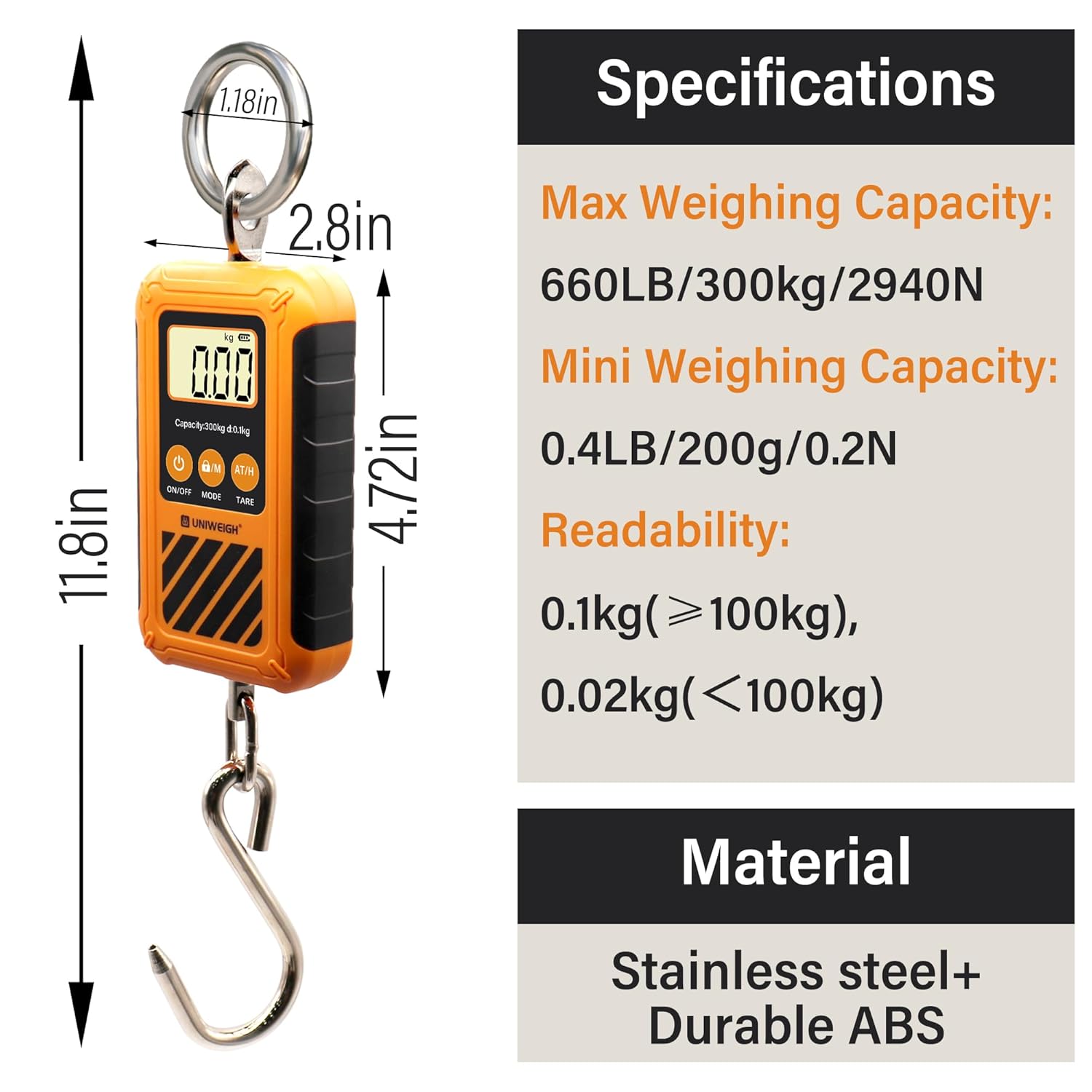
A visual representation of the scale's physical dimensions and a summary of its technical specifications, including maximum capacity and readability.
| Feature | Detail |
|---|---|
| Brand | UNIWEIGH |
| Model Number | UN-ADH |
| Max Weighing Capacity | 300 Kilograms (660 LB) |
| Readout Accuracy | 0.02kg (≤100kg), 0.1kg (>100kg) |
| Display Type | Backlit LCD |
| Units | kg, lb, N |
| Material | High-strength ABS Plastic, Stainless Steel Hook |
| Power Source | 2 AAA batteries (included) |
| Special Features | Auto Shut Off, Portable, Precision Balanced, Tare Function |
| Item Weight | 0.5 Kilograms |
| Parcel Dimensions | 16.51 x 9.5 x 6.4 cm |
Warranty & Support
The UNIWEIGH Digital Hanging Scale comes with a 2-Year Warranty from the date of purchase.
For any product inquiries, technical support, or warranty claims, please contact UNIWEIGH directly. Do not attempt to repair the scale yourself, as this may void the warranty.
Manufacturer Contact Information: UNIWEIGH