
Riflewell AKG5-132W
Riflewell 20-25 Gun Rifle Safe Instruction Manual
Model: AKG5-132W
1. Introduction
This manual provides comprehensive instructions for the assembly, operation, and maintenance of your Riflewell 20-25 Gun Rifle Safe. Please read this manual thoroughly before assembly and use to ensure proper function and safety.
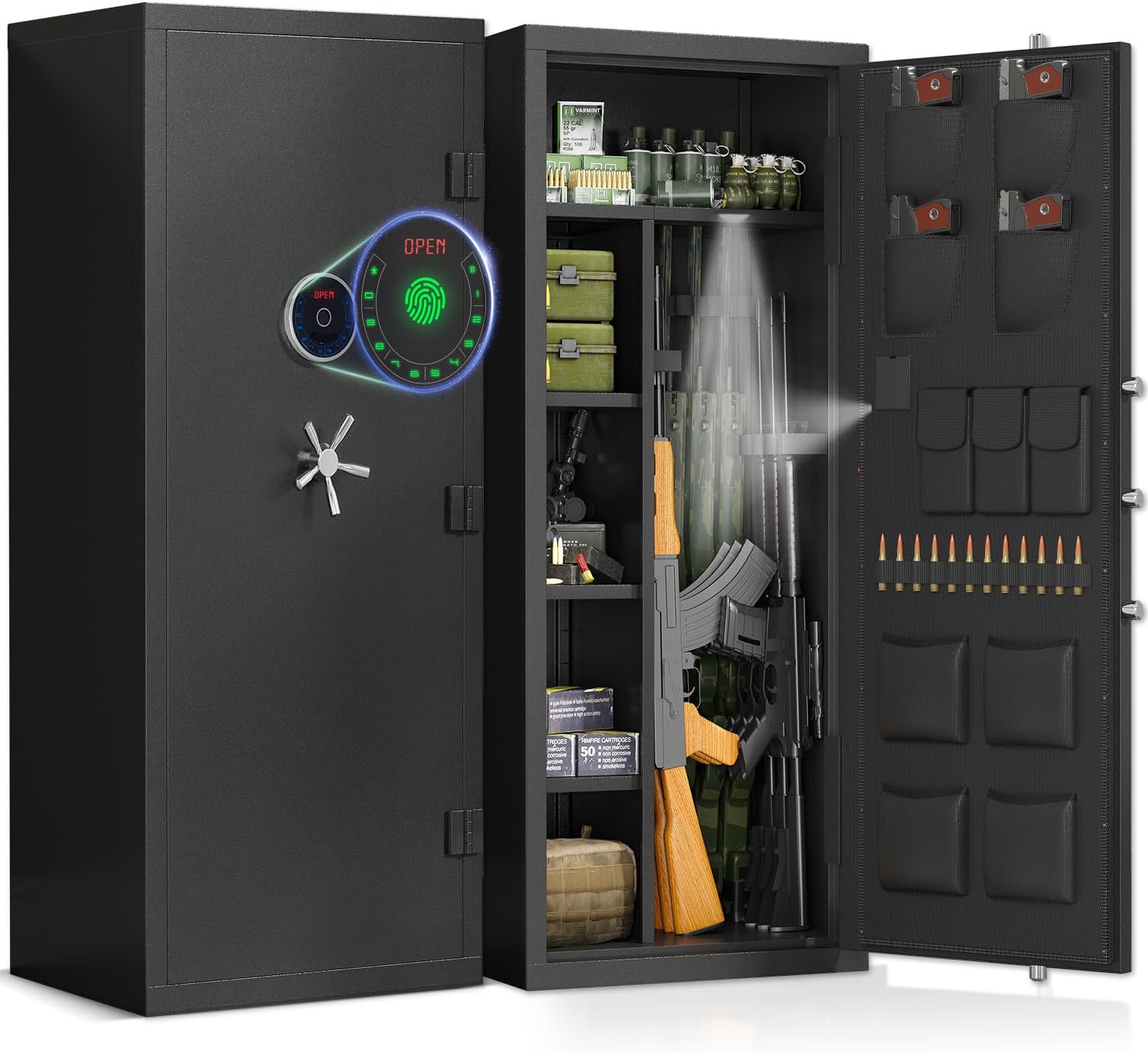
Figure 1: The Riflewell 20-25 Gun Rifle Safe, showcasing its large capacity and biometric locking mechanism.
2. Safety Information
- Always keep the safe locked when not in use.
- Store emergency keys in a secure location away from the safe and out of reach of children.
- Do not store flammable materials or open containers of liquids inside the safe.
- Ensure the safe is securely mounted to prevent tipping.
- Keep children and unauthorized individuals away from the safe.
- Do not attempt to force the safe open if the lock malfunctions. Refer to troubleshooting.
3. Package Contents
Verify that all components are present and undamaged before beginning assembly.
- 1 x 20-25 Large Unassembled Gun Safe (main panels)
- 2 x Emergency Keys
- 4 x Expansion Screws
- 3 x Gun Racks (adjustable)
- 1 x Magnetic Light
- 1 x User manual (this document)
- Additional accessories: 2 storage bags, magazine clips, 4 pistol bags.

Figure 2: Visual representation of the safe's dimensions and all included parts for assembly.
4. Setup and Assembly
Your Riflewell gun safe is designed for easy assembly. Follow these steps carefully. It is recommended to have two people for assembly due to the size and weight of the components.
4.1 Assembly Video Guide
For a visual guide, please refer to the official assembly video:
Video 1: Detailed assembly instructions for the Riflewell AKG5 Series Unassembled Gun Safe.
4.2 Step-by-Step Assembly Instructions
- Unpack Components: Carefully open the packaging and remove all panels and accessories. Lay them out on a soft, clean surface to prevent scratches. Identify each panel using the labels (e.g., Left Plate, Right Plate, Door, Top Plate, Bottom Plate, Ammo Box).
- Install Side Panels: Attach the left and right side panels to the bottom plate using the provided screws (e.g., Screw C). Ensure the panels align correctly with the pre-drilled holes.
- Attach Back Panel: Secure the back panel to the assembled side and bottom panels.
- Install Top Plate: Place the top plate onto the assembled structure and secure it with screws.
- Attach Door: Carefully align the safe door with the hinges on the main body and secure it. Install the handle by screwing it into place.
- Install Internal Components:
- Ammo Box/Internal Shelf: Insert the internal ammo box or fixed shelf into its designated position and secure it.
- Adjustable Shelves: Insert the shelf clips into the desired slots on the side panels. Place the adjustable shelves onto the clips.
- Gun Racks: Attach the foam gun racks to the interior walls as desired.
- Magnetic Light: Place the magnetic light in a convenient location inside the safe for illumination.
- Secure Mounting: For maximum security, it is highly recommended to mount the safe to the floor or wall using the provided expansion screws. Locate the pre-drilled holes at the back and bottom of the safe.

Figure 3: The flexible interior storage space, highlighting adjustable shelves and door organization for various items.
5. Operating Instructions
5.1 Opening the Safe
Your Riflewell safe offers multiple access methods:
- Fingerprint + Handle: Place your registered finger on the fingerprint collector and turn the handle.
- Code + Handle: Enter your programmed digital code on the LCD touch screen and turn the handle.
- Key + Handle: Insert the emergency key into the hidden keyhole, turn it, and then turn the handle.
- USB Type-C Cable + Code/Fingerprint + Handle: In case of battery depletion, connect a USB Type-C cable for emergency power, then use your code or fingerprint, and turn the handle.

Figure 4: The four primary methods for accessing your safe, including biometric and digital options.
5.2 Programming Fingerprints and Codes
Refer to the detailed instructions in the separate user manual provided with the electronic lock for programming fingerprints and digital codes. This process typically involves entering a master code, then following prompts to register new fingerprints or set new numerical codes.
5.3 Dual Alarm System and Mute Function
- Dual Alarm System: The safe activates an alarm after 3 consecutive incorrect code entries or 5 consecutive incorrect fingerprint attempts. A vibration alarm is also triggered if the safe is moved violently. The alarm sound reaches up to 70 decibels.
- Mute Function: To operate the safe silently, activate the mute function. This prevents the safe from making sounds during opening or alarm triggers. Consult the electronic lock manual for specific instructions on enabling/disabling the mute function.

Figure 5: The safe's dual alarm system provides enhanced security, while the mute function allows for silent operation.
6. Maintenance
- Cleaning: Wipe the exterior and interior surfaces with a soft, damp cloth. Avoid abrasive cleaners or solvents.
- Battery Replacement: The electronic lock is powered by batteries (not specified, but typically AA). Replace batteries annually or when the low battery indicator appears. Refer to the electronic lock manual for battery compartment location and replacement procedure.
- Lock Mechanism: Do not lubricate the lock mechanism.
7. Troubleshooting
| Problem | Possible Cause | Solution |
|---|---|---|
| Safe does not open with code/fingerprint. | Incorrect code/fingerprint, low batteries, lock malfunction. | Verify code/fingerprint. Replace batteries. Use emergency key. Contact customer service if issue persists. |
| Alarm triggers unexpectedly. | Incorrect entries, violent movement. | Ensure correct entry. Avoid moving the safe. Use mute function if desired. |
| Door does not close properly. | Obstruction, misalignment. | Check for obstructions. Ensure safe is on a level surface. Re-check assembly if recently moved. |
8. Specifications
| Brand | Riflewell |
| Model Number | AKG5-132W |
| Product Dimensions (D x W x H) | 17.72"D x 22.83"W x 51.96"H |
| Lock Type | Biometric |
| Color | Black |
| Material | Low Carbon Steel |
| Special Feature | Biometric Fingerprint, LCD Screen, Backlit Keypad, Dual Alarm System, Mute Function |
| Mounting Type | Floor Mount, Wall Mount |
| Capacity | 20-25 Rifles (up to 50 inches) |
9. Warranty and Support
Riflewell stands behind the quality of its products. If you encounter any problems with your gun safe, please contact our experienced customer service team directly. We are committed to responding within 24 hours and assisting you with a resolution.
For support, please visit the Riflewell Store on Amazon or refer to the contact information provided in your product packaging.
Ask a question about this manual
Ask about setup, troubleshooting, compatibility, parts, safety, or missing instructions. Manuals+ will review the question and use this page’s manual context to help answer it.