
1. Introduction
Welcome and thank you for choosing the UNIWEIGH Digital Crane Scale UN-ADH. This manual provides essential instructions for safe and effective operation, maintenance, and troubleshooting. Please read it thoroughly before using the device to ensure optimal performance and longevity.
2. Safety Information
- Ensure the scale is securely hung from a stable support before weighing any items.
- Keep clear of goods during weighing to prevent personal injury or damage to items.
- Avoid striking or impacting the scale, as this can affect its accuracy and durability.
- Remove batteries if the scale will not be used for an extended period to prevent leakage and potential circuit damage.
- Do not exceed the maximum weighing capacity of 300 kg (660 lb). Overloading can damage the scale and void the warranty.
3. Package Contents
- 1 x UNIWEIGH Digital Crane Scale (Model: UN-ADH)
- 2 x AAA Batteries
- 1 x User Manual
4. Product Overview
The UNIWEIGH Digital Crane Scale UN-ADH is a high-precision, portable weighing device designed for various applications including industrial, agricultural, domestic, luggage, parcels, fishing, and hunting. It features a large LCD display, durable construction, and multiple weighing units (kg, lb, N).

An image showing the UNIWEIGH Digital Crane Scale, highlighting its compact design, large hook, and clear display.
5. Setup
5.1. Installing Batteries
- Locate the battery compartment on the back of the scale.
- Open the battery cover by sliding or unlatching it.
- Insert 2 AAA batteries, ensuring correct polarity (+ and - terminals match the markings inside the compartment).
- Close the battery cover securely.
5.2. Initial Use
The UNIWEIGH Digital Crane Scale is designed for quick and easy setup. No complex assembly is required. Simply install the batteries as described above, and the scale is ready for immediate use.
6. Operating Instructions
6.1. Power On/Off
- To power on: Press the ON/OFF button once. The display will light up.
- To power off: Press and hold the ON/OFF button until the display turns off. The scale also features an energy-saving auto shut-off function after a period of inactivity.
6.2. Unit Conversion
- With the scale powered on, press the MODE button repeatedly to cycle through the available weighing units: kilograms (kg), pounds (lb), and Newtons (N). The selected unit will be displayed on the LCD.
6.3. Tare Function
The Tare function allows you to subtract the weight of a container or an initial item, so you can accurately weigh additional items placed within or on it.
- Hang the empty container or initial item on the scale's hook.
- Wait for the weight reading to stabilize.
- Press the TARE button. The display will reset to zero, indicating the container's weight has been tared.
- Place the item(s) to be weighed into the container or add them to the initial item. The display will now show only the net weight of the added item(s).
A two-panel image demonstrating the TARE function. Panel 1 shows the scale displaying 0.00kg with an empty sling. Panel 2 shows the scale displaying 5.00kg after an item has been placed in the sling, indicating the net weight after taring the sling.
6.4. Hold Function
The Hold function freezes the displayed weight once it stabilizes, allowing you to read the measurement easily even after removing the item from the hook.
- Hang the item to be weighed on the hook.
- Wait for the weight reading to stabilize.
- The scale will automatically hold the reading (often indicated by an 'AT/H' icon or similar on the display).
- To clear the held reading and return to live weighing, press the AT/H button (if available) or the ON/OFF button briefly.
7. Maintenance
- Clean the scale with a soft, damp cloth. Do not use abrasive cleaners, solvents, or immerse the scale in water.
- Store the scale in a dry environment, away from extreme temperatures, humidity, and direct sunlight.
- If the scale is not used for an extended period (e.g., several months), remove the batteries to prevent potential corrosion and damage to the electronic components.
- Regularly inspect the stainless steel hook and pull ring for any signs of wear, bending, or damage. Replace if necessary to ensure safe operation.
8. Troubleshooting
| Problem | Possible Cause | Solution |
|---|---|---|
| No display / Scale won't turn on | Dead batteries Incorrect battery installation | Replace batteries with new AAA batteries Check battery polarity (+/-) and reinsert correctly |
| Inaccurate readings | Overload Unstable hanging Scale not tared for container | Do not exceed maximum capacity (300kg/660lb) Ensure the scale is hung stably and item is not swinging Use the Tare function to zero out container weight |
| "Lo" or "Low Battery" message | Low battery power | Replace both AAA batteries immediately |
| "O-Ld" or "Err" message | Overload | Remove the item immediately. Do not exceed the maximum capacity of 300kg/660lb. |
9. Specifications

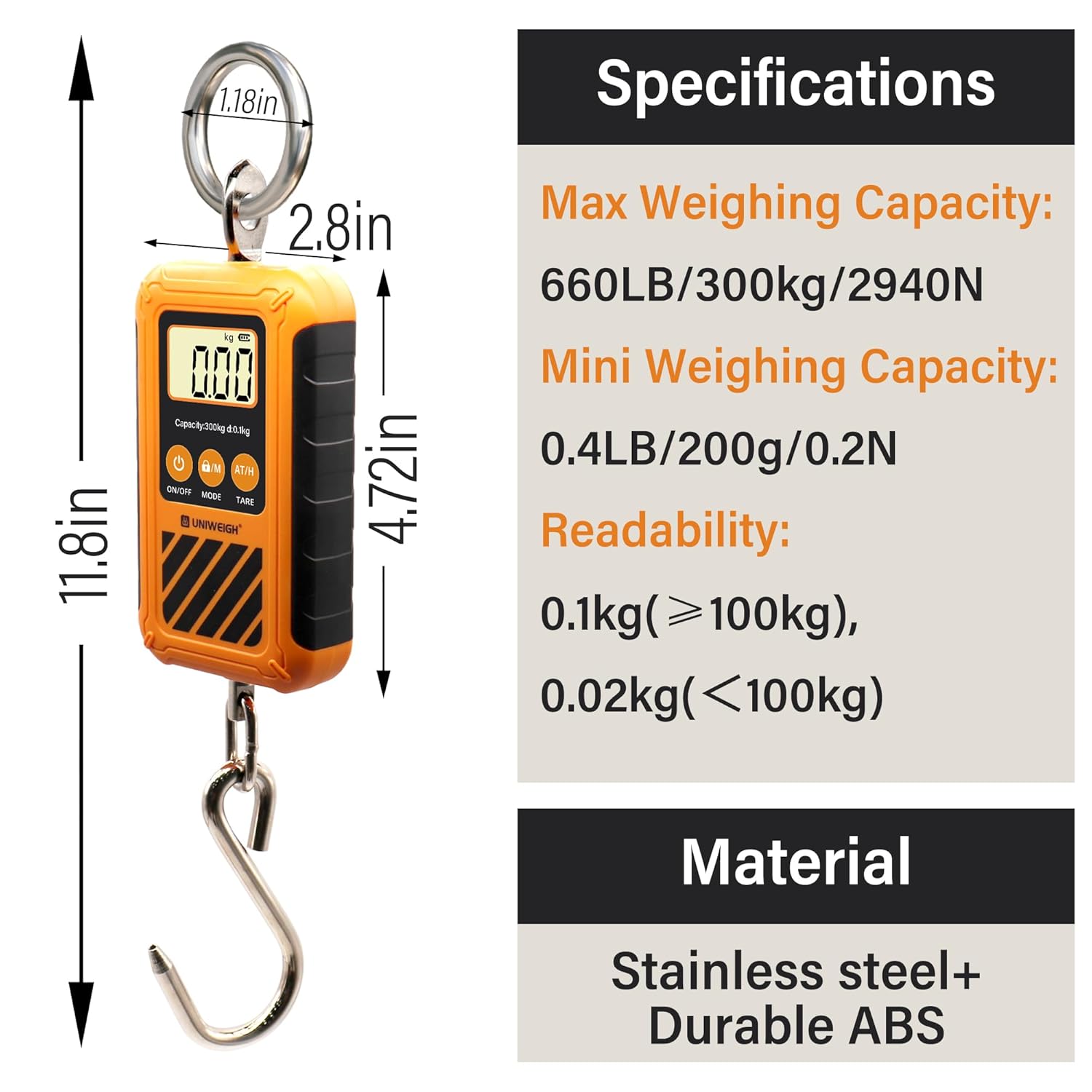
An image detailing the physical dimensions and key technical specifications of the UNIWEIGH Digital Crane Scale, including maximum capacity, mini capacity, readability, and material.
- Model Number: UN-ADH
- Max Weighing Capacity: 300 kg / 660 lb / 2940 N
- Mini Weighing Capacity: 0.2 kg / 0.4 lb / 0.2 N
- Readability: 0.1 kg (for weights ≥100kg), 0.02 kg (for weights <100kg)
- Weighing Units: kg, lb, N
- Display: Large Backlit LCD
- Power Supply: 2 x AAA Batteries (included)
- Material: ABS Engineering Plastic Shell, Stainless Steel Hook and Loop
- Special Features: Auto Weight Hold Function, Tare Function, Low Battery Indication, Overload Indication, Energy-saving Auto Shut-off
- Approximate Dimensions (Body): 12 cm (4.72 in) length, 7.1 cm (2.8 in) width
- Overall Length (with hook and ring): 30 cm (11.8 in)
10. Warranty & Support
For warranty information or technical support regarding your UNIWEIGH Digital Crane Scale UN-ADH, please contact UNIWEIGH customer service. Refer to the product packaging or the official UNIWEIGH website for the most current contact details.
Official UNIWEIGH Store: Visit the UNIWEIGH Store on Amazon