
1. Introduction
This instruction manual provides essential information for the proper installation, operation, and maintenance of your FUZHUI WSDT 60A RC Brushless Electronic Speed Controller (ESC). This ESC is designed for 1/10 scale RC cars and trucks, offering robust performance and multiple protection features. Please read this manual thoroughly before using the product to ensure safe and optimal performance.
2. Safety Precautions
- Always disconnect the battery from the ESC when not in use to prevent accidental operation and potential damage.
- Ensure all connections are secure and correctly polarized before powering on the system. Incorrect polarity can cause severe damage to the ESC and battery.
- Operate RC vehicles in open areas, away from people, animals, and obstacles.
- Keep the ESC and motor well-ventilated during operation to prevent overheating.
- Do not attempt to modify the ESC. Unauthorized modifications can lead to malfunction and void the warranty.
- This ESC is water and dust proof; however, remove the cooling fan before water use and promptly dry the unit to prevent rusting.
3. Product Overview
3.1 Package Contents
- 1 x FUZHUI WSDT 60A RC Brushless ESC
- 2 x Adhesive Pads
- 2 x Cable Ties
- 1 x User Manual (this document)
3.2 Key Features
- Wide Compatibility: Suitable for various 1/10 RC vehicles, including short-range trucks and four-wheeled vehicles.
- Adjustable Performance: Features 4-tier maximum brake force, 8-tier drag brake force, and 9-step acceleration adjustments for customized performance.
- Multiple Protections: Equipped with low voltage cutoff, overheating protection, throttle signal loss prevention, and motor lock safeguards.
- External Programming Port: Facilitates connection to an optional programming card for convenient setting adjustments.
- Waterproof Construction: Designed for all-weather racing, this ESC is water and dust proof.
3.3 Product Components Diagram

Figure 1: Overview of the FUZHUI WSDT 60A RC Brushless ESC, showing the main unit, cooling fan, power input (XT60 connector), motor output wires (A, B, C), receiver connection, and external programming port.

Figure 2: Detailed view of the XT60 battery connector, which provides power to the ESC. Ensure correct polarity when connecting to the battery.
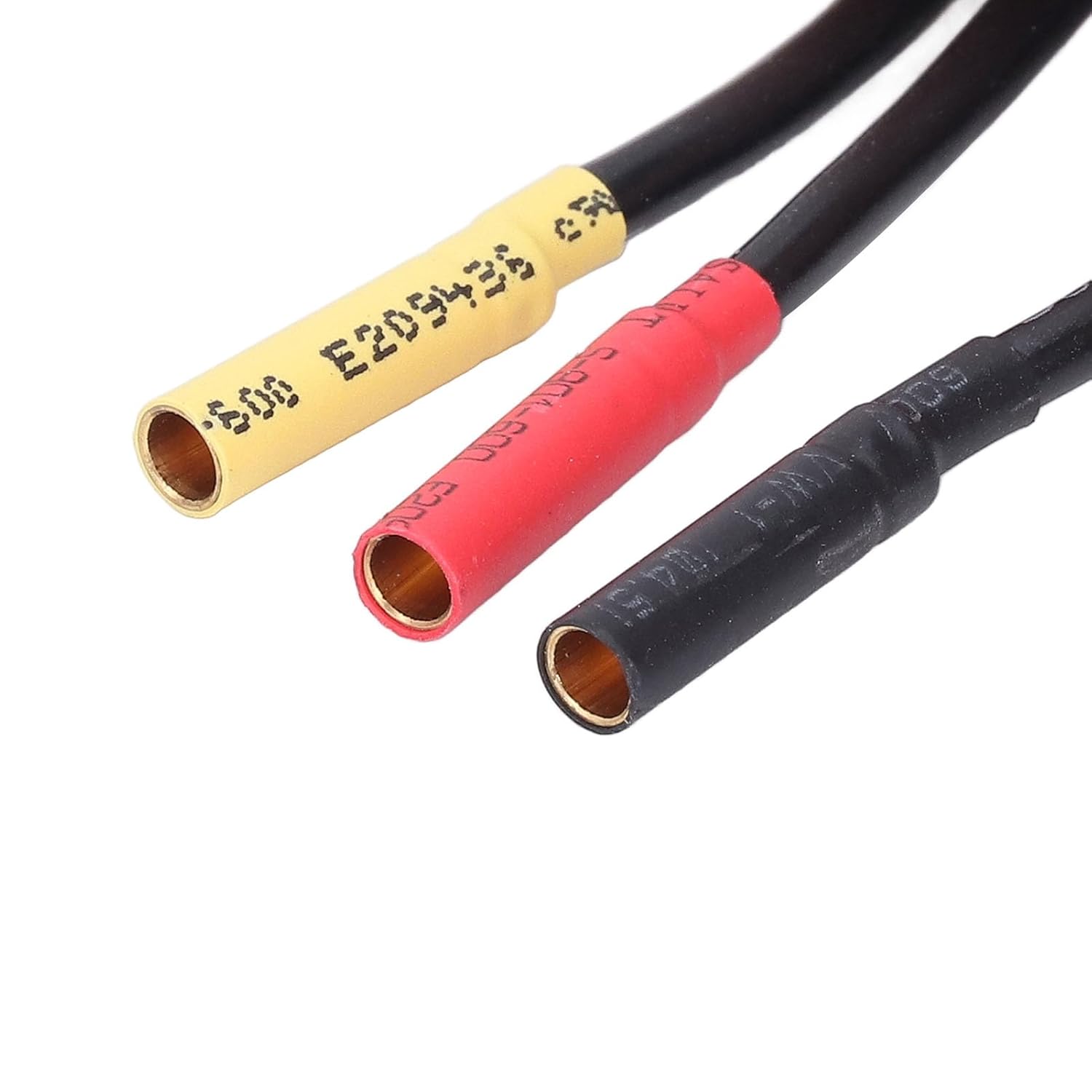
Figure 3: Close-up of the three motor output wires (A, B, C) with bullet connectors, designed for connection to a brushless motor.
4. Setup and Installation
4.1 Connecting the ESC
- Motor Connection: Connect the three output wires from the ESC (labeled A, B, C) to the three wires of your brushless motor. The order of connection may affect motor rotation direction; if the motor spins in the wrong direction, swap any two of the ESC's motor wires.
- Receiver Connection: Plug the small signal cable from the ESC into the throttle channel (usually Channel 2) of your RC receiver. Ensure the polarity is correct (signal wire typically yellow/white, positive red, negative black/brown).
- Battery Connection: Connect your battery pack to the XT60 connector on the ESC. Ensure the battery's polarity matches the ESC's connector. Do not connect the battery until all other connections are made and you are ready to operate.
- Mounting the ESC: Use the provided adhesive pads to securely mount the ESC in your RC vehicle chassis. Ensure adequate airflow around the ESC for cooling.
4.2 ESC Calibration (Throttle Range Setting)
To ensure proper communication between your transmitter, receiver, and ESC, throttle range calibration is necessary. This procedure should be performed whenever a new ESC or transmitter is used.
- Turn on your transmitter and ensure the throttle trim is set to neutral (center).
- Connect the ESC's signal cable to the receiver's throttle channel.
- Hold the throttle trigger on your transmitter at full throttle (forward).
- Connect the battery to the ESC. The ESC will emit a series of beeps.
- When the ESC beeps indicating full throttle has been recognized, move the throttle trigger to full brake (reverse). The ESC will beep again.
- Finally, release the throttle trigger to the neutral position. The ESC will beep one last time, indicating successful calibration.
- The ESC is now calibrated and ready for use.
Note: Specific beep patterns may vary. Refer to your transmitter's manual for throttle channel setup.
4.3 Programming the ESC
The WSDT 60A ESC features an external programming port, allowing for convenient adjustment of parameters using an optional digital LED program card. Connect the program card to this port to access and modify settings such as:
- Brake Force (4-tier)
- Drag Brake Force (8-tier)
- Acceleration (9-step)
- Low Voltage Cutoff
- Motor Timing
- Start Mode
Refer to the program card's manual for detailed instructions on parameter adjustment.
5. Operating Instructions
After successful installation and calibration, your RC vehicle is ready for operation. Always ensure a clear operating area and perform a range check before driving.
- Turn on your transmitter first, then connect the battery to the ESC.
- The ESC will initialize, and you should hear a series of beeps.
- Test throttle response by gently applying forward and reverse throttle.
- Monitor the ESC and motor temperature during operation. If temperatures become excessively high, allow the components to cool down.
- When finished operating, disconnect the battery from the ESC first, then turn off your transmitter.
6. Maintenance
- Cleaning: Regularly clean the ESC and cooling fan to remove dirt, dust, and debris. Use a soft brush or compressed air.
- Water Exposure: While the ESC is water and dust proof, it is recommended to remove the cooling fan before operating in wet conditions. After exposure to water, promptly dry the ESC and fan to prevent corrosion and rusting of metal components.
- Inspections: Periodically inspect all wires and connectors for signs of wear, damage, or loose connections. Replace damaged components immediately.
- Storage: Store the ESC in a dry, cool place away from direct sunlight and extreme temperatures.
7. Troubleshooting
| Problem | Possible Cause | Solution |
|---|---|---|
| Motor does not run or runs intermittently. | Loose connections, uncalibrated ESC, low battery voltage, motor or ESC damage. | Check all wiring connections. Perform ESC calibration. Charge or replace battery. Inspect motor and ESC for visible damage. |
| Motor runs in the wrong direction. | Incorrect motor wire connection. | Swap any two of the three motor wires between the ESC and motor. |
| ESC overheats. | Insufficient cooling, incorrect gear ratio, motor over-stressed, high ambient temperature. | Ensure proper airflow to the ESC. Check gear ratio. Reduce load on the motor. Operate in cooler conditions. |
| Vehicle loses control or stops unexpectedly. | Low voltage cutoff activated, throttle signal loss, radio interference. | Charge or replace battery. Check receiver and transmitter connection. Ensure no strong interference sources are nearby. |
8. Specifications
| Model | WSDT 60A |
| Continuous Current | Fwd. 60A / Rev. 60A |
| Burst Current | Fwd. 180A / Rev. 180A |
| Resistance | 0.001Ω |
| Compatible Vehicle Type | 1:10 On-road, Off-road, Truck |
| Battery | 4-9 NiMH cells, 2-3S Li-Ion cells |
| Motor Limitations (2S LiPo / 6 cell NiMH) | On-highway: Motors of size 3656 or smaller KV Off-road, Truck: Size 3656 or KV |
| Motor Limitations (3S LiPo / 9 cell NiMH) | On-highway: Motors of size 3656 or smaller KV Off-road, Truck: Size 3656 or KV |
| BEC Output | 5.85V / 3A |
| Cooling Fan | Directly from battery, no adjustment needed. Compatible with 2S and 3S LiPo. |
| External Programming Port | Yes (for optional digital LED program card) |
| Waterproof | Yes (remove fan before water use) |
9. Warranty Information
FUZHUI products are manufactured to high-quality standards. This product is covered by a limited warranty against manufacturing defects from the date of purchase. The warranty does not cover damage caused by misuse, improper installation, unauthorized modification, accident, or normal wear and tear. Please retain your proof of purchase for warranty claims.
10. Customer Support
For technical assistance, troubleshooting, or further inquiries regarding your FUZHUI WSDT 60A RC Brushless ESC, please contact FUZHUI customer support through the retailer where the product was purchased or visit the official FUZHUI store online.
FUZHUI Store: https://www.amazon.com/stores/FUZHUI/page/E72029D9-145D-4226-96C5-6B17B08C907A