
Product Overview
The WYMECT USB C Male to 12V Cigarette Lighter Socket Adapter is designed to provide a 12V power source from a USB-C port, enabling the use of various in-vehicle devices that typically require a car cigarette lighter socket. This adapter is ideal for devices with a power consumption of 18W or less, offering a reliable and efficient power supply solution.
It features an upgraded efficiency, converting power with over 95% efficiency, and includes built-in protections for safe operation.
Key Features
- Versatile Compatibility: Supports devices such as dash cams, car interior mood lighting, electronic speed radar detectors, and other in-vehicle devices with power consumption up to 18W.
- High Efficiency: Achieves over 95% conversion efficiency, providing a maximum 12V output of 1.5A (18W).
- Stable Power Output: Requires a 5V input voltage and an input current ranging from 2.4A to 4A for stable operation.
- Safety Protections: Built-in safeguards against short circuits, over-voltage, and over-current.
- Compact Design: Small, lightweight, and highly portable, designed for discreet placement in vehicles.
- Durable Construction: Equipped with eco-friendly PVC insulation and copper wire conductors for robust durability.
- Certified Quality: CE and FCC certified for safety and quality assurance.
Setup and Installation
To set up your USB C to 12V Cigarette Lighter Socket Adapter, follow these steps:
- Identify Power Source: Ensure you have a USB-C power source in your vehicle or a compatible power bank that can provide 5V input with a current of 2.4A to 4A. The input power at the Type-C port must exceed the rated power of the connected device.
- Connect USB-C: Insert the USB-C male connector of the adapter into the USB-C port of your power source.
- Connect Device: Plug your 12V device (e.g., dash cam, LED light strip) into the 12V cigarette lighter socket of the adapter.
- Verify Operation: Confirm that your device powers on and functions correctly. The adapter's display will show the output voltage.

Image: The USB C to 12V adapter connected to a car's USB-C port, providing power to a dashcam, illustrating a typical installation scenario.

Image: A visual representation of compatible devices such as car chargers, dash recorders, GPS units, car LED strip lights, car fans, and car aromatherapy diffusers, demonstrating the adapter's versatility.
Operating Instructions
The adapter operates by converting the 5V USB-C input to a 12V DC output suitable for car accessories. To ensure optimal performance and prevent damage, adhere to the following guidelines:
- Power Limit: Do not connect devices that require more than 18W (12V/1.5A) of power. Connecting higher-power devices can lead to adapter malfunction or damage to the connected device.
- Input Current: Ensure your USB-C power source can supply sufficient current (2.4A to 4A) to meet the demands of the connected 12V device.
- Voltage Output: The output port provides a fixed 12V DC voltage. It does not support devices that require voltages higher or lower than 12V.
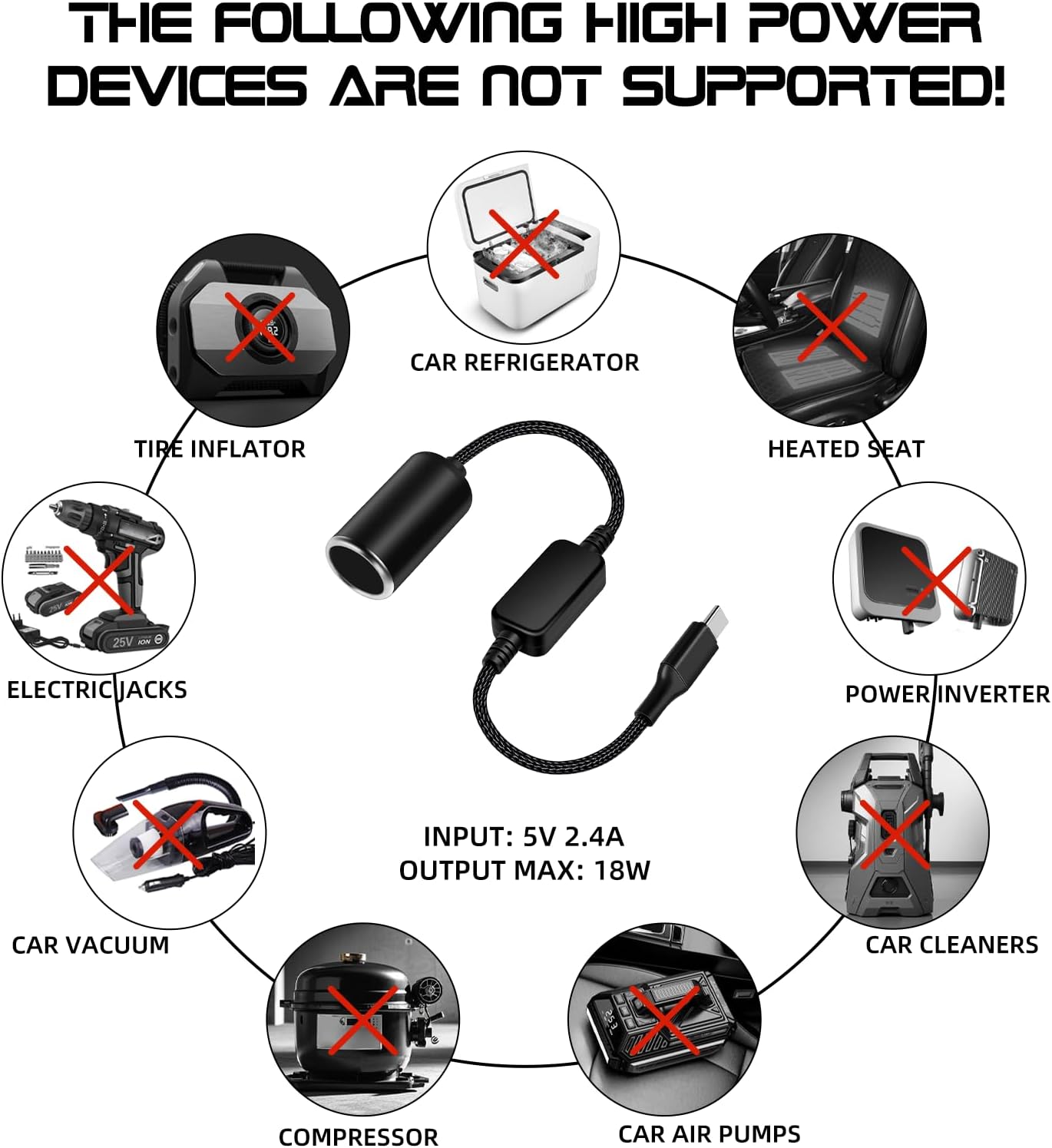
Image: An illustration clearly indicating high-power devices such as tire inflators, car refrigerators, heated seats, and power inverters that are not compatible with this 18W adapter due to their higher power requirements.
Maintenance
To ensure the longevity and proper functioning of your adapter, follow these simple maintenance guidelines:
- Cleaning: Gently wipe the adapter with a dry, soft cloth. Avoid using liquid cleaners or abrasive materials.
- Storage: Store the adapter in a cool, dry place when not in use. Avoid extreme temperatures and direct sunlight.
- Handling: Do not bend or twist the cable excessively. Avoid dropping the adapter or subjecting it to strong impacts.
- Connection Points: Periodically check the USB-C and 12V socket connections for any debris or damage.
Troubleshooting
If you encounter issues with your USB C to 12V Cigarette Lighter Socket Adapter, refer to the following common problems and solutions:
| Problem | Possible Cause | Solution |
|---|---|---|
| Device not powering on. | Insufficient input power from USB-C source, or connected device exceeds 18W. | Ensure your USB-C power source provides at least 5V/2.4A. Verify the connected 12V device's power consumption is 18W or less. Try a different USB-C power source. |
| Adapter display is off or flickering. | Loose connection or unstable input power. | Check all connections to ensure they are secure. Try connecting to a different USB-C port or power source. |
| Device powers on but functions intermittently. | Power draw is close to the 18W limit, or input current is fluctuating. | Ensure the input power at the Type-C port significantly exceeds the rated power of the connected device. Consider using a USB-C power source with higher current output (closer to 4A). |
| Adapter feels warm during use. | Normal operation, especially when supplying maximum power. | This is generally normal. If it becomes excessively hot to touch, disconnect immediately and ensure the connected device is within the 18W limit. |
Specifications
| Feature | Detail |
|---|---|
| Model Number | XZT002032-1PC |
| Input Voltage | 5V (USB-C) |
| Input Current | 2.4A - 4A |
| Output Voltage | 12V DC |
| Maximum Output Power | 18W (1.5A) |
| Conversion Efficiency | >95% |
| Dimensions (Adapter Body) | Approx. 4.8cm (1.8in) length (socket), 4.2cm (1.6in) length (control box) |
| Total Cable Length | Approx. 35.8cm (14.1in) |
| Item Weight | 2.39 ounces |
| Certifications | CE, FCC |

Image: Detailed dimensions of the adapter, including the overall length, and the sizes of the cigarette lighter socket and the central control unit.
Warranty and Support
The WYMECT USB C Male to 12V Cigarette Lighter Socket Adapter comes with a 1-year warranty from the date of purchase.
For any questions, technical assistance, or warranty claims, please contact WYMECT customer service. We offer 24-hour customer service support to ensure a worry-free purchase experience.
Please refer to your purchase platform or the product packaging for specific contact details, or visit the official WYMECT brand page on Amazon.