
4DRC 4D-G6-BLUE
4DRC Foam RC Plane Model 4D-G6-BLUE Instruction Manual
Comprehensive guide for setup, operation, and maintenance.
Introduction
This manual provides essential information for the safe and effective operation of your 4DRC Foam RC Plane, Model 4D-G6-BLUE. Please read these instructions carefully before first use to ensure proper setup and to maximize your flying experience. This remote control aircraft is designed for users aged 8 years and up, featuring an automatic balance gyroscope for ease of control.
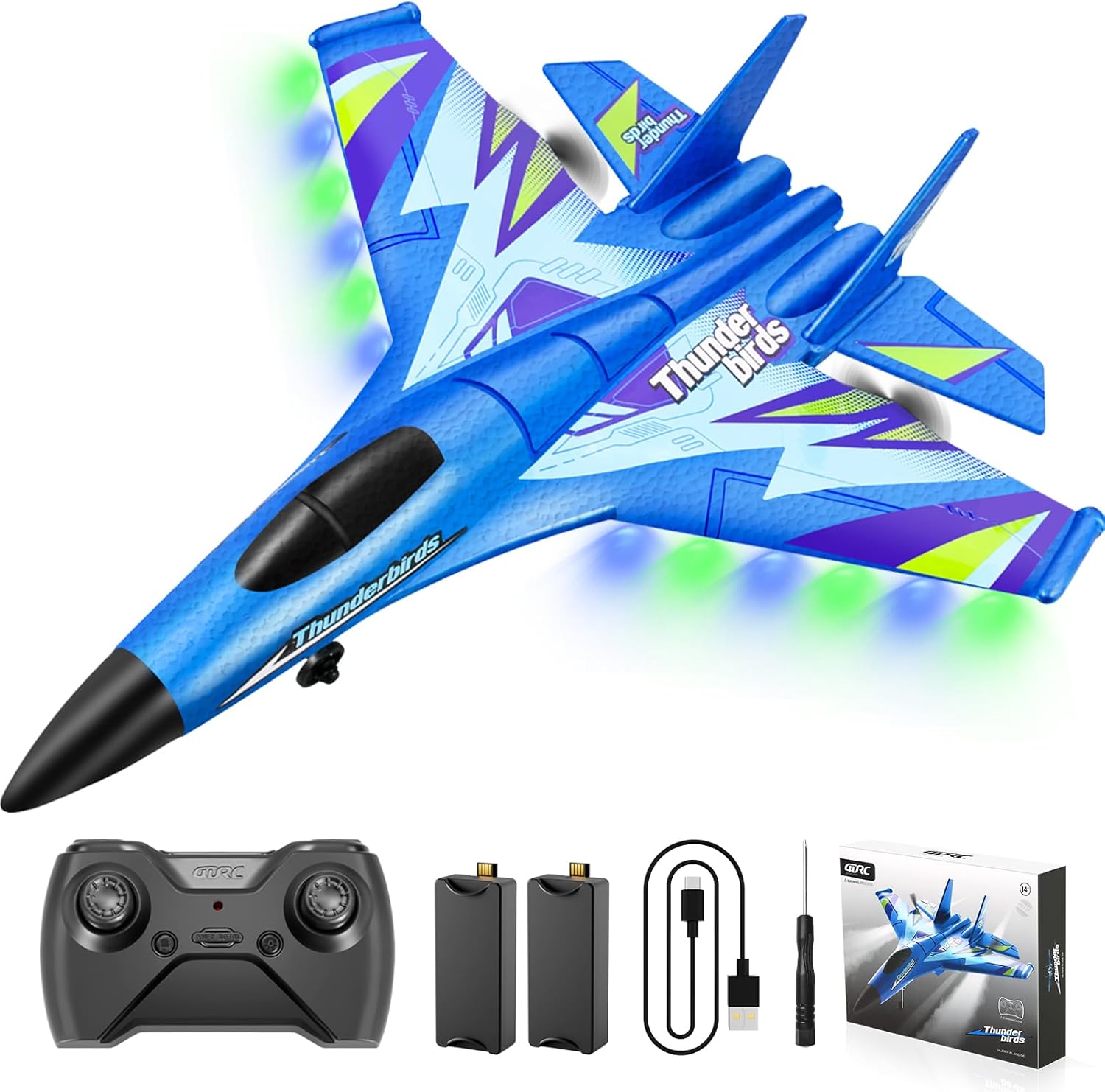
Image: The 4DRC Foam RC Plane (Model 4D-G6-BLUE) in blue, accompanied by its remote control, two batteries, a USB charging cable, and a small screwdriver, all packaged in its retail box.
Package Contents
Verify that all items listed below are included in your package:
- 1 x 4DRC 4D-G6 Airplane
- 1 x Transmitter (Remote Control)
- 2 x Rechargeable Batteries
- 2 x Extra Propeller Blades
- 1 x USB Charging Cable
- 1 x Screwdriver

Image: A visual representation of the package contents, detailing the airplane, remote control, two rechargeable batteries, two extra propeller blades, and a USB charging cable.
Setup
1. Battery Installation
- Locate the battery compartment on the underside of the aircraft.
- Open the compartment cover.
- Insert one of the provided rechargeable batteries, ensuring correct connection.
- Close the battery compartment cover securely.
- For the remote control, install 3 AA batteries (not included) into its compartment, ensuring correct polarity.
2. Charging the Aircraft Battery
- Connect the aircraft battery to the USB charging cable.
- Plug the USB charging cable into a compatible USB power source (e.g., computer, USB wall adapter).
- The charging indicator light on the USB cable will typically turn red during charging and off when fully charged.
- Once fully charged, disconnect the battery from the charger.
3. Pairing the Remote Control
- Ensure both the aircraft and the remote control have fresh batteries installed and are powered off.
- Place the aircraft on a flat, stable surface.
- Turn on the aircraft.
- Turn on the remote control.
- Move the throttle stick (left stick) all the way up, then all the way down. The remote and aircraft should now be paired.
- Confirm successful pairing by checking for a solid indicator light on both the aircraft and remote.
Operating Instructions
1. Pre-Flight Checklist
- Ensure batteries are fully charged.
- Verify successful pairing between aircraft and remote.
- Check for any visible damage to the aircraft (e.g., propellers, foam body).
- Choose an open, clear area free from obstacles, people, and animals for flight.
2. Take-off Procedures
The 4DRC Foam RC Plane supports two take-off methods:
- Hand-Throw Take-off: Hold the aircraft firmly and gently throw it forward into the wind while simultaneously increasing throttle.
- Ground Launch Take-off: Place the aircraft on a smooth, flat surface. Gradually increase throttle, allowing the aircraft to gain speed and lift off.

Image: Demonstrates the two available take-off methods: hand-throwing the plane into the air and launching it from the ground.

Image: A visual guide showing the two distinct methods for initiating flight: a ground take-off and a hand-throw launch.
3. Flight Controls
The remote control allows for precise maneuvers:
- Throttle (Left Stick Up/Down): Controls altitude and speed.
- Direction (Right Stick Left/Right): Controls turning left or right.
- Pitch (Right Stick Up/Down): Controls ascending or descending.
- Hover: The built-in gyroscope assists in maintaining stable flight and hovering.

Image: Illustrates the smart gyroscope's role in stabilizing the RC plane and enabling various flight orientations such as leaning left, leaning right, leaning forward, and looking up.
4. Speed Modes
The aircraft features two speed modes for different flying experiences:
- Low Speed Mode: Ideal for beginners and indoor flying, offering more stable and controlled flight.
- High Speed Mode: Provides faster, more agile flight for experienced pilots and outdoor use.

Image: Displays the two distinct speed settings for the RC plane, indicating a low-speed mode for controlled flight and a high-speed mode for faster maneuvers.
5. Night Flying with LED Lights
The aircraft is equipped with bright, colorful LED lights, allowing for visibility and an enhanced flying experience during dusk or nighttime conditions.

Image: The RC plane in flight during twilight, showcasing its vibrant LED lights that make it visible in low-light conditions.

Image: A detailed view of the RC plane's LED lights glowing in the dark, highlighting their functionality for night flights.
6. Low Battery and Over Range Alarm
The remote control system includes alerts for low battery and when the aircraft is nearing the edge of its operational range. Pay attention to these alerts to ensure safe return of the aircraft.

Image: A visual representation of the low battery and over-range alarm system, indicating when the pilot should return the aircraft.
7. Official Product Video
Video: An official product video from 4DRC demonstrating the remote control airplane in flight, showcasing its features and capabilities.
Maintenance
1. Material Durability
The aircraft is constructed from high-quality EPP foam, which is lightweight, flexible, and designed to withstand impacts. The silicone head provides anti-collision protection, and carbon-fiber blades enhance durability.
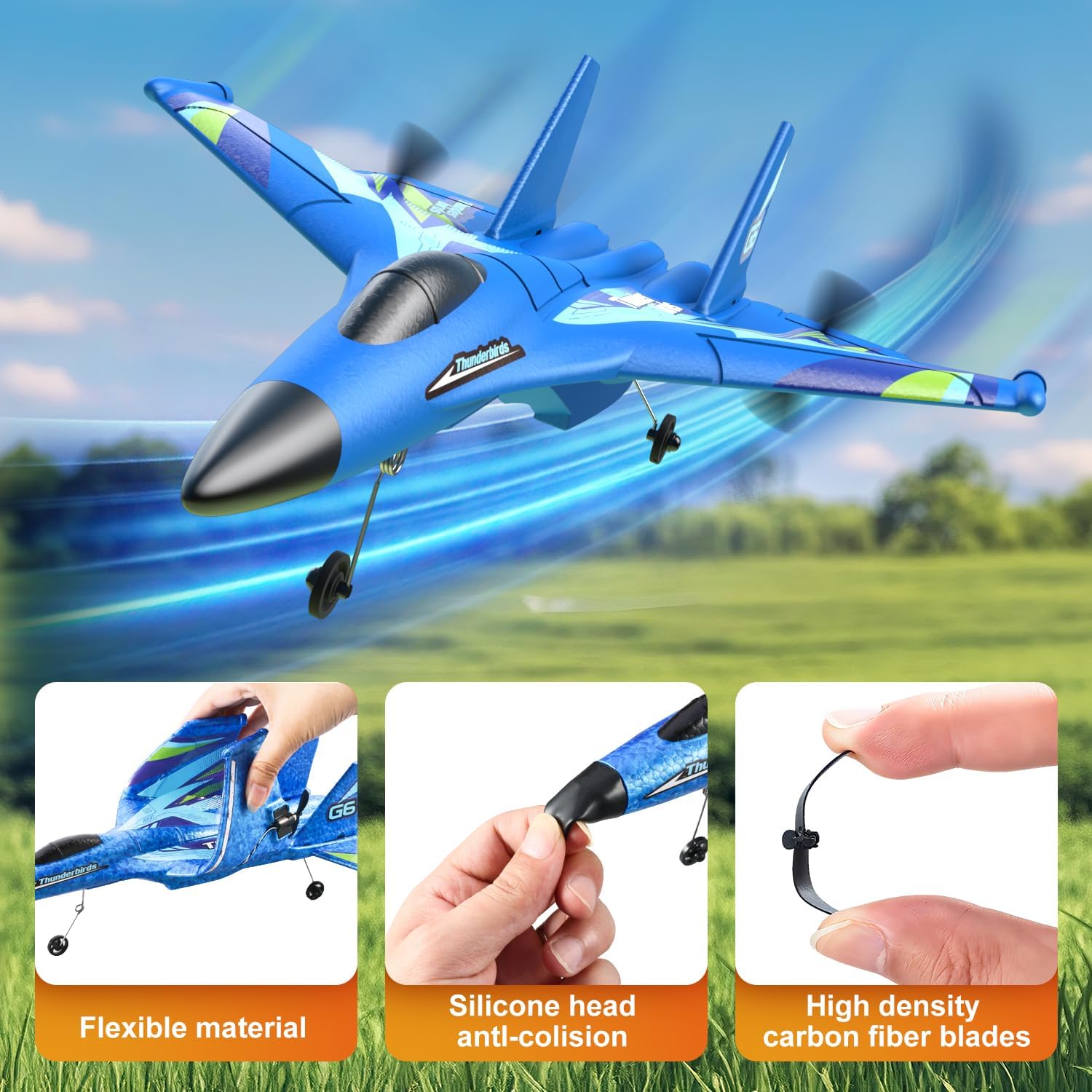
Image: Detailed views highlighting the plane's flexible EPP foam material, the protective silicone head designed for anti-collision, and the durable high-density carbon fiber propeller blades.

Image: Showcases the detailed painting on the aircraft and the robust high-density propeller, emphasizing quality and durability.
2. Cleaning and Storage
- After each flight, gently wipe the aircraft with a dry, soft cloth to remove any dirt or debris.
- Avoid using harsh chemicals or solvents.
- Store the aircraft in a cool, dry place away from direct sunlight and extreme temperatures.
- Remove batteries from both the aircraft and remote control during long periods of storage.
3. Propeller Replacement
If a propeller is damaged, replace it with one of the extra propeller blades provided. Use the included screwdriver to carefully remove the old propeller and install the new one, ensuring it is securely fastened.
Troubleshooting
| Problem | Possible Cause | Solution |
|---|---|---|
| Aircraft does not respond to remote. | Not paired, low battery in remote or aircraft, out of range. | Re-pair the remote and aircraft. Charge/replace batteries. Ensure aircraft is within 150-meter range. |
| Aircraft does not take off or flies erratically. | Damaged propeller, incorrect take-off technique, strong wind. | Replace damaged propellers. Review take-off instructions. Fly in calm conditions. |
| Short flight time. | Battery not fully charged, old battery. | Ensure battery is fully charged before flight. Consider replacing old batteries. |
| Aircraft nose or body breaks easily. | Severe impact, repeated crashes. | While durable, extreme impacts can cause damage. Practice gentle landings. Minor foam damage can often be repaired with appropriate foam-safe adhesive. |
Specifications
- Brand: 4DRC
- Model Number: 4D-G6-BLUE
- Product Dimensions: 15 x 12 x 2 inches
- Item Weight: 12 ounces
- Recommended Age: 8 years and up
- Batteries: 2 rechargeable batteries (included for aircraft), remote control batteries (typically AA, not included)
- Flight Range: Approximately 150 meters
- Play Time: Up to 30 minutes with 2 batteries
- Material: EPP Foam, Silicone, Carbon Fiber
- Features: Automatic Balance Gyro, Colorful Night Lights, 2 Speed Modes, Low Battery/Over Range Alarm
Warranty and Support
For warranty information or technical support, please refer to the contact details provided with your product packaging or visit the official 4DRC website. Keep your purchase receipt as proof of purchase.
You can also visit the 4DRC Store on Amazon for additional product information and support resources.
Ask a question about this manual
Ask about setup, troubleshooting, compatibility, parts, safety, or missing instructions. Manuals+ will review the question and use this page’s manual context to help answer it.