
1. Introduction
This manual provides detailed instructions for the installation, operation, maintenance, and troubleshooting of your INJORA MBL32 G2 Waterproof Micro Brushless Electronic Speed Controller (ESC). The MBL32 G2 is designed for 1/24 and 1/18 scale RC crawlers, offering precise control and robust performance. Please read this manual thoroughly before use to ensure proper function and longevity of your product.
2. Product Overview
2.1 Key Features
- Based on AM32 firmware, specifically tailored for Micro crawlers and programmable.
- Provides smooth and linear low-speed control, with powerful high-speed performance.
- Operates quietly compared to brushed systems, with minimal noise output.
- Integrated BEC with adjustable output: 6.0V/7.4V.
- Waterproof design for reliable performance in various conditions.
- Multiple protection features: Low-voltage cutoff, fail-safe, and rotor lock protection.
2.2 What's in the Box
- INJORA MBL32 G2 Micro Brushless ESC

Image 2.1: The INJORA MBL32 G2 ESC, its retail packaging, and the optional USB programming card.
3. Specifications
The following table details the technical specifications of the INJORA MBL32 G2 ESC:
| Specification | Value |
|---|---|
| Part Number | MBL32 G2 |
| LiPo Cells | 2-3S |
| Continuous Current | 25A |
| Peak Current | 60A |
| BEC Output | 6.0V/7.4V adjustable |
| BEC Current | 3A |
| Dimensions (L*W*H) | 30*19*12mm |
| Waterproof | Yes |
| App Tuning | Not Supported |
| Weight | 0.45oz (13g) |
| Compatible Motors | INJORA 1721 Purple Viper / 2204 Fat Viper |
| Suggested Applications | 1/18 1/24 RC Crawler cars |

Image 3.1: Dimensions of the MBL32 G2 ESC and examples of compatible INJORA brushless motors (Purple Viper 1721, Fat Viper 2204).
4. Setup and Installation
4.1 Component Identification
Familiarize yourself with the connection points on the ESC:
- Receiver CH2: Connects to the throttle channel of your RC receiver.
- Battery: Connects to your 2S or 3S LiPo battery.
- Motor: Connects to your brushless motor.
- Power: Main power input from the battery.
- BEC: Provides regulated power to the receiver and servo.

Image 4.1: Connection diagram illustrating how to connect the ESC to the receiver, battery, and motor.
4.2 Installation Steps
- Connect the Motor: Connect the three wires from your brushless motor to the corresponding motor output wires on the ESC. Ensure a secure connection.
- Connect to Receiver: Plug the signal cable from the ESC (labeled 'Receiver CH2' or similar) into the throttle channel (usually Channel 2) of your RC receiver.
- Connect the Battery: Connect your 2S or 3S LiPo battery to the battery input connector on the ESC. Ensure correct polarity.
- Mount the ESC: Securely mount the ESC in your RC crawler using double-sided tape or zip ties, ensuring it is protected from moving parts and excessive vibration. Allow for adequate airflow if possible, although the unit is waterproof.
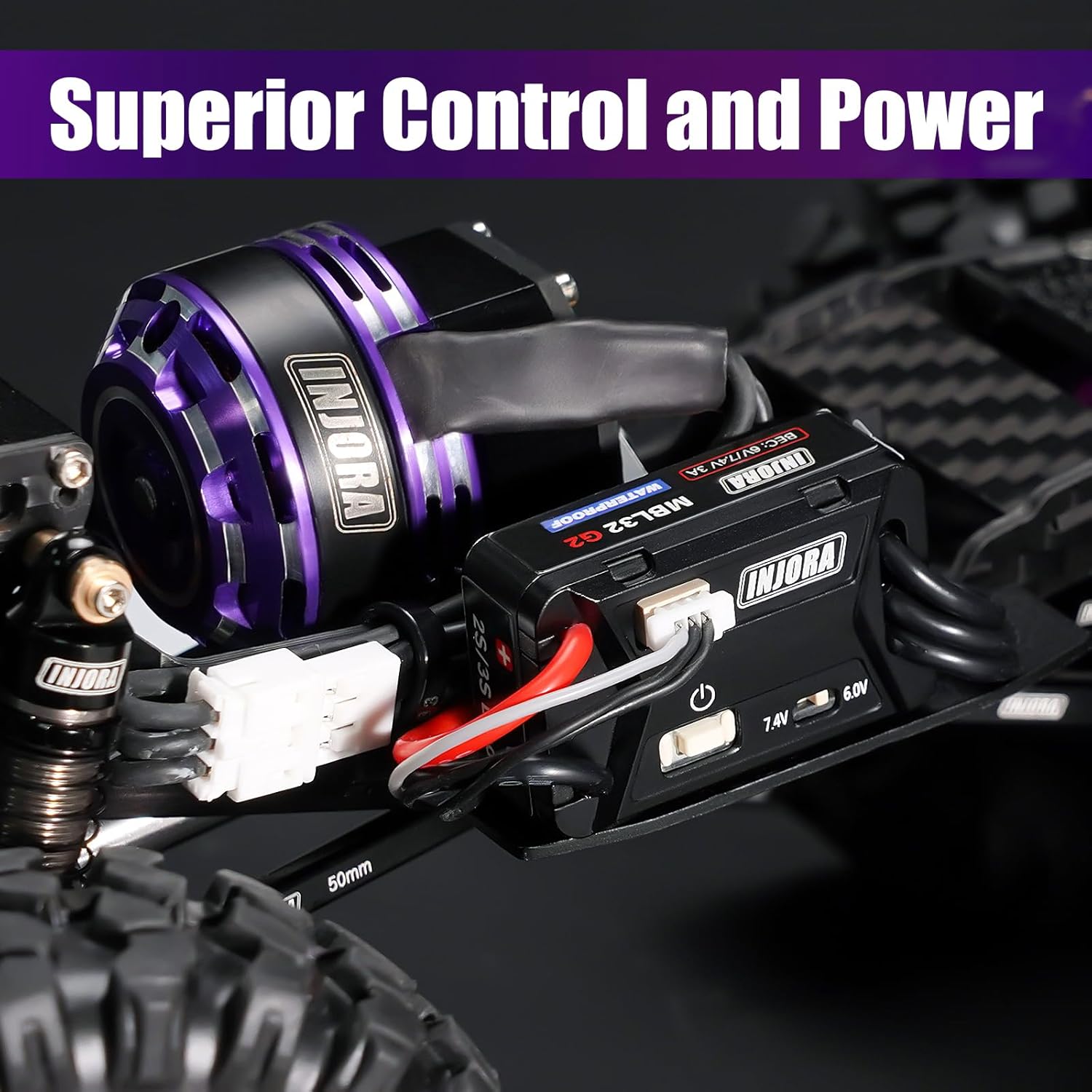
Image 4.2: Example of the MBL32 G2 ESC and a compatible brushless motor installed within an RC crawler chassis.
5. Operating Instructions
5.1 Powering On/Off
To power on the ESC, ensure all connections are correct, then connect the battery. The ESC will typically emit a series of beeps indicating successful initialization. To power off, disconnect the battery.
5.2 BEC Voltage Adjustment
The MBL32 G2 ESC features an adjustable BEC output to power your receiver and servo. You can switch between 6.0V and 7.4V using the small switch located on the ESC unit. Select the voltage appropriate for your servo and receiver to prevent damage.

Image 5.1: The MBL32 G2 ESC highlighting the switch for adjusting the BEC output voltage between 6.0V and 7.4V.
5.3 Programming
The MBL32 G2 ESC is programmable using a dedicated USB programming card (sold separately). Connect the programming card to the ESC and your computer to access advanced settings and fine-tune performance parameters. Refer to the programming card's specific instructions for software installation and usage.

Image 5.2: Connection diagram for the USB programming card, showing its interface with the ESC, battery, and computer.
6. Maintenance
To ensure optimal performance and longevity of your MBL32 G2 ESC, follow these maintenance guidelines:
- Cleaning: Although waterproof, it is recommended to clean the ESC after use, especially if exposed to dirt, mud, or saltwater. Use a soft brush and clean water, then allow it to dry completely before storage or next use.
- Inspection: Regularly inspect all wires and connectors for signs of wear, damage, or corrosion. Replace any damaged components immediately.
- Storage: Store the ESC in a cool, dry place away from direct sunlight and extreme temperatures. Disconnect the battery when not in use.
- Avoid Overheating: While the ESC has protection features, prolonged operation under extreme load or in poor ventilation can lead to overheating. Monitor temperatures during use.
7. Troubleshooting
If you encounter issues with your MBL32 G2 ESC, refer to the following troubleshooting steps:
- No Power/No Response:
- Check battery connection and ensure the battery is charged.
- Verify all wires are securely connected to the ESC, receiver, and motor.
- Ensure the receiver is powered on and functioning correctly.
- Motor Stutters/Irregular Operation:
- Confirm motor wires are correctly connected and not loose.
- Check for any obstructions in the motor or drivetrain.
- Ensure the battery has sufficient charge and can deliver the required current.
- Servo Issues (e.g., stuttering, loss of power):
- If your servo draws significant power, it might cause issues with the ESC's BEC output. Try adjusting the BEC voltage switch to 6.0V if it is currently set to 7.4V. This can reduce the power demand on the ESC and stabilize servo operation.
- Consider using a less power-hungry servo if the issue persists.
- USB Programmer Not Connecting/Working:
- Ensure the USB programming card is correctly connected to the ESC and your computer.
- Verify that the necessary drivers for the USB programming card are installed on your computer.
- Try a different USB port or computer.
- Ensure the programming software is up-to-date and compatible with your operating system.
- Overheating:
- Reduce load on the motor or ESC.
- Improve ventilation around the ESC.
- Check for short circuits or excessive current draw.
8. Warranty and Support
INJORA products are manufactured to high-quality standards. For warranty information or technical support, please contact INJORA customer service through their official channels or the retailer from whom you purchased the product. Please have your product model (MBL32 G2) and purchase details ready when contacting support.