
M-VAVE MK-300
M-VAVE MK-300 Guitar Multi-Effects Processor Pedal
User Manual
1. Introduction
Thank you for purchasing the M-VAVE MK-300 Guitar Multi-Effects Processor Pedal. This device is a comprehensive solution for guitar and bass players, integrating advanced Audio Neural Network (ANN) modeling technology to deliver authentic amplifier and cabinet tones. With a wide array of effects, presets, and versatile connectivity options, the MK-300 is designed to enhance your musical expression in any setting, from studio recording to live performance and practice.
This manual provides essential information on the setup, operation, maintenance, and troubleshooting of your MK-300 pedal. Please read it thoroughly before use to ensure proper functionality and to maximize your experience with the product.
2. Safety Information
To prevent electric shock, fire, or damage to the unit, please observe the following precautions:
- Do not open the unit. There are no user-serviceable parts inside. Refer all servicing to qualified service personnel.
- Do not expose the unit to rain, moisture, or extreme temperatures.
- Use only the specified power adapter or ensure the power supply meets the unit's voltage requirements.
- Keep the unit away from heat sources such as radiators, heat registers, stoves, or other apparatus (including amplifiers) that produce heat.
- Avoid placing heavy objects on the unit or subjecting it to strong impacts.
- Clean only with a dry cloth. Do not use liquid cleaners or aerosols.
3. Key Features
- Audio Neural Network (ANN) Modeling: Simulates real amp and cabinet tones with high accuracy.
- Extensive Effects Library: Over 320 types of effects with 11 simultaneous effect modules.
- Amp & Cabinet Simulations: 120 amp models (85 electric guitar, 30 bass, 5 folk guitar) and 100 cabinet simulations.
- Preset System: 160 editable preset slots (80 Factory + 80 User) for instant tone recall.
- Integrated Looper: 150-second looper with recording, overdubbing, and playback capabilities.
- Drum Machine: 128 drum patterns across 9 genres.
- Versatile Connectivity: MIDI (5-pin, BT, USB-C), USB Audio 2.0 (44.1kHz/24bit), Dual 1/4" TS Output, XLR Balanced Out, Dedicated Headphone Monitoring.
- Control Interface: 3.5" chromatic LCD screen, 4 programmable footswitches, and multiple control knobs.
- Power: Battery powered with 10+ hours of battery life, or external power supply.
- Mobile App & Software Support: Wireless control via mobile app (Bluetooth) and official software for Windows, macOS, Android.
4. Controls and Connections
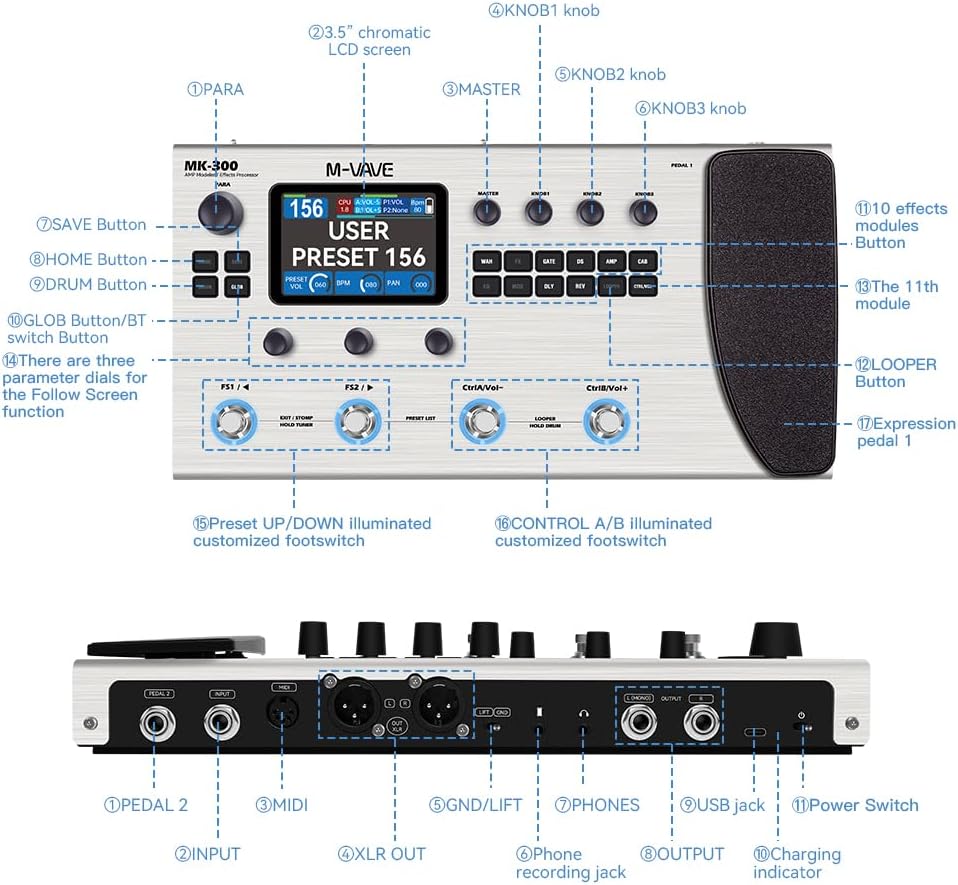
Figure 4.1: MK-300 Controls and Connections Diagram
Front Panel Controls:
- PARA Button: Used for parameter adjustments.
- 3.5" Chromatic LCD Screen: Displays current settings, effects chain, and menu navigation.
- MASTER Knob: Controls the overall output volume.
- KNOB1, KNOB2, KNOB3: Multi-function knobs for parameter editing and menu navigation.
- SAVE Button: Saves current settings to a preset.
- HOME Button: Returns to the main display or home screen.
- DRUM Button: Activates and controls the drum machine.
- GLOB Button/BT Switch Button: Accesses global settings or activates Bluetooth pairing.
- Effect Module Buttons (10): Dedicated buttons for activating/deactivating and selecting individual effect modules (e.g., WAH, FX, GATE, DS, AMP, CAB, EQ, MOD, DLY, REV).
- The 11th Module: An additional effect module button.
- LOOPER Button: Controls the looper function.
- Expression Pedal 1: Assignable expression pedal for volume, wah, or other parameters.
- FS1 / FS2 (Preset UP/DOWN Footswitches): Illuminated footswitches for navigating presets or other assigned functions.
- CtrlA/Vol- / CtrlB/Vol+ (Control A/B Footswitches): Illuminated footswitches for customizable control functions, often volume control or looper operations.
Rear Panel Connections:
- PEDAL 2 Input: For connecting an optional external expression pedal.
- INPUT: 1/4" mono input for guitar or bass.
- MIDI: 5-pin MIDI In/Out for external MIDI control.
- XLR OUT (L/R): Balanced XLR outputs for direct connection to a mixer or audio interface.
- GND/LIFT Switch: Ground lift switch to eliminate hum.
- PHONES: 3.5mm stereo headphone output.
- USB Jack: USB-C port for computer connection (USB Audio, MIDI, software updates).
- Power Switch: Turns the unit on/off.
- Charging Indicator: LED indicating charging status.
- OUTPUT (L/R): 1/4" TS mono/stereo outputs.
- Phone Recording Jack: Dedicated output for connecting to mobile devices for recording.
5. Setup
5.1 Unpacking and Initial Inspection
Carefully unpack your M-VAVE MK-300 pedal. Ensure all components are present:
- M-VAVE MK-300 Multi-Effects Processor
- USB Cable (x1)
- User Manual (this document)
- Recording Cable (x1)

Figure 5.1: Package Contents
5.2 Powering On
The MK-300 can be powered by its internal rechargeable Lithium Polymer battery or via the USB-C port using a compatible power adapter (not included) or a computer USB port. Ensure the unit is fully charged before initial battery-powered use.
5.3 Initial Pedal Calibration
IMPORTANT: Upon receipt of the product, you must calibrate Expression Pedal 1 first. Failure to do so may prevent Pedal 1 from functioning normally.
To calibrate Expression Pedal 1:
- Turn on the MK-300.
- Navigate to the Global Settings menu.
- Locate the 'Pedal 1 Setting' or 'Pedal Calibration' option.
- Follow the on-screen instructions to calibrate the pedal, typically involving moving the pedal through its full range of motion (heel to toe).
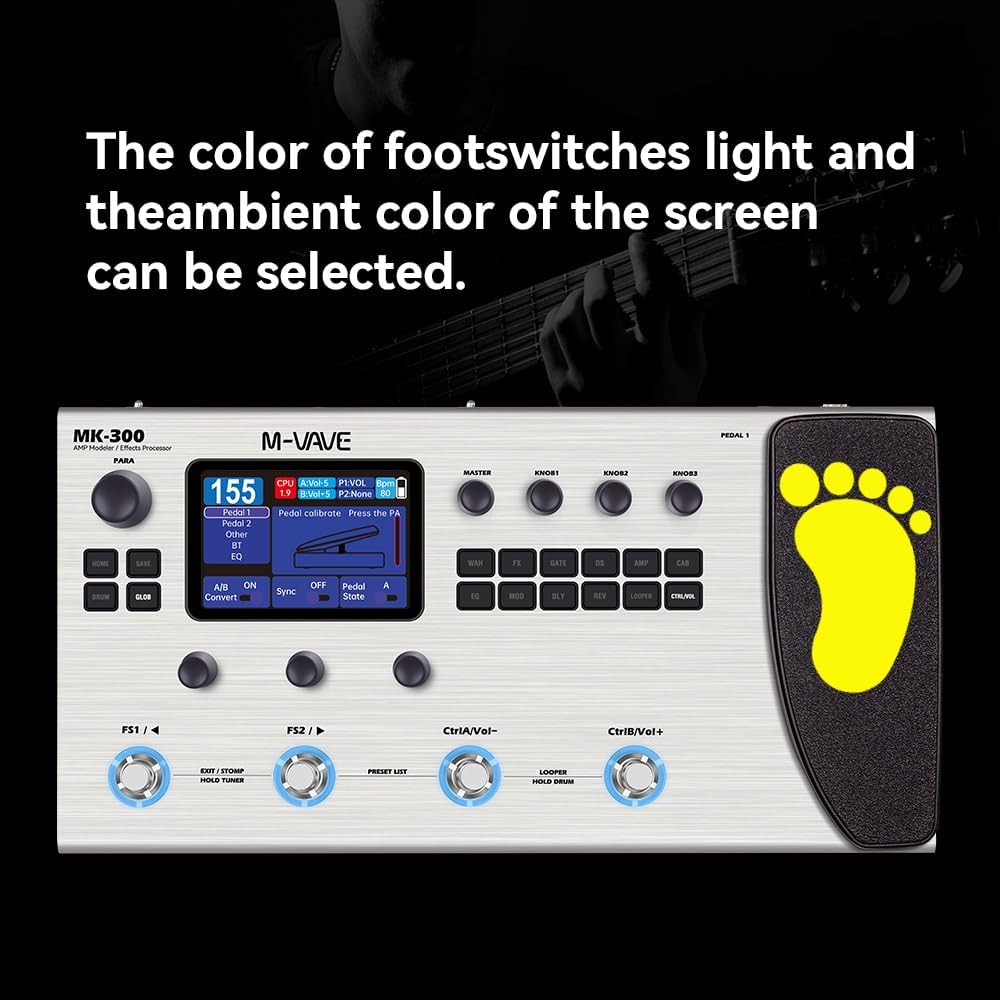
Figure 5.2: Pedal Calibration Screen Example
5.4 Connecting Your Equipment
- Guitar/Bass: Connect your instrument to the 1/4" INPUT jack.
- Amplifier/Mixer: Connect the 1/4" OUTPUT (L/R) jacks to your guitar amplifier or the XLR OUT (L/R) to a mixer or audio interface for balanced output.
- Headphones: Connect headphones to the 3.5mm PHONES jack for silent practice.
- Computer: Use the USB-C cable to connect the MK-300 to your computer for USB Audio, MIDI, and software management.
- External Pedal: If using an additional expression pedal, connect it to the PEDAL 2 input.
6. Operating Instructions
6.1 Basic Navigation
The MK-300 features a 3.5" LCD screen and multiple knobs and buttons for intuitive navigation:
- Use the KNOB1, KNOB2, KNOB3 to scroll through menus, select options, and adjust parameter values.
- Press the HOME button to return to the main screen or previous menu.
- The PARA button allows access to detailed parameters for selected effects.
6.2 Preset Management
The MK-300 comes with 80 factory presets and 80 user-editable slots.
- Selecting Presets: Use the FS1 and FS2 footswitches to cycle through presets. The screen will display the current preset number and name.
- Editing Presets: Select a preset, then use the effect module buttons (e.g., WAH, FX, AMP) to activate/deactivate modules. Use the knobs to adjust parameters for the active module.
- Saving Presets: After making changes, press the SAVE button. You can choose to overwrite the current preset or save it to a new user slot.

Figure 6.1: User Preset Display
6.3 Effect Modules and Stomp Interface
The MK-300 features 11 simultaneous effect modules. Each module can be individually activated or deactivated.
- Activating/Deactivating: Press the corresponding effect module button (e.g., DS for Distortion, REV for Reverb) to toggle it on or off within the current preset.
- Adjusting Parameters: When an effect module is active, its parameters will be displayed on the screen. Use the knobs to adjust these parameters.
- Stomp Interface: The screen can display a visual representation of the effects chain, allowing for quick selection and activation of modules, similar to individual stompboxes.

Figure 6.2: Stomp Interface Display
6.4 Looper Function
The integrated looper allows for up to 150 seconds of recording time.
- Press the LOOPER button to enter looper mode.
- Use the footswitches (often CtrlA/B or FS1/FS2, depending on assignment) to control Record, Play, Overdub, and Undo functions.
- Refer to the on-screen prompts for specific looper operations.
6.5 Drum Machine
The MK-300 includes 128 drum patterns across 9 genres.
- Press the DRUM button to activate the drum machine.
- Use the knobs to select drum patterns and adjust tempo (BPM).
- The drum machine can be synchronized with the looper.
6.6 MIDI and USB Audio
- MIDI: Connect external MIDI devices via the 5-pin MIDI ports or use MIDI over USB-C or Bluetooth for control.
- USB Audio: The MK-300 functions as a 24-bit/44.1kHz USB audio interface, allowing direct recording to a computer with zero latency.
6.7 Mobile App and Software Control
The MK-300 supports wireless control via a dedicated mobile app (iOS/Android) and desktop software (Windows/macOS).
- Bluetooth Connection: Press and hold the GLOB/BT button to activate Bluetooth pairing mode. Connect your mobile device to the MK-300 via Bluetooth.
- App Functionality: The app allows for convenient monitoring and adjustment of parameters, preset management, and access to community features for downloading tones.

Figure 6.3: Wireless Connection via Mobile App and Computer
6.8 Customizing Footswitches
The four illuminated footswitches (FS1, FS2, CtrlA/Vol-, CtrlB/Vol+) are programmable. You can assign various functions to them, such as preset switching, effect on/off, looper control, or volume control.
- Access the 'Footswitch Settings' in the Global Settings menu to customize their functions.
- The color of the footswitch lights and the ambient color of the screen can also be selected for personalization.
7. Maintenance
- Cleaning: Use a soft, dry cloth to clean the unit. Do not use abrasive cleaners, waxes, or solvents.
- Storage: When not in use for extended periods, store the unit in a cool, dry place away from direct sunlight and extreme temperatures.
- Battery Care: If using battery power, periodically charge the unit to maintain battery health, even if not in regular use.
8. Troubleshooting
| Problem | Possible Cause | Solution |
|---|---|---|
| No power | Battery drained; Power adapter not connected or faulty. | Charge the battery; Ensure power adapter is securely connected and functional. |
| No sound output | Cables incorrectly connected; Volume too low; Effect module bypassed. | Check all audio cable connections; Increase MASTER volume; Ensure desired effect modules are active. |
| Expression Pedal 1 not working | Pedal not calibrated. | Perform the initial pedal calibration as described in Section 5.3. |
| Humming or noise | Ground loop; Faulty cables; Interference. | Engage the GND/LIFT switch; Try different cables; Move unit away from other electronic devices. |
| Cannot connect via Bluetooth | Bluetooth not activated; Device not in pairing mode. | Ensure Bluetooth is enabled on both devices; Press and hold GLOB/BT button to enter pairing mode. |
9. Specifications
| Feature | Specification |
|---|---|
| Model Number | MK-300 |
| Item Weight | 3.41 pounds (1.55 Kilograms) |
| Product Dimensions | 12.99 x 2.17 x 6.89 inches (330mm L x 175mm W x 55mm H) |
| Batteries | 1 Lithium Polymer battery (included) |
| Power Source | Battery Powered / USB |
| Voltage | 3.7 Volts (internal battery) |
| Hardware Interface | USB, MIDI |
| Signal Format | Digital |
| Display | 3.5" Chromatic LCD screen |
| Effects Types | 320+ |
| Simultaneous Effect Modules | 11 |
| Presets | 160 (80 Factory + 80 User) |
| Amp Models | 120 (85 electric guitar, 30 bass, 5 folk guitar) |
| Cabinet Simulations | 100 |
| Looper Time | 150 seconds |
| Drum Patterns | 128 |
| USB Audio | 24-bit/44.1kHz, Zero-Latency |
| Connectivity | MIDI (5-pin, BT, USB-C), USB Audio, Dual 1/4" TS Output, XLR Balanced Out, Headphone Out, Phone Recording Out |
10. Warranty Information
Specific warranty terms and conditions for the M-VAVE MK-300 are typically provided by the retailer or manufacturer at the time of purchase. Please retain your proof of purchase. For detailed warranty information, including coverage period and claim procedures, refer to the documentation included with your product or visit the official M-VAVE website.
11. Customer Support
If you encounter any issues not covered in this manual or require further assistance, please contact the retailer from whom you purchased the M-VAVE MK-300. You may also visit the official M-VAVE website for support resources, FAQs, and contact information for technical support.
Related documentsMK-300


Ask a question about this manual
Ask about setup, troubleshooting, compatibility, parts, safety, or missing instructions. Manuals+ will review the question and use this page’s manual context to help answer it.