
Introduction
Thank you for purchasing the Eureka Wet and Dry Vacuum Cleaner WD X2. This versatile appliance is designed for efficient cleaning of both wet spills and dry debris, featuring a powerful 1300W motor and a blower function. Please read this manual carefully before operating the appliance to ensure safe and optimal performance. Keep this manual for future reference.
Important Safety Instructions
Always follow basic safety precautions when using electrical appliances to reduce the risk of fire, electric shock, or injury.
- Read all instructions before use.
- Do not leave the appliance unattended when plugged in. Unplug from outlet when not in use and before servicing.
- Do not use outdoors or on wet surfaces.
- Do not allow to be used as a toy. Close attention is necessary when used by or near children.
- Use only as described in this manual. Use only manufacturer's recommended attachments.
- Do not use with damaged cord or plug. If appliance is not working as it should, has been dropped, damaged, left outdoors, or dropped into water, return it to a service center.
- Do not pull or carry by cord, use cord as a handle, close a door on cord, or pull cord around sharp edges or corners. Do not run appliance over cord. Keep cord away from heated surfaces.
- Do not unplug by pulling on cord. To unplug, grasp the plug, not the cord.
- Do not handle plug or appliance with wet hands.
- Do not put any object into openings. Do not use with any opening blocked; keep free of dust, lint, hair, and anything that may reduce air flow.
- Keep hair, loose clothing, fingers, and all parts of body away from openings and moving parts.
- Do not pick up anything that is burning or smoking, such as cigarettes, matches, or hot ashes.
- Do not use to pick up flammable or combustible liquids, such as gasoline, or use in areas where they may be present.
- Do not pick up toxic material, such as chlorine bleach, ammonia, or drain cleaner.
- Do not use without filters in place.
- Turn off all controls before unplugging.
- Use extra care when cleaning on stairs.
Product Components
The Eureka Wet and Dry Vacuum Cleaner WD X2 comes with the following components:
- Main Unit
- Suction Hose
- Extension Tubes (2)
- Floor Brush
- Crevice Tool
- Other 8 specialized accessories (total 13 accessories)
- Dry Filter
- HEPA Filter
- Wet Filter

Image: The main unit of the Eureka WD X2 vacuum cleaner, showing the canister design, attached hose, and various cleaning attachments.

Image: A close-up top view of the Eureka WD X2 vacuum cleaner, highlighting the power dial, auto-clean switch, and power cord input.
Setup
- Unpacking: Carefully remove all components from the packaging. Retain packaging for storage or future transport.
- Wheel Assembly (if required): Attach the wheels to the base of the main unit if they are not pre-assembled. Ensure they click securely into place.
- Filter Installation:
- For Dry Vacuuming: Ensure the Dry Filter and HEPA Filter are correctly installed inside the canister. Refer to the diagram inside the unit for proper placement.
- For Wet Vacuuming: Remove the Dry Filter and HEPA Filter. Install the Wet Filter. Never use dry filters for wet vacuuming.
- Hose Connection:
- For Suction: Connect the suction hose to the inlet port on the front of the main unit. Twist to secure.
- For Blower Function: Connect the suction hose to the outlet port located on the rear or top of the main unit (refer to specific model design). Twist to secure.
- Attachment Connection: Attach the desired cleaning accessory (e.g., extension tubes, floor brush, crevice tool) to the end of the suction hose. Ensure a snug fit.

Image: The rear view of the Eureka WD X2 vacuum cleaner, showing the power cord neatly wrapped around integrated storage hooks.
Operating Instructions
1. Dry Vacuuming
- Ensure the Dry Filter and HEPA Filter are correctly installed.
- Connect the hose to the suction inlet.
- Plug the power cord into a suitable electrical outlet.
- Turn the power dial to the "On" position.
- Adjust the suction power using the dynamic dial control as needed for different surfaces.
- Begin cleaning.
2. Wet Vacuuming
- Remove the Dry Filter and HEPA Filter. Install the Wet Filter.
- Connect the hose to the suction inlet.
- Plug the power cord into a suitable electrical outlet.
- Turn the power dial to the "On" position.
- Begin cleaning wet spills. Do not overfill the tank. The vacuum has an automatic shut-off when the liquid reaches maximum capacity.
3. Blower Function
- Ensure the canister is empty and clean.
- Connect the hose to the blower outlet port (usually at the rear or top of the unit).
- Plug the power cord into a suitable electrical outlet.
- Turn the power dial to the "On" position.
- Use the blower to clear debris from pathways, workshops, or hard-to-reach areas.
4. Dynamic Dial Power Control
The vacuum cleaner features a dynamic dial power control. Rotate the dial to increase or decrease the suction power. This allows for precise adjustment based on the cleaning task and surface type.
5. Auto Clean Switch
The Smart Auto Clean Switch helps maintain the vacuum cleaner's performance. When activated, it assists in clearing dust and debris from the filter, extending its lifespan and ensuring consistent suction.
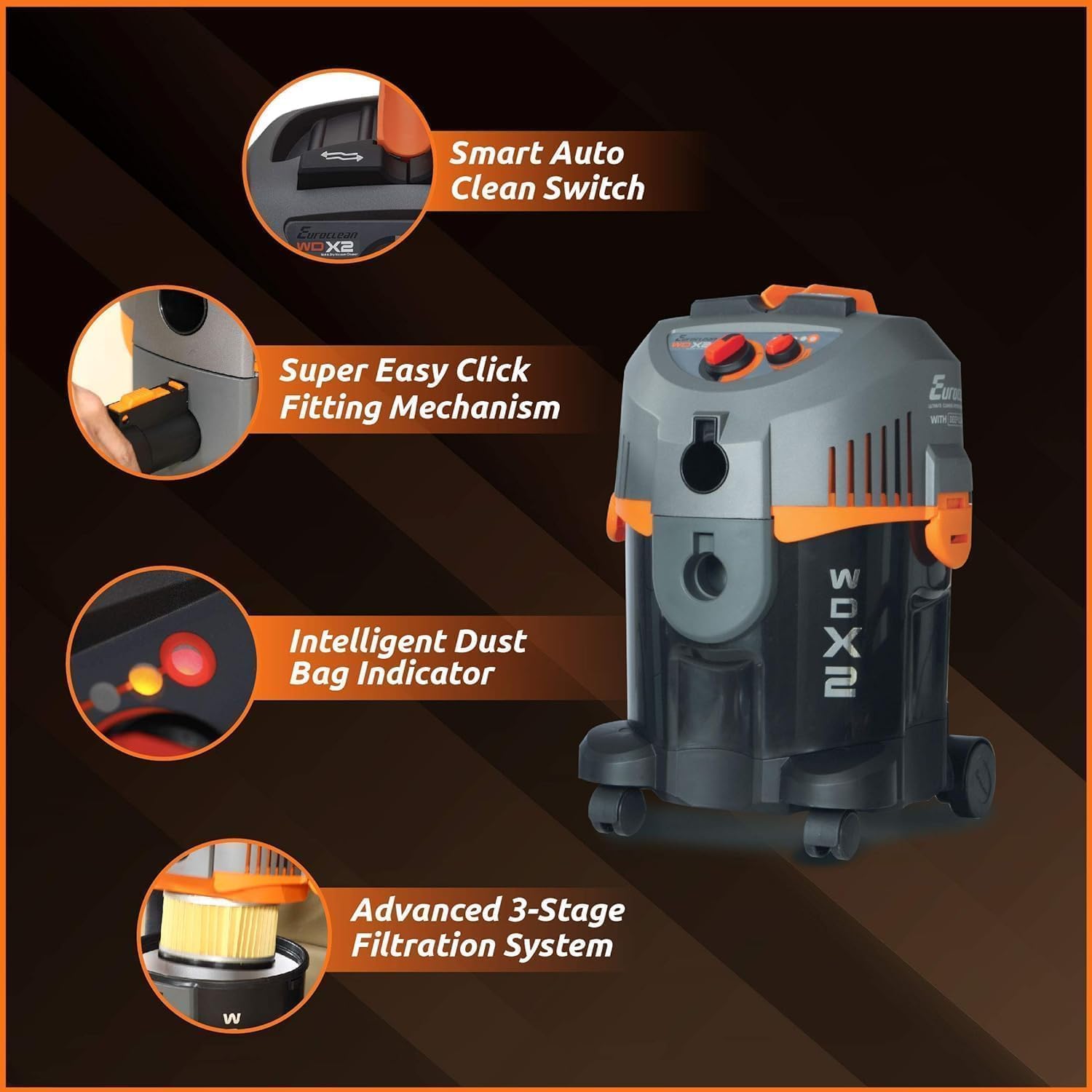
Image: A diagram illustrating key features of the Eureka WD X2, including the Smart Auto Clean Switch, Easy Click Fitting Mechanism, Intelligent Dust Bag Indicator, and Advanced 3-Stage Filtration System.
Maintenance
Regular maintenance ensures the longevity and optimal performance of your vacuum cleaner.
1. Emptying the Canister
- Always unplug the vacuum cleaner before emptying.
- Release the latches securing the motor head to the canister.
- Carefully lift the motor head.
- Dispose of dry debris or empty liquids into a suitable drain.
- Clean the inside of the canister with a damp cloth if necessary.
- Reattach the motor head and secure the latches.
2. Filter Cleaning and Replacement
- Dry Filter & HEPA Filter: Tap off loose dust. If heavily soiled, wash with mild soap and water, rinse thoroughly, and allow to air dry completely before reinstallation. Do not use wet filters for dry vacuuming.
- Wet Filter: Rinse with water after each wet use. Allow to air dry completely before storage.
- Replace filters periodically or when performance noticeably decreases.
3. Accessory Cleaning
Wash accessories with mild soap and water as needed. Ensure they are dry before storing.
4. Cord Storage
Wrap the power cord neatly around the integrated cord storage hooks on the unit to prevent damage.
Troubleshooting
| Problem | Possible Cause | Solution |
|---|---|---|
| Vacuum does not turn on. | No power supply. Power switch is off. | Check power cord connection and wall outlet. Turn power switch to "On". |
| Low suction power. | Canister is full. Filter is clogged. Hose or attachment is blocked. Hose is not securely connected. | Empty the canister. Clean or replace filters. Check and clear any blockages in hose or attachments. Ensure hose is firmly attached to the inlet. |
| Water leaking during wet vacuuming. | Wet filter not installed correctly. Canister is overfilled. Seals are damaged. | Ensure wet filter is properly seated. Do not exceed maximum liquid capacity. Inspect seals and replace if damaged. |
| Blower function not working. | Hose not connected to blower port. Blower port is blocked. | Connect hose to the designated blower outlet. Check and clear any blockages in the blower port or hose. |
If the problem persists after attempting these solutions, please contact customer support.
Specifications
- Model Name: Eureka Select WD X2
- Power: 1300 Watts
- Suction Power: 22.5 KPa
- Capacity: 8 litres
- Hose Length: 2 Metres
- Voltage: 230 Volts
- Amperage: 5.7 A
- Noise Level: 80 Decibels
- Product Dimensions: 35L x 30W x 35H Centimeters
- Item Weight: 6 kg
- Filter Types: Dry Filter, HEPA Filter, Wet Filter
- Special Features: Auto Clean, Blower Function, Dynamic Dial Power Control, High Suction Power, Wet And Dry Cleaning
- Control Method: Push Button, Dial Control
- Connectivity: Corded Electric
- Manufacturer: Aquacity Pvt Ltd
Warranty and Support
This Eureka Wet and Dry Vacuum Cleaner WD X2 comes with a 1 Year Warranty from the date of purchase.
For warranty claims, technical support, or service inquiries, please contact the manufacturer or authorized service center. Keep your purchase receipt as proof of purchase.
Manufacturer: Aquacity Pvt Ltd