
1. Introduction
Welcome to the PATONA Action Cam Life SL3 user manual. This guide provides detailed instructions on how to set up, operate, maintain, and troubleshoot your new action camera. Please read this manual carefully before using the camera to ensure optimal performance and longevity.
The PATONA Action Cam Life SL3 is designed to capture your adventures in stunning 4K resolution, featuring a 140-degree wide-angle lens, Electronic Image Stabilization (EIS), and waterproof capabilities up to 30 meters with its protective case. It comes with a comprehensive accessory kit to support various activities.
2. Package Contents
Please check the box for the following items:
- 1 x PATONA Platinum Action Cam Life SL3
- 2 x Platinum Li-ion Batteries (1000 mAh/3.7Wh)
- 1 x Dual Charger
- 1 x 64GB Micro SD Card
- 1 x Waterproof Case
- 1 x USB-C to USB-C Cable
- 1 x Clip
- 1 x Remote Control with CR2032 Battery
- 1 x Remote Control Strap
- Double-sided Adhesive Tape
- 2 x Supports
- 1 x Quick Release with Screw
- 1 x Helmet Mount
- 1 x Handlebar and Pole Mount
- 4 x Fastening Straps
- QR Code for Instructions (digital manual)

Figure 2.1: Included accessories in the PATONA Action Cam Life SL3 'Big Set'.
3. Product Overview
The PATONA Action Cam Life SL3 features a compact design with a 2.0-inch LCD display for easy navigation and preview. It integrates a 140-degree wide-angle lens with 4G + IR elements for clear and expansive shots.

Figure 3.1: Key features and components of the Action Cam Life SL3.

Figure 3.2: Technical highlights of the Action Cam Life SL3.
4. Setup
4.1. Battery Installation and Charging
- Open the battery compartment cover on the bottom of the camera.
- Insert the two included PATONA Platinum Li-ion batteries, ensuring correct polarity.
- Close the battery compartment cover securely.
- Connect the dual charger to a power source using the USB-C cable. Insert the batteries into the dual charger for approximately 180 minutes until fully charged.
A fully charged battery provides approximately 90 minutes of recording time at 1080P resolution.
4.2. Micro SD Card Insertion
- Locate the Micro SD card slot on the side of the camera.
- Insert the included 64GB Micro SD card with the contacts facing the front of the camera until it clicks into place.
- To remove, gently push the card in until it springs out.
Note:
- Use a high-speed (Class 10 or higher) Micro SD card for optimal performance.
- Format the Micro SD card in the camera's settings before first use.
4.3. Waterproof Case Usage
The included waterproof case allows the Action Cam Life SL3 to be submerged up to 30 meters (98 feet). Ensure the camera is securely placed inside the case and the latch is firmly closed before any water activities. The camera is not waterproof without this case.

Figure 4.1: Action Cam Life SL3 in its waterproof case for underwater use.
Video 4.1: Demonstration of the PATONA Action Cam Life SL3's underwater capabilities.
4.4. Mounting Accessories
Utilize the various included mounts (helmet, handlebar, pole, quick release) to attach your camera securely to different surfaces and equipment. Ensure all mounts are tightened properly before use to prevent accidental detachment.
4.5. Initial Power On
Press and hold the Power/Mode button on the front of the camera until the screen illuminates. The camera will display the startup logo and then enter the default recording mode.
Video 4.2: Overview of the PATONA Action Cam Life SL3's 4K 60FPS video recording and basic operation.
5. Operating Instructions
5.1. Basic Controls
- Power/Mode Button: Press and hold to power on/off. Press briefly to switch between video, photo, and playback modes.
- Shutter/OK Button: Press to start/stop recording video or take a photo. In menu, press to confirm selection.
- Up/Down Buttons: Navigate through menu options or zoom in/out (if applicable).
5.2. Video Modes
The camera offers several video recording modes:
- Normal Video: Standard video recording.
- Time-lapse Video: Records frames at set intervals to create a sped-up video.
- Loop Recording: Records video continuously, overwriting the oldest files when the memory card is full.
- Slow Motion Video: Records at higher frame rates for slow-motion playback. Available resolutions: 1080P / 60fps, 720P / 120fps.
Video Resolutions:
- 4K: 3840x2160 at 30/60fps
- 2.7K: 2688x1520 at 30fps
- FHD (1080P): 1920x1080 at 60/30fps
- HD (720P): 1280x720 at 90/60/30fps
5.3. Photo Modes
The camera supports various photo capture modes:
- Normal Photo: Standard single photo capture.
- Timed Photo: Takes a photo after a set delay.
- Continuous Shot: Takes multiple photos in quick succession.
- Time-lapse Photo: Captures a series of still images at specified intervals.
Photo Resolutions: 16MP, 12MP, 8MP, 5MP, 2MP.
5.4. Electronic Image Stabilization (EIS)
The PATONA Action Cam Life SL3 features Electronic Image Stabilization (EIS) to reduce blur and shake, providing smoother footage even during dynamic activities. This digital stabilization helps maintain clear and steady shots.
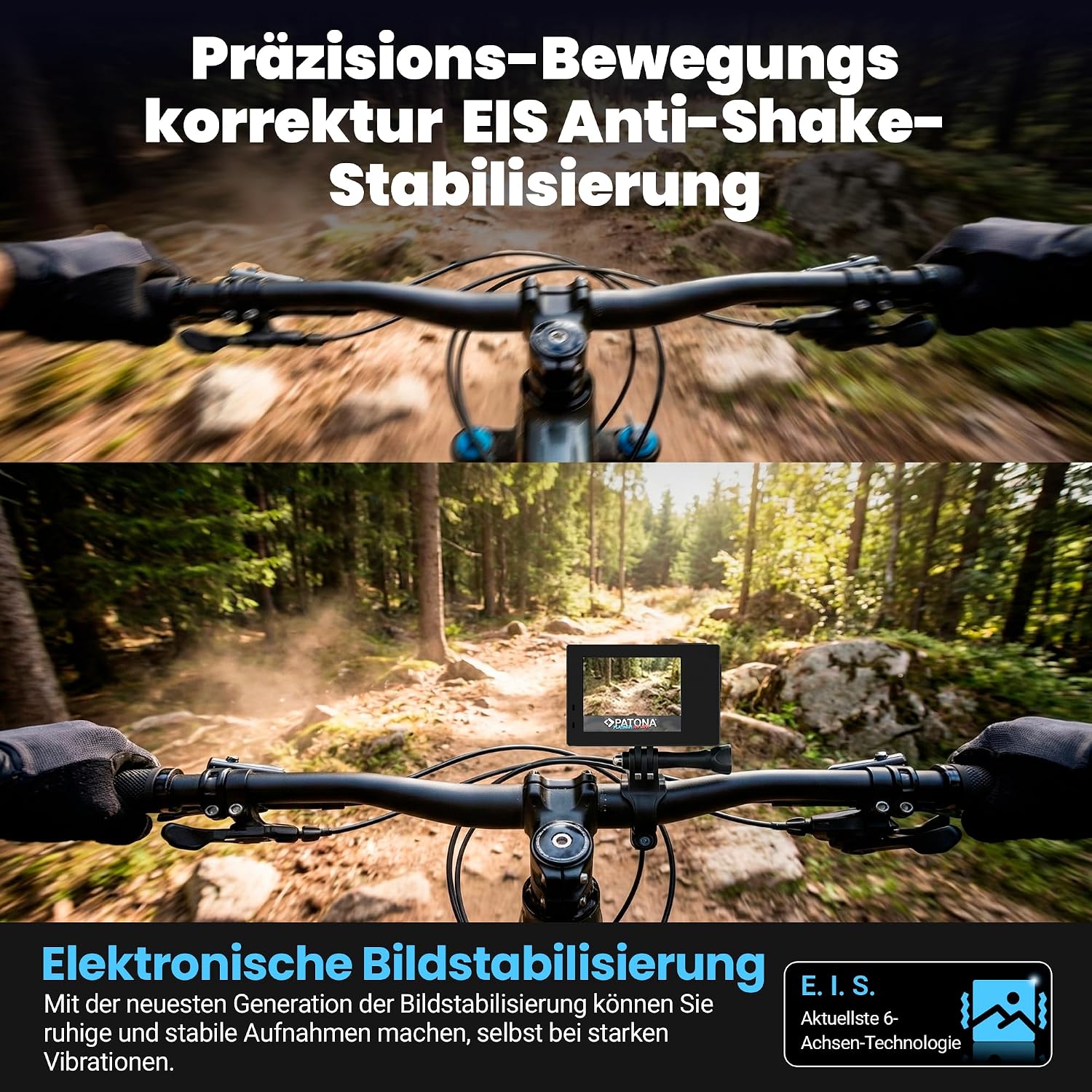
Figure 5.1: EIS in action, providing stable footage during movement.
5.5. Connectivity
- Wi-Fi & XDV App: Connect your camera to a smartphone via Wi-Fi using the XDV app (available for Android and iOS). This allows for remote control, live view, and file transfer.
- Remote Control: Use the included remote control to start/stop recording or take photos from a distance. The remote uses a CR2032 battery.
- USB-C 2.0: Connect the camera to a computer for file transfer or charging using the USB-C to USB-C cable.
5.6. Audio
The camera has an integrated speaker for audio playback and an integrated microphone for recording sound. It also supports an external microphone for enhanced audio quality (external microphone not included).
6. Maintenance
6.1. Cleaning
- Wipe the camera body and lens with a soft, lint-free cloth.
- For the waterproof case, rinse with fresh water after saltwater use and allow it to air dry. Ensure no sand or debris is trapped in the seals.
- Do not use harsh chemicals or solvents for cleaning.
6.2. Battery Care
- Store batteries in a cool, dry place when not in use.
- Avoid fully discharging batteries for extended periods.
- Charge batteries regularly, even if not used, to maintain their health.
6.3. Storage
When storing the camera for extended periods, remove the batteries and keep the camera in a dry, dust-free environment away from direct sunlight and extreme temperatures.
7. Troubleshooting
- Camera does not turn on:
- Ensure batteries are fully charged and correctly inserted.
- Try using the second battery provided. - Cannot record video/take photos:
- Check if the Micro SD card is inserted correctly and formatted.
- Ensure there is sufficient space on the Micro SD card.
- The battery might be too low; charge it. - Poor video/photo quality:
- Clean the camera lens.
- Ensure you are using the correct resolution settings for your needs.
- Check lighting conditions. - Wi-Fi connection issues:
- Ensure Wi-Fi is enabled on the camera and your smartphone.
- Restart both the camera and your smartphone.
- Make sure you are within the Wi-Fi range. - Remote control not working:
- Check the CR2032 battery in the remote control and replace if necessary.
- Ensure the remote control is paired with the camera (refer to specific pairing instructions if available in the app or quick start guide).
8. Specifications
- Brand:
- PATONA
- Model Name:
- Life SL3 4K
- Model Number:
- 4195
- Camera Type:
- Action Camera
- Photo Sensor Technology:
- CMOS
- Video Capture Resolution:
- 4K (3840x2160)
- Effective Still Image Resolution:
- 16 MP
- Lens Type:
- Wide-angle
- Viewing Angle:
- 140 Degrees
- Maximum Focal Length:
- 2.8 Millimeters
- Maximum Aperture:
- 2.8 f
- Screen Size:
- 2 Inches
- Image Stabilization:
- Digital (EIS)
- Flash Memory Type:
- Micro SD
- Installed Flash Memory Size:
- 64 GB (included)
- Video Capture Format:
- MP4 (H.264 compression)
- Supported Image Format:
- JPG
- Supported Audio Format:
- AAC, MP3
- Connectivity Technology:
- Wi-Fi (2.4G), USB-C 2.0, Bluetooth (for remote control)
- Water Resistance Level:
- Waterproof (up to 30m with case)
- Batteries:
- 2 x 1000 mAh Li-ion (included)
- Average Battery Life:
- 90 Minutes (at 1080P)
- Item Weight:
- 114 Grams
- Dimensions (DxWxH):
- 3.1P x 6l x 4.1H cm
- Color:
- Black
- Manufacturer:
- PTS-Trading GmbH
9. Safety Information
- Do not expose the camera to extreme temperatures or direct sunlight for prolonged periods.
- Keep the camera and accessories out of reach of children.
- Ensure the waterproof case is properly sealed before submerging the camera in water.
- Use only approved chargers and batteries.
- Avoid dropping or subjecting the camera to strong impacts.
10. Warranty and Support
For warranty information, technical support, or service inquiries, please contact PATONA International directly or refer to the official PATONA website. Keep your purchase receipt as proof of purchase for warranty claims.