
1. Introduction
This manual provides essential information for the safe and efficient operation of your Dreo 110-Pint Smart Dehumidifier, Model DR-HDH001S. This appliance is designed to remove excess moisture from the air in large spaces up to 4500 sq ft, such as basements, bedrooms, living rooms, bathrooms, and laundry rooms. Please read this manual thoroughly before use and retain it for future reference.

Front view of the Dreo 110-Pint Smart Dehumidifier, showing the control panel with digital display and water level indicator.
2. Safety Instructions
To reduce the risk of fire, electric shock, or injury, always follow these basic safety precautions:
- Read all instructions before using the appliance.
- Ensure the power supply matches the voltage specified on the rating label.
- Do not operate the dehumidifier with a damaged cord or plug.
- Always plug into a grounded outlet.
- Do not block air inlets or outlets.
- Keep the appliance away from heat sources and direct sunlight.
- Do not use in areas where flammable liquids or gases are stored.
- Unplug the unit before cleaning or performing any maintenance.
- The unit features a 90° tilt waterproof design that automatically powers off when tilted.
- Equipped with comprehensive thermal protection (23°F to 248°F) and 15A overcurrent protection.
3. Product Overview
The Dreo DR-HDH001S dehumidifier is designed for efficient moisture removal with user-friendly controls and smart features.
Components:
- Control Panel with Digital Display
- Air Inlet Grille
- Air Outlet Grille
- Water Tank (2 Gallon / 8L capacity)
- Drain Hose Outlet
- Power Cord
- Caster Wheels for easy mobility

The Dreo 110-Pint Dehumidifier in a living space, illustrating its dimensions (11.3"D x 15.4"W x 24.4"H) and coverage area of 4,500 sq ft.
4. Setup
Placement:
Place the dehumidifier on a level surface in the desired area. Ensure there is at least 8 inches (20 cm) of space around the unit for proper airflow. The unit is suitable for large spaces up to 4500 sq ft.
Power Connection:
Plug the power cord into a grounded electrical outlet. The unit will enter standby mode.
Drainage Options:
Your Dreo dehumidifier offers two drainage methods:
- Manual Drainage: The 2-gallon (8L) water tank collects condensed moisture. When the tank is full, the LED display will show a water-full alert, and the unit will automatically stop operation. Carefully remove the tank and empty the water.
- Continuous Drainage: For uninterrupted operation, connect a standard garden hose (not included, 25mm diameter recommended) to the drain hose outlet at the back of the unit. Ensure the hose is sloped downwards to allow gravity drainage into a floor drain or larger container.

Diagram showing the two drainage options for the Dreo Dehumidifier: manual emptying of the water tank and continuous drainage via a garden hose connection.
5. Operating Instructions
Control Panel:
The intuitive control panel allows you to manage settings directly on the unit.
Close-up of the dehumidifier's control panel showing 'Auto Mode' and a graphic indicating precise humidity detection within ±5%.
Operating Modes:
- Auto Mode: Set your desired humidity level. The dehumidifier's high-precision sensor will automatically adjust fan speed (low/medium/high) to maintain the target humidity within a 5% tolerance.
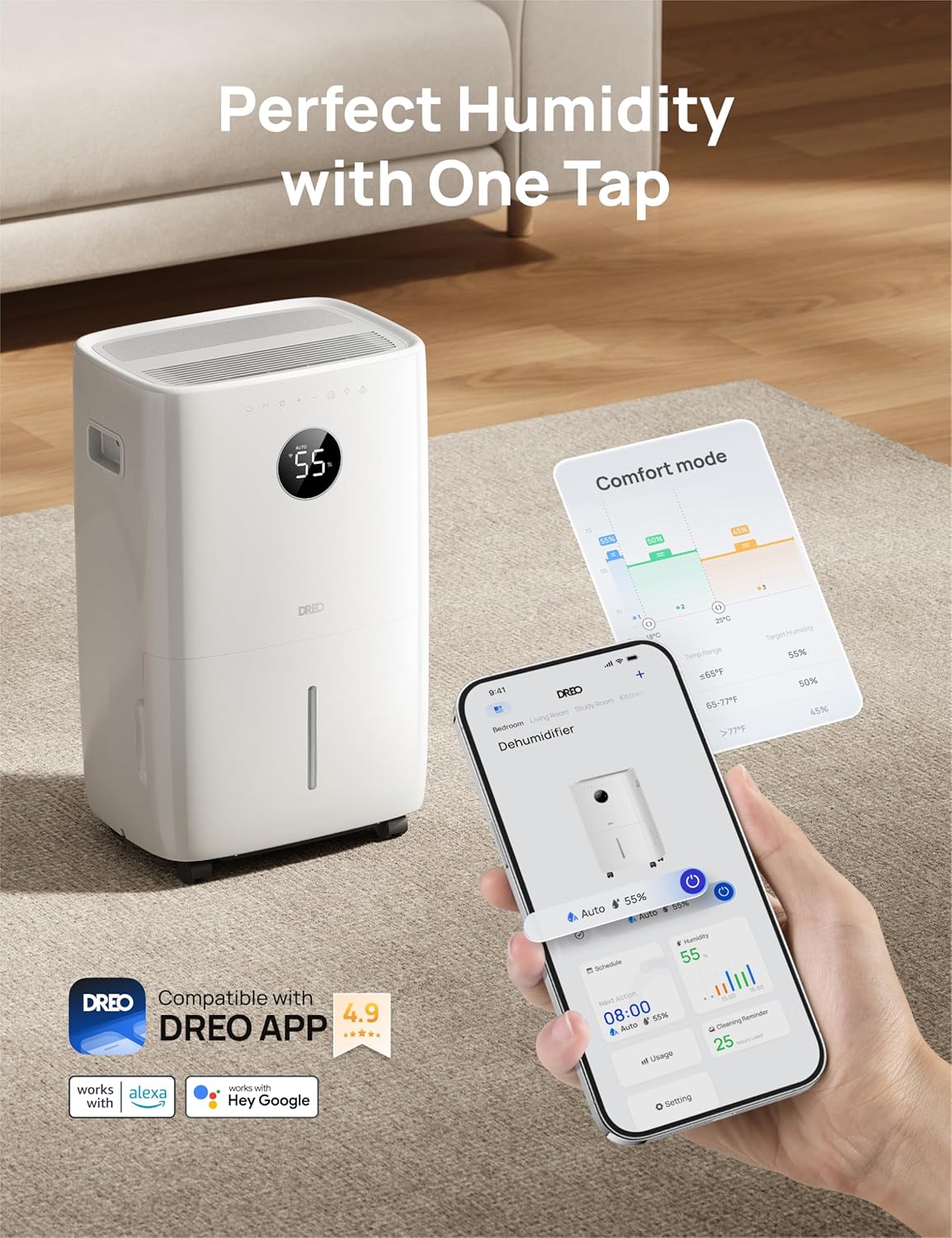
- Comfort Mode: Optimizes humidity levels for general comfort based on ambient temperature.
- Continuous Mode: The unit will operate continuously regardless of the humidity level, ideal for very damp conditions.
Smart Control (DREO App):
For enhanced control, download the DREO app on your smartphone. The app allows you to:
- Monitor real-time humidity levels.
- Set schedules for operation.
- Adjust modes and fan speeds remotely.
- Utilize voice commands with Alexa and Google Home assistants.

Image depicting the Dreo Dehumidifier alongside a smartphone displaying the DREO app interface, highlighting smart control features.
Auto-Defrost Function:
The intelligent auto-defrost system activates automatically at 41°F (5°C) to prevent frost buildup on the coils, ensuring efficient operation in cooler environments.
6. Maintenance
Regular maintenance ensures optimal performance and longevity of your dehumidifier.
Cleaning the Water Tank:
Empty the water tank regularly. Clean it with mild detergent and water, then rinse thoroughly. Ensure the tank is completely dry before reinserting it into the unit.
Cleaning the Air Filter:
The dehumidifier is equipped with a washable filter. It is recommended to clean the filter every 250 hours of operation or as needed. Remove the filter, wash it with warm, soapy water, rinse, and allow it to air dry completely before reinstalling.
Exterior Cleaning:
Wipe the exterior of the unit with a soft, damp cloth. Do not use harsh chemicals or abrasive cleaners.
Storage:
If storing the unit for an extended period, ensure the water tank is empty and clean, and the filter is clean and dry. Store the dehumidifier upright in a cool, dry place.
7. Troubleshooting
Refer to this section for common issues and their solutions.
| Problem | Possible Cause | Solution |
|---|---|---|
| Dehumidifier does not turn on. | No power; Power cord not securely plugged in; Water tank full or incorrectly installed. | Check power outlet; Ensure power cord is firmly plugged in; Empty and correctly reinsert water tank. |
| Unit is running but not removing moisture. | Air filter clogged; Room temperature too low; Humidity setting too high; Air inlets/outlets blocked. | Clean air filter; Ensure room temperature is above 41°F (5°C); Lower the target humidity setting; Clear any obstructions. |
| Water tank full indicator is on, but tank is not full. | Water tank sensor malfunction or obstruction. | Remove and reinsert the water tank to reset the sensor. Clean the sensor area if visible. |
| Unit is noisy. | Unit not on a level surface; Air filter clogged; Loose parts. | Place unit on a firm, level surface; Clean air filter; Check for any loose components. |
| DREO App connectivity issues. | Wi-Fi signal weak; Incorrect network password; Dehumidifier not in pairing mode. | Ensure strong 2.4GHz Wi-Fi signal; Re-enter Wi-Fi password; Follow app instructions to put dehumidifier in pairing mode. |
8. Specifications
| Brand | Dreo |
| Model Name | DR-HDH001S |
| Floor Area Coverage | 4500 Square Feet |
| Capacity | 110 Pints/Day (at 86°F, RH 90%) |
| Tank Volume | 2 Gallons (8 Liters) |
| Product Dimensions | 11.3"D x 15.4"W x 24.4"H |
| Number of Speeds | 3 |
| Air Flow Capacity | 210 Cubic Feet Per Minute (CFM) |
| Item Weight | 44.1 pounds |
| Special Feature | Adjustable Humidity Control, Smart App Control, Auto-Defrost |
| Operation Mode | Auto, Comfort, Continuous |
| Included Components | Dehumidifier, Drain Hose, User Manual |
| UPC | 810142859813 |
9. Warranty and Support
Dreo products are manufactured to the highest quality standards. For warranty information or technical support, please contact Dreo customer service. Keep your purchase receipt as proof of purchase.
For assistance, please visit the official Dreo website or contact their support team directly.


