
1. Introduction
Welcome to the King Lucky i121 Open Ear Clip-On Wireless Bluetooth Earbuds user manual. These earbuds are designed to provide a comfortable audio experience while maintaining awareness of your surroundings. This manual provides essential information for setting up, operating, and maintaining your new earbuds.
2. Package Contents
Please verify that all items are present in your package:
- King Lucky i121 Open Ear Earbuds (L/R)
- Charging Case
- USB-C Charging Cable
- User Manual
- Detachable Decorative Clips (optional, may vary by package)

Figure 2.1: Package Contents. This image displays the King Lucky i121 earbuds, their charging case, a USB-C charging cable, and a pair of decorative clips.
3. Setup
3.1. Charging the Earbuds and Case
Before first use, fully charge the earbuds and charging case. Connect the provided USB-C cable to the charging port on the case and a compatible USB power source. The indicator light on the case will show charging status.

Figure 3.1: Battery Life and Charging. The earbuds offer approximately 6 hours of playback on a single charge, with the charging case providing up to 50 hours of total battery life.
3.2. Bluetooth Pairing
- Ensure the earbuds are charged.
- Open the charging case. The earbuds will automatically enter pairing mode.
- On your device (smartphone, tablet, etc.), enable Bluetooth and search for available devices.
- Select "King Lucky i121" from the list of devices to connect.
- Once connected, a voice prompt will confirm successful pairing.
4. Wearing the Earbuds
The King Lucky i121 earbuds feature an open-ear clip-on design for comfort and situational awareness.
- Identify the Left (L) and Right (R) earbuds.
- Gently open the ear clip and position it over the top of your ear, allowing the speaker part to rest near your ear canal without entering it.
- Adjust for a secure and comfortable fit.
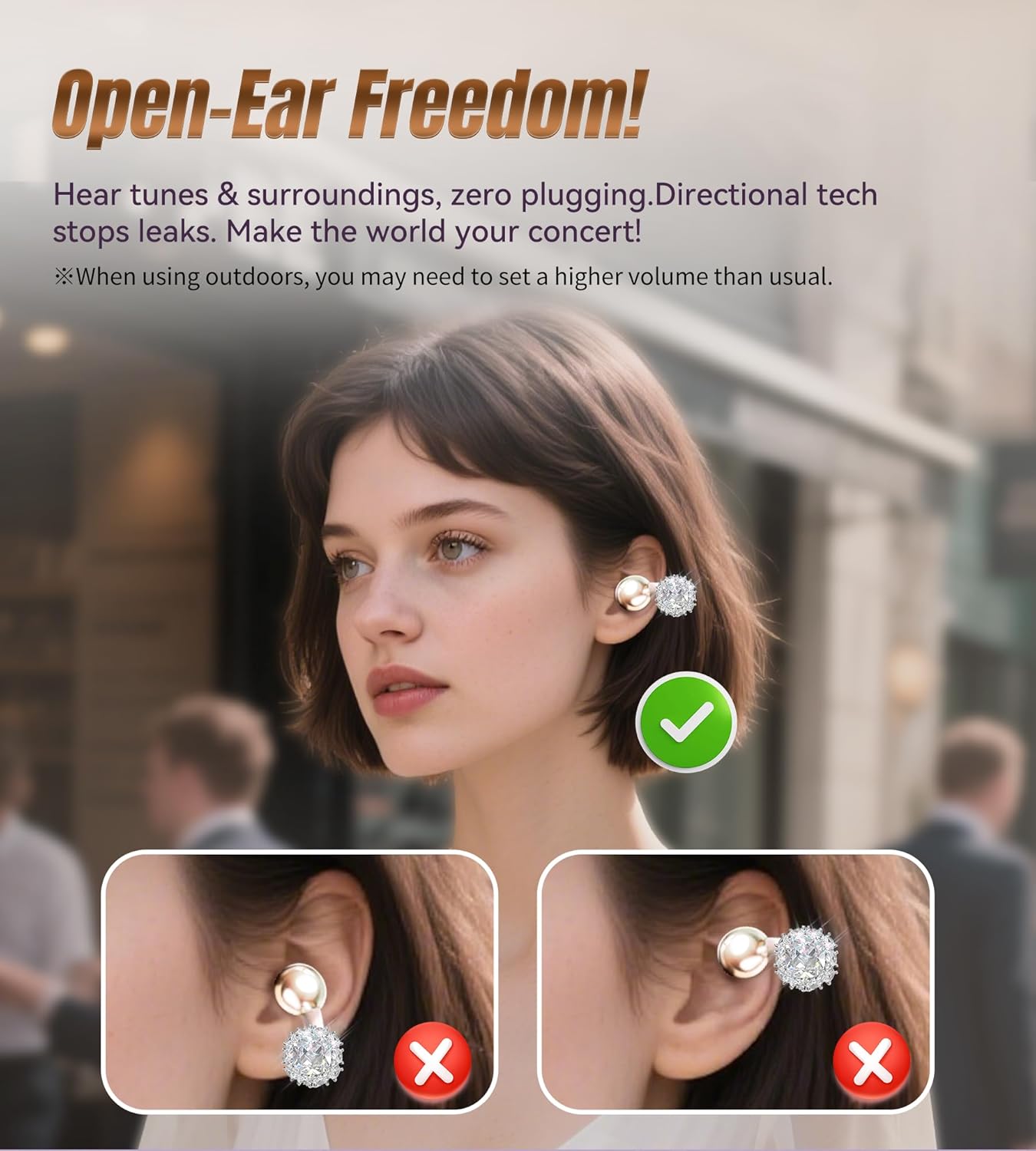
Figure 4.1: Open-Ear Design. This diagram shows how the earbuds sit on the ear, providing audio without blocking ambient sounds.
4.1. Attaching Detachable Decorative Clips
If your package includes detachable decorative clips, follow these steps to attach them:
- Remove the earbuds from the charging case.
- Carefully clip the decorative element onto the ear hook of the earbud.
- Ensure the clip is securely fastened.
Note: The charging case may not close properly with the decorative clips attached. It is recommended to remove them before placing the earbuds back into the case for charging or storage.

Figure 4.2: Attaching Decorative Clips. This visual guide demonstrates the process of attaching the decorative clips to the earbuds for a customized look.

Figure 4.3: Earbuds with Decorative Clips. A woman is shown wearing the King Lucky i121 earbuds with the detachable jewelry, illustrating their integration as a fashion accessory.
5. Operating Controls
The King Lucky i121 earbuds feature touch controls for easy management of audio and calls.
| Action | Function |
|---|---|
| Tap x1 (L/R) | Answer Call |
| Tap x2 (L/R) | End Call / Play/Pause Music |
| Tap x1 (L) | Volume Down |
| Tap x1 (R) | Volume Up |
| Tap x3 (L) | Activate Voice Assistant (Siri, Google Assistant) |
| Tap x3 (R) | Game Mode |
| Long Press 2" (L/R) | Reject Call |
| Long Press 2" (L) | Previous Track |
| Long Press 2" (R) | Next Track |
| Tap x5 (L/R) | Factory Reset |
6. Key Features
- Open-Ear Design: Allows you to hear your audio content while remaining aware of your surroundings, ideal for outdoor activities or office environments.
- Immersive Sound: Equipped with 12mm dynamic drivers for clear audio and enhanced bass.
- Clear Calls: Features Environmental Noise Cancellation (ENC) microphones for clear voice transmission during calls.
- Bluetooth 5.4: Provides a stable and low-latency wireless connection.
- IPX5 Water Resistance: Protects against sweat and light rain, suitable for workouts and outdoor use.
- Long Battery Life: Up to 6 hours of listening time per charge, with the charging case extending total playtime to 50 hours.
- Lightweight: Each earbud weighs approximately 5.2g for comfortable extended wear.

Figure 6.1: 12mm Dynamic Driver. An internal view of the earbud highlighting the 12mm dynamic driver, which contributes to the audio quality.
7. Maintenance
- Cleaning: Use a soft, dry cloth to clean the earbuds and charging case. Avoid using harsh chemicals or abrasive materials.
- Storage: Store the earbuds in their charging case when not in use to protect them from dust and damage.
- Water Exposure: While IPX5 rated, avoid submerging the earbuds in water. Dry them thoroughly if exposed to sweat or rain before placing them back in the charging case.
8. Troubleshooting
| Problem | Solution |
|---|---|
| Earbuds not pairing | Ensure earbuds are charged. Turn off and on Bluetooth on your device. Perform a factory reset (Tap x5 on either earbud). |
| No sound | Check device volume and earbud volume. Ensure earbuds are properly connected to your device. |
| Poor sound quality | Ensure earbuds are clean and free of debris. Move closer to your connected device to avoid interference. |
| Charging issues | Verify the USB-C cable and power source are working. Ensure earbuds are correctly seated in the charging case. |
9. Specifications
- Model: i121
- Brand: King Lucky
- Connectivity: Bluetooth 5.4
- Water Resistance: IPX5
- Earbud Weight: Approximately 5.2g per earbud
- Driver Size: 12mm Dynamic
- Battery Life (Earbuds): Up to 6 hours
- Battery Life (with Case): Up to 50 hours
- Charging Port: USB-C
10. Official Product Video
Video 10.1: King Lucky Jewelry Clip-on Earbuds with Detachable Aurora. This official video from King Lucky showcases the design and features of the earbuds, including the detachable decorative elements and their versatile use.
11. Warranty and Support
King Lucky products come with a manufacturer's warranty. For detailed warranty information, product support, or service inquiries, please refer to the contact information provided in your product packaging or visit the official King Lucky website. The seller, KING LUCKY 100-Day Return Guarantee, offers a return policy as specified at the point of purchase.

