
Wuzhi Audio ZK-DAM H1
Wuzhi Audio ZK-Dam H1 Audio Front-End Board User Manual
Model: ZK-DAM H1 | Brand: Wuzhi Audio
1. Introduction
This manual provides detailed instructions for the proper setup, operation, and maintenance of your Wuzhi Audio ZK-Dam H1 audio front-end board. The ZK-Dam H1 is a versatile audio device featuring wide voltage input, dual microphone inputs, dynamic anti-feedback capabilities, TWS pairing, and multiple audio input options including USB, AUX, and Bluetooth. Please read this manual thoroughly before using the product to ensure optimal performance and safety.
2. Safety Information
- Power Supply: Use only a DC 8-36V power supply. Do not connect to AC power. Ensure the power supply polarity is correct.
- Ventilation: Ensure adequate ventilation around the device to prevent overheating.
- Environment: Avoid exposing the device to moisture, extreme temperatures, or direct sunlight.
- Handling: Do not disassemble or modify the device. Refer all servicing to qualified personnel.
- Connections: Ensure all connections are secure before powering on the device.
3. Product Overview
The Wuzhi Audio ZK-Dam H1 features a compact design with clearly labeled inputs, outputs, and controls. Understanding the layout is crucial for proper operation.
3.1. Component Identification

Figure 3.1: Top view of the ZK-Dam H1 board with key components labeled. This diagram illustrates the location of the power input, microphone inputs (A and B), audio output, USB drive/sound card input, AUX input, and the Echo/Bass enable switch.
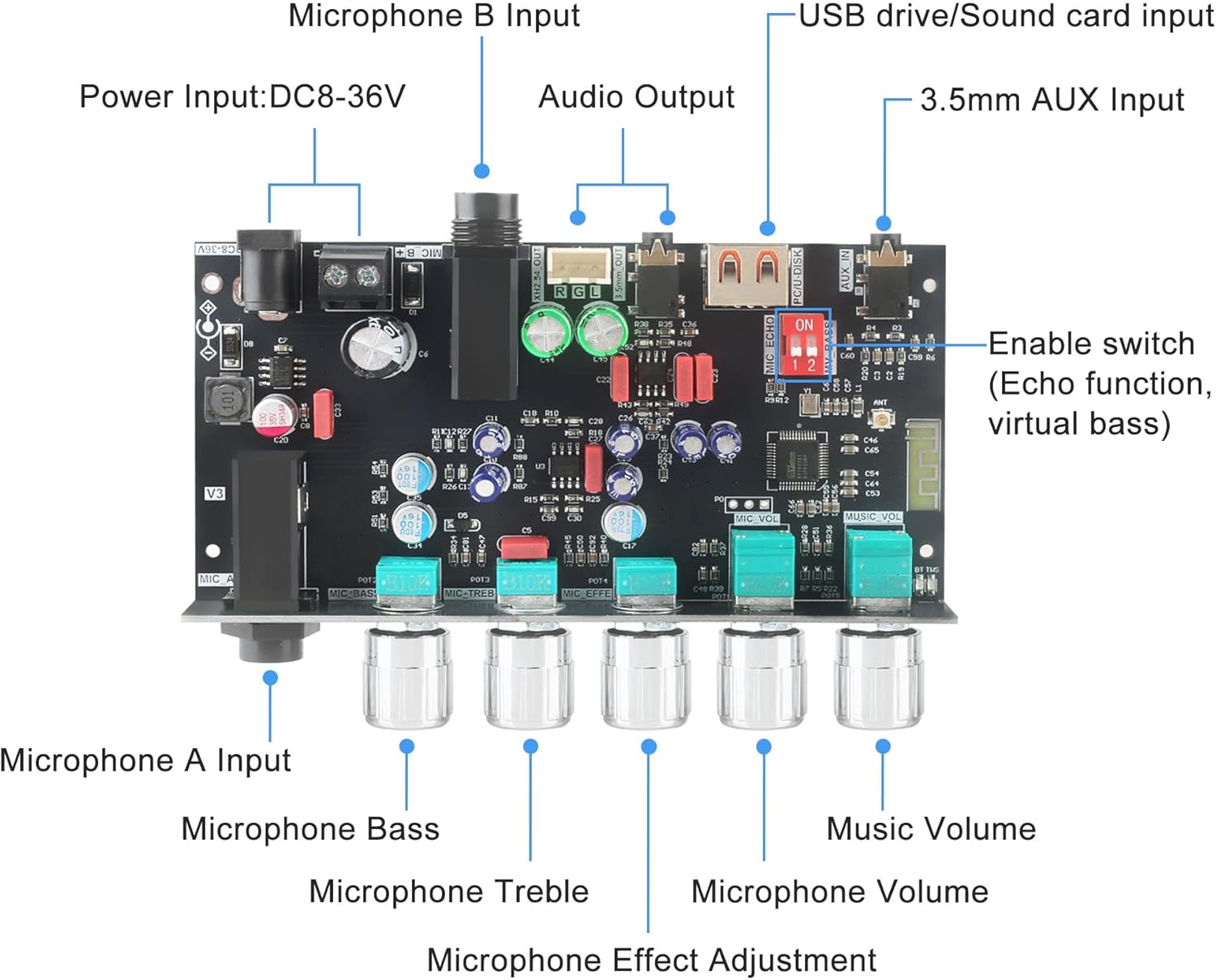
Figure 3.2: Internal view of the ZK-Dam H1 circuit board, highlighting the various input and output connections, as well as the control potentiometers for microphone bass, treble, effect, microphone volume, and music volume.
3.2. Control Knobs and Switches

Figure 3.3: Detailed functions of the Multi-Functional Knobs. The MIC VOL knob controls mode switching, vocal cancellation, and TWS pairing. The MUSIC VOL knob manages play/pause, track selection, and TWS record clearing.
- MIC_A / MIC_B: 6.35mm microphone input jacks.
- MIC_BASS: Adjusts the bass level for microphone input.
- MIC_TREBLE: Adjusts the treble level for microphone input.
- MIC_EFFECT: Adjusts the effect (e.g., reverb) for microphone input.
- MIC_VOL (Multi-functional Knob):
- Short press: Switches between Bluetooth, USB drive, and AUX modes.
- Long press (1 second): Activates/deactivates vocal cancellation.
- Long press (3 seconds): Initiates TWS pairing or unpairing.
- MUSIC_VOL (Multi-functional Knob):
- Single press: Play/Pause audio playback.
- Double press: Skips to the next track.
- Long press (1 second): Skips to the previous track.
- Long press (3 seconds): Clears TWS records.
- ECHO/BASS Switch: Enables or disables the Echo function and virtual bass enhancement.
4. Setup
Follow these steps to set up your ZK-Dam H1 audio front-end board.
- Power Connection: Connect a DC 8-36V power adapter to the 'POWER IN' port. Ensure the correct polarity.
- Audio Output: Connect your speakers or headphones to the 'AUDIO OUT' port (3.5mm headphone jack or XH2.54-3P socket).
- Microphone Connection: Insert your 6.35mm microphones into the 'MIC_A' and/or 'MIC_B' jacks.
- Input Source Selection: Choose your desired audio input source:
- Bluetooth: The device will automatically enter Bluetooth mode if no USB or AUX input is detected.
- AUX: Connect an audio device via the 3.5mm AUX input.
- USB: Insert a USB drive into the 'PC/U-DISK' port.

Figure 4.1: A typical usage diagram illustrating how to connect a microphone, power supply, and various audio input sources like Bluetooth, AUX, or USB to the ZK-Dam H1.
5. Operating Instructions
5.1. Power On/Off
The device powers on automatically when connected to a DC 8-36V power supply. Disconnect the power supply to turn off the device.
5.2. Input Mode Selection
The ZK-Dam H1 supports Bluetooth, AUX, and USB/Flash Drive modes. The device prioritizes inputs as follows: USB/AUX input automatically overrides Bluetooth. The last-used mode is remembered after power-off.
- Switching Modes: Short press the MIC_VOL knob to cycle through Bluetooth, USB, and AUX modes.
5.3. Bluetooth Pairing
- Ensure no USB drive or AUX cable is inserted. The device will automatically enter Bluetooth mode.
- On your mobile device, search for Bluetooth devices and select "ZK-DAM H1" to pair.
- The blue LED indicator will be steady when Bluetooth is successfully connected.
5.4. USB Playback
Insert a USB drive containing MP3, WAV, FLAC, or APE audio files (bitrate less than 1500kbps) into the 'PC/U-DISK' port. The device will automatically switch to USB mode and begin playback. Use the MUSIC_VOL knob for playback controls.
5.5. Microphone Usage
Adjust the microphone's sound characteristics using the dedicated knobs:
- MIC_BASS: Rotate to increase or decrease microphone bass.
- MIC_TREBLE: Rotate to increase or decrease microphone treble.
- MIC_EFFECT: Rotate to adjust the microphone effect level (e.g., reverb).
- MIC_VOL: Rotate to adjust the overall microphone volume.
5.6. TWS (True Wireless Stereo) Pairing
The ZK-Dam H1 supports TWS pairing for a stereo experience with two units.

Figure 5.1: Visual guide for TWS connection and cancellation. This image shows two ZK-Dam H1 units pairing and explains the LED indicators for TWS status.
- Ensure both ZK-Dam H1 devices are powered on and neither has a USB or AUX input inserted.
- On one device, long-press the MIC_VOL knob for more than 3 seconds. The red TWS indicator will begin flashing, indicating it is searching for a pairing device.
- Once paired, the device that initiated pairing will have a solid red TWS light (left channel), and the other device will have a flashing TWS light (right channel).
- TWS connection functions in Bluetooth, USB, and AUX modes once paired.
TWS Cancellation:
Long-press the MIC_VOL knob on either paired device for more than 3 seconds. The red TWS indicator light will turn off, confirming TWS function cancellation.
5.7. Echo and Virtual Bass Function
Use the 'ECHO BASS' switch on the board to enable or disable the echo effect for microphones and the virtual bass enhancement for music playback.
5.8. LED Indicators
- Blue slow flash: USB/AUX mode.
- Blue steady: Bluetooth connected.
- Red flash: TWS pairing in progress.
- Red steady/slow flash: TWS left/right channel indication.
6. Troubleshooting
| Problem | Possible Cause | Solution |
|---|---|---|
| No power | Incorrect power supply voltage or polarity; loose connection. | Ensure DC 8-36V power supply is correctly connected with proper polarity. Check all power connections. |
| No sound output | Incorrect audio output connection; volume too low; wrong input mode selected. | Verify speakers/headphones are correctly connected to 'AUDIO OUT'. Increase MUSIC_VOL. Short press MIC_VOL to cycle through input modes. |
| Bluetooth not connecting | USB/AUX cable inserted; device not in pairing mode; out of range. | Remove USB/AUX cables. Ensure the blue LED is flashing slowly (indicating Bluetooth mode). Move device closer to the source. |
| Microphone not working | Microphone not connected; MIC_VOL too low; microphone faulty. | Check microphone connection to MIC_A/MIC_B. Increase MIC_VOL. Test with another microphone if possible. |
| USB playback issues | Unsupported file format; USB drive not properly inserted; corrupted files. | Ensure files are MP3, WAV, FLAC, or APE with bitrate <1500kbps. Reinsert USB drive. Try a different USB drive or files. |
| TWS pairing failed | USB/AUX inserted; incorrect pairing procedure. | Ensure no USB/AUX is connected to either device. Follow TWS pairing steps precisely (long press MIC_VOL for 3+ seconds). |
7. Specifications
| Feature | Detail |
|---|---|
| Product Name | Karaoke Front-End Board with BT and USB Decoding Function |
| Input Voltage | Wide voltage range 8-36V DC (AC input not supported) |
| Bluetooth Decoding Formats | SBC, AAC |
| Bluetooth Transmission Distance | 15 meters (Accessibility) |
| USB Decoding Formats | MP3, WAV, FLAC, APE (bitrate less than 1500 kbps) |
| Microphone Interface | Dual 6.35 mm microphone jacks |
| Power Interface | DC 5.5x2.1mm socket or wiring terminal (select one) |
| Audio Output | 3.5mm headphone jack or XH2.54-3P socket (select one) |
| Working Modes | Bluetooth (BT), AUX, USB flash drive / USB sound card |
| Indicator Light (USB/AUX) | Blue light flashes slowly |
| Indicator Light (BT Connected) | Blue light stays on continuously |
| Indicator Light (No Connection) | Blue light flashes very slowly when no connection is detected |
| TWS Mode (Pairing) | Red light flashing while searching for pairing |
| TWS Mode (Left Channel) | Red light steady on |
| TWS Mode (Right Channel) | Red light slow flashing |
| Mode Priority | Inserting USB or AUX input will preempt and interrupt BT mode; Last mode is memorized after power off; BT cannot be detected in USB or AUX mode |
| Dimensions | 80 × 122 × 22.6 mm (3.14 x 4.80 x 0.88 inches) |
| Item Weight | 7.8 ounces |

Figure 7.1: A comprehensive table outlining the technical specifications of the ZK-Dam H1, including input voltage, Bluetooth details, USB decoding, interfaces, working modes, and indicator light behaviors.

Figure 7.2: Dimensional drawing of the ZK-Dam H1, providing precise measurements for length, width, height, and potentiometer spacing, useful for integration into custom enclosures.
8. Maintenance
- Cleaning: Use a soft, dry cloth to clean the device. Do not use liquid cleaners or solvents.
- Storage: Store the device in a cool, dry place away from direct sunlight and moisture when not in use.
- Inspection: Periodically check all cables and connections for wear or damage.
9. Warranty and Support
For warranty information and technical support, please refer to the seller or manufacturer's official channels. Keep your purchase receipt for warranty claims. This product is manufactured by Wuzhi Audio.
Related documentsZK-DAM H1


Ask a question about this manual
Ask about setup, troubleshooting, compatibility, parts, safety, or missing instructions. Manuals+ will review the question and use this page’s manual context to help answer it.