1. Introduction
This manual provides essential instructions for the safe and effective use of your Pxdiiry AC DC Adapter. This adapter is specifically designed to provide reliable power to your Realtone Cassette Tape Recorder Model 7610. Please read this manual thoroughly before use and retain it for future reference.
2. Safety Information
To ensure safe operation and prevent damage, observe the following precautions:
- Always connect the adapter to a power outlet with the specified voltage (120 Volts).
- Do not expose the adapter to water, moisture, or extreme temperatures.
- Avoid dropping or subjecting the adapter to severe impact.
- Do not attempt to open, modify, or repair the adapter. Refer servicing to qualified personnel.
- Ensure the adapter is properly ventilated and not covered during use.
- Disconnect the adapter from the power outlet when not in use for extended periods.
- This adapter is equipped with built-in safety features to protect against overvoltage, overheating, and short circuits. However, always use it responsibly.
3. Product Overview
The Pxdiiry AC DC Adapter is designed for efficient and reliable power delivery. It features a robust construction and incorporates advanced safety mechanisms.

Figure 3.1: The Pxdiiry AC DC Adapter, showing the main unit with its integrated power plug and the attached DC output cable with its connector.
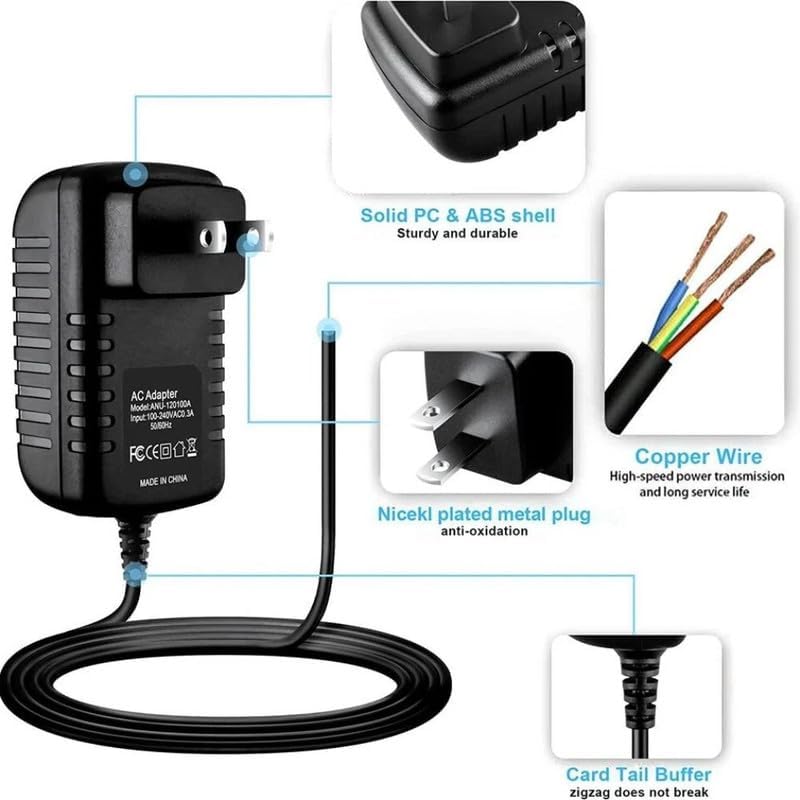
Figure 3.2: Detailed diagram highlighting the adapter's construction, including the solid PC & ABS shell for durability, nickel-plated metal plug for anti-oxidation, copper power wire for high-speed transmission, and a card tail buffer to prevent cable breakage.
Key Features:
- High-Quality Materials: Constructed from durable and reliable materials for long-lasting performance.
- Built-In Safety Features: Equipped with mechanisms to protect against overvoltage, overheating, discharge, short circuits, and antistatic impact.
- Energy-Efficient: Engineered to minimize power consumption while maintaining optimal performance.
- Robust Design: Features a solid PC & ABS shell, nickel-plated metal plug, and copper power wire for enhanced durability and conductivity.

Figure 3.3: The adapter plugged into a wall outlet, visually representing its intelligent security protection against temperature anomalies, discharge, short circuits, and antistatic impact.
4. Setup
Follow these steps to set up your Pxdiiry AC DC Adapter:
- Verify Compatibility: Ensure your Realtone Cassette Tape Recorder Model 7610 requires an AC DC adapter with the specifications provided by this product.
- Connect to Device: Insert the DC output connector of the adapter firmly into the power input port of your Realtone Cassette Tape Recorder Model 7610.
- Connect to Power Outlet: Plug the AC input prongs of the adapter into a standard 120-Volt wall outlet.
- Power On: Once connected, your device should receive power. Refer to your cassette recorder's manual for specific power-on procedures.

Figure 4.1: An example of the adapter connected to a power source and a compatible device, demonstrating a typical setup.
5. Operating Instructions
The Pxdiiry AC DC Adapter operates automatically once connected. It provides a stable power supply to your device.
- Ensure all connections are secure before operating your device.
- The adapter is designed for continuous operation within its specified limits.
- If your device has a power indicator, confirm it illuminates after connecting the adapter.
6. Maintenance
The Pxdiiry AC DC Adapter is designed for easy maintenance to ensure consistent functionality.
- Cleaning: Disconnect the adapter from the power outlet and your device before cleaning. Use a soft, dry cloth to wipe the exterior. Do not use liquid cleaners or solvents.
- Storage: When not in use, store the adapter in a cool, dry place, away from direct sunlight and extreme temperatures. Avoid tightly coiling the cable to prevent damage.
- Inspection: Periodically inspect the adapter and cable for any signs of damage, such as frayed wires, bent prongs, or cracks in the casing. If damage is found, discontinue use and replace the adapter.
7. Troubleshooting
If you encounter issues with your Pxdiiry AC DC Adapter, refer to the following common troubleshooting steps:
- No Power to Device:
- Ensure the adapter is securely plugged into a working wall outlet.
- Verify the DC connector is fully inserted into your Realtone Cassette Tape Recorder.
- Test the wall outlet with another device to confirm it is functional.
- Check the adapter cable for any visible damage.
- Device Not Functioning Correctly:
- Confirm that the adapter's specifications (voltage, amperage) match the requirements of your Realtone Cassette Tape Recorder.
- Disconnect and reconnect the adapter to reset the power supply.
- Adapter Overheating:
- Ensure the adapter is in a well-ventilated area and not covered.
- If overheating persists, discontinue use immediately and contact support.
If these steps do not resolve the issue, please contact customer support.
8. Specifications
| Feature | Detail |
|---|---|
| Brand | Pxdiiry |
| Model Compatibility | Realtone Cassette Tape Recorder Model 7610 |
| Connector Type | DC Barrel Connector |
| Color | Black |
| Input Voltage | 120 Volts |
| Power Source | Corded Electric |
| Special Feature | Powered |
| Safety Certifications | CCC, CE |
| Manufacturer | Pxdiiry |
| ASIN | B0F83DFKTG |
| Date First Available | May 9, 2025 |
9. Warranty and Support
Specific warranty details are not provided in this document. For information regarding warranty coverage, technical support, or replacement parts, please contact Pxdiiry customer service through your retailer or the official brand website.