Bagotte Robot Vacuum and Mop Combo Instruction Manual
Model: BG-A22-FBA-GB
1. Introduction
The Bagotte A22 Robot Vacuum and Mop Combo is an advanced 4-in-1 robotic cleaning device engineered to simplify your home maintenance. It combines powerful vacuuming, sweeping, and mopping functionalities to effectively remove dust, debris, and pet hair from various hard floor surfaces and low-pile carpets. With smart navigation and multiple control options, the A22 ensures a thorough and convenient cleaning experience.

Image: The Bagotte A22 Robot Vacuum and Mop Combo, showcasing the main unit, remote control, and a smartphone displaying the companion app interface, along with the detachable water tank and mop pad.
2. What's in the Box
Carefully unpack all components and ensure all items are present and in good condition. If any items are missing or damaged, please contact customer support.

Image: A visual representation of all items included in the Bagotte A22 Robot Vacuum package, neatly arranged on a wooden surface.
- Bagotte A22 Robot Vacuum Cleaner x1
- 2-in-1 Water Tank (Dust Box & Water Tank Combo) x1
- Charging Station x1
- Remote Control x1 (requires 2 AAA batteries, included)
- Power Adapter x1
- Side Brushes x2 pairs
- Mop Holder x1
- Mop Cloth x2
- HEPA Filters x1 (plus foam filter)
- Cleaning Brush x1
- User Manual x1
3. Setup
3.1 Initial Charging
Before first use, fully charge the robot vacuum. Place the charging station against a wall in an open area, ensuring no obstacles within 1 meter to the sides and 2 meters in front. Connect the power adapter to the charging station and a power outlet. Place the robot onto the charging station, aligning its charging contacts. The indicator light will show charging status.

Image: The Bagotte A22 Robot Vacuum automatically returning to its charging station, illustrating the auto-return charging feature.
3.2 Installing Side Brushes
Attach the side brushes to the corresponding posts on the bottom of the robot until they click into place. Ensure they are securely fastened.
3.3 App Connection (2.4GHz WiFi Only)
Download the 'Tuya Smart' app from your smartphone's app store. Follow the in-app instructions to connect your Bagotte A22 to your home's 2.4GHz Wi-Fi network. This enables remote control, scheduling, and access to advanced features.

Image: A smartphone displaying the Bagotte A22 control app, with icons indicating remote control, app control, and voice control compatibility with Alexa and Google Assistant.
4. Operating
4.1 Cleaning Modes
The Bagotte A22 offers multiple cleaning modes to suit different needs:
- Auto Cleaning: The robot intelligently navigates to clean the entire floor area.
- Edge Cleaning: Cleans along walls and furniture edges.
- Spot Cleaning: Focuses on a specific dirty area for intensive cleaning.
- Manual Cleaning: Control the robot's movement manually via the app or remote.
- Scheduled Cleaning: Set specific times for the robot to automatically start cleaning.

Image: An overhead diagram illustrating the four primary cleaning modes of the Bagotte A22 Robot Vacuum: Auto Cleaning, Edge Cleaning, Spot Cleaning, and Manual Cleaning, showing their typical cleaning paths within a room layout.
4.2 Vacuuming and Mopping
The A22 features a 2-in-1 design with a 250ml dust box and a 200ml water tank. It can vacuum and mop simultaneously. The smart control water tank allows for three water output levels (low, medium, high) adjustable via the app to suit different floor types and cleaning needs.

Image: The Bagotte A22 Robot Vacuum demonstrating its 3-in-1 functionality, showing it vacuuming on carpet, sweeping on a hard floor, and mopping with water flow, highlighting adjustable waterflow and suction levels.
4.3 Control Options
Control your robot vacuum with ease using the included remote control, the Tuya Smart App (requires 2.4GHz WiFi), or voice commands through Amazon Alexa and Google Assistant. The app provides comprehensive control over cleaning direction, mode, suction power, water level, and allows you to view cleaning history and set schedules.
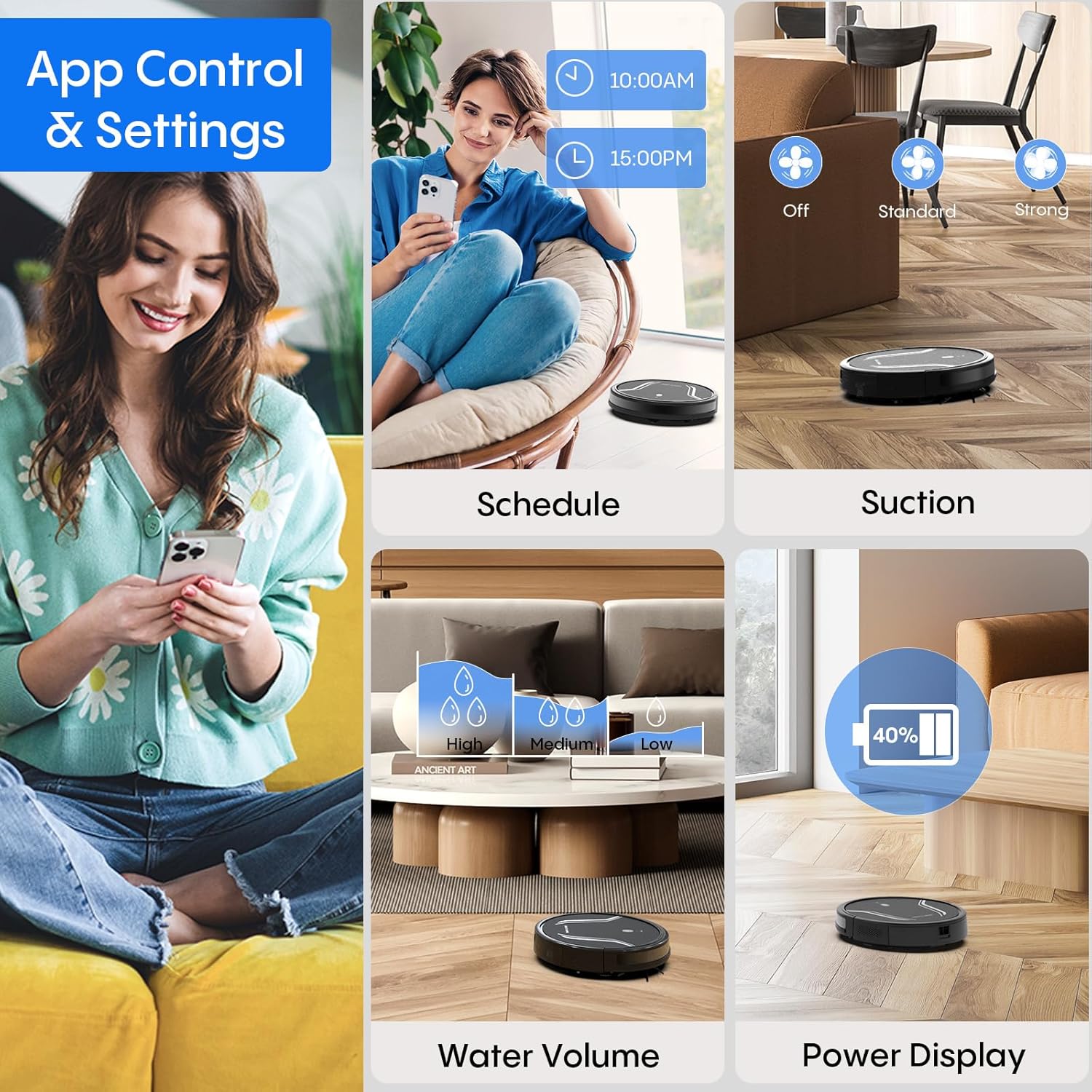
Image: A detailed view of the smartphone app interface for controlling the Bagotte A22 Robot Vacuum, showing options for scheduling, suction adjustment, water volume control, and power display.
4.4 Smart Navigation
Equipped with a full set of anti-fall sensors, the A22 intelligently identifies and prevents falls from stairs or other elevated surfaces. Its slim 2.87-inch design allows it to easily reach under furniture and navigate narrow spaces for thorough cleaning. The robot can also climb over obstacles up to 15mm, such as low carpets or floor transition layers, ensuring uninterrupted cleaning.

Image: The Bagotte A22 Robot Vacuum demonstrating its anti-collision features, showing it avoiding obstacles and preventing falls with its intelligent sensors.
4.5 Official Product Video
Video: An official product video demonstrating the Bagotte Robot Vacuum and Mop Combo, highlighting its 4000Pa mopping capabilities and various features in action.
5. Maintenance
Regular maintenance ensures optimal performance and extends the lifespan of your Bagotte A22. Always turn off the robot and disconnect it from the charging station before performing any maintenance.
5.1 Cleaning the 2-in-1 Water Tank and Dust Box
- Press the release button to remove the 2-in-1 water tank/dust box from the robot.
- Open the dust box cover and empty the collected debris into a trash bin.
- Remove the HEPA filter and foam filter. Tap them gently to remove dust. Do not wash the HEPA filter with water.
- Rinse the dust box and water tank thoroughly with water. Ensure they are completely dry before re-installing.
- Re-install the filters and close the dust box cover.
5.2 Cleaning the Main Brush
Flip the robot over. Press the tabs on the main brush cover to remove it. Lift out the main brush. Use the provided cleaning tool to remove any hair or debris tangled around the brush. Re-install the main brush and cover, ensuring it clicks into place.
5.3 Cleaning Side Brushes
Periodically check the side brushes for tangled hair or debris. Gently pull them off their posts to remove. Use the cleaning tool or a cloth to clean them. If brushes are worn or damaged, replace them with new ones. Push them back onto the posts until they click.
5.4 Cleaning Sensors and Charging Contacts
Wipe the anti-drop sensors (located on the bottom), the bumper sensor, and the charging contacts (on the robot and charging station) with a clean, dry cloth. This ensures proper navigation and charging.
5.5 Cleaning Mop Cloth
Remove the mop cloth from the mop holder after each use. Hand wash or machine wash the mop cloth with mild detergent. Air dry completely before reattaching.
6. Troubleshooting
If you encounter issues with your Bagotte A22, please refer to the following common solutions. For more detailed troubleshooting or persistent problems, consult the full user manual or contact customer support.
| Problem | Possible Cause | Solution |
|---|---|---|
| Robot does not turn on | Low battery; Power button not pressed | Charge the robot; Press and hold the power button for 3 seconds. |
| Robot cannot charge | Charging contacts dirty; Charging station not powered | Clean charging contacts; Ensure charging station is plugged in. |
| Robot gets stuck frequently | Too many obstacles; Robot stuck on high thresholds | Clear obstacles; Use virtual walls or block off problematic areas. |
| Poor cleaning performance | Dust box full; Brushes tangled; Filter clogged | Empty dust box; Clean/replace brushes; Clean/replace filter. |
| Mopping function not working | Water tank empty; Water outlet clogged; Mop cloth dry | Fill water tank; Clean water outlets; Moisten mop cloth before use. |
| App connection issues | Incorrect WiFi band (not 2.4GHz); Weak signal | Ensure 2.4GHz WiFi; Move robot closer to router. |
7. Specifications
| Feature | Detail |
|---|---|
| Brand | Bagotte |
| Model Name | BG-A22-FBA-GB |
| Special Feature | Edge Cleaning |
| Color | Grey Black |
| Product Dimensions | 11"L x 11"W x 3"H |
| Included Components | Floor Brush, 2-in-1 Water Tank, Charging Station, Remote Control, Power Adapter, Side Brushes, Mop Cloths, HEPA Filters, Cleaning Brush, User Manual |
| Filter Type | HEPA |
| Battery Life | 120 minutes |
| Power Source | Battery Powered |
| Control Method | App, Push Button, Remote |
| Compatible Devices | Amazon Echo, Google Home, Smartphones |
| Form Factor | Robotic |
| Item Weight | 7.15 pounds |
| Manufacturer | Bagotte |
8. Warranty & Support
Bagotte offers a 12-month service for this product. For any inquiries, technical assistance, or warranty claims, please refer to the contact information provided in your product's packaging or visit the official Bagotte website. Please retain your proof of purchase for warranty validation.


