Introduction
This manual provides comprehensive instructions for the setup, operation, and maintenance of your Putikeeg Mini Morse Code Key MCT03. This dual paddle key is designed for amateur ham radio enthusiasts, featuring a magnetic base and precise adjustments for optimal performance.

Figure 1: Putikeeg Mini Morse Code Key MCT03 and accessories. The image shows the blue key, two small Allen wrenches, two white spare contact adjustment screws, and a black 3.5mm TRS cable.
Setup
Package Contents
- Putikeeg Mini Morse Code Key MCT03 (Blue)
- 3.5mm TRS Cable
- Adjustment Allen Wrenches (2)
- Spare Contact Adjustment Screws (2)
Physical Placement
The key features a magnetic base for stable placement on metallic surfaces. Ensure the surface is clean and flat for optimal adhesion. The non-slip material over the magnets prevents movement during operation.
Connecting to Your Radio/Keyer
Connect the supplied 3.5mm TRS cable from the jack on the side of the Morse Code Key to the corresponding keyer input on your amateur radio transceiver or external keyer unit.
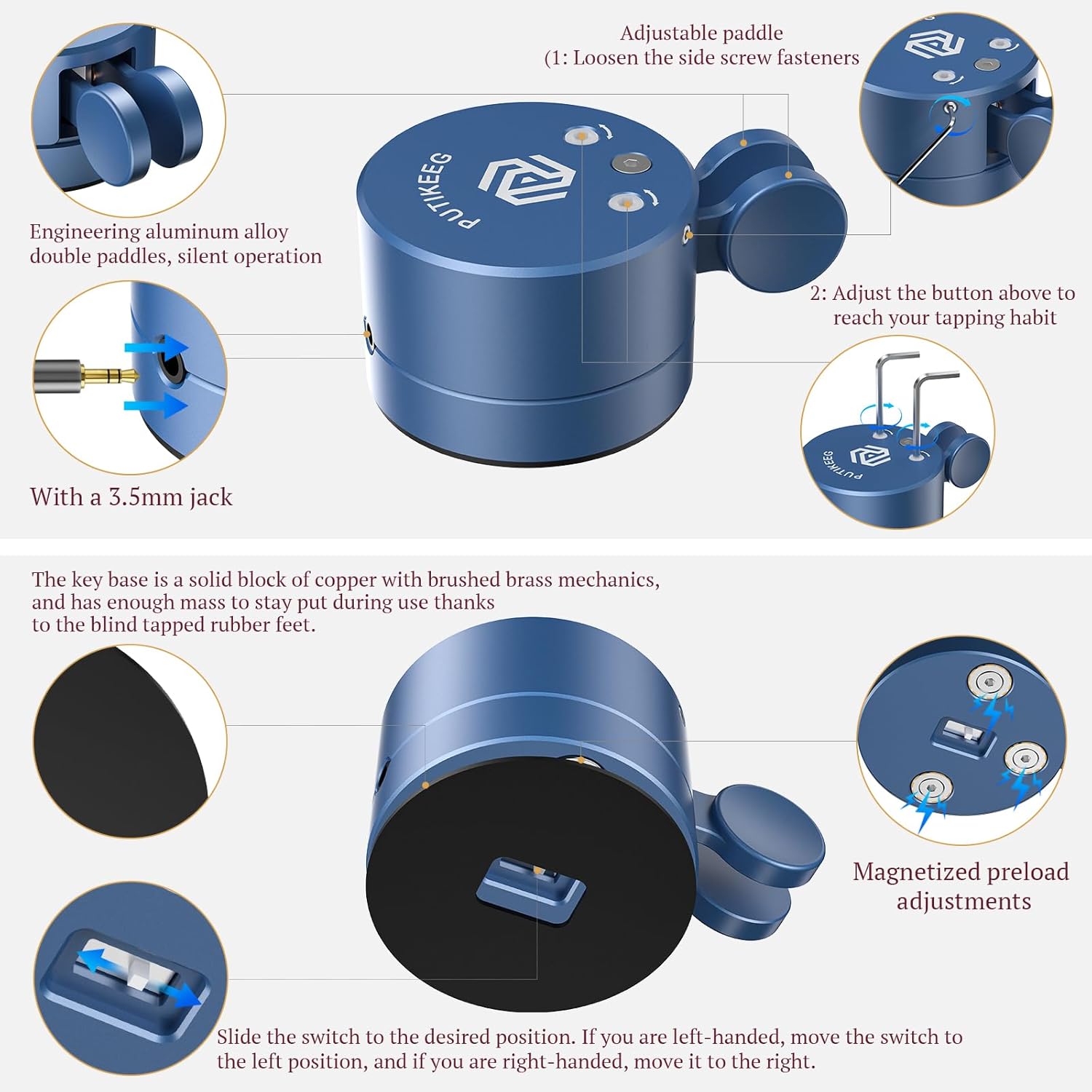
Figure 2: Connection point and adjustment features. The image illustrates the 3.5mm jack and the adjustable paddle mechanism.
Paddle Adjustments
- Paddle Distance: To adjust the distance of the dit and dah paddles to the center contact, loosen the side screw fasteners using one of the provided Allen wrenches. Carefully adjust the paddle position to your preferred spacing. Tighten the fasteners once the desired distance is achieved.
- Preload/Tension: The key features magnetized preload adjustments. These adjustments control the tension and return of the paddles. Experiment with these settings to find a comfortable feel for your sending style.
- Handedness Switch: A switch located on the base allows you to configure the key for left-handed or right-handed operation. Slide the switch to the desired position: left for left-handed, right for right-handed.
Operating Instructions
The Putikeeg Mini Morse Code Key MCT03 is a dual paddle (iambic) key. This means it has two independent paddles, one for "dits" (short signals) and one for "dahs" (long signals). When connected to an iambic keyer, you can send Morse code efficiently by alternating between the paddles.
- Press the dit paddle (typically the right paddle for right-handed users) to generate short signals.
- Press the dah paddle (typically the left paddle for right-handed users) to generate long signals.
- For iambic operation, you can hold one paddle while pressing the other to generate alternating dits and dahs (e.g., holding the dah paddle and tapping the dit paddle can produce a string of "di-dah-di-dah").
Practice is essential for developing proficiency with a dual paddle key. Start with slow speeds and gradually increase as your comfort and accuracy improve.

Figure 3: Key in use, demonstrating its compact and portable design.
Maintenance
Cleaning
Wipe the key with a soft, dry cloth to remove dust and fingerprints. Avoid using abrasive cleaners or solvents, as these can damage the anodized finish and internal components.
Contact Care
The key uses solid brass contacts. If contact issues arise, ensure the contact surfaces are clean and free of debris. Avoid excessive force when cleaning contacts to prevent damage.
Storage
When not in use, store the key in a clean, dry environment. The compact size makes it suitable for travel and storage in its original padded case, if available.
Troubleshooting
- Inconsistent Contact:
- Check paddle distance adjustments. Ensure they are not too wide or too narrow.
- Verify that the side screw fasteners are securely tightened after adjustment.
- Inspect contact points for any debris or oxidation. Clean gently if necessary.
- Key Moves During Operation:
- Ensure the key is placed on a flat, metallic surface for the magnetic base to function effectively.
- Clean the bottom of the key and the surface to remove any dust that might reduce magnetic adhesion.
- No Output Signal:
- Verify the 3.5mm TRS cable is securely connected to both the key and your radio/keyer.
- Confirm your radio or keyer settings are correctly configured for an external key.
- Check the handedness switch on the base to ensure it is set correctly.
Specifications
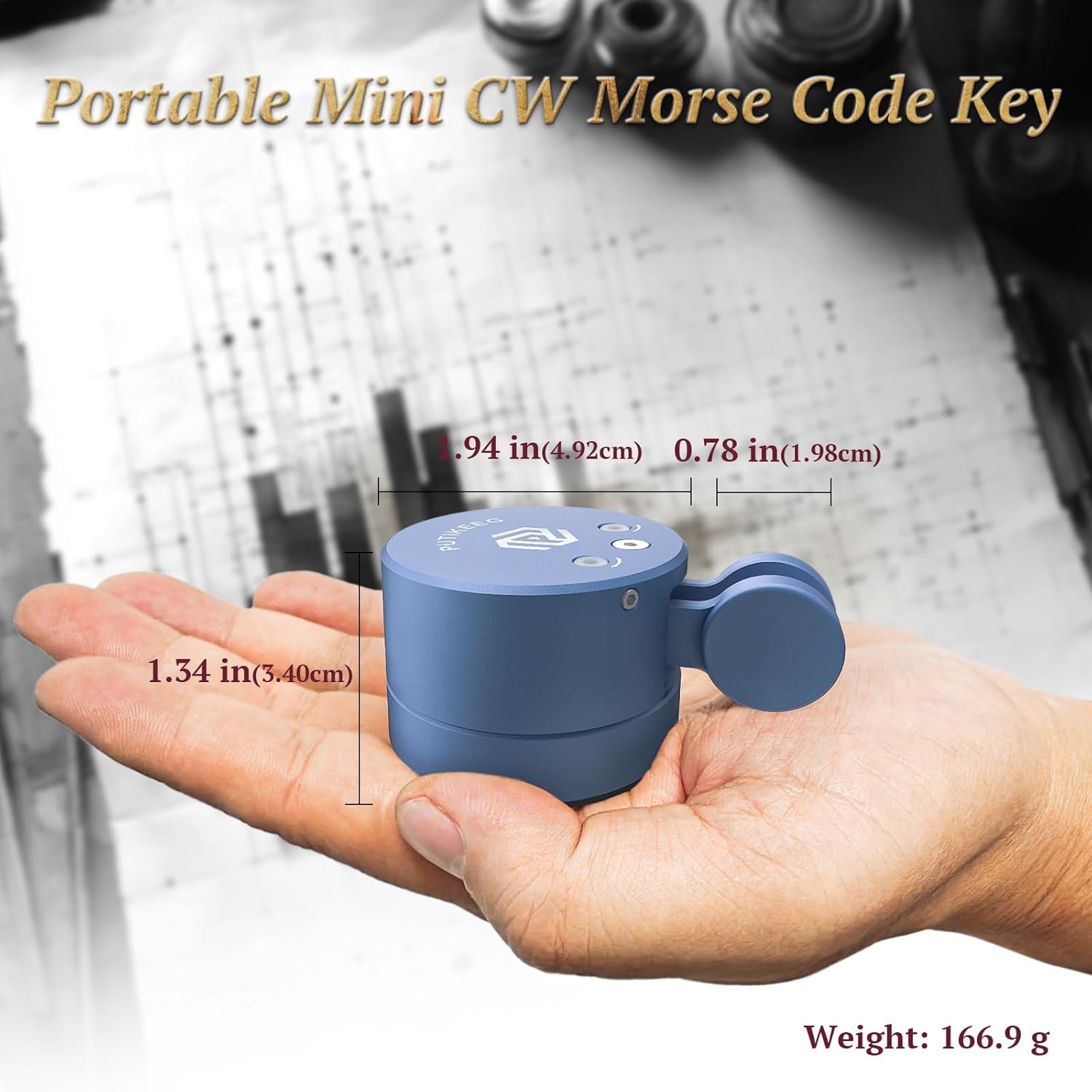
Figure 4: Product dimensions and weight.
| Feature | Detail |
|---|---|
| Brand | Putikeeg |
| Model Number | MCT03 |
| Item Weight | 166.9 grams (approx. 5.89 ounces) |
| Package Dimensions | 4.06 x 3.27 x 2.05 inches |
| Material | 6061 Billet Aluminum (main body), Solid Brass (contacts) |
| Special Feature | Shockproof, Magnetic Base, Adjustable Paddles |
| Included Components | CW Morse code key, 3.5mm TRS cable, Allen wrenches, Spare contact screws |
| Color | Blue (for this specific model) |
Warranty Information
The manufacturer states that there is NO explicit warranty provided with this product. Please refer to the retailer's return policy for any issues upon receipt.
Support
For further assistance or inquiries regarding your Putikeeg Mini Morse Code Key MCT03, please contact Putikeeg customer support through their official channels or the retailer from whom the product was purchased.
