
1. Introduction
This manual provides essential instructions for the safe installation, operation, and maintenance of your HTBRCVM 5140175-45 Generator Voltage Regulator. This component is designed as a direct replacement for DeWalt DXGNR7000 models. Please read this manual thoroughly before attempting any installation or service to ensure proper function and safety.
2. Safety Information
Always observe the following safety precautions to prevent injury or damage to equipment:
- Disconnect Power: Before installing or servicing the voltage regulator, ensure the generator is completely shut down and disconnected from all power sources.
- Qualified Personnel: Installation and service should only be performed by qualified individuals familiar with generator electrical systems.
- Electrical Hazard: Generators produce high voltage. Contact with live electrical components can cause severe injury or death.
- Inspect Components: Always inspect the new regulator for any signs of damage before installation. Do not install damaged parts.
- Proper Tools: Use appropriate insulated tools for electrical work.
3. Package Contents
Verify that all items are present and undamaged upon opening the package:
- 1 x HTBRCVM 5140175-45 Generator Voltage Regulator
4. Setup and Installation
Follow these steps to replace the generator voltage regulator:
- Prepare the Generator: Ensure the generator is turned off, cooled down, and disconnected from any fuel or power supply.
- Locate the Old Regulator: Identify the existing voltage regulator on your generator. It is typically a rectangular or square component with multiple wire connections.
- Document Connections: Before disconnecting any wires, take clear photos or make a diagram of all wire connections to the old regulator. This will aid in correct re-installation.
- Disconnect Wires: Carefully disconnect all wires from the old voltage regulator. Note the position and color of each wire.
- Remove Old Regulator: Unscrew or unmount the old regulator from its position.
- Compare and Verify: Before installing the new regulator, compare its appearance and dimensions (5.35 x 5.60 x 2.30 inches) with the old unit to ensure a perfect fit.
- Install New Regulator: Mount the new HTBRCVM 5140175-45 Generator Voltage Regulator in the same location as the old one. Secure it firmly.
- Reconnect Wires: Using your photos or diagram, carefully reconnect all wires to the new regulator. Ensure all connections are secure and correct.
- Final Inspection: Double-check all connections and mounting points. Ensure no wires are pinched or exposed.
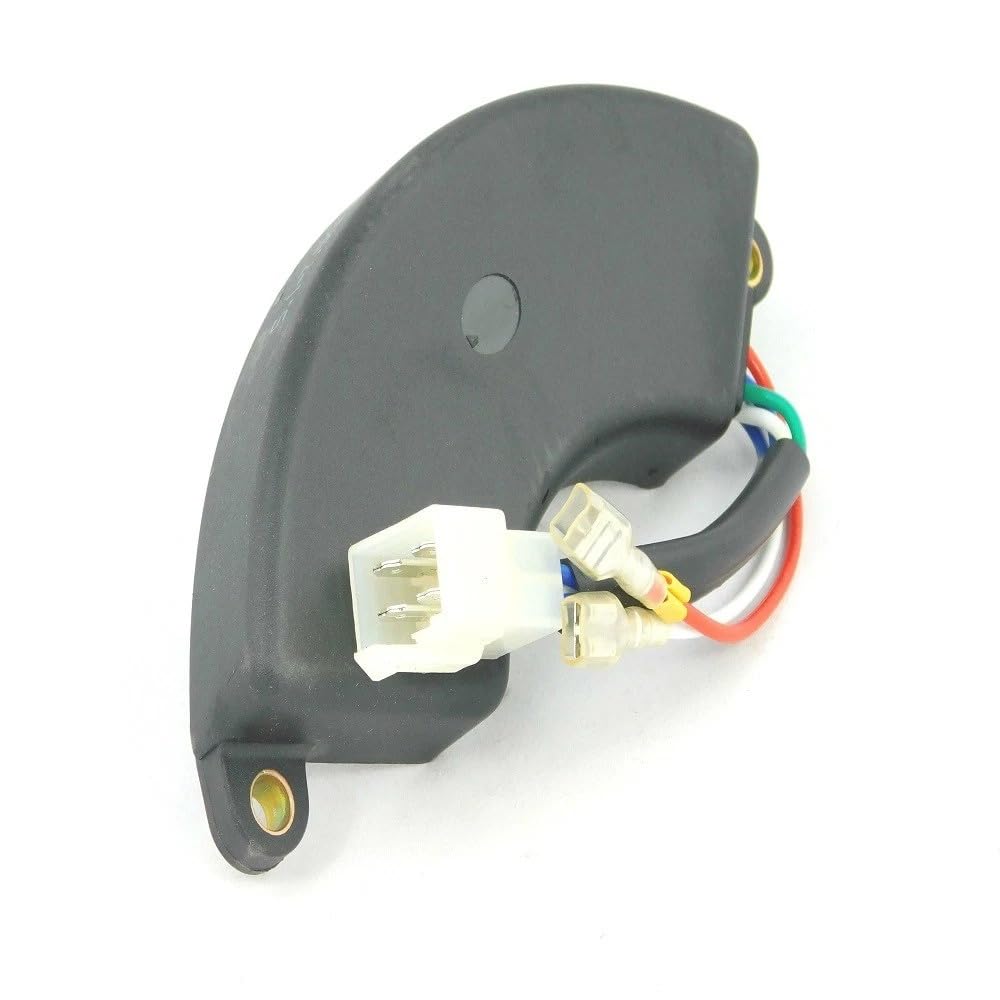
Image 1: The HTBRCVM 5140175-45 Generator Voltage Regulator. This image shows the front and side views of the regulator, highlighting its compact design and connection points. It measures approximately 5.35 x 5.60 x 2.30 inches.
5. Operating the Generator After Installation
After successfully installing the new voltage regulator:
- Reconnect Power: Reconnect the generator's fuel and power supply.
- Start Generator: Start the generator according to its manufacturer's instructions.
- Monitor Output: Observe the generator's voltage output. It should be stable and within the specified range for your generator model.
- Load Test (Optional): If possible, apply a small load to the generator to confirm stable voltage under operating conditions.
6. Maintenance
To ensure the longevity and optimal performance of your voltage regulator and generator:
- Regular Inspection: Periodically inspect the voltage regulator and its connections for any signs of wear, corrosion, or loose wiring.
- Keep Clean: Keep the area around the regulator clean and free from dust, dirt, and debris, which can impede cooling.
- Environmental Protection: Ensure the generator is operated and stored in conditions that protect electrical components from excessive moisture or extreme temperatures.
7. Troubleshooting
If you experience issues after installing the new voltage regulator, consider the following:
- No Power Output:
- Check all wire connections to ensure they are secure and correctly matched.
- Verify the generator's circuit breakers are not tripped.
- Ensure the generator engine is running at the correct RPM.
- Unstable Voltage Output:
- Inspect for loose connections or damaged wiring.
- Ensure the generator's engine speed is stable.
- Overheating Regulator:
- Ensure adequate ventilation around the regulator.
- Verify the regulator is correctly rated for your generator's output.
If troubleshooting steps do not resolve the issue, consult a qualified technician or contact HTBRCVM customer support.
8. Specifications
| Attribute | Detail |
|---|---|
| Brand | HTBRCVM |
| Model Number | 5140175-45 DXGNR7000 |
| Dimensions | 5.35 x 5.60 x 2.30 inches |
| Included Components | Generator Voltage Regulator |
| UPC | 781103180690 |
9. Warranty and Support
For warranty information or technical support regarding your HTBRCVM 5140175-45 Generator Voltage Regulator, please contact the manufacturer directly. Keep your purchase receipt as proof of purchase.