1. Introduction
Thank you for choosing the OPPO Enco Buds3 True Wireless Earphones. This manual provides detailed instructions on how to set up, operate, and maintain your new earphones. Please read this manual thoroughly before use to ensure optimal performance and longevity of your device.
2. Package Contents
Ensure all the following items are present in your product package:
- OPPO Enco Buds3 True Wireless Earphones
- Charging Case
- Silicone Earbuds in 3 sizes (S/M/L)
3. Component Identification
Familiarize yourself with the components of your OPPO Enco Buds3 earphones and charging case.

Image 3.1: OPPO Enco Buds3 Earphones in their open charging case. The earbuds are white, with the OPPO logo visible on the front of the case. A small LED indicator is visible below the logo.

Image 3.2: OPPO Enco Buds3 Earphones in their closed charging case, viewed from the front. The case is white with the OPPO logo. A small LED indicator is visible.
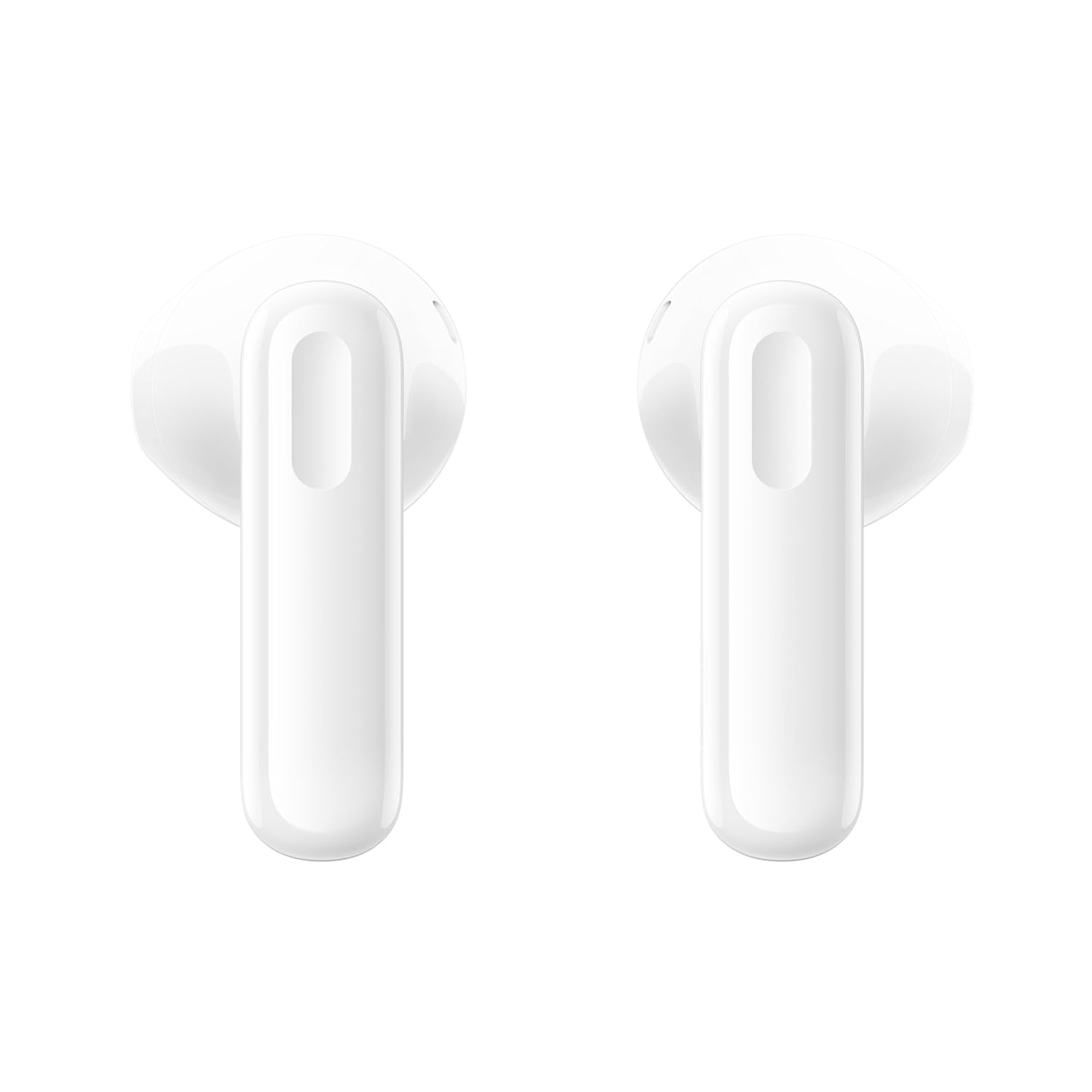
Image 3.3: Top view of the two individual OPPO Enco Buds3 earphones. They are white with a stem design.

Image 3.4: Bottom view of the two individual OPPO Enco Buds3 earphones, showing the speaker grilles and charging contacts.
4. Setup
4.1. Charging the Earphones and Case
Before first use, fully charge the earphones and the charging case.
- Place the earbuds into the charging case.
- Connect the charging case to a power source using a USB-C cable (not included).
- The indicator light on the case will show charging status. A full charge for both case and earphones takes approximately 80 minutes.
4.2. Initial Pairing
To connect your OPPO Enco Buds3 to a new device:
- Ensure the earphones are in the charging case and the lid is open.
- On your device (smartphone, tablet, etc.), enable Bluetooth.
- Search for available Bluetooth devices and select "OPPO Enco Buds3".
- Once connected, the indicator light on the case will change, and you will hear an audio prompt.
The earphones support Bluetooth 5.4 and can be paired with two devices simultaneously for seamless switching.
4.3. Wearing the Earbuds
For optimal sound quality and comfort, ensure a proper fit:
- Select the silicone ear tips that best fit your ear canals. Experiment with different sizes (S, M, L) for the most secure and comfortable seal.
- Gently insert each earbud into your ear, twisting slightly until it feels snug and stable.
5. Operating Instructions
5.1. Touch Controls
The OPPO Enco Buds3 feature intuitive touch controls on each earbud:
- Single Tap: Play/Pause music, Answer/End call.
- Double Tap: Skip to next track, Decline call.
- Triple Tap: Activate voice assistant.
- Touch and Hold (Left Earbud): Volume down.
- Touch and Hold (Right Earbud): Volume up.
5.2. Call Management
- Answer Call: Single tap either earbud.
- End Call: Single tap either earbud.
- Decline Call: Double tap either earbud.
5.3. Music Playback
- Play/Pause: Single tap either earbud.
- Next Track: Double tap either earbud.
- Volume Up: Touch and hold the right earbud.
- Volume Down: Touch and hold the left earbud.
6. Maintenance and Care
6.1. Cleaning
Regular cleaning helps maintain sound quality and hygiene:
- Use a soft, dry, lint-free cloth to wipe the earbuds and charging case.
- Gently remove any earwax or debris from the ear tips and speaker grilles using a small, clean brush or cotton swab.
- Do not use abrasive cleaners, alcohol, or chemical solvents.
6.2. Storage
When not in use, store the earphones in their charging case to protect them from dust and damage.
6.3. Water Resistance
The OPPO Enco Buds3 are rated IP55 for dust and water resistance. This means they are protected against limited dust ingress and low-pressure water jets from any direction. They are suitable for use during workouts and can withstand sweat and light splashes. However, they are not designed for submersion in water or exposure to heavy rain.
7. Troubleshooting
If you encounter issues with your earphones, refer to the following common solutions:
- No Sound: Ensure earphones are charged, connected to your device, and volume is up.
- Pairing Issues: Turn off Bluetooth on your device, then turn it back on. Try resetting the earphones (refer to device-specific instructions or OPPO support).
- One Earbud Not Working: Place both earbuds back in the case, close the lid, wait a few seconds, then open and try again.
- Charging Problems: Check the charging cable and power adapter. Ensure charging contacts on earbuds and case are clean.
- Poor Sound Quality: Ensure ear tips are properly fitted and clean. Try different ear tip sizes.
8. Product Specifications
| Feature | Specification |
|---|---|
| Model Name | Enco Buds3 |
| Model Number | 110070830042 |
| Audio Driver Type | Dynamic Driver |
| Audio Driver Size | 12.4 mm |
| Speaker Sensitivity | 123 ± 2 dB |
| Noise Control | Passive Noise Cancellation (music), Active Noise Reduction (calls) |
| Connectivity Technology | Wireless (Bluetooth) |
| Bluetooth Version | 5.4 |
| Bluetooth Range | 10 Metres |
| Control Method | Touch |
| Earbud Battery Capacity | 43 mAh |
| Charging Case Battery Capacity | 530 mAh |
| Charging Time (Case & Earphones) | Approx. 80 minutes |
| Battery Life (Earphones) | Up to 8 hours (single charge) |
| Water Resistance Rating | IP55 (Sweat and Splash Proof) |
| Compatibility | Android & iOS |
| Item Weight | 41.5 g (total) |
9. Safety Information
Please observe the following safety guidelines:
- Avoid listening at high volume levels for extended periods to prevent hearing damage.
- Do not use the earphones in situations where you need to hear your surroundings, such as while driving, cycling, or walking in traffic.
- Keep the earphones and charging case away from children and pets to prevent accidental ingestion of small parts.
- Do not expose the product to extreme temperatures, direct sunlight, or fire.
- Dispose of the product and its battery responsibly according to local regulations.
10. Warranty and Support
Your OPPO Enco Buds3 True Wireless Earphones come with a standard manufacturer's warranty. For detailed warranty terms and conditions, please refer to the warranty card included in your original packaging or visit the official OPPO website.
For technical support, troubleshooting assistance, or service inquiries, please contact OPPO customer support through their official channels. You can typically find contact information on the OPPO website or in your product documentation.


