
1. Safety Information
Before operating your isinwheel U4 electric bike, please read all safety instructions carefully. Failure to follow these instructions may result in serious injury or damage to the product.
- Always wear a helmet and appropriate safety gear when riding.
- Ensure all components are securely fastened before each ride.
- Do not ride in adverse weather conditions, such as heavy rain or snow.
- Familiarize yourself with local laws and regulations regarding electric bicycles.
- Regularly check tire pressure, brakes, and battery charge level.
- Avoid riding under the influence of alcohol or drugs.
2. Package Contents
Verify that all items are present in the package:
- isinwheel U4 Folding Electric Bike
- Charger
- Keys for battery lock
- Rear Rack (included component)
- User Manual
3. Setup and Assembly
The isinwheel U4 electric bike requires some assembly. Follow these steps carefully.
3.1 Unfolding the Bike
The bike comes in a folded configuration for transport. To unfold:
- Place the bike on a flat surface.
- Release the frame folding latch, typically located on the main frame tube. Carefully unfold the frame until it locks into place. Ensure the latch is fully secured.
- Release the handlebar folding latch and raise the handlebar stem. Secure the latch.
- Adjust the handlebar height to your preference and secure the quick-release lever.
- Adjust the seat post height. The seat post also serves as the battery compartment access. Lift the seat to access the battery.

Figure 3.1: The folding mechanism allows for compact storage and easy transport.
3.2 Battery Installation and Charging
The 374.4 Wh (10.4Ah) removable battery is located under the seat. It may come partially charged, but a full charge before first use is recommended.
- Unlock the battery compartment using the provided key and lift the seat to expose the battery.
- Insert the battery into its slot, ensuring it clicks securely into place. Lock the battery with the key.
- To charge, connect the charger to the bike's charging port (or remove the battery and charge it separately). Plug the charger into a standard wall outlet. The indicator light on the charger will show charging status.
- Once fully charged, disconnect the charger.
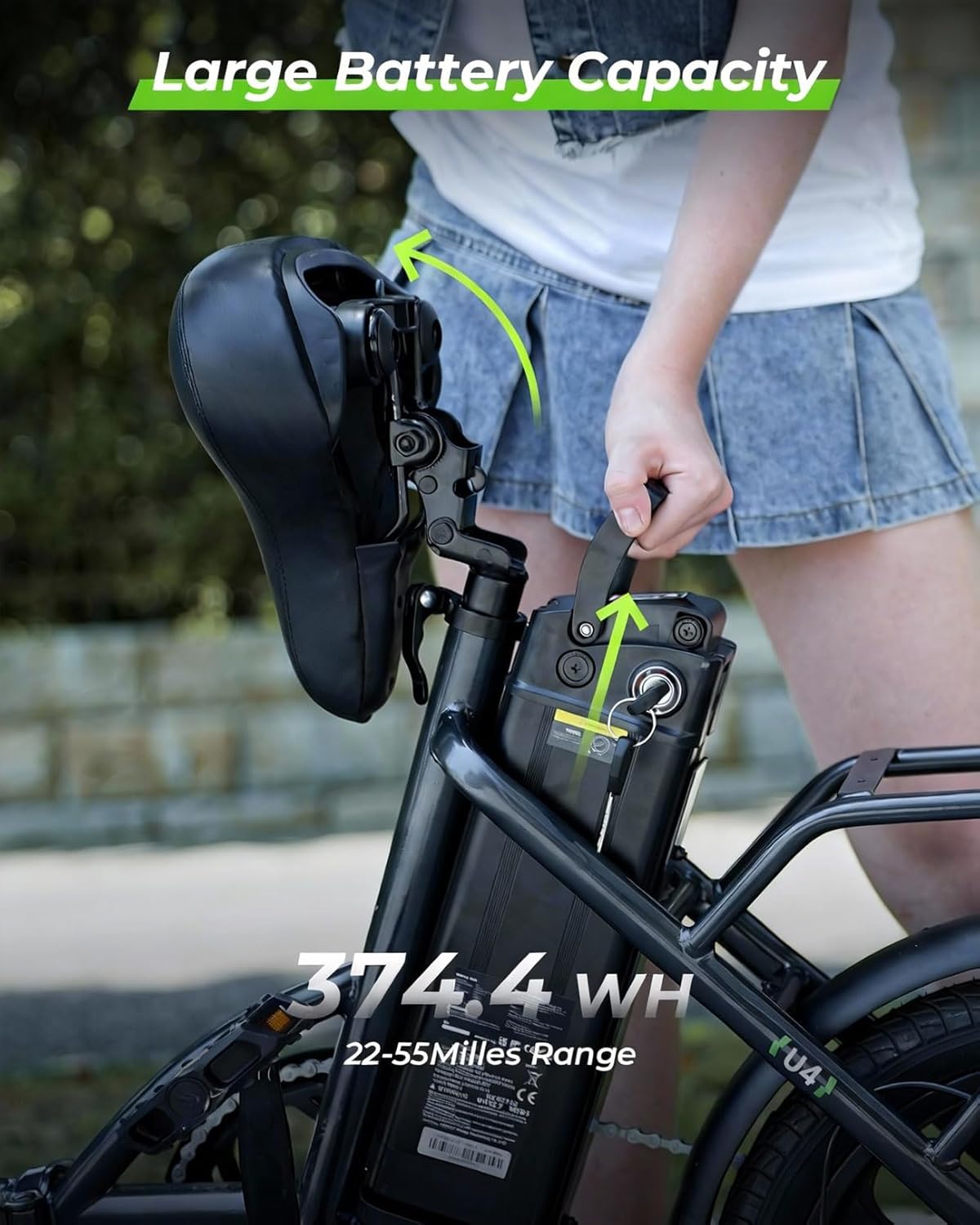
Figure 3.2: The removable battery is located beneath the seat for convenient charging.
3.3 Front Wheel Installation (if not pre-installed)
If the front wheel is not pre-installed, follow these steps:
- Carefully align the front wheel with the front fork dropouts. Ensure the brake rotor slides correctly into the brake caliper.
- Insert the quick-release skewer through the wheel hub and secure it according to the manufacturer's instructions.
- Check that the wheel spins freely and the brake pads do not rub against the rotor.
4. Operating Instructions
Understand how to operate your isinwheel U4 for a safe and enjoyable ride.
4.1 Powering On/Off
To power on the bike, press and hold the power button on the handlebar display. To power off, press and hold the same button.
4.2 Riding Modes
The isinwheel U4 features a 3+1 working mode system:
- Assist 1-3 (Pure Electric Mode): Use the throttle for electric-only propulsion. Levels 1-3 adjust power output.
- Assist 1-3 (Pedal Assist Mode): The motor provides assistance as you pedal. Levels 1-3 adjust the level of assistance.
- Assist 0 (Normal Bike Mode): The electric assist is off, and the bike functions as a traditional bicycle.
- Long Press (Walk Assist Mode): Hold the designated button for low-speed assistance, useful when walking the bike.

Figure 4.1: The display shows current speed, battery level, and assist mode.
4.3 Braking System
The bike is equipped with dual disc brakes for reliable stopping power. Apply both brake levers gently and evenly to slow down or stop. Avoid sudden, hard braking, especially at high speeds or on slippery surfaces.

Figure 4.2: Dual suspension and disc brakes provide enhanced control and comfort.
4.4 Adjusting Handlebar and Seat Height
For optimal comfort and control, adjust the handlebar and seat height to fit your body. Use the quick-release levers to loosen, adjust, and then securely tighten them.
5. Maintenance
Regular maintenance ensures the longevity and safe operation of your electric bike.
5.1 Battery Care
- Charge the battery regularly, even if not in use, to maintain its health.
- Avoid completely draining the battery before recharging.
- Store the battery in a cool, dry place away from direct sunlight and extreme temperatures.
- The battery is designed for approximately 5000 charge cycles and includes BMS intelligent safety and overcharge protection.

Figure 5.1: The 374.4 Wh removable battery is designed for durability and safety.
5.2 Tire Maintenance
- Check tire pressure before each ride. Maintain pressure within the recommended range printed on the tire sidewall.
- Inspect tires for wear, cuts, or punctures. The bike uses 16" x 2.5" durable anti-slip tires.
5.3 Brake Inspection
- Regularly check brake levers for proper tension and responsiveness.
- Inspect brake pads for wear and replace them if necessary.
- Ensure brake rotors are clean and free from oil or grease.
5.4 General Cleaning
Clean the bike with a damp cloth and mild soap. Avoid using high-pressure washers directly on electrical components.
6. Troubleshooting
This section addresses common issues you might encounter.
6.1 Bike Not Powering On
- Check if the battery is fully charged and securely installed.
- Ensure the battery is unlocked and properly connected.
- Verify that the power button on the display is pressed correctly.
6.2 Motor Not Engaging
- Confirm that the bike is in an assist mode (Assist 1-3) and not Assist 0.
- Check if the brake levers are fully released, as some systems cut motor power when brakes are applied.
- Ensure the battery has sufficient charge.
6.3 Brakes Squeaking or Dragging
- Clean the brake rotors and pads with a suitable brake cleaner.
- Check for proper alignment of the brake caliper. Adjust if necessary.
- Worn brake pads may need replacement.
6.4 Reduced Range or Power
- Ensure the battery is fully charged before each ride.
- Riding in higher assist modes, against strong winds, or on steep inclines will reduce range.
- Tire pressure can affect efficiency; ensure tires are properly inflated.
7. Specifications
| Feature | Specification |
|---|---|
| Model Name | U4 |
| Bike Type | Electric Bike |
| Motor | 500W (Peak 750W) Brushless Motor |
| Battery | 10.4Ah / 374.4 Wh Removable Lithium Battery |
| Top Speed | Up to 19 mph |
| Range | 22-55 Miles (depending on assist level and terrain) |
| Wheel Size | 16 Inches |
| Tires | 16" x 2.5" Durable Anti-slip Tires |
| Brake Style | Dual Disc Brakes |
| Suspension Type | Front Fork & Seat Shock Absorber |
| Frame Material | Aluminum Alloy |
| Frame Type | Step-Through, Foldable |
| Folded Dimensions | Approx. 32.2" L x 27" W |
| Bicycle Weight | 57 LBS |
| Load Capacity | 264 lbs |
| Recommended Rider Height | 4'2" - 5'7" |
| Included Components | Rear Rack |

Figure 7.1: Key dimensions and weight specifications for the isinwheel U4.
8. Warranty and Support
8.1 Warranty Information
This specific isinwheel U4 electric bike variant includes a 1-year extended warranty. Please refer to your purchase documentation for full warranty terms and conditions.
8.2 Customer Support
For any questions, technical assistance, or warranty claims, please contact isinwheel customer service. Contact details can typically be found on the official isinwheel website or through your purchase platform.


