
1. Introduction
Thank you for choosing the Ströme Cooler 12 Portable Air Conditioner. This manual provides essential information for the safe and efficient operation, installation, and maintenance of your unit. Please read it thoroughly before use and retain it for future reference.

Image: The Ströme Cooler 12 Portable Air Conditioner positioned in a living room, demonstrating its compact design and exhaust hose setup.
2. Safety Information
Always observe the following safety precautions to reduce the risk of fire, electric shock, or injury.
- Ensure the power supply matches the voltage specified on the unit's rating label.
- Do not operate the unit with a damaged cord or plug.
- Keep the air inlet and outlet clear of obstructions.
- Do not insert objects into the air vents.
- Unplug the unit before cleaning or servicing.
- This appliance is not intended for use by persons (including children) with reduced physical, sensory or mental capabilities, or lack of experience and knowledge, unless they have been given supervision or instruction concerning use of the appliance by a person responsible for their safety.
- Children should be supervised to ensure that they do not play with the appliance.
3. Product Overview
The Ströme Cooler 12 is a versatile portable air conditioner designed for rooms between 16-23 m². It offers cooling, dehumidification, and fan functions.
3.1 Main Components
- Main Unit with integrated wheels and carrying handles.
- Exhaust Hose for expelling warm air.
- Window Kit (adaptor and plate, not explicitly listed but implied by exhaust hose).
- Remote Control.
- Washable Air Filters.
- Control Panel with LCD display.
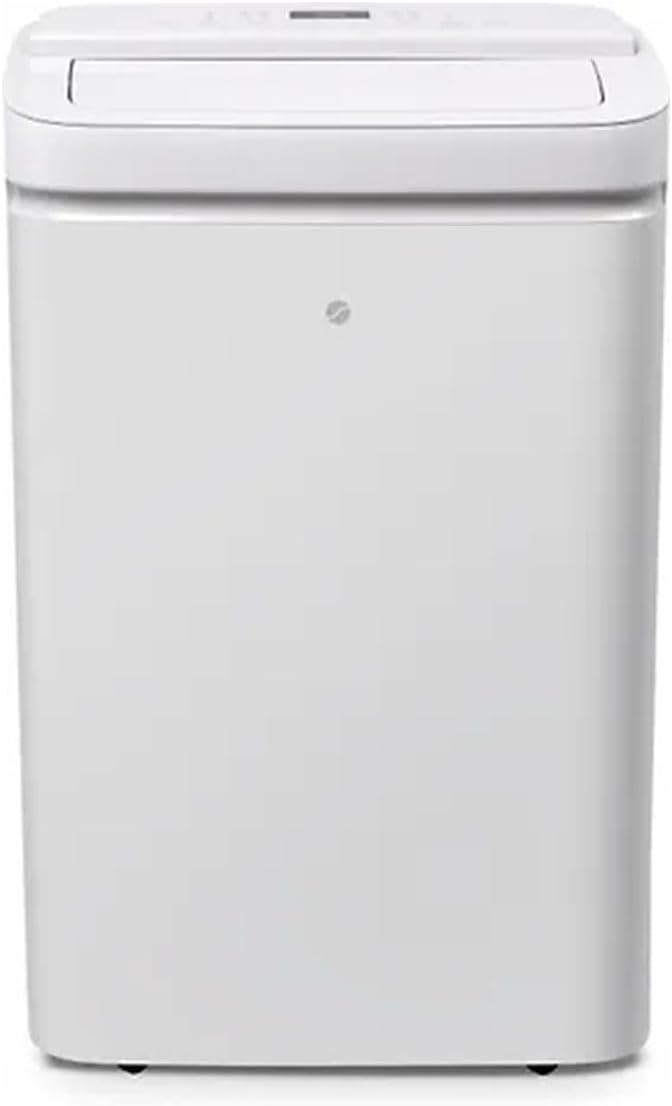
Image: Front view of the Ströme Cooler 12 unit, showcasing its sleek white design.

Image: Close-up of the top control panel with an LCD display and various function buttons.
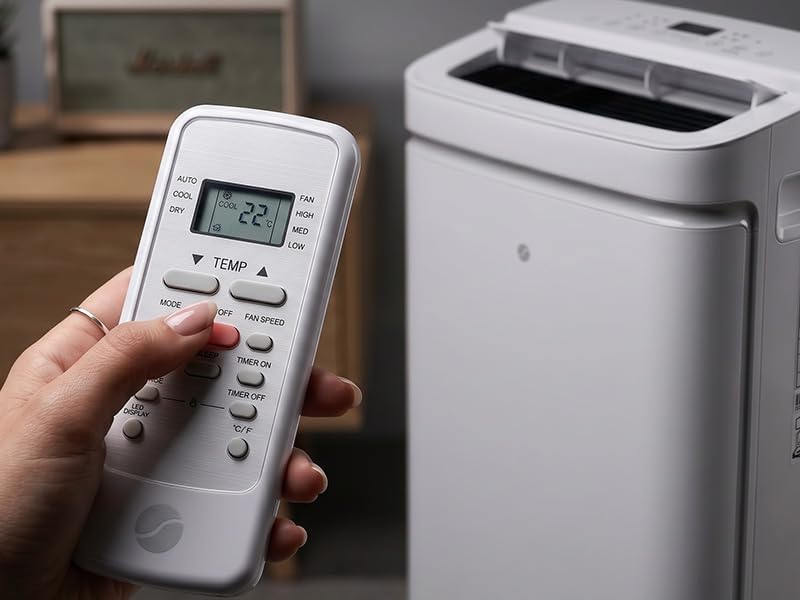
Image: The remote control for the Ströme Cooler 12, showing buttons for mode, temperature, fan speed, and timer.
4. Setup
Follow these steps for initial setup of your portable air conditioner.
- Unpacking: Carefully remove the unit from its packaging. Retain packaging for storage or transport.
- Positioning: Place the unit on a flat, stable surface. Ensure there is at least 30 cm (12 inches) of space around the unit for proper airflow. The integrated wheels allow for easy movement between rooms.
- Exhaust Hose Installation:
- Attach the exhaust hose to the air outlet on the back of the unit.
- Extend the exhaust hose to the nearest window or opening.
- Secure the window kit adaptor to the end of the hose and install it in the window opening to seal off the gap and prevent warm air from re-entering the room.

Image: A person connecting the exhaust hose to a window opening, ensuring proper ventilation.
- Power Connection: Plug the power cord into a grounded electrical outlet.
5. Operating Instructions
The Ströme Cooler 12 offers multiple operating modes and settings for optimal comfort.
5.1 Control Panel and Remote Control
The unit can be operated using the control panel on top of the unit or the included remote control. The LCD display shows current settings.

Image: Detailed view of the control panel, highlighting the mode and fan speed buttons.
5.2 Operating Modes
- Cooling Mode: Select 'Cool' to activate the air conditioning function. Adjust the desired temperature using the temperature up/down buttons. The unit will cool the room to the set temperature.
- Dehumidification Mode: Select 'Dry' to remove excess moisture from the air. In this mode, the fan speed is typically fixed, and temperature cannot be adjusted.
- Fan Mode: Select 'Fan' to circulate air without cooling. Choose from three fan speeds (Low, Medium, High).
5.3 Fan Speed
In Cooling and Fan modes, you can select from three fan speeds: Low, Medium, or High, to adjust airflow intensity.
5.4 Timer Function
The 24-hour timer allows you to set the unit to turn on or off automatically after a specified period. Use the 'Timer On' or 'Timer Off' buttons on the remote control to set the desired duration.
5.5 Swing Function
Activate the 'Swing' function to enable automatic oscillation of the air outlet louvers, distributing air evenly throughout the room.
6. Maintenance
Regular maintenance ensures optimal performance and extends the lifespan of your Ströme Cooler 12.
6.1 Cleaning the Air Filters
The washable filters should be cleaned regularly, typically every two weeks, depending on usage and air quality.
- Power Off: Always unplug the unit before cleaning.
- Remove Filters: Locate and carefully remove the air filters from the back of the unit.
- Clean Filters: Wash the filters with lukewarm water and a mild detergent. Rinse thoroughly.
- Dry Filters: Allow the filters to air dry completely before reinserting them. Do not expose them to direct sunlight or heat.
- Reinstall Filters: Place the dry filters back into their original position.

Image: The rear of the Ströme Cooler 12, indicating the location of the exhaust port and the washable air filters.
6.2 Cleaning the Unit Exterior
Wipe the exterior of the unit with a soft, damp cloth. Do not use harsh chemicals or abrasive cleaners.
7. Troubleshooting
If you encounter issues with your Ströme Cooler 12, refer to the following common problems and solutions.
| Problem | Possible Cause | Solution |
|---|---|---|
| Unit does not turn on | No power supply Power cord not plugged in | Check power outlet Ensure power cord is securely plugged in |
| Insufficient cooling | Air filters are dirty Exhaust hose not properly installed Room size too large Windows/doors open | Clean air filters Ensure exhaust hose is sealed Verify room size is within 16-23 m² Close all windows and doors |
| Unit is noisy | Unit not on a flat surface Obstruction in fan | Place unit on a level surface Check for and remove any obstructions |
| Water leakage | Drain plug not properly sealed Water tank full (if applicable) | Ensure drain plug is secure Drain water tank as per manual (if applicable) |
8. Specifications
| Feature | Detail |
|---|---|
| Brand | Ströme |
| Model Number | Cooler 12 |
| Cooling Capacity | 12,000 BTU (3.5 kW) |
| Recommended Room Size | 16–23 m² |
| Functions | Cooling, Dehumidification, Fan |
| Fan Speeds | 3 (Low, Medium, High) |
| Timer | 24-hour |
| Noise Level | Max 64 dB |
| Color | White |
| Material | Plastic |
| ASIN | B0F7XMXYDJ |

Image: The energy efficiency label for the Ströme Cooler 12, detailing its performance metrics.
9. Warranty and Support
For warranty information and customer support, please refer to the documentation included with your purchase or contact Ströme customer service. Keep your proof of purchase for warranty claims.

