
Introduction
This manual provides essential information for the safe and efficient operation of your ProCaster LE-32A552H 32" HD Ready LED-TV. Please read these instructions thoroughly before using the television and retain them for future reference. This television features Android TV 11, HDR10 support, built-in Chromecast, Bluetooth connectivity, and supports both 12V and 230V power sources.
Safety Information
Always follow basic safety precautions when using this television to reduce the risk of fire, electric shock, and injury.
- Do not expose the TV to rain or moisture.
- Do not open the TV casing; refer all servicing to qualified personnel.
- Ensure proper ventilation around the TV.
- Use only the power adapter supplied with the TV or a compatible 12V/230V power source.
- Keep the TV away from direct sunlight and heat sources.
Package Contents
Verify that all items are present in the package:
- ProCaster LE-32A552H 32" HD Ready LED-TV
- Remote Control
- Power Adapter (230V)
- 12V Power Cable (for mobile use)
- TV Stand (2 pieces) and Screws
- User Manual (this document)
- Quick Start Guide
Setup
1. Unpacking
Carefully remove the TV and all accessories from the packaging. Retain the packaging for future transport or storage.
2. Stand Installation
If you are not wall-mounting the TV, attach the stand as follows:
- Place the TV face down on a soft, clean surface to prevent screen damage.
- Align each stand piece with the corresponding slots on the bottom of the TV.
- Secure each stand piece with the provided screws. Ensure they are tightened firmly.
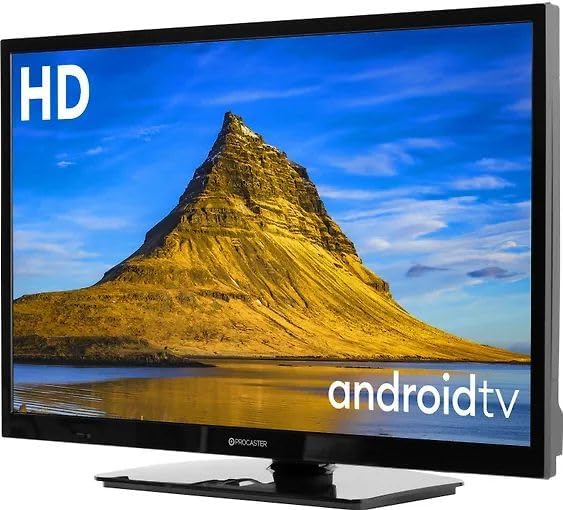
Image: The ProCaster LE-32A552H television with its stand attached, ready for placement.
3. Wall Mounting (Optional)
This TV is VESA compatible. For wall mounting, use a compatible VESA mount (not included) and follow the instructions provided with the wall mount. Ensure the wall can support the weight of the TV and mount.
4. Connecting Power
Your TV supports both 230V AC (standard household) and 12V DC (e.g., for caravans or boats) power sources.
- For 230V AC: Connect the supplied power adapter to the TV's power input, then plug the adapter into a wall outlet.
- For 12V DC: Connect the supplied 12V power cable to the TV's 12V input and to a compatible 12V DC power source.
5. Connecting External Devices
Connect your external devices such as set-top boxes, game consoles, or USB drives to the appropriate ports on the TV.
- HDMI: For high-definition audio and video.
- USB: For media playback from USB drives or connecting USB accessories.
- Ethernet (LAN): For a wired internet connection.
Operating
1. Remote Control
Insert two AAA batteries (not included) into the remote control. Ensure correct polarity.

Image: The remote control for the ProCaster LE-32A552H television, showing its layout and buttons.
2. Power On/Off
Press the Power button on the remote control or on the TV to turn the TV on or off.
3. First Time Setup (Android TV)
Upon first power-on, the TV will guide you through the initial setup process:
- Language Selection: Choose your preferred language.
- Network Connection: Connect to your Wi-Fi network or use a wired Ethernet connection.
- Google Account Sign-in: Sign in with your Google account to access Android TV features, apps, and Google Assistant.
- Terms of Service: Accept the terms and conditions.
- Channel Scan: Scan for available TV channels (if connecting an antenna).

Image: The ProCaster LE-32A552H television displaying the Android TV home screen, showing various streaming service applications.
4. Basic Navigation
Use the directional buttons (Up, Down, Left, Right) and the OK button on the remote to navigate the Android TV interface. The Home button returns you to the main screen.
5. Input Source Selection
Press the Input button on the remote to switch between HDMI inputs, TV tuner, or other connected sources.
6. Smart TV Features
- Chromecast Built-in: Cast content from your compatible mobile devices or computer to the TV.
- Bluetooth: Connect Bluetooth headphones, speakers, or game controllers. Navigate to Settings > Remotes & Accessories to pair devices.
- Apps: Download and install apps from the Google Play Store. Popular services like Netflix, Disney+, YouTube, and HBO Max are supported.
- Voice Control: Use the Google Assistant button on your remote to issue voice commands for searching content, controlling smart home devices, and more.
7. Picture Settings
Access picture settings via Settings > Display & Sound > Picture. Adjust brightness, contrast, color, and select picture modes. The TV supports HDR10 for enhanced dynamic range with compatible content.
8. Sound Settings
Access sound settings via Settings > Display & Sound > Sound. Adjust volume, balance, and select sound modes.
Maintenance
1. Cleaning the TV
- Screen: Gently wipe the screen with a soft, lint-free cloth. For stubborn marks, use a screen cleaner specifically designed for TVs, applied to the cloth, not directly to the screen.
- Casing: Wipe the casing with a soft, dry cloth. Do not use abrasive cleaners or solvents.
2. Software Updates
The TV may receive automatic software updates via the internet. You can also manually check for updates via Settings > Device Preferences > About > System update.
Troubleshooting
If you encounter issues, try the following solutions before contacting support:
- No Power: Ensure the power cable is securely connected and the power outlet is working. Try a different outlet.
- No Picture/Sound: Check input source selection. Ensure external devices are powered on and connected correctly.
- Remote Not Working: Check batteries and ensure there are no obstructions between the remote and the TV's IR sensor.
- Network Connection Issues: Restart your router. Check Wi-Fi password. For wired connections, ensure the Ethernet cable is properly connected.
- Apps Not Working: Try restarting the app or clearing its cache via Settings > Apps > [App Name] > Clear cache.
- Factory Reset: If problems persist, a factory reset can resolve many software issues. Go to Settings > Device Preferences > About > Factory reset. Warning: This will erase all personal data and settings.
Specifications
| Feature | Specification |
|---|---|
| Model Name | ProCaster LE-32A552H |
| Screen Size | 32 inches |
| Display Technology | LED |
| Resolution | HD Ready |
| Refresh Rate | 60 Hz |
| Aspect Ratio | 16:9 |
| Operating System | Android TV 11 |
| HDR Support | HDR10 |
| Smart Features | Chromecast Built-in, Bluetooth, Wi-Fi |
| Supported Internet Services | Netflix, Disney+, YouTube, HBO Max |
| Connectivity | HDMI, USB (1x USB 3.0), Ethernet, Bluetooth, Wi-Fi |
| Power Supply | 12V DC / 230V AC |
| Control Method | Remote Controlled, Voice Controlled |
Warranty and Support
Your ProCaster LE-32A552H television comes with a standard manufacturer's warranty. Please refer to the warranty card included in your package for specific terms and conditions. For technical support, troubleshooting assistance, or warranty claims, please contact your retailer or the official ProCaster customer service. Contact information can typically be found on the manufacturer's website or in your purchase documentation.


