Introduction
This manual provides essential information for the proper installation, function, and care of your ScYWdLi K101MAX Folding Quadcopter Motor Accessory. Please read these instructions carefully before use to ensure optimal performance and longevity of the product.
Product Overview
The K101MAX Motor Accessory is a replacement or upgrade component designed specifically for K101MAX folding quadcopter models. It features an integrated engine mount and propellers, facilitating direct motor installation and compact storage.
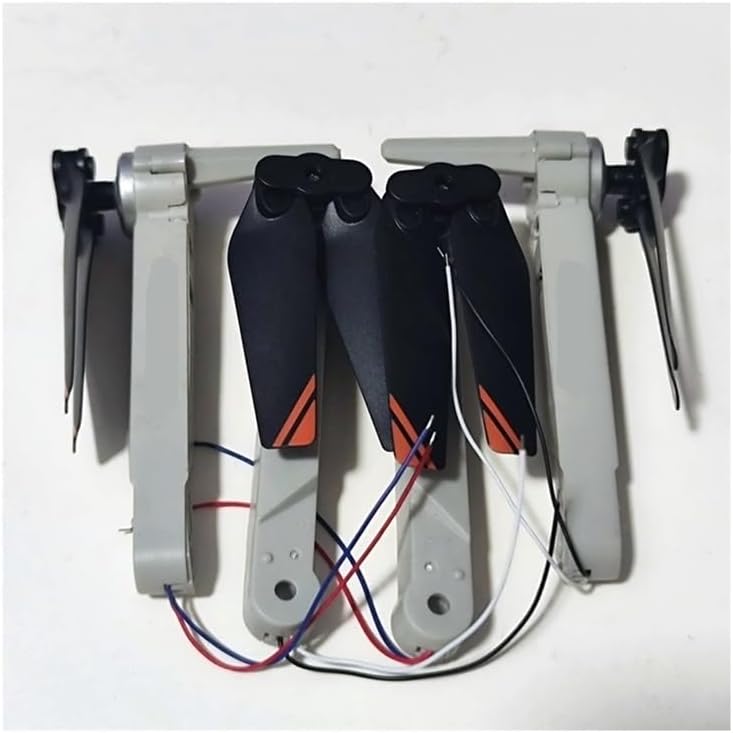
Image 1: Two K101MAX Folding Quadcopter Motor Accessories. Each accessory consists of a gray arm, a black propeller, and connecting wires (red, blue, white, black). The arms are designed to fold, and the propellers are attached to the motor mounts.
Setup and Installation
This motor accessory is designed for simple screw-on replacement. Ensure compatibility with your K101MAX folding quadcopter model before proceeding.
- Preparation: Power off your K101MAX quadcopter and disconnect its battery. Place the quadcopter on a clean, stable surface.
- Removal of Existing Component: Carefully unscrew and remove the existing motor arm or damaged component from the quadcopter frame. Note the wiring connections before disconnecting them.
- Wiring Connection: Connect the wires from the new motor accessory to the corresponding ports on your quadcopter's flight controller or power distribution board. Ensure correct polarity (e.g., red to positive, black to negative, if applicable, and signal wires as per your drone's specific wiring diagram). Refer to your quadcopter's main manual for detailed wiring instructions.
- Mounting: Align the new motor accessory with the mounting points on the quadcopter frame. Secure it in place using the appropriate screws. Do not overtighten.
- Inspection: After installation, visually inspect all connections and ensure the motor arm is securely attached and the propellers can rotate freely without obstruction.
Note: If you are unsure about any step, consult a qualified technician or refer to the comprehensive manual of your K101MAX quadcopter.
Function and Operation
Once installed, the motor accessory integrates with your K101MAX quadcopter's flight system. Its primary function is to provide thrust for flight. The folding design allows for compact storage and transport of the quadcopter.
- Ensure the motor arms are fully extended and locked into position before flight.
- Verify that propellers are securely attached and free from damage.
- Always perform a pre-flight check to confirm all motors are spinning correctly and smoothly.
Maintenance
Regular maintenance helps ensure the durability and reliable performance of your motor accessory.
- Cleaning: Periodically clean the motor arms and propellers to remove dust, dirt, or debris. Use a soft, dry cloth. Avoid using harsh chemicals or excessive moisture.
- Inspection: Regularly inspect the motor arms for any signs of damage, cracks, or loose connections. Check propellers for chips, bends, or wear. Replace damaged components immediately.
- Storage: When not in use, store the quadcopter with the motor accessories in a cool, dry place, away from direct sunlight and extreme temperatures. The folding mechanism allows for compact storage.
Troubleshooting
If you encounter issues with your motor accessory, consider the following common troubleshooting steps:
- Motor Not Spinning:
- Check all wiring connections for looseness or incorrect polarity.
- Ensure the quadcopter battery is fully charged.
- Inspect the motor for physical obstructions or damage.
- Unusual Noise/Vibration:
- Check propellers for damage or imbalance. Replace if necessary.
- Ensure the motor is securely mounted and screws are tightened appropriately.
- Inspect for any foreign objects caught in the motor mechanism.
- Folding Mechanism Stiff:
- Ensure no dirt or debris is lodged in the hinge.
- Avoid forcing the mechanism; it should fold smoothly.
If problems persist, contact the seller or manufacturer for further assistance.
Specifications
| Feature | Detail |
|---|---|
| Brand | ScYWdLi |
| Model Name | ScYWdLi190101 |
| Compatibility | K101MAX Folding Quadcopter |
| Item Weight | 50 Grams (1.76 ounces) |
| Package Dimensions | 0.39 x 0.39 x 0.39 inches |
| Assembly Required | No (for the accessory itself, but installation into drone is required) |
| Number of Pieces | 1 |
| Manufacturer | ScYWdLi |
Warranty Information
Specific warranty details for the ScYWdLi K101MAX Folding Quadcopter Motor Accessory are not provided in this manual. For information regarding warranty coverage, terms, and conditions, please contact the original seller or the manufacturer, ScYWdLi, directly. Retain your proof of purchase for any warranty claims.
Support and Contact
If you require further assistance, have questions about installation, or need to report a defect, please contact the seller from whom you purchased this product. You may also reach out to the manufacturer, ScYWdLi, for product-specific inquiries.
For general information or to find contact details, please refer to the seller's contact information provided at the time of purchase or visit the manufacturer's official website if available.